-
-
December 26, 2023 at 8:16 pm
Ma Mas
SubscriberHello everyone,
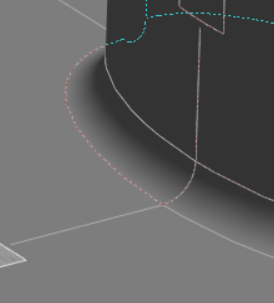
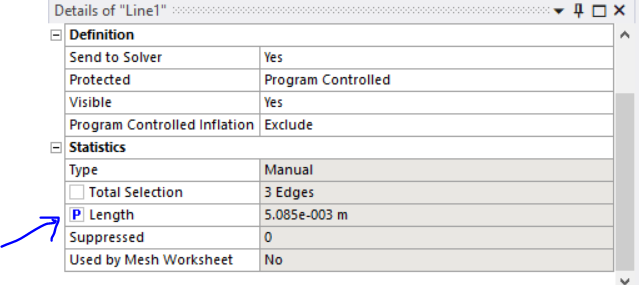
I am currently working with ANSYS Mechanical and have defined a line using named selection on a curved surface, as shown in the figure below.
Now, I need to measure the length of this line after the simulation. While I can measure the deformation, ANSYS provides me with the deformation of "each node" on this line in "three directions". Therefore, it is not possible to use directional deformation values to determine the new length of the curved line.
I have located the initial length of the line in the named selection section before simulation. However, there seems to be no option for the new length after the simulation.
ÂÂI aim to conduct a parametric study and output the length of the line as a result. I would greatly appreciate it if someone could assist me in finding a way to define the new length as an output using Python output code (in ansys mechanical), APDL command, or ANSYS Mechanical settings.
Â
Thanks a lot!
-
December 27, 2023 at 8:54 pm
mjmiddle
Ansys EmployeeÂ
I think a script solution is going to be hard. And it depends how accurate you want to be. Elements with midside nodes have edge curvature. There are element shape functions that determines this curvature, but I don’t see any way to get the edge length before or after solution using those shape functions. If anyone else reading the post has an idea on that, please chime in.
Now if you accept that your answer will be a little less accurate, you can get piecewise linear distances to compute the length. You can get all corner nodes and midide nodes and add up the lengths between them. Small elements along the edge would increase the accuracy. However, this is harder than it seems. We can easily get the nodes on the edge in APDL or python, however, it won’t know which node is at which end of the edge, and it won’t know each next closest node along the path. With the solution in APDL, there is no geometry. But if using python in a result in Mehanical, at least the nodes are associated with the geometry. So you can get the end vertices of a geometry edge and get the node on that vertex to start from one end. But as of yet, I can’t envision a good way to get each successive node in the chain along the edge to work to the other side. I can only think of a brute-force method. You can get the nodes on a geometry edge. Get the node at an end vertex, then get it’s element, and search all the midside nodes first of that element to see if it’s found in the list of nodes on the geometry edge. If found, compute distance between those 2 nodes and add to a total, and remove that node from the list. Also remove the first node, that’s on the vertex, from the list. Then get all the corner nodes of that element, ignore previous corner node and find in the list. Compute distance from last node, add to total, and remove node from list. Get elements attach to this corner node, ignoring remove previous element, and get attached nodes to those elements.Then check which of these nodes is in the list, and continue in this manner. This is a lot more involved code than I would just write for you and provide here.
Instead I can offer a simpler method. Transfer Solution to Model cell of a deformed system.
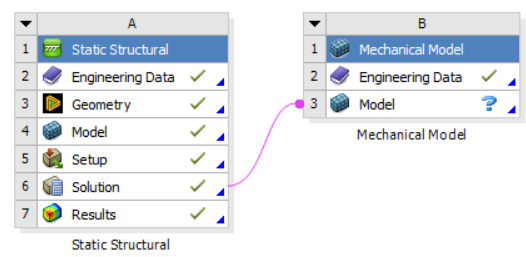
In the downstream system, you can create a named selection of the edge and promote the length to a parameter in the details of the named selection:
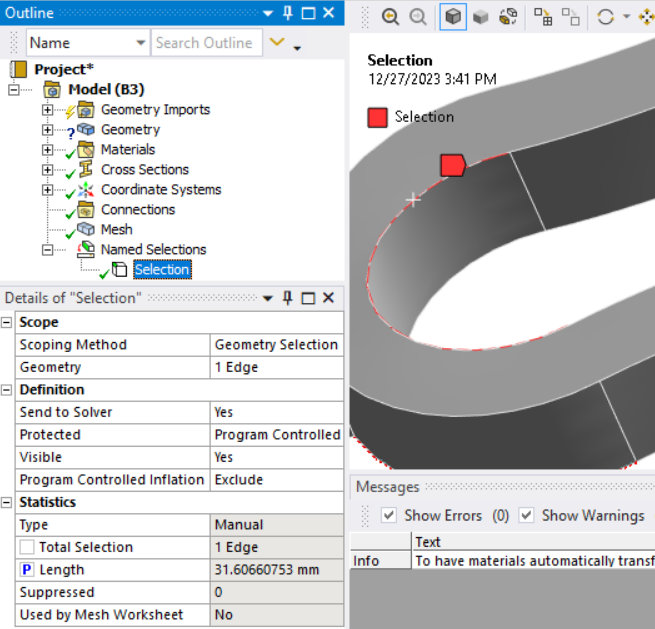
Â
-
January 1, 2024 at 4:37 am
Ma Mas
SubscriberÂ
Hello,
Thank you for your response. Do you have any Python or APDL code that can be used for a line? I attempted to use the mesh node, but the names of the mesh nodes change when I generate a new mesh. Therefore, using the code for mesh nodes is not useful. I believe it would be better if ANSYS had the ability to define line length using the named selection of a line in Python and APDL codes. Do you have any suggestion for it?
Additionally, I have implemented your suggestion using the Mechanical Model. It is helpful, and I have obtained an answer for my current simulation. However, I have a question: each time I define a new parameter for geometry as an input and update the solution, ANSYS cannot define the named selection line in the Mechanical Model. Have you ever tested this? Do you have any suggestions to resolve it? I mean, you can change one parameter in Static Structural, update the solution, and then go to the Mechanical Model. You will find that the named selection in the Mechanical Model is undefined.
-
-
January 1, 2024 at 8:06 pm
mjmiddle
Ansys EmployeeNo, I don't have any python or APDL code to compute the length as you want. I laid out the reasoning you would have to take in the previous message, but it would take significant time to develop something working, and that's not what forum posts are for. That would be a consulting project.
I see that the named selection cannot generate in the downstream model. That's because the geometry gets synthesized from the mesh after each update, so geometry IDs can be different each time. I would think you could create the named selection in the upstream analysis, but it appears that only face named selections are transferring to the downstream analysis, not edge named selections (I tested in 2023 R2).
-
January 2, 2024 at 12:02 am
Ma Mas
SubscriberThanks a lot! Yes I cannot use this method for parametric study since the name selection is not working in the "Mechanical Model".Â
Can you help me export the mesh of the ANSYS mechanical to the abaqus format? I want a mesh file contain the node location and connectivity of the mesh.Â
-
-
- The topic ‘Find length of a curved edge ANSYS MECHANICAL’ is closed to new replies.
-
6379
-
1906
-
1457
-
1308
-
1022
© 2026 Copyright ANSYS, Inc. All rights reserved.