Ansys Assistant will be unavailable on the Learning Forum starting January 30. An upgraded version is coming soon. We apologize for any inconvenience and appreciate your patience. Stay tuned for updates.
Fluids

Fluids

Topics related to Fluent, CFX, Turbogrid and more.

DPM Loop UDF Help

    • eannakennedy
      Subscriber

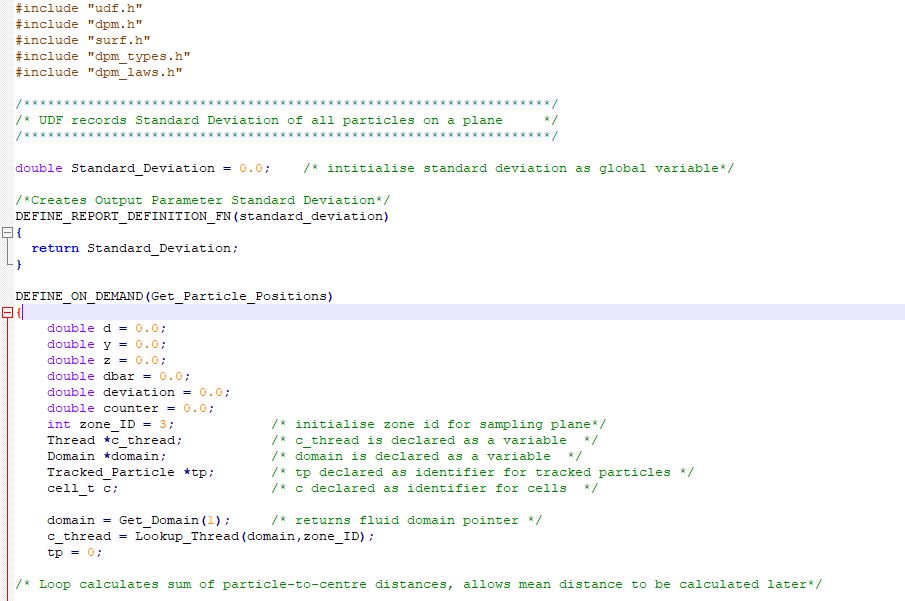
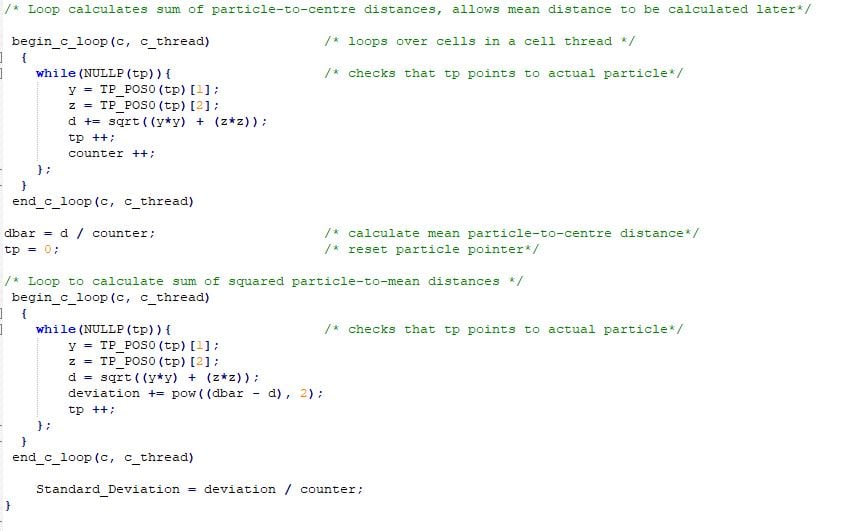
      I am trying to calculate the standard deviation of particles about the centre of a channel at a sampling plane near the exit and I am having trouble getting my UDF to work. The UDF compiles and loads fine, but it causes fluent to crash when i try to run it. I have included my code below. I think the problem is probably due to the need to loop through all particles in a Macro that doesn't take in any DPM arguments. Any advice would be really appreciated.


      I have tried to get the same results in a few different ways now, and I am wondering is it even possible to loop through all particles outside of a DEFINE_DPM macro?


      Thanks.


    • DrAmine
      Ansys Employee

      I will just provide with some things to get started but as ANSYS-Stuff we won't comment much on UDF.  But to get started check DEFINE_DPM_INJECTION_INIT from manual as it contains some tipps how to loop over particles. You will need at first to loop over all injections and you first need to get a list of all the injections you have defined: Injection Ilist = Get_dpm_injections();


      2/You need to define a generic injection pointer Injection *I;


      3/Looping over all the injections can be done using the following command loop(I, Ilist)


      The rest to be found in the manual.


      That is what I can share on open community.

    • eannakennedy
      Subscriber

      Hi Amine, 


      Thanks for the help! This was very useful and I am able to get the particle data now. However I want to read the particle data at a sampling plane downstream.


      Is it possible to use the begin... end_c_loop and PP_POS0 to get the particle data at the specified cells? I tried this but the macro was taking a long time to execute. One of the particles remains trapped in the channel, this is expected, but could this be the reason that the function could not finish?


    • DrAmine
      Ansys Employee
      Why not using Define Dpm Output macro to do everything at the sampling plane?
    • eannakennedy
      Subscriber

      When the code is working I will change it to a DEFINE_EXECUTE_AT_EXIT then use use DEFINE_REPORT_DEFINITION to create an output parameter (standard deviation) that I can use to optimise the channel geometry. From what I understand I wouldn't be able to automatically update the output parameter from a DPM_OUTPUT macro, and I couldn't figure out how to pass the arguments needed for the DPM_OUTPUT into it from another function.

    • DrAmine
      Ansys Employee

      By reading the output of DPM_OUTPUT macro back into Fluent.

    • eannakennedy
      Subscriber
      So I should write a UDF that reads the .dpm file?
      I will need to run a lot of simulations so how would I be able to automate the sample report to be written everytime a simulation is run?
    • eannakennedy
      Subscriber

      Sorry to bother you again, but I really am not sure what you mean. I'll write out my understanding as clearly as I can.


      I want to measure the standard deviation of particles at a plane and use that as an output parameter for optimisation. I'd like to be able to do this automatically at the end of the solver because the code will have to run for a large number of designs.


      So as far as I can see I have three options.


      Option 1: I can use DEFINE_DPM_OUTPUT (nameheaderfptptplane)  to access the tracked particle data and write it to a .dpm file. I could then use another function to read this file and do the calculations I need. But how do I automatically create the .dpm file at the end of each design simulation?


      Option 2: Call DEFINE_DPM_OUTPUT (nameheaderfptptplane inside of an EXECUTE_AT_EXIT macro to do everything at once. But with this option, how do I pass the arguments (header, fp, tp, t, plane) from fluent into the DPM_OUTPUT?


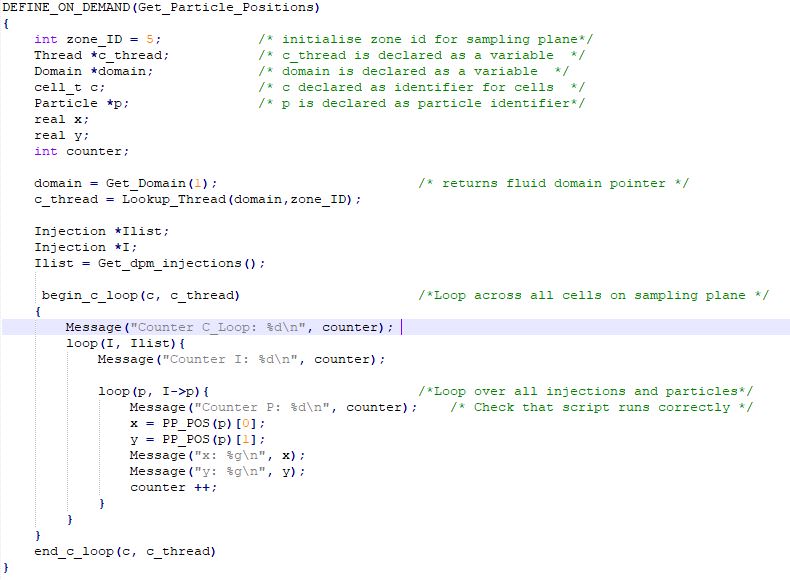
      Option 3: Use the DPM data access macros PP_POS(p) inside a function which loops over all cells on the plane and all particle streams in the injection. I have tried to implement this in the image below. The code compiles but doesn't execute correctly, it doesn't seem to run through the innermost loop at all. I have also tried using PP_POS0(p) instead, but this gives a compile error. (error C2109: subscript requires array or pointer type)


      Any advice you can offer on these options would be really appreciated, I've been struggling to get this to work for some time now.


    • DrAmine
      Ansys Employee

      What I was think about is use DEFINE_DPM_OUTPUT to output the variables one requires, then read the output file, build the mean values or whatever and create a parameter for it.

    • DrAmine
      Ansys Employee

      The reading will be done via ON_DEMAND and the output parameter can be created via User Defined Report definition or via DEFINE_OUTPUT_PARAMETER

    • eannakennedy
      Subscriber

      Hi again Amine, 


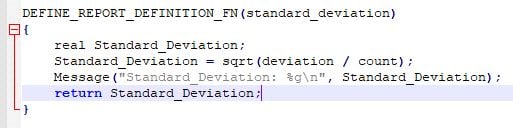
      Thanks for the advice, I see now why I would have to use DPM_OUTPUT. I am using Ansys 19.2 so I think I have to use DEFINE_REPORT_DEFINITION_FN instead, is that correct?


      My code can now compute the value I need, but when i try to return this to fluent it returns nan instead. I also included a Message output in the code and even though I only included it once it returns 2 messages with 2 different values, first it returns -nan(ind) then returns the correct the value. I included this code below. Do you have any idea why this is? 


    • DrAmine
      Ansys Employee

      The macro I was talking about is DEFINE_OUTPUT_PARAMETER but DEFINE_REPORT_DEFINITION_FN can do the same.


      I cannot tell you why you are getting "nan", as you are only showing the screenshot of this macro. You need to restrict the calculation only at host as I imagine the values are only available at host. Perhaps division by zero.. You need to debug.

    • eannakennedy
      Subscriber

      I am trying to debug now, but why would the message output two different values?


    • DrAmine
      Ansys Employee

      I do not understand the question.

    • eannakennedy
      Subscriber

      also in another section of the code i use a for loop and i print out the counter every iteration it always prints 0 even though I am increasing the counter every iteration. I'm really confused by this. I'm running in serial mode and I have used #if RP_HOST for this section of the code. 


      The Message no longer prints twice but even when I declare a variable as some integer and print it immediately it still returns zero.

    • eannakennedy
      Subscriber

      sorry I did not see your last message before typing my last one,I'll try and explain a bit clearer

    • eannakennedy
      Subscriber

      While debugging I wrote the below code in one of the functions yet this still returns 0 as the output. I don't understand this at all.


      count = 148;


      Message("Count: %gn", count);

    • DrAmine
      Ansys Employee

      I am sorry but I am not understanding what you are talking about. Anyway I cannot help you debugging the UDF you are using. I have already provided with a way one can follow.

    • eannakennedy
      Subscriber

      Hi Amine, 


      I have gotten my UDF working but still having problems with automating the design optimization. It seems that to get the particle data that I need I must run a dpm-sample report after a calculation is complete. Is there anyway that I can do this automatically at the end of every calculation? 


      I know that I can record a journal file which can create the sample report but then I still have the problemof how to run the journal file at the end of every calculation.


      Thanks again!

Viewing 18 reply threads
  • The topic ‘DPM Loop UDF Help’ is closed to new replies.
[bingo_chatbox]