-
-
February 4, 2019 at 4:01 pm
-
February 4, 2019 at 5:05 pm
Rob
Forum ModeratorIt's possible that you've not installed the CAD readers but equally dxf/dwg files can cause problems due to the format. Can you export STEP and try that?Â
-
February 5, 2019 at 4:23 am
Keyur Kanade
Ansys Employeewith student version you can not import dwg files. please check following link.Â
https://www.ansys.com/en-in/academic/free-student-products?utm_source=studentcommunity&utm_campaign=studentcommunity&utm_content=Studentproduct&utm_source=studentcommunity&utm_campaign=studentcommunity&utm_content=Studentproduct
Â
please use step, iges or parasolid formatÂ
-
February 5, 2019 at 5:47 am
arjang
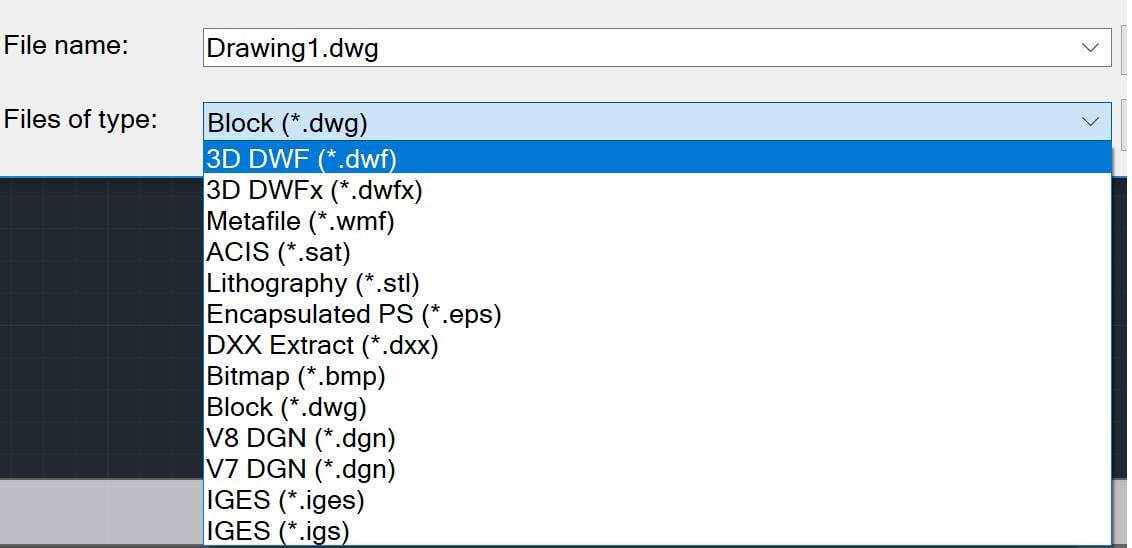
SubscriberThank you kkanade for your response. I tried IGES format but I got the same error. I tried all the other available formats that I could export my drawing (image below) and none of them worked. For some reason I do not see the step or parasolid format. Do you think there is is till some issue with my version of ANSYS? Or is there another way to resolve the issue?
Â
-
February 5, 2019 at 5:49 am
arjang
SubscriberHello rwoolhou
Â
Thank you for your response. For some reason I am not able to export STEP, maybe my AutoCAD is limited. As I mentioned to kkanade, I tried all the available export formats (image below) and none of them opened in ANSYS, I got the same error message. Do you know of any alternate solution?
Â
-
February 5, 2019 at 5:50 am
Keyur Kanade
Ansys Employeeplease convert your drawing in autocad into a surface or solid body. then try.
-
February 5, 2019 at 11:12 am
Rob
Forum ModeratorAlso, click on the DesignModeler box and set properties to mixed lines & surfaces (or similar): I've had another user have problems with AutoCAD & SolidEdge and think there's something odd with the export. Creating faces or solids ought to resolve this too.Â
-
February 7, 2019 at 4:27 pm
arjang
SubscriberHello rwoolhou and kkanade
Â
Thanks to your useful advice, my issue is resolved! I first exported the IGES files using AutoCAD Mechanical and then set the properties of DesignModeler to mixed lines and surfaces. I did not need to try to create a surface or solid on AutoCAD.
-
February 8, 2019 at 5:41 am
Keyur Kanade
Ansys Employeegood.Â
can you mark this as 'is solution' to help others on forum.Â
-
February 26, 2019 at 9:04 pm
mahmoud14
Subscriber
Does anybody know how I can import a 2D AutoCADÂ file as a section! to ANSYS workbench and assign it to a line body.
Many thanks -
February 27, 2019 at 2:37 am
Keyur Kanade
Ansys Employeeplease create a new post as this is marked as solved.Â
-
February 28, 2019 at 2:36 pm
mahmoud14
SubscriberHi,
Does any body know how to import a CAD file to ANSYS workbench as a CROSS- SECTIONÂ for beam.
Thanks a lot for your helps.
-
- The topic ‘Importing drawing file to Ansys Design Modeler’ is closed to new replies.

-
6625
-
1906
-
1469
-
1311
-
1022
© 2026 Copyright ANSYS, Inc. All rights reserved.