-
-
January 20, 2019 at 6:52 pm
tkennedy97
SubscriberI'm trying to simulate the stresses experienced by the bolts in a small frame made of 8020. I have a model with the bolts and a few extrusions of 8020. I've specified the contacts between the cylindrical side of each bolt and the extrusion to be bolted, and the "T" side of the bolt to be frictional with a coefficient of 0.61. I've tried changing the cylindrical contact surface to frictional with the same coefficient, but this resulted in the same stresses.
Â
Â
In the picture above, you can see that the simulation describes a measure of stress at the location marked "T side".
I'm simply unsure as to why the one bolt has stresses present but the others do not. Is this a modeling error on my end, have I not done the contacts correctly, or is it something I'm not thinking of?
Â
Thanks for the help.
-
January 20, 2019 at 7:23 pm
peteroznewman
SubscriberA Tee bolt that was slid into the slot of an extrusion has a nut that was torqued to create a tensile stress in the shaft of the bolt to clamp the two 8020 extrusions together.
Where is the nut in your model?
ANSYS Mechanical has a load called a Bolt Pretension. One way you can use this is to use Bonded Contact to connect the nut to the shaft of the bolt. The bolt shaft should have the face split at the face of the nut. That separates the face bonded to the nut from the face that has the Bolt Pretension applied. Frictional contact between the Tee head is as you have created, and you do a similar contact between the nut and its contact face to the extrusion.
Or perhaps the extrusion has threads cut into it and the Tee has a hole in it to allow a circular threaded fastener to pass through the Tee and reach the other extrusion. It's not clear from your image if this is the configuration of the joint.
Or there is the option shown in the image below where the Tee is the nut.
In either case, you use a two step solution. In step 1, the bolt pretension is applied while the frame load is kept at zero. In step 2, that pretension is set to Lock and the frame load on the 8020 is applied. The contact force of the two faces of the 8020 that were clamped together by the pretension is what supports the load applied to the frame.
Regards,
Peter -

January 20, 2019 at 10:31 pm
tkennedy97
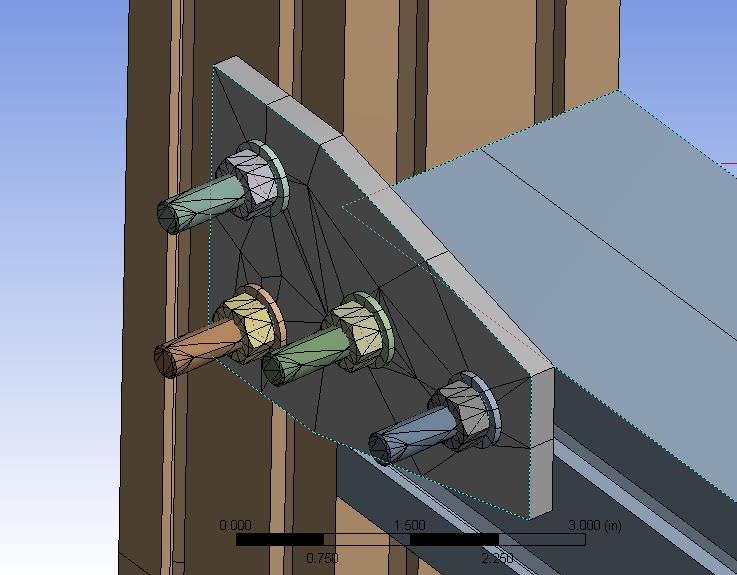
SubscriberThanks for the help Peter. I made a few design changes based on what you said (specifically the nuts) and added a pair of plates to better support the 8020.
Â
The problem I'm experiencing now is that as I am using the ANSYS student version, I'm limited to 32000 nodes. I don't want to increase the mesh size too much, however, as it will make the results less accurate. Is it possible to have one mesh size for the fastener and plate parts while having another for the 8020?
Â
Thanks,
Tom
-
January 21, 2019 at 12:46 am
peteroznewman
SubscriberHi Tom,
It is difficult to keep under the Student limit for problems with contact. Here are a few suggestions.
Use Symmetry if your geometry and loads are symmetric
Cut the Tee bolt length at the end of the nut, the extra material is not relevant.
Combine the washer and nut into a single body, just make the washer the height of the nut.
Cut the 8020 down to short stubs.
Regards, Peter
-
January 21, 2019 at 11:28 am
Ashish Khemka
Forum ModeratorHi Tom,
Â
In addition to Peter's suggestion, to limit the model size - you may use a linear mesh with good mesh density in the regions of interest.Â
Â
Regards,
Ashish Khemka
-
- The topic ‘Simulating contact between bolts and beams’ is closed to new replies.
-
5849
-
1906
-
1420
-
1305
-
1021
© 2026 Copyright ANSYS, Inc. All rights reserved.

.jpg?width=690&upscale=false)