Fluids

Fluids

Topics related to Fluent, CFX, Turbogrid and more.

Error: failing in checking mesh in fluent

    • Dato
      Subscriber

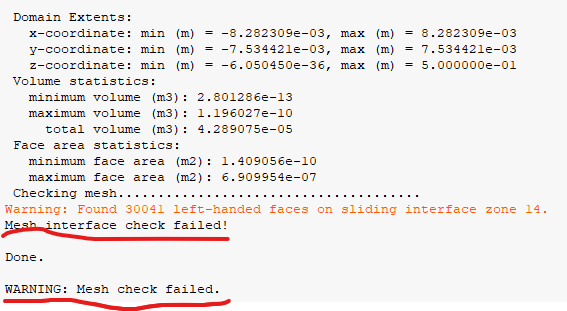
      I fail in checking mesh in fluent when I simulatin an external flow which have many tiny gaps as shown below.

      1、When I have hybrid initialization done, it haven't reach expective convergence and it's only about 1e-1. 

      2、 And it showed "floating point exception" error after two iteration

      3、I wanna know why left-handed faces would appear and does it matter to my calculation.Can I eliminate it?

      4、Do you have any suggestions meshing this kind of geometry?

       And my local mesh is shown below. As we can see , It's divided into two part  to create a non-conformal mesh to simulate the flow. I guess the problem is caused by the inappropriate element size changes between two part. 

      Any of your kindly suggestions would be great help!!!!!!!!!!!!!!!!!!!!!!!

      THANKS A LOT!!!!!


    • Rob
      Forum Moderator

      That mesh isn't going to run, and it needs re-doing. It's swept so I assume you did it in Workbench Meshing? How many surfaces make up the red face? Is it a single volume? 

      • Dato
        Subscriber

        Dear Rob,

        Yes, it's swept in Workbench Meshing. The red face is outlet and is made up of three parts:  cylinders tangent to petals, the mesh between the cylinders and tiny thin sweep locatd at the surface of petal whose inward distance is 0.018mm . 

          Sorry that I'm not exactly undertand your meaning"single volume".  There are three cell zones in domain. Are their any possible problems with the mesh?

           Any advices given are greatly appreciated!!!????

    • Rob
      Forum Moderator

      There are no possible problems with the mesh, there are very definitely some very big problems with the mesh. 

      Does the outlet surface face need to retain the component faces? Ie can you merge the fluid volumes and then the faces? That will remove some of the excessively small gaps and make the pave mesh more likely to work. 

      Also, in Meshing, check for contact regions. You can get these in very narrow gaps as the automatic tool gets confused. You can delete these "false" contacts. 

Viewing 2 reply threads
  • The topic ‘Error: failing in checking mesh in fluent’ is closed to new replies.