Ansys Products

Ansys Products

Discuss installation & licensing of our Ansys Teaching and Research products.

Icepak Installation Error

    • upot2
      Subscriber

      Hello,


      I have an issue opening existing files on Icepak 19.0.  When I click on 'Existing' to open an an existing Icepak file, I get the error attached in the picture below. I am able to unpack tzr files and open them up on Icepak, however I am unable to load existing files. Since I would need to load existing files to recover previously saved solutions, this is not ideal. Can someone tell me how I go about addressing this issue? 


    • ANSYS_MMadore
      Forum Moderator

      Hello,


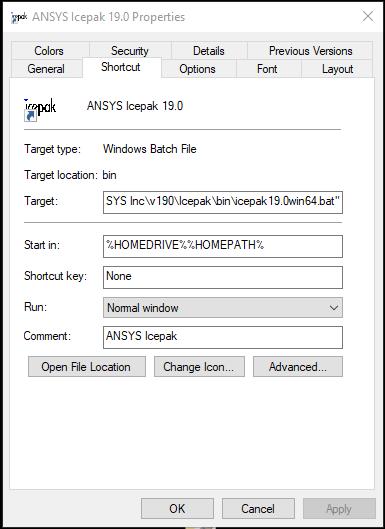
      Can you please check to be sure you are not using C:WindowsTemp for your TEMP or Working directories? It is trying to access that directory as you can see in the first line of the error.  You should not use C:Windows for any temp or working directories. You can check the environment variables, or if you right-click on Icepak you can also look at the Properties for the "Start In" directory.


      Thank you,
      Matt

    • upot2
      Subscriber

      Hello Matt,


      This is what I see on right clicking 'Properties'. Could you tell me what I need to do to solve this? Or how I go about checking environment variables and making changes?


    • ANSYS_MMadore
      Forum Moderator

      To check your environment variables you can open a command prompt and run this command and provide the resulting envout.log file? It will be created in the directory currently displayed in the command prompt prior to the > symbol.


      set > envout.log


      Thank you,
      Matt

    • upot2
      Subscriber

      Hi Matt,


      Thanks, I changed the environment variable to the right directory and it works fine. 


    • ANSYS_MMadore
      Forum Moderator

      Excellent, happy to hear it. Have a wonderful day.


      Thank you,
      Matt

    • malik.awais19
      Subscriber

      Hi Matt,


      Thanks, I changed the environment variable to the right directory and it works fine. 


      Can you plz share what you did .... coz i have he smae issue but i am getting what MAtt has adviced


Viewing 6 reply threads
  • The topic ‘Icepak Installation Error’ is closed to new replies.