-
-
November 13, 2018 at 3:00 am
rumth
SubscriberHow to solve the issue of turbulent viscosity limited to viscosity ratio of 1.000000e+05 in 5 cells?
-
November 13, 2018 at 3:31 am
Keyur Kanade
Ansys EmployeeThis means laminar to turbulent ratio is high. This may happen with several reasons.Â
The main reason would be the turbulent flow with very coarse mesh.Â
Please refine your mesh.Â
Also set appropriate parameters for inlet turbulence.Â
-
November 13, 2018 at 7:09 am
rumth
SubscriberI have changed the Turbulence Intensity and Hydraulic Diameter for inlet. I didn't make any change at outlet. Should I need to change the Turbulence Intensity and Hydraulic diameter for outlet also?
-
November 13, 2018 at 7:24 am
Keyur Kanade
Ansys EmployeeWhat is your cell count? What is min. orthogonal quality?
Can you please refine the mesh?
-
November 13, 2018 at 10:51 am
Rob
Forum ModeratorTo add, how big is the domain? If you're modelling buildings it's a common warning and best fixed by altering the limits!Â
For the outlet that only matters if you have reverse flow, that'll also show in the warnings.Â
-
November 13, 2018 at 10:52 am
seeta gunti
Ansys EmployeeSince it is limiting just 5 cells, we can ignore it. You need to monitor whether the number of cells are increasing or decreasing while solution is progressing. If the number of cells are coming down, you can continue the run. If the number of cells are increasing, you need to change the initialization values for k and epsilon. So try with low k value of 1 and epsilon of 100. ( these values has to be considered such that your laminar viscosity ( from material properties (mu) and turbulent viscosity (K2/epsilon) ratio close to 1) Check whether you are getting the limits or not.  If you still getting the limits, you need to refine the mesh.
I hope this will help you.
Regards,
Seeta
-
November 16, 2018 at 3:07 am
rumth
SubscriberHi Seeta,
I am using N2 supersonic jet flow. At inlet the Re=2.25e+06; Turbulent Intensity= 2.57%; Length Scale= 0.025m; Turbulent kinetic energy=308.58 m2s-2; Dissipation rate=2.16e+05 m2/s3; Viscosity ratio = 2715.
I am using Turbulent intensity and hydraulic diameter boundary condition at inlet.
I have initialized with values , k=0.001; epsilon=100. I also refined the mesh. But getting the same problem. After refining the mesh, the warning is showing after 7000 time steps whereas I got the warning after 3500 time-steps before the mesh refining.
I am straggling with this problem for last two weeks and stuck here. Need a solution badly.
Â
Thanks,
Raju.
-
November 16, 2018 at 5:38 am
Keyur Kanade
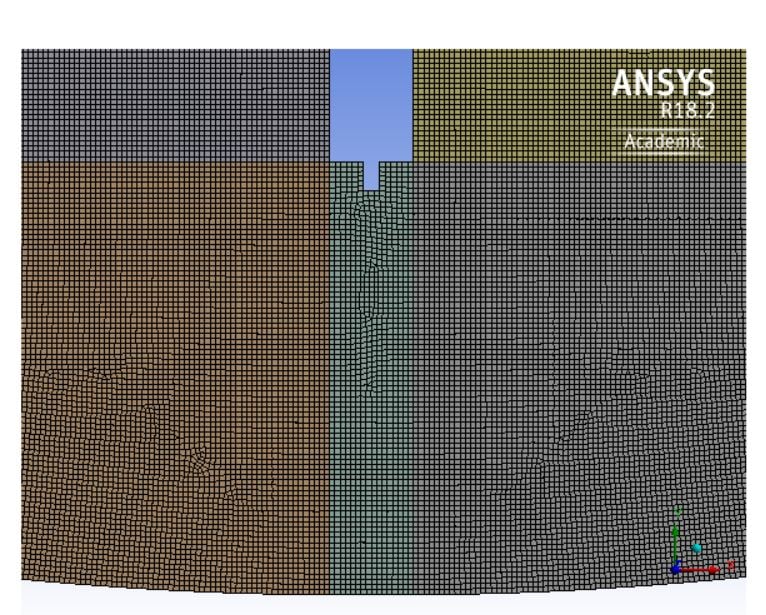
Ansys EmployeeCan you please post images of your mesh?
-
November 16, 2018 at 6:05 am
-
November 16, 2018 at 7:24 am
Keyur Kanade
Ansys EmployeeAs mentioned previously by Rob, if domain is large and you are getting this warning only for 5 cells, you can ignore and proceed. This warning will go out after more iterations. Please check and let us know.Â
-
November 16, 2018 at 7:25 am
rumth
SubscriberYes, with the time the number of cells are increasing to 15000 and more.
Do I make any change for outlet boundary condition for turbulence? Now I am using the default values of Turbulence intensity (5%) and viscosity ratio (10).
-
November 16, 2018 at 10:22 am
Rob
Forum ModeratorThe outlet values only matter if you have backflow. Where's the inlet on this model? If you mark the cells (read up on the adaption tools, but use Mark and DO NOT adapt) with high y+ where are they?
-
November 18, 2018 at 2:20 pm
Karthik Remella
AdministratorHello,
just to add to rwoolhou's comments - when using turbulent flow models, it is extremely important to use inflation layers with the correct value of first layer thickness corresponding to the model y+ values.the correct values of y+ based on your model. If you are using wall functions, please check if you have the correct inflation layers for this. You first layer thickness should correspond to y+ values of 30 - 50. I hope this helps.
Best Regards,
Karthik
-
November 19, 2018 at 5:14 am
rumth
SubscriberHi Karthik,
How to check layer thickness. I have no idea about it. Can you explain in details?
Â
Thanks
Raju
-
November 19, 2018 at 6:04 am
seeta gunti
Ansys EmployeeHi Raju,
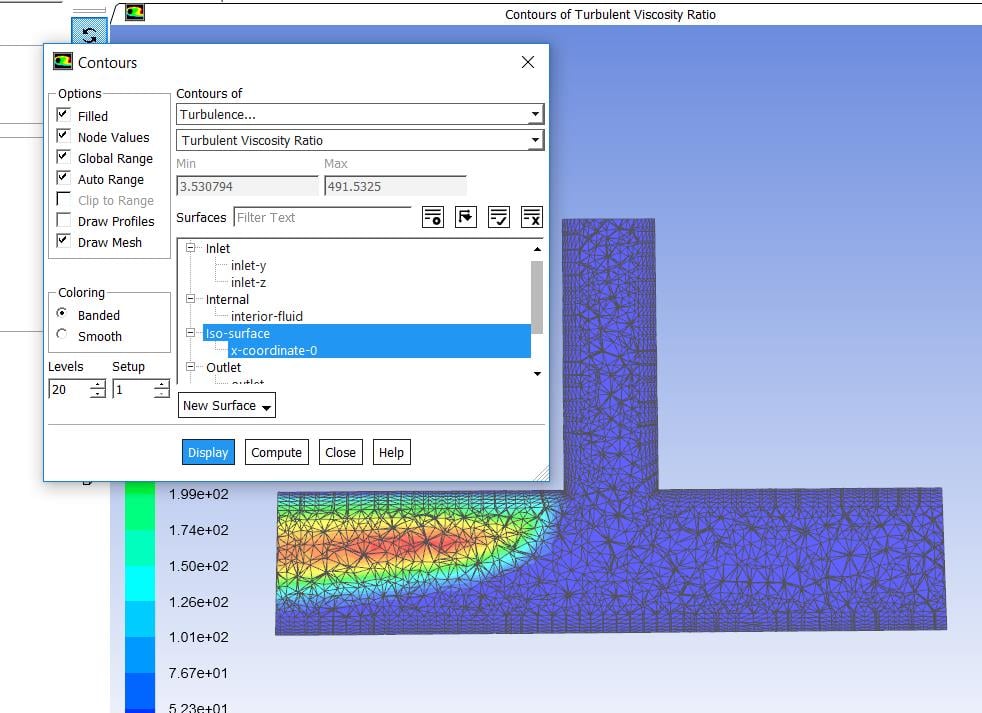
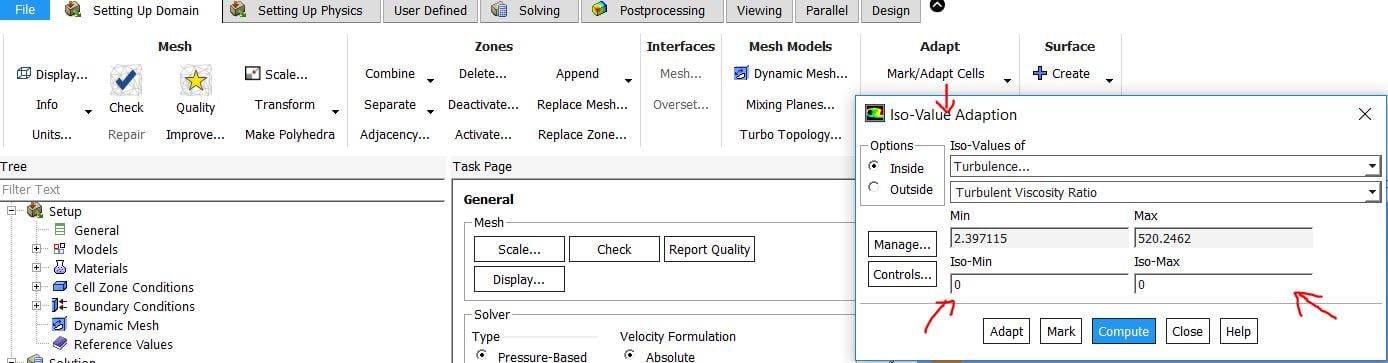
You can display the turbulent viscosity ratio contours and check the region where it is limiting. You can adapt the mesh accordingly in FLuent and check if the turbulent limiting cells are coming down or not.
I attach the pictures for your reference. In the attached picture, turbulent viscosity ratio is ranging b/n 2-520. So I did not give any values for iso-min and iso-max. In your case, you can give minimum as 100k and max is your maximum value and mark the cells. Display the cells and adapt the region accordingly and run the simulation.
Hope this might help you.
Thanks,
Seeta
Â
-
April 18, 2020 at 6:56 pm
minzhang20
Subscriber Hello All, I am sorry to post my question here. I don't know why I could not start a new discussion.
-
April 20, 2020 at 11:52 am
Karthik Remella
AdministratorHello,
Have you tried to create your post today?
Thank you.
Best,
Karthik
-
- The topic ‘turbulent viscosity limited to viscosity ratio of 1.000000e+05 in 5 cells’ is closed to new replies.

-
5899
-
1906
-
1420
-
1306
-
1021
© 2026 Copyright ANSYS, Inc. All rights reserved.