-
-
November 7, 2018 at 3:23 pm
Georgiro
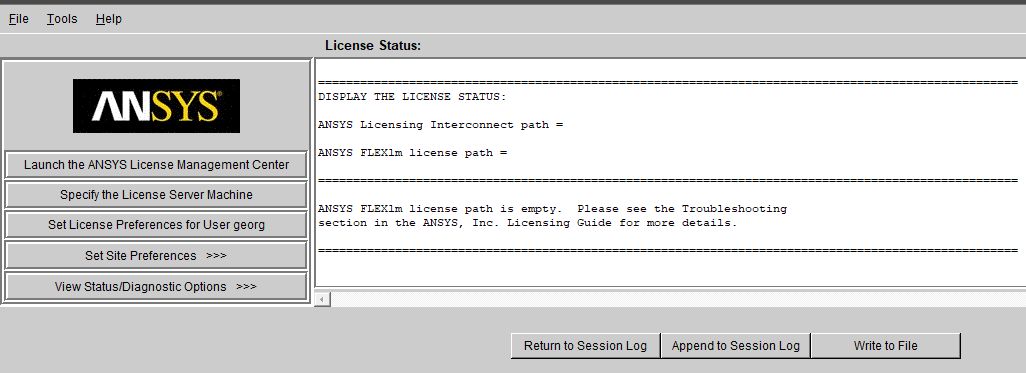
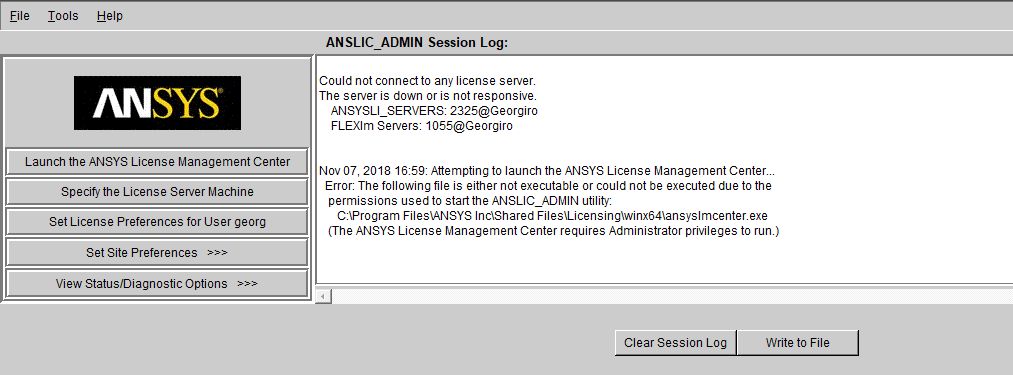
SubscriberSo I made again an installation of Ansys 19.0 and I have a serious problem to start to run the license. So I am giving you the pictures I have seen. I hope you will understand the problem I have here and let me know how to change it. Thanks a lot What is says that I cannot have any licence, but I have it, so I do not understand, but I should also know what could be the problem, but I do not.
Thanks for your ideas.
-
November 7, 2018 at 3:23 pm
-
November 7, 2018 at 3:24 pm
Georgiro
SubscriberAnd be sure that before I did not have any problem to install it, but now yes and I have the same licenses, etc.
-
November 7, 2018 at 3:27 pm
Georgiro
SubscriberBasically it says NO SERVERS PROVIDED.
-
November 7, 2018 at 4:02 pm
-
November 7, 2018 at 5:04 pm
-
November 7, 2018 at 9:03 pm
tsiriaks
Ansys EmployeeHi Georgiro,
It seems like you have an issue with DNS (IP resolution of Georgiro) . Please ask your network IT to help with this.
Also, I see that you are running ANSYS License Manager in a non-default mode (Licensing Interconnect and FlexNet separately). This usually creates a lot of unnecessary complications. Any particular reason you want to run it this way ?
Thank you,
Win
-
November 8, 2018 at 8:57 am
Georgiro
SubscriberUnfortunately, I was not doing it before, but now I am able to open the model, but I cannot add there anything to the model, so what shall I do now? I have to idea with it! Thanks
-
November 8, 2018 at 9:01 am
Georgiro
SubscriberBasically I need to switch something off, but I do not know what and later on to switch it on, but what? Have no idea?
-
November 8, 2018 at 9:05 am
Georgiro
SubscriberWhy ANSLI-SERVERS: 2325@Georgiro FLEXlm Servers: 1055@Georgiro are not working? What shall I do with them? I have no idea?
-
November 8, 2018 at 9:06 am
Georgiro
SubscriberIt is down or not responsive...
-
November 8, 2018 at 9:06 am
Georgiro
SubscriberSo what shall I do in this case?
-
November 8, 2018 at 5:36 pm
tsiriaks
Ansys Employee1. Close anything related to ANSYS
2. Delete the following files (if exist)
C:Program FilesANSYS IncShared FilesLicensingansyslmd.ini
C:Program FilesANSYS IncShared FilesLicensingansyslmd.lic
C:Program FilesANSYS IncShared FilesLicensingansoftd.lic
3. Open ANSYS License Management Center -> Add a license file -> Browse to the license file that you receive and install it -> back to the main page and hit 'Stop'
4. Go to C:Program FilesANSYS IncShared FilesLicensinglicense_files , then look for any .lic files (e.g., ansyslmd.lic , ansoftd.lic). Open all of the .lic files, then edit the second entity (the server hostname) on the SERVER line to be 127.0.0.1 . It would look something like this
SERVER 127.0.0.1 abcdefg 1055
5. Launch the Client ANSLIC_ADMIN Utility with "run as administrator" >> Specify the License Server Machine >> Select on the list that shows your hostname, then edit it >> Change the hostname to be 127.0.0.1 , then choose "OK"
6. Go back to ANSYS License Management Center >> "Start"
Thanks,
Win

-
- The topic ‘So I made again an installation of Ansys 19.0 and I have a serious problem.’ is closed to new replies.
-
4878
-
1587
-
1386
-
1242
-
1021
© 2026 Copyright ANSYS, Inc. All rights reserved.