-
-
June 10, 2018 at 11:48 pm
rshukla786
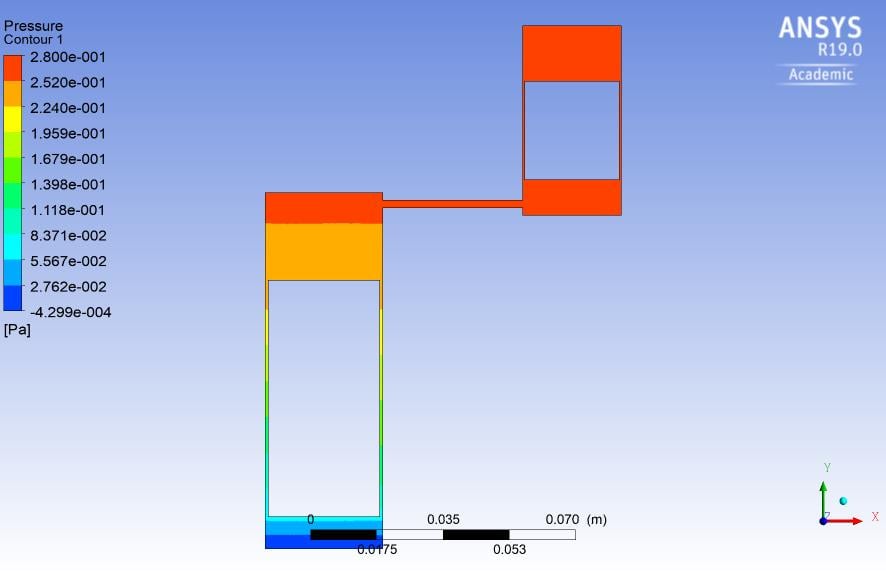
Subscriberi have to provide the motion to two pistons inside cylinder in fluent. two cylinders are connected via a pipe. how to write udf to give motion to both the pistons. I attached the 2D geometry made in ansys 19 modeler. Please help me in to move both the piston and also help me writing the udf its very urgent. I am attaching the image also which I imported in fluent.

-
June 11, 2018 at 7:28 am
Keyur Kanade
Ansys EmployeeHello rshukla786,
Â
You can do it by using profile or by using udf.Â
For profile, please see following link.Â
https://www.sharcnet.ca/Software/Fluent6/html/ug/node446.htm
For udf, you may need to use define_cg_motion macro. Please check its details at following link.Â
https://www.sharcnet.ca/Software/Ansys/17.0/en-us/help/flu_udf/flu_udf_sec_define_cg_motion.html
Regards,
Keyur
-
June 11, 2018 at 10:50 am
rshukla786
Subscriberthanx for the reply Keyur. the prroblem I am facing is that both pistons have to provide the motion simultaneously. I have got one udf but getting negative volume cell error, I am not familiar very much about udf . This is udf I am using for both pistons but not getting results. There is no compilation error. I am attaching both the udf here you check what modification is required its very urgent please help. I am writing the udf in mthe next reply post, please go through and help if possible.
Regards
Rohit Shukla
-
June 11, 2018 at 10:52 am
rshukla786
SubscriberUDF for piston 1
#include "udf.h"
#define r 0.005Â /* i n m et e r */
#define l .03850 /* i n m et e r */
#define omega_0 41.88790205 /* Constant rpm for cranking */
#define I 0.000008596 /* Mass moment of Inertia kg m^2 */
#define A_1 0.00557923 /* Area of P i s t o n */
#define A_2 0.00204 /* Area of P i s t o n */
static real th_n=0.715584993;
static real omega_n=0;
DEFINE_CG_MOTION(p1,dt,vel,omega,time,dtime)
{
face_t f;
Thread *t;
real omega_np1,th_np1,force1,Pressure;
float stroke;
if(!Data_Valid_P( ))
return; /* Donot compute force if the solution is not initialized */
t = DT_THREAD (dt);
/* get the thread pointer(dt) corresponding to piston p1 for which the motion is defined */
/* Compute for ce on thr piston p1 using pressure and area */
begin_f_loop(f,t)
{
Pressure = F_P(f,t);
}
end_f_loop(f,t)
force1 = -(Pressure-101325)*A_1 ;
if(time<100000)
{
omega_n = omega_0;
th_np1 = th_n+omega_n*dtime;
}
else
{
omega_np1 = omega_n+Pressure*r*dtime/I*(A_1*sin(th_n)+A_2*sin(th_n+100*M_PI/180)) ;
th_np1=th_n+omega_n*dtime;
Message("Pressure=%f,Force1=%fn",Pressure,force1);
}
stroke=sqrt(pow(l,2)-pow(r*sin(th_n),2)) ;
vel[0] = - r*sin(th_n)*(1+r*cos(th_n)/stroke)*(th_np1 -th_n)/dtime;/* Specify y velocity for piston 1*/
th_n = th_np1;
omega_n=omega_np1;
}

Â
-
June 12, 2018 at 6:27 am
Keyur Kanade
Ansys EmployeeHello,Â
Along with udf, you need to select correct smoothing, remeshing, laryering options in dynamic mesh. Usually negative volume comes because of wrong remeshing settings.Â
Please check following for general information about dynamic mesh.
https://www.sharcnet.ca/Software/Fluent6/html/ug/node444.htm
Â
Regards,
Keyur
-
June 13, 2018 at 9:31 am
rshukla786
Subscriber@keyur I tried everything its not moving. I have to complete this project otherwise i will not get my degree. Please help me. my whatsapp no is 8171385762
-
June 13, 2018 at 2:46 pm
Keyur Kanade
Ansys EmployeeHello,Â
What kind of mesh you are using? Is it tri or quad? Please use structured quad mesh with which you can effectively use layering option in dynamic mesh.Â
You may want to check https://www.youtube.com/watch?v=BuA6uI2tWuA
Other users can chime in to check your udf.Â
Regards,
Keyur
-
June 14, 2018 at 6:36 am
rshukla786
Subscriberokay i will try, i was using triangular till now.
-
- The topic ‘dynamic meshing in piston cyllinder’ is closed to new replies.
-
4909
-
1603
-
1386
-
1242
-
1021
© 2026 Copyright ANSYS, Inc. All rights reserved.