Ansys Assistant will be unavailable on the Learning Forum starting January 30. An upgraded version is coming soon. We apologize for any inconvenience and appreciate your patience. Stay tuned for updates.
Preprocessing

Preprocessing

Topics related to geometry, meshing, and CAD.

Edge sizing control is applying number of divisions and biasing unexpectedly

    • omareg94
      Subscriber

      When I generate Mesh elements in Ansys Fluent, they aren't generated as expected with the edge sizing control. 
      I've set the Edge Sizing control of this edge with these settings: (Number of Divisions: 20 and Biased):


      With these settings it's expected to see on the edge: 20 mesh elements and with their size biased. But it's not the case: Their sizes are not biased and they are not 20 mesh elements. 


      These are the Mesh general settings:


      How could I fix this so that it generates mesh as I want?

    • raul.raghav
      Subscriber

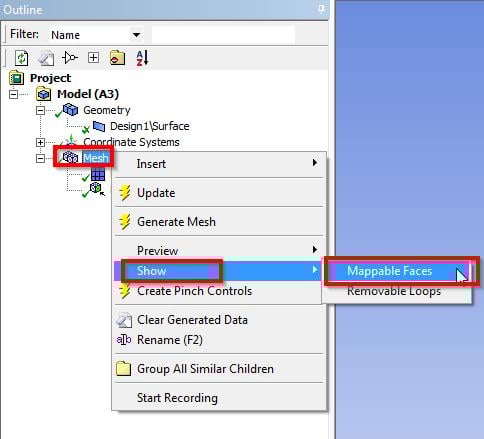
      You've got to use "Face Meshing" to get the mesh you're looking for. Once you apply the "Face Meshing" you can set your sizing to that edge and the mesh will be as you want it. Refer the link and image attached below:


      Mapped Face Meshing in ANSYS Workbench


    • omareg94
      Subscriber

      Hello Rahul,


      I've started a new project (so that I can get the default Mesh settings and start meshing from scratch).


      I've applied these steps only and added the Edge sizing I mentioned, and this is what I get:


      The default settings along with the only applied settings (Face meshing+Edge sizing) are unexpectedly generating non-relevant meshing.


      These are the current general settings of Mesh:


    • omareg94
      Subscriber

      Also I can only get small mesh elements by changing Max Face Size: to 7.592e-003m instead of the default one "7.592e-003m". But also not relevant to the meshing control I set.


      This is the very basic .wbpz file of my project if you wanted to check further.

    • raul.raghav
      Subscriber

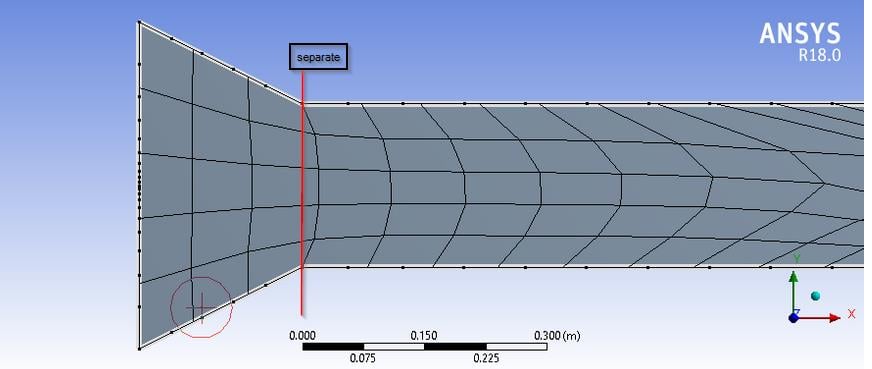
      You can separate the geometry into two parts at the location (shown below in the image) and "Form a New Part" in design modeler. Then open your meshing and continue the Face Meshing + Edge Sizing.


      Refer to following youtube tutorials for meshing on a very similar geometry:


      Mapped Face Meshing (7min33s to 10min07s)


      ANSYS Workbench - Improve Meshing in 3 Easy Steps


      SimCafe: Flat Plate Boundary Layer - Mesh

    • omareg94
      Subscriber

      Thanks a lot Rahul for your precious help.


      I'm now able to get this


    • raul.raghav
      Subscriber

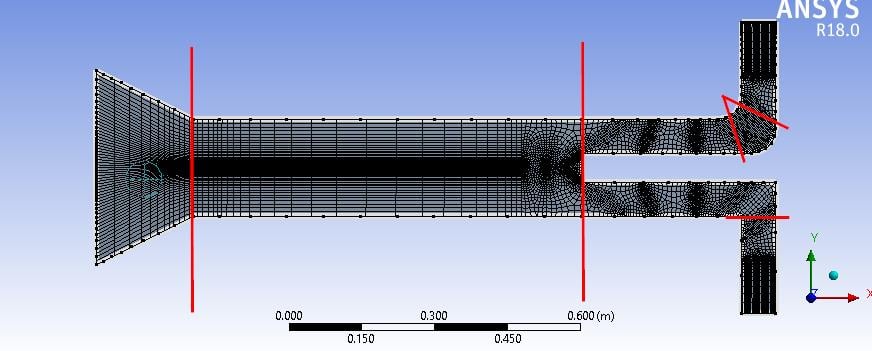
      Refer to the following image and make slices as shown. You'll have a very uniform quadrilateral mesh if you slice your geometry this way. Good luck!


Viewing 6 reply threads
  • The topic ‘Edge sizing control is applying number of divisions and biasing unexpectedly’ is closed to new replies.

[bingo_chatbox]