TAGGED: mesh, mesh-size, mesh-sizing, solver-ansys-mechanical
-
-
April 3, 2023 at 7:56 pm
swu321
SubscriberHi, I am having difficulties changing the size of the mesh.
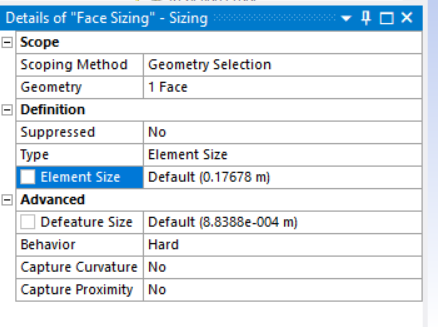
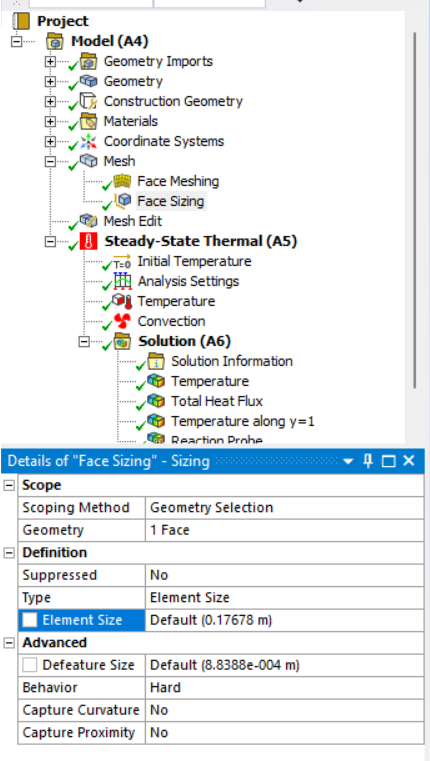
I used face sizing and I was trying to edit the element size under the details window.
However, every time I input my value, it always automatically goes back to the default value.
(I was trying to input 0.25 m, and it always goes back to 'Default (0.17678 m)')
Could anyone help me? I am using the 2023 R1 student version.

-
April 4, 2023 at 3:37 am
Nanda
Ansys EmployeeHi Archer,
Please see if the following links help.
Notes on Element Sizing (ansys.com)
Mapped Face Meshing in ANSYS Workbench - PADT (padtinc.com)
Regards,
Nanda.
Guidelines for Posting on Ansys Learning Forum
How to access ANSYS help links
Â
-
April 4, 2023 at 8:22 pm
-
April 5, 2023 at 9:14 am
Nanda
Ansys EmployeeHi Archer,
It's likely the face sizing is conflicting with another mesh setting. What are you trying to mesh here, is it a simple face or a complex curved face. As we don't know what you're meshing it's hard to tell if you're using the best approach. Kindly, upload some snapshots of what you're trying to do.
Regards,
Nanda.
-
April 5, 2023 at 9:26 am
swu321
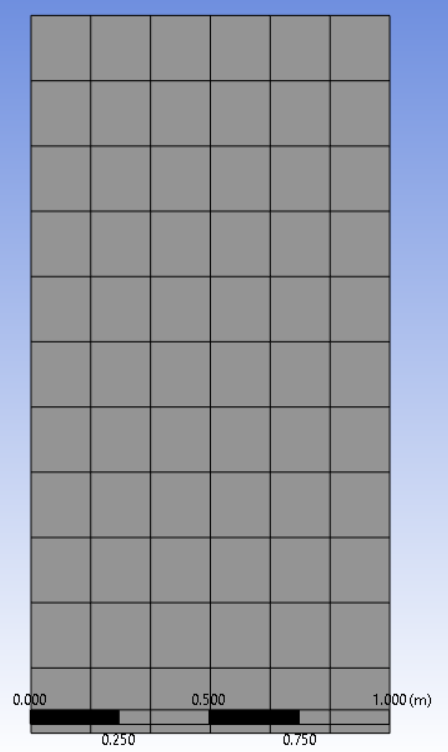
SubscriberIt is a simple face (1 m * 2 m rectangle)
I was following the tutorial mentioned at https://www.ansys.com/academic/students/ansys-student.
In this tutorial, the instructor drew a rectangle in Ansys Discovery and run the simulation in Ansys Mechanical.
So I followed his steps, created Face Meshing, and tried to adjust the mesh size by using Face Sizing. The images below show what I have at this moment. The mesh I have here is the default size since it does not allow me to change it.
-
-
April 6, 2023 at 4:24 am
-
- The topic ‘Cannot change mesh size in Ansys Mechanical’ is closed to new replies.
-
6485
-
1906
-
1458
-
1308
-
1022
© 2026 Copyright ANSYS, Inc. All rights reserved.