-
-
March 15, 2023 at 3:24 am
user deleted
SubscriberHi
Â
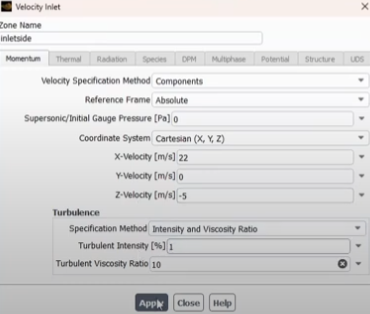
I was wondering could you tell me the command to enter in batch mode to edit the velocity values at a named velocity inlet such as in the image below in GUI mode. I am performing crosswind studies and I want to be able to edit the z component of velocity easily between simulations while using the same case file I have already created.
Thanks!
-
March 15, 2023 at 9:59 am
SRP
Ansys EmployeeHi,
I suggest you to please refer to previous forum discussion: Changing inlet conditions on the fly in batch job (ansys.com)
If you are not able to access the link, please refer to this forum discussion: Using Help with links (ansys.com)
Thank you
-
March 15, 2023 at 5:20 pm
-
March 15, 2023 at 6:38 pm
SRP
Ansys EmployeeHi,
If you go to the console window and type define>boundary condition>velocity inlet and as you proceed further you need to choose various options as yes and no in the console window.
Command mention above is collection of your responses that you enter into the console.
I suggest you to try once using the console, it will hep you to understand the command more easily.
Thank you.
-
March 16, 2023 at 8:01 am
DrAmine
Ansys EmployeeQuick Search Tool to find the most imporant TUI commands.
-
- The topic ‘How to set inlet velocity boundary conditions using a batch command’ is closed to new replies.

-
6104
-
1906
-
1436
-
1308
-
1021
© 2026 Copyright ANSYS, Inc. All rights reserved.