TAGGED: Discovery AIM, mesh
-
-
March 14, 2019 at 3:34 pm
farnazhd66
Subscriberhi,
the mesh generation of my model takes almost 2 days now and still ongoing! I know that it is a complex model but I want to know whether it is normal to take such a long time or should I stop that.
and can you give me some tips on how to reduce meshing time? (mesh resolution is already set to the lowest)
many thanks,
Farnaz
-
March 15, 2019 at 6:32 am
Naresh Patre
Ansys EmployeeHello farnazhd66
Mesh generation taking 2 days doesn't seem to be normal. Are you trying to generate mesh using physics aware meshing approach (Mesh task doesn't appear in the workflow) or manual meshing approach (Mesh task appear in the workflow)? Can you try manual meshing approach and modify the global mesh settings based on geometry details, and set Mesh controls - Element shape as tetrahedron for all bodies and see if that helps?
-
March 15, 2019 at 3:34 pm
farnazhd66
SubscriberNaresh Patre Hi,
many thanks for your reply. actually, I had used a manual meshing approach and element shape was set to Hexahedral. This time I have changed it to tetrahedral as you said and hope it works this time:)
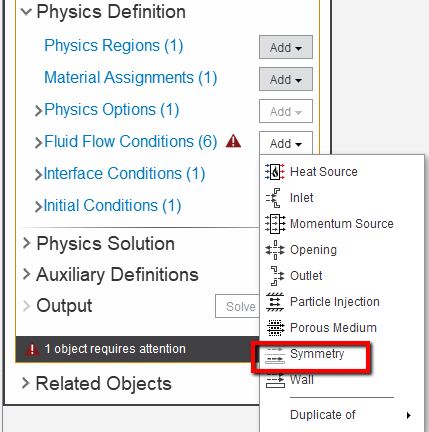
But I think I need to simulate a quarter part of my model using symmetry condition to fasten up the process. Can you please tell me how I can set the symmetry boundary conditions?
 I know one cutting plane should be slip wall and the other insulated wall, but I don't know how to apply :/
-
-
March 18, 2019 at 6:19 am
-
March 18, 2019 at 12:32 pm
farnazhd66
Subscriberhey,
Âmany thanks for the help. with tetrahedral and using a 1/4 of my model, meshing works.
thanks a lot for your help one more time.
-
- The topic ‘mesh generation takes long time!’ is closed to new replies.
-
5874
-
1906
-
1420
-
1306
-
1021
© 2026 Copyright ANSYS, Inc. All rights reserved.