Ansys Assistant will be unavailable on the Learning Forum starting January 30. An upgraded version is coming soon. We apologize for any inconvenience and appreciate your patience. Stay tuned for updates.
3D Design

3D Design

Topics related to Ansys Discovery and Ansys SpaceClaim.

Unlink activation from Ansys account

    • josef.mrtka
      Subscriber

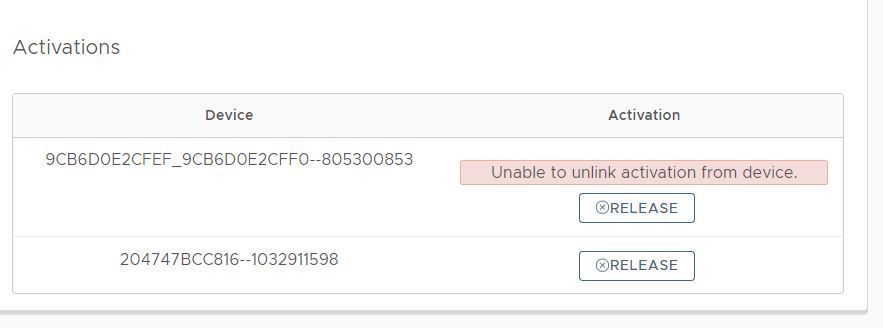
      I am trying to release one of mine license activation of Discovery from Ansys account. Successfully entered my Ansys account but when I want to release one of the activation a message is shown: Unable to unlink activation from device.

      What should I do?

    • Naresh Patre
      Ansys Employee

      Hello Josef Mrtka

      Can you try deactivating license from the command prompt as per steps mentioned below:

      1.    Launch the Windows Command Prompt from the start menu in administrative mode.

      2.    In the command prompt, type in:

      cd C:Program FilesANSYS IncShared FilesLicensingwinx64

      (this is the default installation directory of Discovery products. If you have installed it at a different location, enter the appropriate path where ansysls_client.exe is present)

      3.    Once in that directory, run the following command:

      ansysls_client.exe -DeactivateAllEntitlements

      This command deactivates all the active licenses assigned to you. Let me know if you still face any issues.

      • josef.mrtka
        Subscriber

        Naresh Patre Hello,

        I followed your instructions with no results. 

    • tim.dukes
      Subscriber

      Also getting this issue with a few customers. We have tried manual release which comes up as a success. However has no effect . Going back into the subscriptions tab shows the license activated to both ID's

      The license can't be un-assigned from the administration tab as you also get the same error of 'unable to unlink'.


      Is there something wrong with the servers or any other way of releasing as number of customers having license issues.

    • Naresh Patre
      Ansys Employee

      Hello Tim Dukes

      Let me check with the portal team and let you now.

      • tim.dukes
        Subscriber

        Naresh Patre Still not able to here also Naresh.


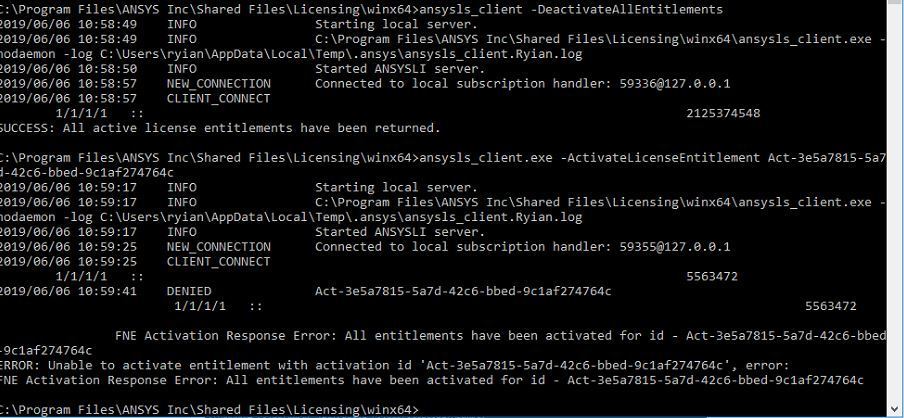
        See below the what we are seeing. Any update on what is causing this?

    • Naresh Patre
      Ansys Employee

      Hello Tim Dukes

      I had reported this issue yesterday itself and will follow up with the team again today on priority.

      Meanwhile, when I reproduced this issue, I deactivated the entitlements from command prompt. The command executed successfully. I then refreshed my Discovery account page and all activations were released successfully. Can you try this manual deactivation again at your end?

    • tim.dukes
      Subscriber

      Hi Naresh

      Manual release worked for me but not for others. It is saying success implying that it is released but then not allowing re-activation as they have not been released.  See below where I tried manual release and also manual re-activation. The portal also showed they hadn't been released.

    • Naresh Patre
      Ansys Employee

      Hello Tim Dukes

      I just checked at my end and the reactivation is working without any issue. Can you zip and send the .ansys folder (located in %temp% directory) from one of the users whose reactivation is failing? Please send it to ansys-discovery-support@ansys.com.

    • tim.dukes
      Subscriber

      Hi Naresh


      I will ask the customer for this. 


      However the issue isn't with re-activation the issue is with releasing the licenses. In the above image we can see that it says success but it actually doesn't release the licenses and we also can't do this via the portal. So the issue is with releasing the activation not re-activating.

    • Naresh Patre
      Ansys Employee

      Hello Tim Dukes

      This issue is mostly due to server being down for maintenance. I am following up with the licensing team and will keep you posted.

    • support
      Subscriber

      Hello

      We have the same problem with a customer. Do you know when the server restart ?

      Regards.

    • Naresh Patre
      Ansys Employee

      Hello FBR

      While the licensing team is working to fix the server side issue, please advice the customers to deactivate the subscription from command prompt and then activate it on required machine using activation command. It has been confirmed that this manual deactivation and activation is working fine. The commands for deactivating and activating are mentioned in the below forum post:

      /knowledge/forums/topic/discovery-downloads/

    • tim.dukes
      Subscriber

      Hi Naresh


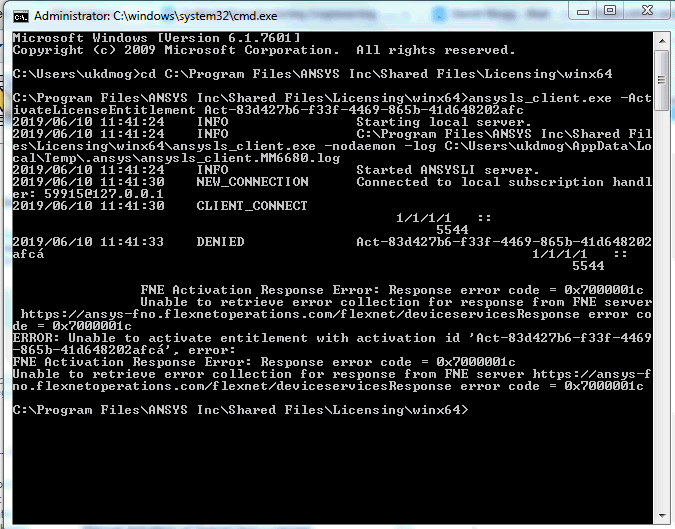
      We have a customer who is trying to manually activate there license but are getting the error below. I can't see this error code on the troubleshooting guide do you know what it points to or any way of resolving?


    • Naresh Patre
      Ansys Employee

      Hello Tim Dukes

      I am not sure but I suspect it could be associated with the server issue that is being faced. Can we get the ansysls_client.log file from %temp%.ansys folder and the UTC time when this error occurred?

    • Naresh Patre
      Ansys Employee

      Hello Tim Dukes Josef Mrtka FBR

      The server issue has been fixed and the activations can be released from the account page. Please let me know if you still see any issues.

Viewing 13 reply threads
  • The topic ‘Unlink activation from Ansys account’ is closed to new replies.
[bingo_chatbox]