Hi Don Lewis
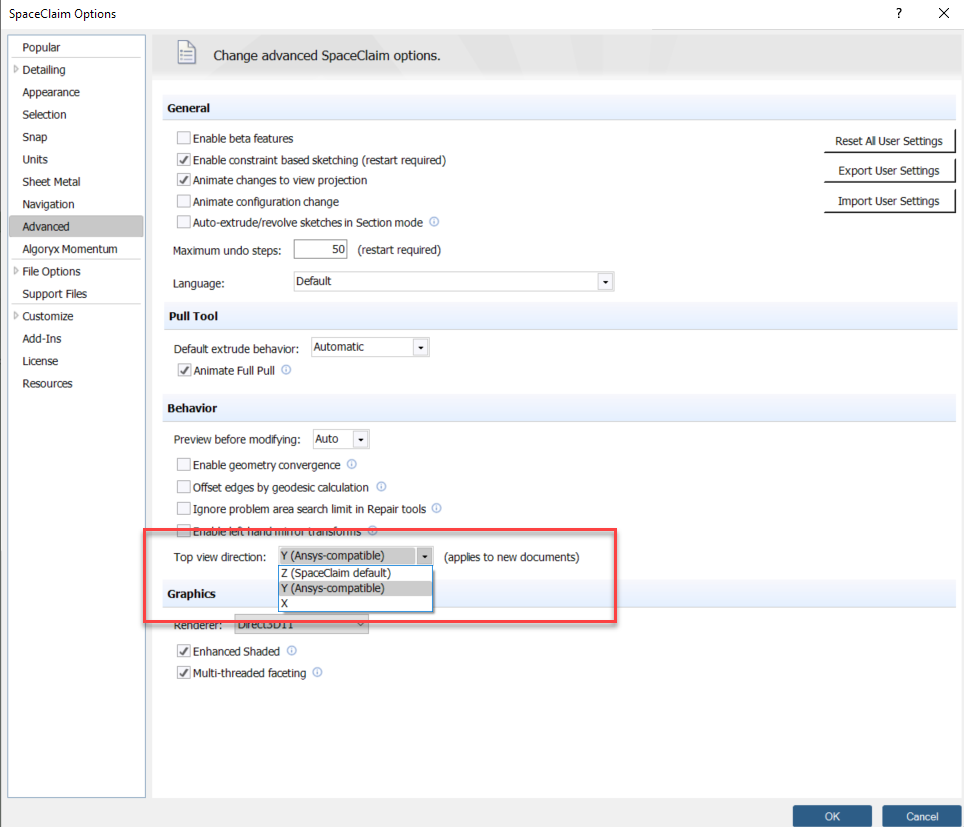
If you go to File > SpaceClaim Options > Advanced, you can change the Top View Direction. (this will apply to all new documents, not the current SpaceClaim design).
See attached screenshot for the option I am referring to.
Top view direction: Allows you to change the top view to Z, Y, or X. This setting is saved with the document and only applies to new documents. You may want to change this setting when you import drawings from other CAD applications that use a different upward direction.
This option is automatically set to Y when you run SpaceClaim with an Ansys license, giving your design the same orientation in SpaceClaim and Ansys. Choose X when you need to comply with manufacturing conventions.
Regards.


















 You are navigating away from the AIS Discovery experience