Ansys Assistant will be unavailable on the Learning Forum starting January 30. An upgraded version is coming soon. We apologize for any inconvenience and appreciate your patience. Stay tuned for updates.
Fluids

Fluids

Topics related to Fluent, CFX, Turbogrid and more.

Defining anisotropic thermal conductivity for complex geometries

    • cakal
      Subscriber

      Hi,

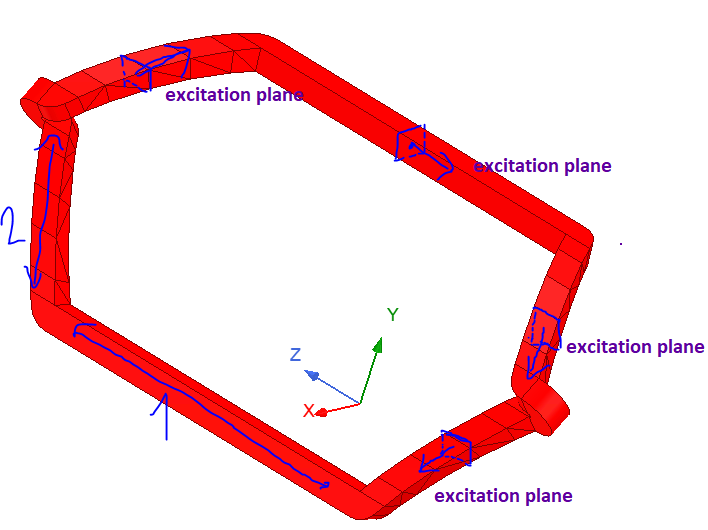
      I have the following 3D solid block coil geometry in Fluent 2021 R2. It has a higher thermal conductivity in the direction normal to the excitation plane compared to in-plane thermal conductivities. For example, for portion 1,  the thermal conductivity is higher in the z-direction. For portion 2, thermal conductivity is higher in the z-y direction. Since the excitation plane changes direction at different parts of the coil, the coil has a varying thermal conductivity in XYZ directions along its path.

      Can you help me to define this anisotropic changing thermal conductivity for this geometry in ANSYS Fluent?


      Thanks! 


    • SRP
      Ansys Employee

      Hi,

      To define anisotropic thermal conductivity for a solid material, select anisotropic for Thermal Conductivity in the Create/Edit material dialog box.

      For more details, please refer to user's guide: 8.5. Thermal Conductivity (ansys.com)

      If you are not able to access the link, please refer to this forum discussion: Using Help with links (ansys.com)

      Hope you find this useful.

      Thank you


    • Rob
      Forum Moderator

      In the above you can use UDFs but the easier approach will be to create a few different materials, and split the solid into separate volumes based on the direction. 

      It's a problem I've seen a few times, and one I can't easily answer here. However, it's also a nicely drawn up specification to pass onto the Product team. 

    • Rob
      Forum Moderator


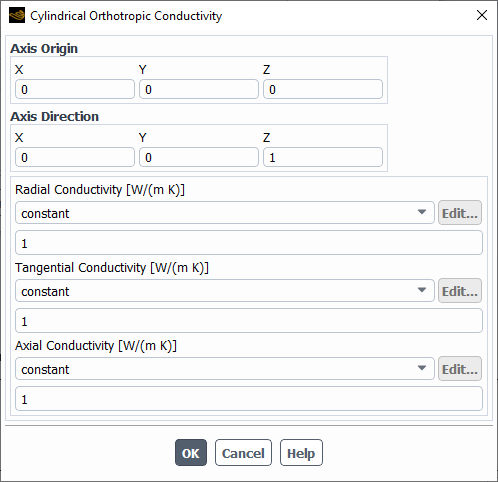
      In this case can you use

      Then turn on the material orientation in the solid cell zone. 


    • cakal
      Subscriber

      Hi Rob,

      Thank you for your answer. Creating different materials based on the direction would solve the problem. 

      You suggested turning on the material orientation in the solid cell zone. How do I do that?

      Thanks!

    • Rob
      Forum Moderator

      Use the cyclic option in the material and then there's an option in the solid cell zone panel for orientation. If it's not there have a look in 2023R1

Viewing 5 reply threads
  • The topic ‘Defining anisotropic thermal conductivity for complex geometries’ is closed to new replies.

[bingo_chatbox]