Ansys Assistant will be unavailable on the Learning Forum starting January 30. An upgraded version is coming soon. We apologize for any inconvenience and appreciate your patience. Stay tuned for updates.
Fluids

Fluids

Topics related to Fluent, CFX, Turbogrid and more.

Extract more data from fluent post-processing

    • Marco Alborghetti
      Subscriber

      Good Morning,

      I've performed a simulation with a pipe in Ansys fluent by using the workbench. When i go to the "results" section, i try to make some plot with the chart function. In doing this i've defined some line along axial direction of the pipe and 4 line in corrispondence of certain section (inlet,outlet, 0.33 from inlet, 0.66 from inlet). The problem is that when i go to make the chart and export the data i obtain a sharp graph with only ten points in terms of data. Is there any way to increase the number of data exported ? Kind regards

    • Nikhil N
      Subscriber

      Hello, 


      I am suspecting that you are using Cfd-post and not the Fluent's post-processing. 

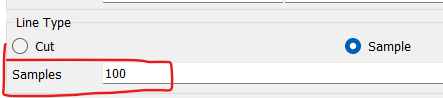
      With that said, if you are using 'line' as a data source for the chart, try increasing samples for that line. 

      Thanks!

      Nikhil

    • Marco Alborghetti
      Subscriber

      Hi,

      Yeah you are right i'm using the cfd-post present in the workbench tree of ansys fluent...can you please tell me where can i find this sample command? Becuase in my chart by selecting the different folder (General, Data Series, X axis, Y axis, Line Display, Chart Display) I cannot find the sample,

      Kind regards

      • DrAmine
        Ansys Employee

        That option to be found directly under Line. If you have a good mesh then stick to Cut. Sample with increased number can help in case your mesh is not having enough grid points along the line.

    • Marco Alborghetti
      Subscriber

      thank you co much 

Viewing 3 reply threads
  • The topic ‘Extract more data from fluent post-processing’ is closed to new replies.

[bingo_chatbox]