TAGGED: 2D, hertz-contact, hertzian-contact-stress, static-structural
-
-
November 8, 2022 at 3:38 pm
henrique.geraissate
SubscriberHello everybody!
I would like to ask for help for configuring this simulation. I've seen some posts here in the forum, but for some reason I am not being able to properly reproduce it myself.
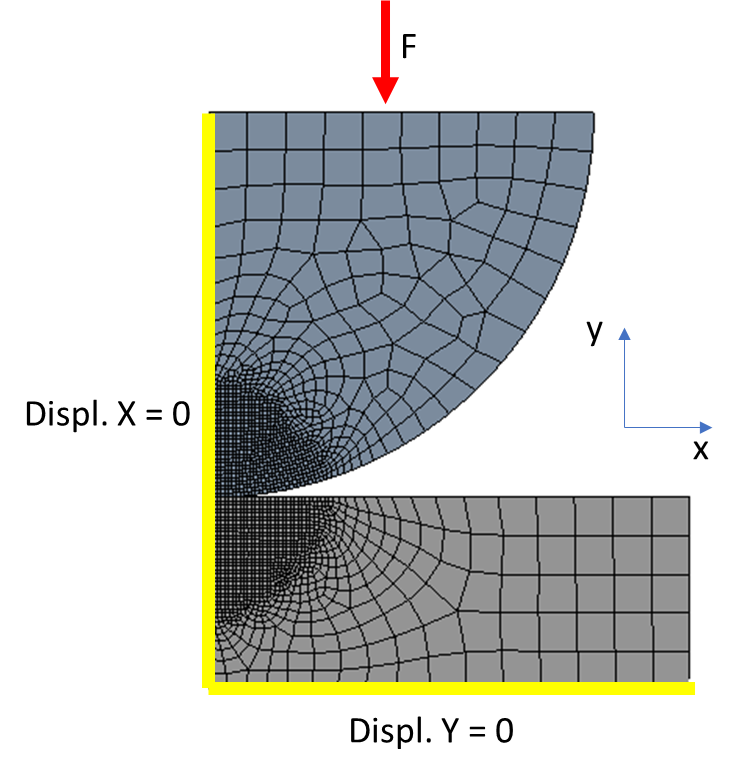
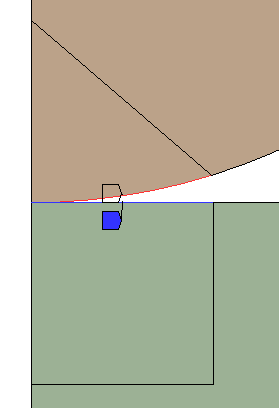
The problem is a standard Hertzian Contact between a sphere and a plane in which I want to evaluate identation, stresses and contact radius to compare to the analytical solution. I am simplifying it to a 2D problem with symmetry. Picture below shows geometry and boundary conditions:
Frictionless contact between bodies. Geometry analysis type set to 2D plane strain.
When I try to solve it, I get an error that "An internal solution magnitude limit was exceeded", pointing out to nodes in the circle regarding the UY direction. Now, I know that that are indeed no constraints to prevent that movement, but I need the circle to be able to move in UY so I get the stresses and deformations, isn't that correct?
Could anyone please help me to understand how should I properly constrain this model to perform the analysis I want?
Thanks in advance!
Henrique
-
November 9, 2022 at 6:05 am
Sean Harvey
Ansys EmployeeHello Henrique,
Have you see our partner Cornell course on this classic problem?
Hertz Contact Mechanics - ANSYS Innovation Courses
What might be happening in your case is to check if the two bodies are in initial contact with no gap. You should use auto time stepping and specify initial, min and max substeps as you could be loading too quickly.
BTW, the topic of loading parts that are close but not touching is covered in this great lesson.
How To Utilize Contact Stabilization Damping Correctly — Lesson 2 - ANSYS Innovation Courses
Please try and let us know.
Regards,
Sean -
November 9, 2022 at 10:13 am
henrique.geraissate
SubscriberHello Sean, thank you for your answer.
I looked into the tutorial provided by Cornell, and a significant difference I noted is that it consider the half-space as a rigid body (single element + fixed support). In my case, I am mostly interested in the deformation and stresses in the half-space (it is a Zirconia sphere pressed against a Stainless Steel plate). It has also some customization in the contact definition, which I tried but unfortunately did not help me.
I have also looked into the loading lesson you suggested, which was really helpful! But, once again, the suggest methods did not help the solver to run. I tried adjusting the contact to touch and also the stabilization damping; and set the solver to perform 50 substeps, but none of them worked.
Other things I tried was changing the 2D behavior from Plane Strain to Axisymmetric, fixing the sphere and loading the halfspace, adding new faces to the bodies to better define contact edges. None of them worked either.
If you have any other ideas, I would be really glad to hear them, because I am really struggling on how to do it.
Thanks,
Henrique
-
November 9, 2022 at 5:57 pm
Sean Harvey
Ansys EmployeeHello Henrique,
Let's do this. Try to solve with displacement instead of force to see that the contact is properly being detected. If it is not, then we can focus on the contact setup.
Thank you
Sean
-
November 10, 2022 at 3:21 pm
henrique.geraissate
SubscriberHi Sean,
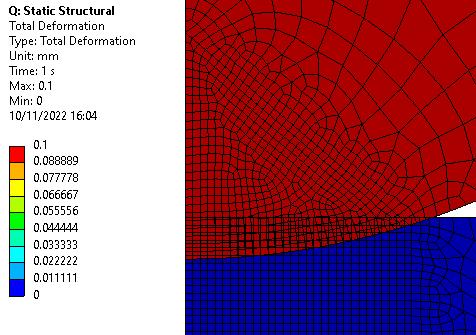
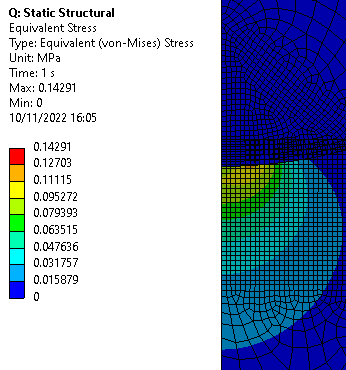
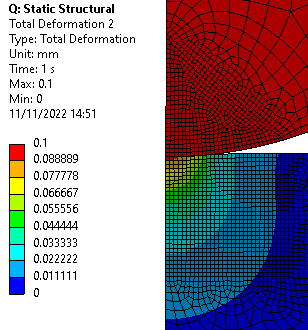
I just tried that out with a vertical displacement of -0.1 mm and, although the simulation converges, I think it is indeed not properly detecting the contact. Please check the deformation and equivalent stress results in the pictures below:
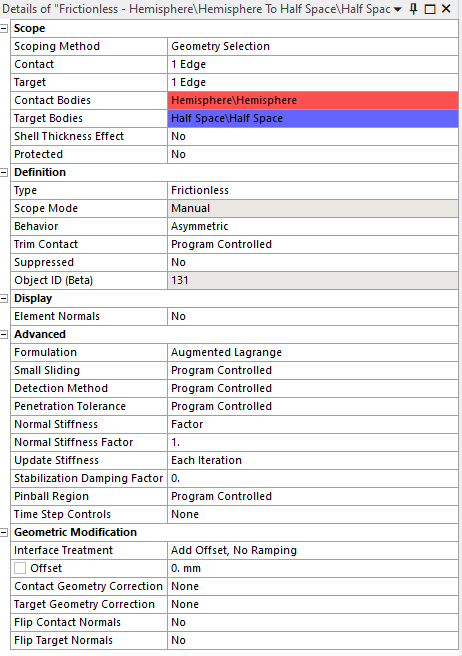
There is no signs of deformations and the stress is for some reason calculated only in the plate with really low values. Below is a picture of me contact setup:
I’ve also noticed that I did two things different from the Cornell tutorial: I defined my geometry in SpaceClaim instead of DesignModeler and I have not unchecked the “Decompose Disjoint Geometry” option in the geometry properties in Workbench.
Thanks again,
Henrique
-
November 10, 2022 at 11:06 pm
Sean Harvey
Ansys EmployeeHello Henrique,
So this was a good finding. It shows that the contact is not being properly detected. You showed the result at time = 1.0 So, you can right click on solution information and insert a contact tracker of type "Number Contacting" So as you make changes, while the solution is running you can monitor this tracker "live" to see if contact is taking place.
With that said, can you share what the contact tracker is showing? The contact side is typically set to contact to report these results but please also share once you have switched to target. (So two plots) If the contact behavior is default this means auto-asymmetric and the contact/target can flip by the solver.
To me, the contact setup looks correct. SpaceClaim vs DesignModeler should not matter nor the other setting.
There is stress in the lower plate, so some force transfer is taking place. Can you also share a plot of just the lower plate stress at first result substep and last (time = 1.0)
Thank you.
Sean
-
November 11, 2022 at 2:00 pm
henrique.geraissate
SubscriberHey Sean,
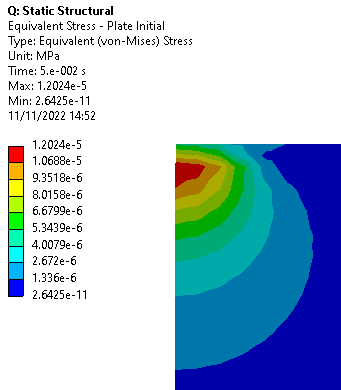
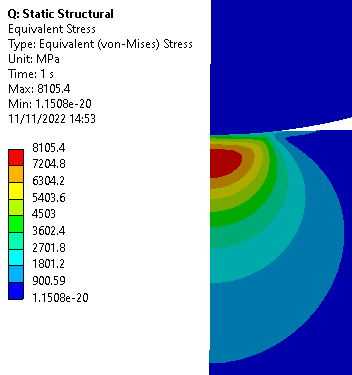
I flipped between target and contact (now contact is the plate edge) and with this change the results already changed a lot:
Stress plot on the plate, first load substep:
Stress on both bodies, final:
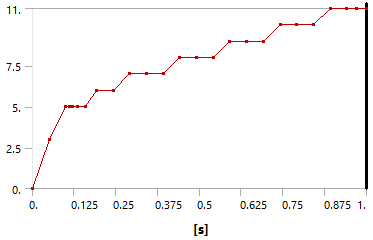
Number Contacting for the contact side (plate):

The contact between bodies seems to be better resolved now, but not completely. I cannot understand why no stress was calculated in the sphere. Also, I tried solving again for force instead of displacement, and got the same error as initialy.
Any more ideas? :)
-
November 11, 2022 at 4:14 pm
Sean Harvey
Ansys EmployeeHello Henrique,
OK, it is good we are getting contact, and the sub surface stress is something physical that is seen in these problems. You could change the contact behavior to symmetric, and change the pinball radius to a bit larger. The default pinball is a small fraction of the element size, so may try making it like 25% of your element size to see if that helps with the detection. You can do this by changing it to Radius, and then computing this value and entering it.
You may also change the contact detection to nodal projected normal from contact. Try displacement first, then back to force to see if these steps help with the detection.
You mentioned specifying contact stabilization damping, I would go back to that if this won't run and progressively increase until you can run with the force application. You then need to plot the stabilization energy vs stiffness to make sure is small. These are under solution information.
Keep in mind that the adjust to touch will change the physics of the problem slighly by offsetting the contact. While it works very well in many cases, for this case we don't want to be offsetting contacts any as that will change the shape of the bodies at the contact slightly, and if you are studying and trying to match analytical solutions, etc. I can potentially change the results a bit, so eventually, your final model should have this turned off. IMO.
Let's see what happens next. Thank you
Sean
-
November 14, 2022 at 11:28 am
henrique.geraissate
SubscriberHello Sean,
Thank you for the comments. I implemented your suggestions one at a time, and the outcomes were the following:
First, changing the contact from asymmetric to symetric resulted only in changes in the plate stress values and profile. The stress in the sphere was still not calculated and has not converged for force.
Through the initial contact information, I noticed that the program controlled pinball radius was already very close to my elements size. The elements are 0.1mm, and the pinball was also 0.1mm for the Asymmetric contact, and recalculated as 0.09mm for the Symmetric contact. I tried making it even bigger in both cases, but none of that changed the results, not even the Number Contacting.
Finally, when I changed the contact detection to Nodal Projected Normal from Contact, the solver did not converger at all, not even with displacement. Error message: "The solver engine was unable to converge on a solution for the nonlinear problem as constrained.". Looking the the solver output text, I found some things that may be useful:
*WARNING*: The default pinball radius may be too small to capture
contacting zone under small sliding assumption. Redefine the pinball
radius if necessary.
The resulting pinball region 0.97598E-01
*WARNING*: Initial penetration is included.
*** NOTE *** CP = 0.516 TIME= 12:03:45
Min. Initial gap 3.75099569E-05 was detected between contact element
2225 and target element 2284.
You may move entire target surface by: x= 0, y= 3.75099569E-05, z= 0,
to bring it in contact.In the initial 3 substeps where the solution still converged, several messages like this appeared:
THERE IS TOO MUCH PENETRATION AT 4 CONTACT POINTS OF THE 2D CONTACT ELEMENTS
*** WARNING *** CP = 1.750 TIME= 12:03:46
Convergence has been achieved in spite of large penetration.
If this message is repeated frequently, we recommend either increasing
penalty stiffness (FKN), or enlarge penetration tolerance(FTOLN).Then it stopped converging in load step 1, substep 4.
Would you perhaps have some more ideas?
I will do some more tests with the pinball region and also will move the geometry to try to manually close that gap mentioned.
Thanks again,
Henrique

-
November 14, 2022 at 7:03 pm
Sean Harvey
Ansys EmployeeHello Henrique,
Is the behavior of the sphere set to flexible or rigid? Please click on the part and look in the details. If not, can you double check the material units used for the bodies. I have seen where a mistype of MPa vs Pa cause similar issues. Also, even if the materials are correct, double check that the body has that material assigned. Thank you.
Regards,
Sean
-
-
November 15, 2022 at 9:46 am
henrique.geraissate
SubscriberHi Sean,
Oh man, I am so embrassed right now! Indeed I made a mistake with the units in the sphere's Elasticity Modulus: it was set as 186 Pa instead of 186 GPa. ? Now it works just fine for force, and the stress results are relativily close to the analytical solution!
I am so sorry that you wasted your time thinking on a lot of possibilities when it was only this typo.
I would like to thank you for the help, all in all it was a nice discussion for me where I've learnt new features and got more knowledge about contacting and loading.
Have a nice week!
Henrique
-
November 15, 2022 at 6:56 pm
Sean Harvey
Ansys EmployeeHello,
No problem at all. It has happened to all of us. It is great it is working.
The final resolution to those who will read this in the future. Double-check your units!
Regards,
Sean
-
- The topic ‘Hertzian Contact between Sphere and Half Space’ is closed to new replies.
-
5879
-
1906
-
1420
-
1306
-
1021
© 2026 Copyright ANSYS, Inc. All rights reserved.