-
-
May 17, 2022 at 8:16 am
theo.martel
SubscriberHello,
I began using the Python API recently, and everything was working fine, until it started hanging endlessly on the lumapi.FDTD() call.
My situation : I run Lumerical on a CentOS 7.9 server, and I installed a custom Python with anaconda. I restricted myself to the following test script : import lumapi; f = lumapi.FDTD();
After a reboot of the server, the test script was working perfectly, but if I force quit during the lumapi.FDTD() call, then this function call hangs endlessly until the next reboot of the server. In this state, I also tried the python interpreter included in Lumerical, and even a small C snippet that would link directly with the libinterop-api shared library, and they would all hang on the appOpen call of the interop-api library.
Would there be a way to solve this problem without having to reboot the server, as it is a shared server that is not easily rebootable ?
July 19, 2022 at 9:22 pmLito
Ansys Employee@TheoMartel, try to set your shell environment with the Lumerical API and install path and your Python's installation path as shown in our KB. >https://optics.ansys.com/hc/en-us/articles/5771091294739August 1, 2022 at 9:39 amtheo.martel
SubscriberI thought I had configured the parameters well, but apparently not.
Nonetheless, even with the environment variables PATH and PYTHONPATH correctly configured, the problem still exists : force quitting (CTRL+C) during the lumapi.FDTD() call makes the next call to this function hang endlessly until a reboot of the server.
-
August 2, 2022 at 8:58 pm
Lito
Ansys Employee@theo,
Sorry, I thought the issue was happening after the script runs / is completed. force quitting using CTRL+C might not always work. Try to manually "kill" the running process after force quitting (CTRL+C).
-
August 3, 2022 at 8:21 am
theo.martel
SubscriberWhen I list all running processes under my username (using "ps -u [username]"), I don't have anything related to Python or Lumerical, even after the force quitting, but still the call to lumapi.FDTD() hangs when I try again (to be more precise, there is another user running Lumerical on the same server, so there are some Lumerical processes on the system, but they should be unrelated to my problem I think ?)
That's why I am a bit puzzled by this problem : I don't see anything on my system persisting between Python sessions (or in general between uses of the API, as I can see the same problem when using the API with a C programm), but still there is something somewhere stuck that prevents me from using the API unless I reboot the server ...
-
August 3, 2022 at 4:55 pm
Lito
Ansys EmployeeWhich version of Lumerical are you using? Are you running lumapi from the CAD's script file editor window? Is this happening to all Python API script? Or the issue only happens to a specific command and only when you force quit the script?
Please try to run the script below from the CAD.
import lumapi
fdtd = lumapi.FDTD()
fdtd.addfdtd()
fdtd.addring()
fdtd.addmesh()
fdtd.save("mytestpy.fsp")Would you be able to share a sample script that is causing this issue? Copy and paste the sample script. Thank you.
-
August 19, 2022 at 10:33 am
theo.martel
SubscriberI'm running version 2021 R1.1 (on a remote server managed by IT, so I can't make updates on my side).
I can't run run scripts inside the CAD : I get the following error "Error constructing proxy for org.gnome.Terminal:/org/gnome/Terminal/Factory0: Error spawning command line “dbus-launch --autolaunch=6115d180364a4337941a54349eb1e04f --binary-syntax --close-stderr”: Child process exited with code 1" when I try to run any Python script from within the CAD . That is why I'm directly using a Python interpreter from the command line. I could verify the hang using the interpreter included with Lumerical files, as well as another one installed with Anaconda. (Sidenote : I didn't really investigate this problem with the CAD and Python, as I was able to use the API from outside, and using it from outside intergated better with my workflow)
The code I'm ruuning is :
>>> import lumapi
>>> fdtd = lumapi.FDTD() #Hit CTRL-C while this line is running
If I follow this procedure, then all following invocations of the lumapi.FDTD() function in a Python script will hang endlessly, even if I kill all processes under my username. I had to ask IT to reboot the server to be able to use the API again.
-
August 19, 2022 at 5:53 pmLito
Ansys Employee@theo.martel,
You mentioned that you were using our API and then it suddenly stopped working. Please check with IT for any changes they made prior to the issue. Could be something in your system that changed that is preventing the Python API from running and crashing.
Do you have a GUI connection to your Linux machine? Our API and scripting environment requires a GUI interface and Gnome or Mate terminal/desktop environment. See the following KB articles for details.
- https://optics.ansys.com/hc/en-us/articles/360033862333-Lumerical-product-components-and-licensing-overview
- https://optics.ansys.com/hc/en-us/articles/360037824513-Python-API-overview
August 22, 2022 at 10:00 amtheo.martel
SubscriberI never said that it suddendly stopped working, I said that when I was force quitting the Python script while it was executing the lumapi.FDTD() function, all the following lumapi.FDTD() calls would hang, thus rendering the API unusable until the next server reboot. This is a problem I have been seeing since I started using the Python API more than a year ago, with a 2020 release version I think, so it is not linked to a recent change by IT. I only reported it recently because I started using the API more frequently, and I have more time to try and solve this problem.
I don't really know what you mean by "GUI connection" ? I run Lumerical on the remote server using either X forwarding through ssh (ssh -X) or VNC on the remote server. We only have the gnome-terminal installed (as required by the documentation you linked, our IT didn't install the full GNOME desktop as it is not listed as a requirement).
As a side note, I was able to use the API and run your script from CAD, by first launching the gnome-terminal by using "dbus-launch gnome-terminal", and then from this new terminal window launching the CAD. Launching Python directly from the terminal still gives me the hang as for the other options, only launching from the GUI works. Moreover I tried to reproduce the problem from the CAD by running a script with just "import lumapi", then in the new terminal running "ftdt = lumapi.FDTD()" and pressing CTRL-C while it runs : the terminal window crashes and running a script afterwards work. So I can't reproduce from inside the GUI.
-
August 22, 2022 at 4:05 pm
Lito
Ansys Employee@theo.martel,
Thanks for the clarification. So the issue happens when the lumapi script is “killed” with CTRL+C? Can you run the lumapi script to completion, does this reproduce the issue? Have you configured your shell/environment as shown in this KB guide? As you mentioned this happened before on Lumerical 2020 – which version are you running now? Thank you.
./fdtd-solutions -v
-
August 22, 2022 at 4:13 pm
theo.martel
SubscriberIf I run the script to completion, everything works fine. But if I force quit at the wrong time, then all the following invocations of the script will hang on lumapi.FDTD() (and so I can't run the script to completion anymore until the next reboot).
As you already recommended, I checked my environnment and reconfigured it following the guide. But even with that, I still have the same problem.
I'm currently running version : Ansys Lumerical 2021 R1.1 Finite Difference IDE Version 8.25.2599 (Linux 64bit)
-
August 22, 2022 at 6:02 pm
Lito
Ansys Employee@theo.martel,
Typically the kill command [CTRL+C] terminates the API process. Do you see any running “fdtd” processes running in the background after “killing” the lumapi script?
Can you try the latest release, Lumerical 2022 R2.1. We run our tests and reproduction of the issue with the latest release available on our website. Just want to verify if this is happening to all the versions of Lumerical installed on your Linux machine. Before running a different version or switching between versions, remove/delete your Lumerical preference.ini files first.
-
August 23, 2022 at 1:26 pm
theo.martel
SubscriberI don't see any process related to fdtd under my username. Just to be sure i ran "killall -u [username]" to kill all processes under my username, but it did not solve the problem (the FDTD() call was hanging before killall, and using killall did not make the hang go away).
I will try to run the new release and come back to you when I have results.
-
August 23, 2022 at 4:23 pmLito
Ansys EmployeePlease remove/delete your Lumerical preference.ini files before running a different version or switching between versions.
Can you try running a lumapi script example from the Lumerical Application Gallery. Let us know which lumapi script example you are running and we will try to use the same on our end to try and reproduce the issue. Thank you.
August 30, 2022 at 2:49 pmtheo.martel
SubscriberWe were able to install Lumerical 2022 on another server (running on Rocky Linux 8, a clone of CentOS 8), in order not to replace the currently installed version already used by other users. To verify that the installation went fine, I ran a small simulation, with success.
Sadly, I was not able to test the API, as it doesn't work. To be more precise, whenever I call the lumapi.FDTD() function, I can see a new Lumerical window opening properly, but the function never returns, so I can't do anything in Python.
I see the same problem if I run a script in the CAD (I ran the script you wrote a few messages above : compared to Lumerical 2021 nothing happens in the new window and I don't have any mytestpy.fsp file saved afterwards), or in the command line, properly setup as linked above, with the python provided by Lumerical (In the python interpreter, I run import lumapi, then fdtd = lumapi.FDTD(), and I can't do anything afterwards as the function never returns).
This problem is different to the one I reported on Lumerical 2021 : here I didn't do anything particular with the stock install (as hitting CTRL-C at the wrong time), testing the API was the first thing I did after the install and it was not working. So it makes me think that we have a problem with the installation on our side. But we check all the requirements and dependencies of the package, and everything matches, so I don't see anything else we can do on our side to solve this. Did you already see this kind of problem, and know how to solve it ?
On a brighter note, it seems (heavy emphasis on "seems" as I can't fully check) that my initial problem is indeed solved with Lumerical 2022, as trying the same thing with the 2022 version (hitting CTRL-C during the beginning of the luampi.FDTD() call) doesn't seem to alter the future behavior of the API (I still see the window opening the next times, which was not the case on Lumerical 2021). So I'd really like to be able to properly check the API with Lumerical 2022 to confirm that !

August 30, 2022 at 4:22 pmLito
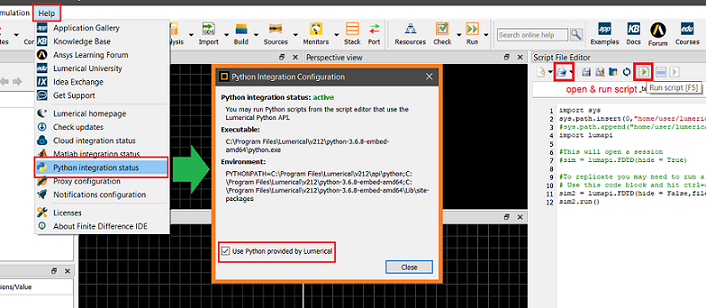
Ansys EmployeeAre you able to run the sample script I provided from my previous post in the CAD/GUI's script file editor window with the Python API integration set to use the Python bundled by Lumerical 2022 R2.1? This should confirm if you have the API integration working on our machine.

Which version of CentOS 8? Ensure that you are running on a supported platform and and setup the Python API integration and environment and have read/write access to the "/tmp" folder.
https://www.lumerical.com/licensing/system-requirements/
https://optics.ansys.com/hc/en-us/articles/360037824513-Python-API-overview
https://optics.ansys.com/hc/en-us/articles/5771091294739
August 31, 2022 at 3:58 pmtheo.martel
SubscriberI just checked that the Python integration, the /tmp folder and the API integration in the environnement, and everything is fine. So the fact that the script you provided never finishes doesn't come from that.
But the CentOS version is 8.6, which is above the required versions listed in the article (8.1, 8.2 & 8.3). Do you think you think it comes from there, and that I should find another server with the right OS version ?
September 8, 2022 at 10:10 pmLito
Ansys Employee@theo.martel,
At the moment, we are unable to reproduce your issue on our test machines. We recommend running on a supported OS like CentOS 7.9 and the latest release, 2022 R2.2 - just released today, Sept 8, 2022.
Viewing 9 reply threads- The topic ‘Lumerical API : hang on the appOpen() call’ is closed to new replies.
Innovation SpaceTrending discussionsTop Contributors-
6535
-
1906
-
1463
-
1311
-
1022
Top Rated Tags© 2026 Copyright ANSYS, Inc. All rights reserved.
Ansys does not support the usage of unauthorized Ansys software. Please visit www.ansys.com to obtain an official distribution.
-
Ansys Assistant will be unavailable on the Learning Forum starting January 30. An upgraded version is coming soon. We apologize for any inconvenience and appreciate your patience. Stay tuned for updates.