Hi, I am currently very confused about how to go about the HPC process. I now realise I need to use APDL (2020 R2) to be able to generate the correct input files required for HPC.
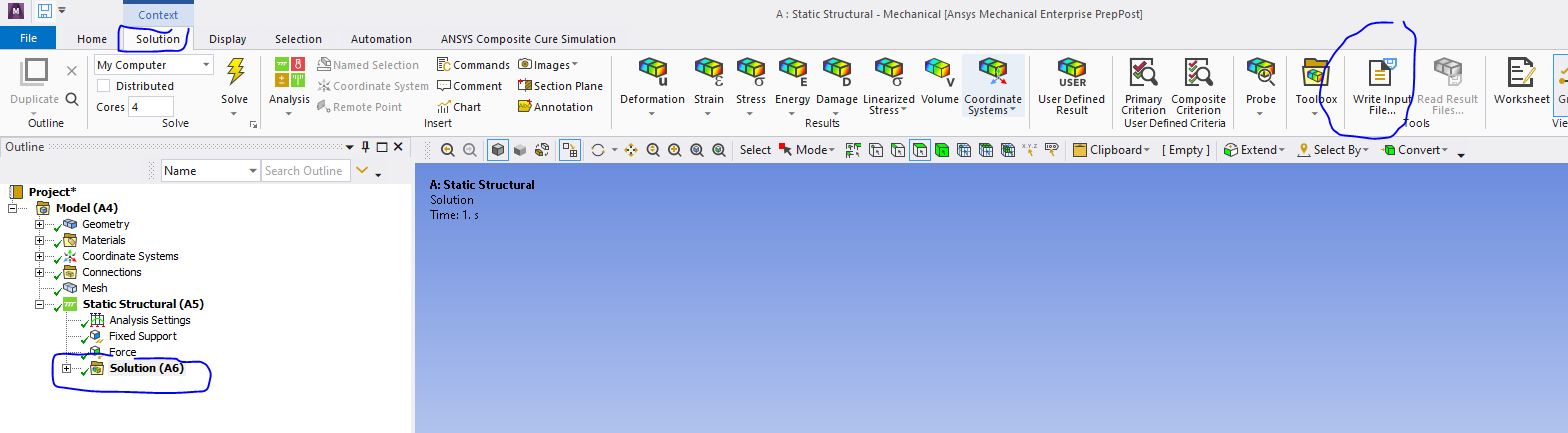
However, I am currently only very familiar with the static structural module. I was wondering if it's possible to somehow generate a script of my setup (in static structural) which I can then import into APDL? If so, how do I do this? I have tried to import a number of file types but nothing seems to be working. I am currently trying out very simple geometry (i.e. a 20mm cube) with material properties E=2.5 MPa, v = 0.49, but ultimately I need to be able to important assembly models of very complex geometry, so ideally setup in static structural would make it much easier to handle.
Any help would be much appreciated. Thanks!


















 You are navigating away from the AIS Discovery experience