-
-
August 9, 2021 at 6:49 am
deadvermin97
SubscriberHi, I'm a student (using ANSYS on a student license).
I have a Workbench Journal that I would like to run several times in a loop from an external python script, perhaps using subprocess. I've found this:
but I would like to know how one would find the ANSYS path as the current one doesn't work for me.
Thanks
August 9, 2021 at 2:15 pmRK
Ansys EmployeeHello,
This I guess would be the temp folder ( C/ Users/ .....) where the WB files are saved. You can check this location by going to Tools tab in WB.
August 11, 2021 at 7:36 amdeadvermin97
SubscriberHello Thanks for the reply, I've actually managed to find the appropriate path. Also, I've found this quite useful in understanding the code I've referenced before:
https://www.padtinc.com/blog/starting-ansys-products-from-the-command-line/
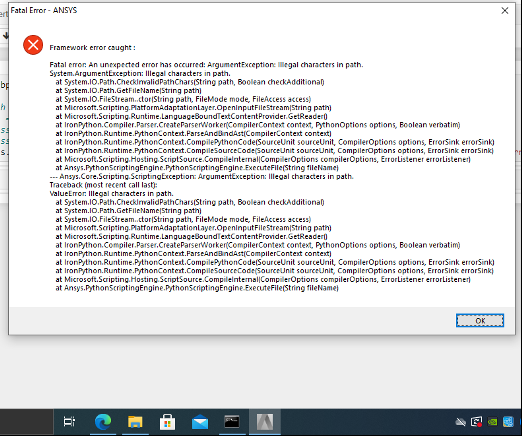
However, I appear to be getting this error from ANSYS only when I try to run the journal from python (running it directly from WB works okay):
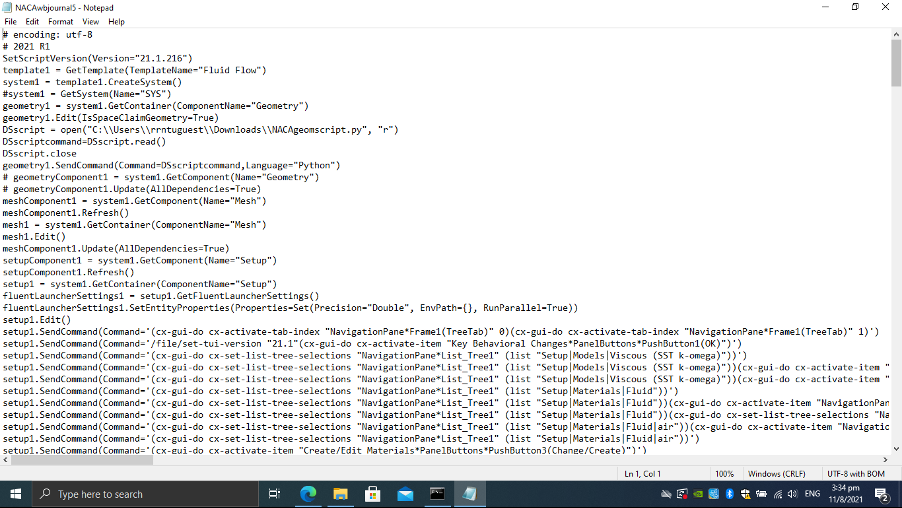
Just in case, here's some of the journal script:

August 11, 2021 at 1:03 pmRK
Ansys EmployeeThe error says there are illegal entries in the path, please make sure the characters in the path are the ones allowed to be used.
August 12, 2021 at 3:34 pmdeadvermin97
SubscriberOkay, the problem has been resolved! While using subprocess.run() still results in the error, the subprocess.Popen() method works. Thanks.
Viewing 4 reply threads- The topic ‘How to run a WB journal from external python script?’ is closed to new replies.
Innovation SpaceTrending discussionsTop Contributors-
6575
-
1906
-
1463
-
1311
-
1022
Top Rated Tags© 2026 Copyright ANSYS, Inc. All rights reserved.
Ansys does not support the usage of unauthorized Ansys software. Please visit www.ansys.com to obtain an official distribution.
-
Ansys Assistant will be unavailable on the Learning Forum starting January 30. An upgraded version is coming soon. We apologize for any inconvenience and appreciate your patience. Stay tuned for updates.