Ansys Assistant will be unavailable on the Learning Forum starting January 30. An upgraded version is coming soon. We apologize for any inconvenience and appreciate your patience. Stay tuned for updates.
Fluids

Fluids

Topics related to Fluent, CFX, Turbogrid and more.

Display window in transient Fluent simulation doesn’t update

    • tpsagaro
      Subscriber

      Dear all,

      I want to save one contour picture (jpg) every N time steps in a transient simulation carried out with Fluent.

      I set up the Execute Commands:

      command-1 => /display/set-window 1

      command-2 => /display/hc "name._%t.jpg"

      And it correctly saves the image that appears in window 1. But the problem is that the image in window 1 doesn't update when changing the time step. It is always showing the same initial condition. How can I set the display so as to update the information along with the simulation?

      Thanks,

    • Rob
      Forum Moderator
      You also need to tell the solver to create the image.
      command 1a => /display/contour etc

    • tpsagaro
      Subscriber
      Hi Rob Now, I have this in the Execute Commands /display/set-window 1
      /display/set/contours surface id
      /display/set/contours filled-contours yes
      /display/set/contours sand vof 0 0.7
      /display/hc "name_%t.jpg"
      and it saves the picture but still without updating as time progresses.
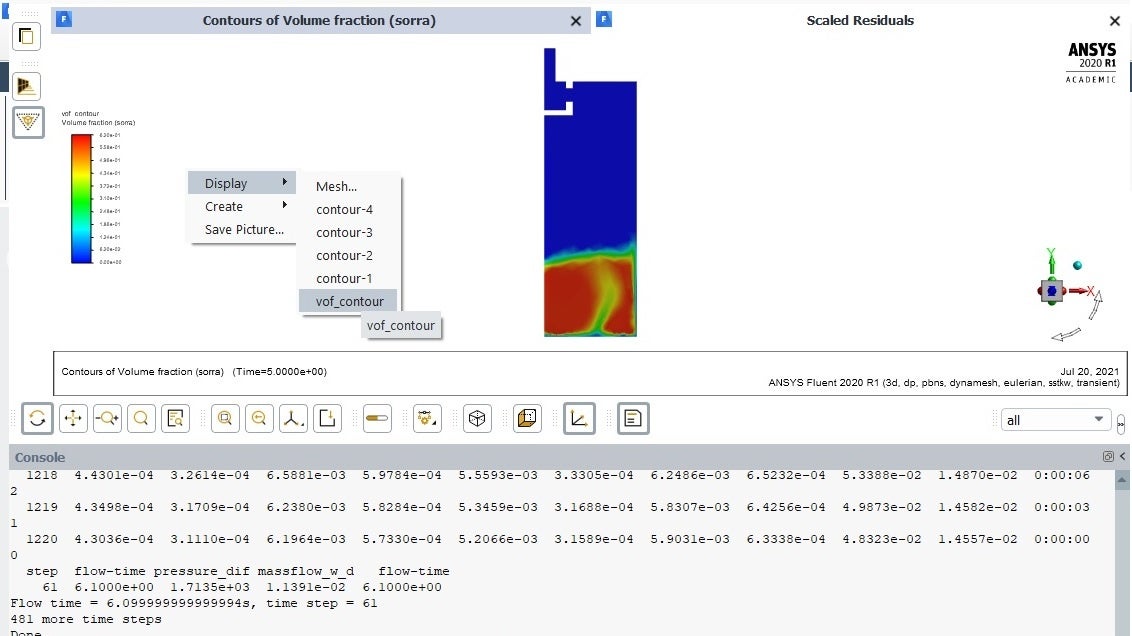
      I think the problem may come from another point as in the GUI of window 1, I do not see any change as time evolves. I have to stop the simulation, place the cursor in window 1, right-click and select vof in order to see a graph with updated information.
      In the image below, I have ended the simulation at time 6.1 s but window 1 is still showing the contours at time 5.0 s (which was the time I re-started the simulation). I have to do "Display => vof_contour" to see the contours at 6.1 s. And if I re-start the simulation at that point, window 1 is always showing the results at 6.1 s though it internally modifies the results, as I know from saved data at different intervals. How can I synchronize the contourns of the image of window 1 with the results of the running time?


    • Rob
      Forum Moderator
      Try the /display/object (I think that's what it is) to reduce the number of commands that need to be executed. Setting the window should solve the problem, double check the command syntax.
    • tpsagaro
      Subscriber
      I have removed all the execute commands and the problem persists. The display in the GUI does not update as time progresses. I have created a new display from Results => Contours and the information (contours) does not change with time. It permanently shows the initial value. I have to stop the simulation, with the mouse, go on the display window, right-click and select display again. Then, it updates the information to the new data. However, in other Fluent transient problems I do have display windows updating the information while the process is running. Maybe, is there an option to modify the update rate for the things displayed in the GUI? By default, should the display be updated every time step?


    • Rob
      Forum Moderator
      Fluent only updates the graphics when instructed, it's not automatic. Residual and monitor plots are an exception in that they update with every iteration/time step as per the panel.
    • tpsagaro
      Subscriber
      Hi Rob. I have solved the issue. Basically, I modified one instruction in the Execute Commands. The following ones work perfect:
      /display/set-window 1
      /display/set/contours surface "surface name"
      /display/set/contours filled-contours yes
      /display/contours sand vof 0 0.7
      /display/hc "name_%t.jpg"
      Thanks,
Viewing 6 reply threads
  • The topic ‘Display window in transient Fluent simulation doesn’t update’ is closed to new replies.
[bingo_chatbox]







