

TAGGED: cfd-post, collision, dpm-dem-fluent, particle-tracking, udf-fluent
-
-
June 11, 2021 at 7:02 pm
Lumono
SubscriberHello everyone,
I am simulating discrete particles and I am interested in the particle-particle collisions. Therefore, I am using the DEM collision model available in Fluent. This forces me to work with instationary particles (although I am looking for a steady solution, where the particle collisions dictate the spread).
My idea is to inject particles, until the fluid and the particles have achieved a steady state.
Due to the use of the DEM model, and the collisions between different sized particles, I am forced to use a very small particle time step size (10^-8) in order to get “physical” collisions/the right overlap.
Since I am continuously injecting particles, the simulation would be too slow if I had 1 particle time step for each fluid time step, so I increased the number of particle iterations per time step to speed the process up.
Desirable would be e.g. a number of Time Steps=1e6 for particle time step size 1e-8 so that I get 0,01sec simulation time with only one fluid iteration.
So far, I have worked out a solution that fits my needs:
Setup->General->Time: Steady
Setup->Models->Discrete Phase (On)
Discrete Phase Model:
Interaction with Continuous Phase (On)
DPM Iteration Interval: 1
Unsteady Particle Tracking (On)
Particle Time Step Size: 1e-8
Number of Time Steps: 1e6
Physical Models->DEM Collision (On)
Injections:
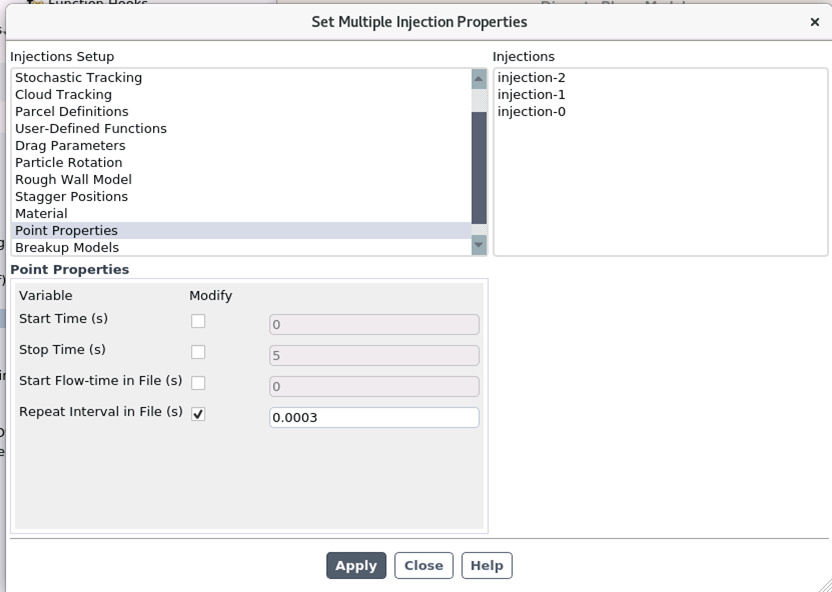
File Injection using a unsteady file.inj as described in the Manual
Start Time: 0
Stop Time: 5
Start Flow-time in File: 0
Repeat Interval in File: 1e-6 (so that a new particle is injected every particle time step)
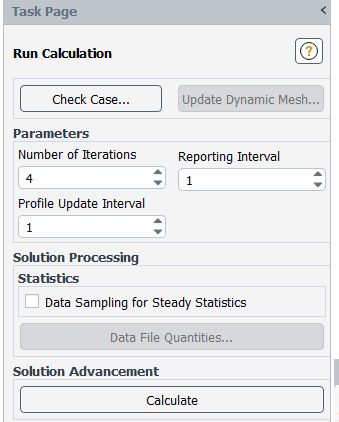
Run Calculation -> Number of Iterations: 1
The simulation runs as desired and is obviously much faster than the setup (Particle Time Step Size:1e-8/No of Steps:1/DPM Iteration Interval:1/Number of (Fluid) Iterations:1e6).
However, I encounter problems when it comes to view the results:
I want to investigate the collisions etc. in CFD-Post and therefore I want to export the particle history data.
The way Solution->Calculation Activities->Automatic Export -> Create Particle History Data Export does not work for me, since it only is executed every fluid time step.
I do not need an export every fluid time step but every (nth) Particle Time Step, because I want to visualize the collisions and particle trajectories properly.
I could increase the number of fluid time steps and decrease number of particle time steps but this would slow down my simulation.
Furthermore, it seems possible with a transient simulation, but this is also not what I want.
I made two more ideas to approach a solution but was not successful with them:
1.)
I had the idea to use an UDF, more accurate the “DEFINE_DPM_SCALAR_UPDATE” and in this UDF execute the following scheme text command:
(ti-menu-load-string
(format #f "file/export/particle-history-data cfdpost tracktest injection-0 , acc-total-mag force-coll-mag force-total-mag , ,"))
But I get a compiling error when trying it.
I read that it is eventually not possible to execute TI-commands by UDF.
It might be an option to export the data to a .txt file, e.g. like this:
https://www.cfd-online.com/Forums/fluent-udf/215456-udf-current-particle-position.html
#include "udf.h"
#include "dpm.h"
DEFINE_DPM_SCALAR_UPDATE(gpif,c,t,initialize,p)
{
int n;
n = N_TIME;
char filename[50];
real current_time = CURRENT_TIME;
snprintf(filename,50,"particleposition_%d.txt",n);
FILE *fid1;
fid1 = fopen(filename,"a");
if (P_TIME(p) == CURRENT_TIME)
{
fprintf(fid1, "%f %f %f %f %f %f %f %"int64_fmt" ",P_POS(p)[0],P_POS(p)[1],P_POS(p)[2],P_VEL(p)[0],P_VEL(p)[1],P_VEL(p)[2],P_TIME(p),p->part_id);
}
else
{
printf("time is not reached");
}
fclose(fid1);
}
June 13, 2021 at 4:18 pmSubscriberUpdate: I did some more research about an possible UDF-solution.
Preferably I would do something like this:
#include "udf.h"
#include "dpm.h"
#include "cx.h"
DEFINE_DPM_SCALAR_UPDATE(partikeldatacreator,c,t,initialize,p)
{
CX_Interpret_String((format #f "file/export/particle-history-data cfdpost tracktest injection-0 , acc-total-mag force-coll-mag force-total-mag , ,"))
}
I am able to compile this UDF but it seems like it cannot access the environment. When I start the simulation the error "unbound Variable" is printed in the console.
I have found some old forum discussions (2006/2013) on the topic "use tui-commands via UDF" stating that back then, no way was known to call a tui-command by an UDF.
Even though I wonder if this is possible now, since quite a bit time has passed since then?
Or, like written in my first post, if there is any other possible way?
June 14, 2021 at 10:05 amDrAmine
Ansys EmployeeI think you can try to write from DPM_SCALAR_UPDATE to write the information into file (or DEFINE_DPM_OUTPUT) but you cannot use the TUI commands from UDF: forget about that. You cannot however visualize it in CFD-Post.
June 14, 2021 at 12:30 pmSubscriberThank you for your reply!
Okay, so it seems like there is no solution for my preferred idea to export the particle data every particle step without setting the number of particle steps= 1 per fluid iteration.
For the UDF, I have a (working) sample:
#include "udf.h"
#include "dpm.h"
DEFINE_DPM_SCALAR_UPDATE(partikeldatenersteller,c,t,initialize,p)
{
int n;
n = 1;
char filename[50];
snprintf(filename,50,"particleposition_%d.txt",n);
FILE *fid1;
fid1 = fopen(filename,"a");
fprintf(fid1, "%f %f %f %f %f %f %f %"int64_fmt"\n",P_POS(p)[0],P_POS(p)[1],P_POS(p)[2],P_VEL(p)[0],P_VEL(p)[1],P_VEL(p)[2],P_TIME(p),p->part_id);
fclose(fid1);
}
Are there macros to access the other particle variables like collision force magnitude/ total acceleration magnitude/... in order to print them to the text file as well?
In the UDF Guide I have only found documentation about (position x,y,z, velocity u,v,w, diameter and a few more).
June 14, 2021 at 1:24 pmAnsys EmployeeIf not documented I won't provide any input here. There is a collision pointer but is not documented.
June 15, 2021 at 2:27 pmSubscriberThanks again for the answer.
I have got one last question towards the UDF DPM_Scalar_Update.
I used following UDF to create the text file "particleposition_1.txt"
#include "udf.h"
#include "dpm.h"
DEFINE_DPM_SCALAR_UPDATE(partikeldatenersteller,c,t,initialize,p)
{
int n;
n = 1;
char filename[50];
snprintf(filename,50,"particleposition_%d.txt",n);
FILE *fid1;
fid1 = fopen(filename,"a");
fprintf(fid1, "%f %f %f %f %f %f %f %"int64_fmt"\n",P_POS(p)[0],P_POS(p)[1],P_POS(p)[2],P_VEL(p)[0],P_VEL(p)[1],P_VEL(p)[2],P_TIME(p),p->part_id);
fclose(fid1);
}
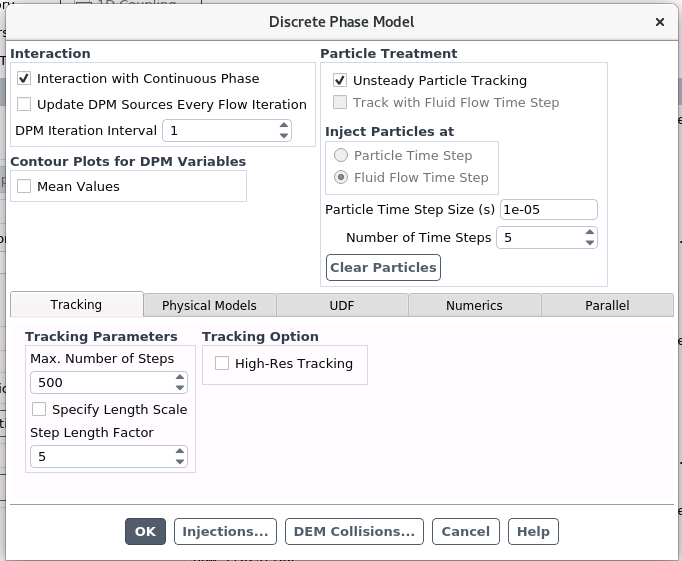
Other (relevant) settings in Fluent were:
Setup->General->Steady
Setup->Models->Discrete Phase (On)
 I have sorted the printed data in "particleposition_1.txt" at first by Particle ID (last column) and second by P_Time(p) (second column from the right).

According to the Theory Guide and this Information
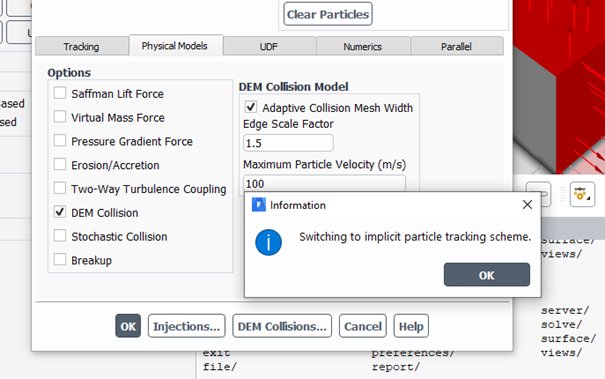 The Euler implicit discretization is used.
I guess, this is the reason for the entries with P_time(p) different from Particle Time Steps (0,00001/0,00002/....).
Is this assumption correct? If so, I still wonder why the number of "in-between" entries varies?
Another thing I am not sure about are the rows where the fluid iterates (@N*5*10e-5).
For instance, in row 24-26, at P_Time=0,00005s there are three entries.
Compared to row 76-77, at P_Time=0,00015s where there are only two entries.
Could you explain me what (particle time step/fluid iteration/implicite euler/ anything else?) and how influences the number of entries in my txt-File created by my UDF?
Or, to sum up my problem:
I want to get the values of the particle (x,y,z,u,v,w) at each particle time step. Am I right if I sort my entries by Particle_ID, then by P_Time from top to bottom and always take the LAST row for the relevant particle time steps?
For Particle_ID=0 this would be for example row: 1, 5,10,15, 20, 26 , ?
Here, do I need two entries for the P_times where the fluid iterates?
Thank you again for your time!
June 15, 2021 at 2:57 pmAnsys EmployeeNo that is not due to the Euler Implicit Scheme. With DEM it is moreover recommended not to enable accuracy control.
You need to to understand between the particle time step size you input in the panel and time step required for trajectory integration (which depends on your input under Tracking Parameters). For DEM we set that particle time step size to 1/20 of the collision time. Smallest of both times will be used for particle trajectory integration.
You are writing from Scalar Update so it will go through all particles (all particle ID'S) and write information every time particle is tracked (so at entry to the cell, at exit, in the cell itself). If you look to the data you will for the lines that something is changing.
What you are asking for is more that I can provide on this open community but I think you should go with that strategy with sorting the time (other ways will require more scripting and more help from me).
PS: If you want to have data at each particle time step what about using Unsteady Particle Reporting.
June 15, 2021 at 3:04 pmAnsys EmployeeTP_DT will provide you with particle integration time step used and it is mentioned in the one the examples using Scalar Update in the manual. Have a fun.
June 19, 2021 at 12:31 pmSubscriberThank you again for your reply!
I did not enable accuracy control, I let it in the default setting for DEM (off).
You need to to understand between the particle time step size you input in the panel and time step required for trajectory integration (which depends on your input under Tracking Parameters). For DEM we set that particle time step size to 1/20 of the collision time. Smallest of both times will be used for particle trajectory integration.
In the forum, I have found a PDF called "DEM best practice", which contained a guide to get the right particle time step size.
I want to simulate wood particles (700kg/m┬│) with a diameter of d=100e-6m and an initial speed of about 30m/s.
My dem collision parameters are:
Normal: spring-dashpot
Spring-dashpot: k(n/m)=1650
Spring-dashpot: eta=0.4
Tangential: off
I have calculated a Collison time for the spring dashpot model t_coll=1,09e-6s which led me to a particle time step size of 1/20*t_coll=5,45e-8s.
Therefore, I want to set the particle time step size: 1e-8s, to get the right amount of overlap (soft sphere) and do not get ÔÇ£unphysicalÔÇØ collisions.
If I have understood it right, the number of time steps/Particle time step size define, how many particle iterations happen during one fluid iteration and also determine the time frame of 1 fluid iteration (fluid iteration time = no of time steps* Particle time step size).
My thought was, that ÔÇ£Tracking ParametersÔÇØ do not have an influence on the collision and that for the correct soft-sphere-overlap of the particles only relevant parameter is the Particle time step size.
I interpreted ÔÇ£Max. Number of StepsÔÇØ as a parameter to prevent recirculation and ÔÇ£Step Length FactorÔÇØ according to the user guide as a factor ÔÇ£roughly equivalent to the number of time steps required to traverse the current continuous phase control volumeÔÇØ and therefore I kept the default value (5). Both parameters related with particle-fluid-interaction and not relevant for the DEM collision.
My guess was that the particle time step size is smaller than the time step restrictions of ÔÇ£Tracking ParametersÔÇØ and therefore the particle time step is used for calculation.
Maybe I misunderstood something here?
However, my idea was to use these settings:
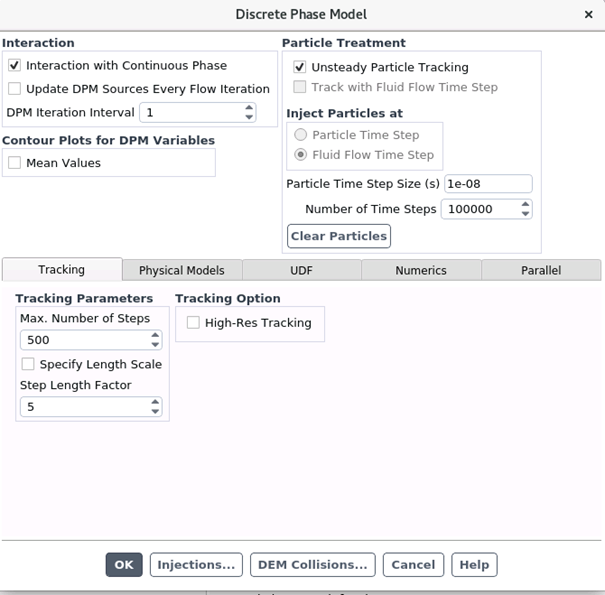
If I got it right, these settings mean that 1 fluid iteration is calIculated, and then 100000 particle iterations with a time step of 10e-8s are calculated, meaning that with 1 fluid iteration I get a total simulation time of 0,001s.
With a particle initial speed of 30m/s the particle then travels about 0,001s*30m/s=0,03m, so that I need roughly 15-20 fluid iterations (0,015-0,02s simulation time) for my particles to leave the domain.
Fluid iterations take a lot longer than the particle iterations and since I have a converged fluid solution already, it would be great to use the settings above (to speed things up).
I want to inject particles via file injection/repeat interval in a constant manner, to get a steady fluid solution with unsteady particles.
To check if this would work, I played around a bit and encountered the problem with the particle data export, leading to my post in the forum.
PS: If you want to have data at each particle time step what about using Unsteady Particle Reporting.
Sounds great, I do not know though where /how I can use this.
I export the particle data like this:
Calculation Activities->Automatic Export->Create->
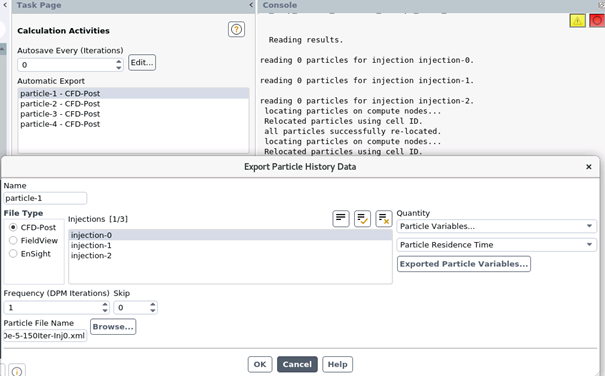
A quick simulated example, with a particle time step size: 1e-5/ particle time steps: 800/ 2 fluid iterations (Simulation Time 1e-5s*800*2=0.016s) shows this in CFDPost:
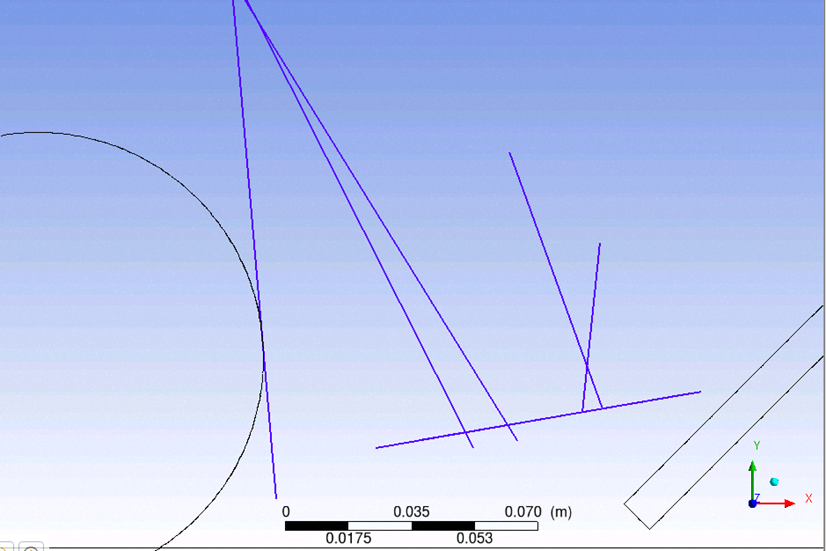
Apparently, the particle data is only exported every fluid iteration and useless in this case because I want to investigate the collisions at the wall on the right and not just lines between start point and end point.
I have not found a way to export the particle data every particle iteration, which is why I came up with the mentioned UDF idea.
If there is a way to solve my problem without an UDF would be even better, if not at least I can work with the DPM_Scalar_Update_UDF and sorting the time.
Thank you for the hint with P_T(p), I will try it!
Thank you once again for your help!.
June 21, 2021 at 6:37 amAnsys EmployeeAt particle time step / particle iteration you require UDF for Export
Viewing 9 reply threads- The topic ‘How to Export Particle History Data every Particle Time Step’ is closed to new replies.
Innovation Space Trending discussions
 Top Contributors
-
peteroznewman
 6600
6600 -
scabo
 1906
1906 -
Dennis Chen
 1464
1464 -
javat33489
 1311
1311 -
Shyam Prasad V Atri
1022
Top Rated Tags
© 2026 Copyright ANSYS, Inc. All rights reserved.
Ansys does not support the usage of unauthorized Ansys software. Please visit www.ansys.com to obtain an official distribution.
-


 You are navigating away from the AIS Discovery experience