

Tagged:
-
-
May 7, 2025 at 4:27 pm
 FAQParticipant
 Table of Contents
FAQs
- Which license is required to run Fluent on GPUs?
- What features and capabilities are currently supported on the Fluent GPU Solver?
- What are the requirements to run Fluent on GPUs?
- How do I choose GPU cards that work best for me?
- Which GPU cards are recommended for use with the Fluent GPU solver?
- Won’t the (non-recommended) card I already have work just as well as the recommended one?
- I only have a mid-range budget. Can you recommend a card for me?
- If you had to recommend one, all-around best card for most situations, what would it be?
- Can I run Fluent with multiple GPUs that are not the same model (e.g., A100 and H200)?
- Can you recommend a card for specific models?
- What if I want to use Cloud solutions instead of buying my own GPU hardware?
- Benchmark before buying
- Where can I learn more?
Appendix
PrefaceWhat Are CPUs?
Central processing units (CPUs) feature a relatively small number of versatile cores designed to handle complex instruction sets. Each CPU core can handle serial computations, file input/output (I/O), networking, and communication with peripherals like USB devices, keyboards and mice. CPUs can often calculate single- or double-precision variables at comparable speeds for memory-bound applications like CFD. (However, for compute-bound applications such as Molecular Dynamics applications, the CPU will be half as fast using double precision!)
What Are GPUs?
Graphics processing units (GPUs) consist of thousands of simpler, energy-efficient cores. These cores are grouped into units known as Streaming Multiprocessors (SMs) on NVIDIA GPUs and Compute Units (CUs) on AMD GPUs. Each GPU core is designed to handle simple instructions at lower clock speeds than CPU cores, making them more power-efficient for parallel tasks. The significant speedup seen in GPU-accelerated simulations comes from this large volume of parallel cores, which enables simultaneous execution of thousands of lightweight threads, far surpassing what traditional CPU cores can achieve.
GPU cores are not all the same. They fall into several specialized categories, each optimized for different types of operations:
- FP32 cores – handle single-precision floating-point calculations
- FP64 cores – handle double-precision floating-point calculations
- INT32 cores – perform 32-bit integer operations
- Tensor cores – accelerate matrix operations
- RT cores – dedicated to “Ray Tracing”, simulating light paths from objects to the camera
Importantly, not all GPUs include every type of core, and the quantity of each core type varies significantly between models! This is why it is so important to understand your application and how it fits with the capabilities of a particular GPU.
Using GPUs with the Fluent GPU Solver
The Fluent GPU solver, when running in single-precision (3d) mode, primarily utilizes the GPU’s FP32 cores, taking full advantage of their parallel processing capabilities. It does not use FP64 cores, even if they are present on the GPU. Tensor cores and integer (INT32) cores are used as needed, typically within the same SM or CU, depending on the GPU architectures.
Currently, Fluent does not use the RT (Ray Tracing) cores for a CFD solution. In the future, it is possible for certain radiation models to benefit. In contrast, Ansys Optics applications, which perform raytracing for optical analysis, do use RT cores and can achieve performance improvements of orders of magnitude.
Choosing the Right Precision for Fluent on GPUs
Many lower-cost GPU cards, including models up to the NVIDIA RTX 6000 Ada (i.e., the workstation variant of the NVIDIA L40 server GPU), do not include FP64 cores. The good news is that Fluent can still run in double precision (3ddp) on these GPUs. This is possible because CUDA libraries emulate FP64 operations using pairs of FP32 cores. The tradeoff is that on such hardware, double-precision runs at roughly half the speed due to this emulation.
Perhaps it is time to think carefully about double precision? Traditionally, the 3ddp solver was reserved for cases with weak gradients (e.g., natural convection) or complex physics (e.g., multiphase flows). In recent years, the availability of low-cost CPU memory made 3ddp a convenient default, despite its performance cost.
But today’s GPU-accelerated workflows demand a more deliberate choice between “3d” (single precision) and “3ddp” (double precision). In fact, the Fluent GPU solver is generally more robust and converges better in single precision than the Fluent CPU solver.
If single-precision CFD or ray-tracing workloads are your primary use cases, cost-effective GPUs without FP64 cores can offer exceptional value and performance.
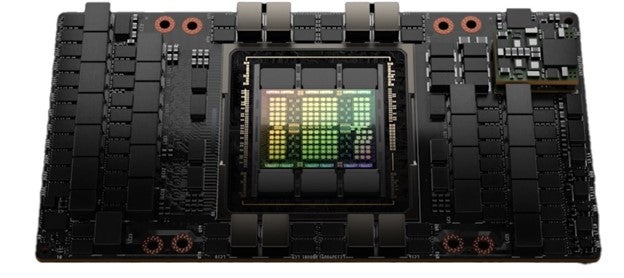
Figure 1. Nvidia H100 GPU internals
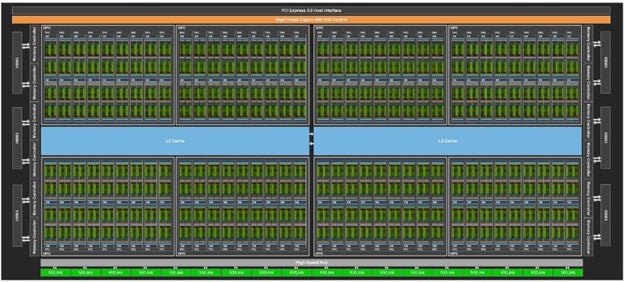
Figure 2. Nvidia H100 SM layout
All the small green squares are SMs. Slightly different number of SMs depending on the variant. H100 PCIe (114 SMs), H100 SXM5, (132 SMs), GH100 (144 SMs). The Grace Hopper architecture co-locates ARM CPUs with the GPUs on the card.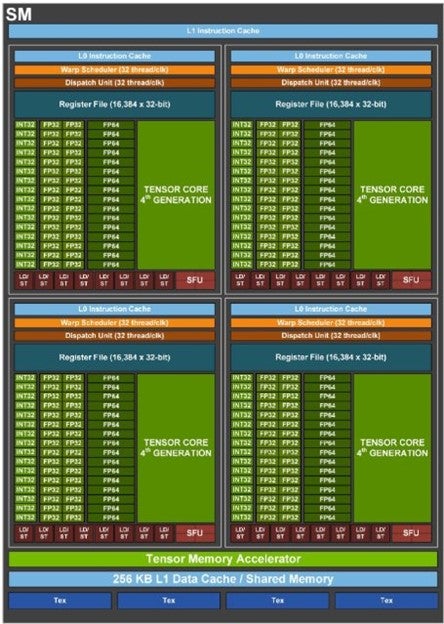
Figure 3. Nvidia H100 SM internals showing different types of cores. Note the FP64 cores for native double precision calculations
When Double Precision is Required
High-end GPUs, such as the NVIDIA H100, include dedicated FP64 cores, enabling fast and efficient double-precision calculations. In contrast, lower end GPU cards emulate FP64 by combining two FP32 (single precision) cores, which significantly reduces performance for double-precision workloads. When native FP64 cores are present, as in the H100, this emulation is unnecessary, resulting in substantially better performance. Additionally, the H100 delivers higher FP32 performance and greater memory bandwidth, making it faster even for single-precision workloads.
[Reference comparison: https://vast.ai/article/nvidia-h100-vs-l40s-power-meets-versatility]
Most interesting, the H100 GPUs have no RT cores. Ansys optics simulations, which benefit from RT cores are still fast on H100 GPUs, but cost efficiency is much better on L40 hardware which has 142 RT cores.
Now that we have a better understanding of the unique aspects of the GPU cards, let’s move on to discuss more fundamental aspects including specific GPU models, RAM requirements, and licensing considerations.
IntroductionThe Fluent GPU solver is a native GPU-powered solver, which uses graphics processing units (GPUs) to run complex CFD simulations. The Fluent GPU solver is available starting in version 2023 R1 and onwards.
FAQs1. Which license is required to run Fluent on GPUs?
To run Fluent on GPUs, you need a license that provides access to CFD Enterprise capabilities version 2023 R1 and later, or CFD HPC Ultimate starting with 2025 R1 SP2.
With a CFD Enterprise License, licensing is based on the total number of streaming multiprocessors (SMs), if using NVIDIA GPUs, or compute units (CUs) if using AMD GPUs. 40 SMs/CUs are included with the CFD Enterprise license. For additional SMs/CUs, you must purchase Ansys HPC licenses. See the appendix for additional information about SMs/CUs.
HPC Requirements for Common GPUs:
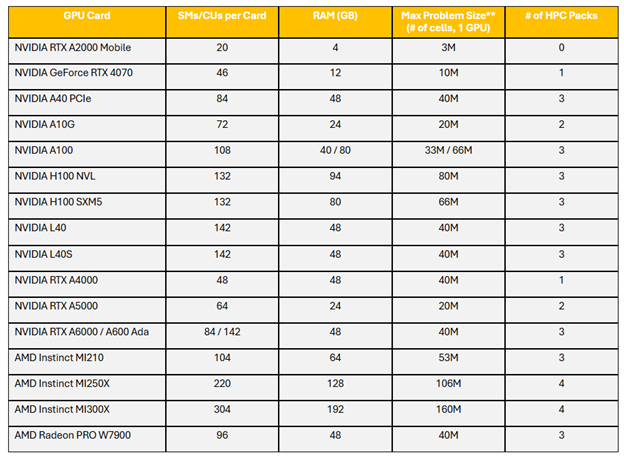
**Assuming 1.2GB GPU RAM per million cells for a typical Single precision Steady State SIMPLE model. Actual GPU RAM requirements per million cells will be case specific and will depend on the mesh type, physics solved, single vs. double precision and other factors. Double precision and the Coupled solver significantly increase RAM requirements. Larger mesh sizes can be solved using multiple GPUs.
Example of HPC Packs required for an NVIDIA A100 GPU Card
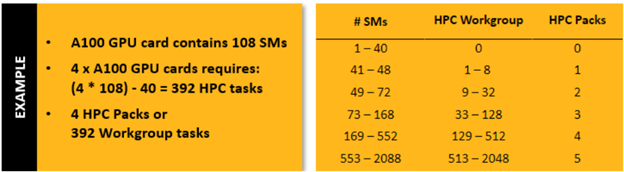
When using a CFD HPC Ultimate license, you have access to unlimited SMs/CUs. Contact Us to learn more about this license type.
2. What features and capabilities are currently supported on the Fluent GPU Solver?
The following is supported on the GPU Solver at 2026 R1
-
- Single/multi-GPU (shared/distributed memory)
- CPU/GPU re-mapping (invoke with
–gpu_remap) - Hybrid precision solver (invoke with
3ddp –gpu_hybrid_precision) (β) - Expressions (requires explicit installation of CUDA 12.8 or ROCm 7)
- Python based UDF (β) (requires explicit installation of CUDA 12.8 or ROCm 7)
- Low speed compressible solver
- Steady and transient simulations
- Segregated and coupled solvers
- Species transport with volumetric reactions
- EDM combustion model
- Stiff Chemistry Solver
- Adiabatic and non-adiabatic Flamelet Generated Manifold (FGM) model
- Acoustics with Ffowcs Williams & Hawking (FW-H)
- Non-reflecting boundary conditions (NRBC) (β)
- Surface-to-Surface (S2S) radiation model
- DO radiation model
- Discrete Phase Model (DPM)
- Ideal gas and viscous heating
- Volume of Fluid (VOF) method with species transport and conjugate heat transfer (β)
- All mesh types
- Multiple reference frames and sliding meshes
- Ideal Gas and Materials with temperature-dependent properties
- Real fluids with equations of state Peng Robinson and Soave Redlich Kwong (β)
- Turbulence: laminar, standard and realizable (RKE) k-espilon, k-omega SST, GEKO, SBES, LES, WMLES, Gamma-Algebraic Transition Model
- Solid conduction and conjugate heat transfer (CHT), with anisotropic conductivity
- Extended monitors – Asynchronous monitors (invoke with
–gpu_async), point/cut plane monitors, mass averages and sum - Porous media
- Solid motion
- 3D Fan (β)
- Electric potential / Joule heating
- Non-Newtonian viscosity (β)
- Macro Heat Exchanger Model (β)
- Battery model, battery ROM tool kit and thermal abuse model
- Parametric workflow
- Windows and Linux
For more detailed information, visit the Ansys Help Site.
3. What are the requirements to run Fluent on GPUs?
General requirements:
- Fluent benefits from GPUs because of their dedicated architecture for matrix operations.
- You can use more than one GPU on the same or on multiple computers if your model does not fit in the memory of a single GPU.
- The sum of the memory of all GPU cards must be able to hold the model and the computation overhead.
- Certain input/output operations still require the CPU and the main memory. Each system should have at least the same amount of system memory as the sum of the GPU memory in this system. For example, a system with two GPU cards with 40 GB each should have at least 80 GB of system memory. It is possible that more system memory than GPU memory is needed, especially for polyhedral meshes. This applies to all computers involved in the calculation.
- You need an Ansys CFD Enterprise license with enough HPC Packs, HPC tasks or an Ansys CFD HPC Ultimate license.
Requirements specific to Nvidia cards:
- The graphics card and its driver must be compatible with CUDA 11.8 or newer for Fluent 2025 R1 and CUDA 12.8 for Fluent 2025 R2 and 2026 R1. Maxwell, Pascal, Volta, Turing, Ampere, Ada Lovelace, Hopper, and Blackwell architectures should be compatible with CUDA 12.8. Kepler GPUs (introduced in 2013) are only supported up to Fluent 2025 R1.
- CUDA 12.8 must be installed together with the driver for 2025 R2 and 2026 R1.
- Fluent is currently not compatible with CUDA 13.x.
Requirements specific to AMD cards:
- The graphics card and its driver must be compatible with ROCm-6.0 or newer for Fluent 2025 R1 and R2. This version was released in 2019. All RDNA and CDNA architectures are compatible.
- For Fluent 2026 R1 ROCm-7.0 or newer must be installed together with the graphics card driver.
- AMD cards can only be used under Linux with Fluent 2025 R1 or later.
4. How do I choose GPU cards that work best for me?
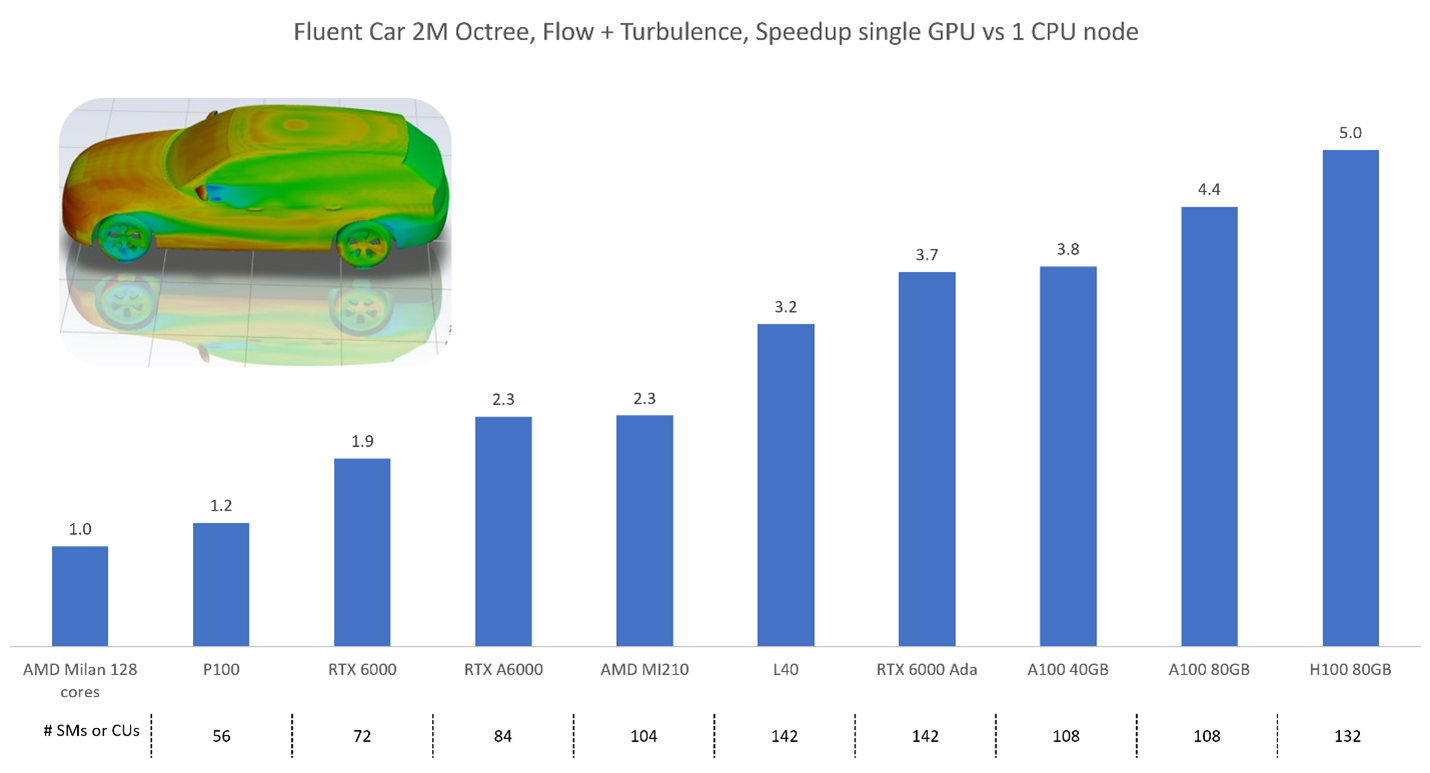
Consider budget and needed memory, first. The best approach is to benchmark yourself using cloud services. Ansys publishes benchmark results, but we cannot consider every possible use case and every possible combination of models.
The exact memory needs depend on the type of cells, the number of cells and boundary facets, the number of equations, the type of the solver, and the specifics of the used models. Still, it is possible to provide a rough rule of thumb as a lower limit:
- The Fluent Cortex process needs about 55 MB of GPU memory and 725 MB of system memory. This is only needed once, independent of the number of GPUs used. Post-processing is done with this process. It can take a lot more system and GPU memory depending on what is shown.
- Each Fluent compute process requires about 95 MB of GPU memory and 210 MB of system memory, regardless of single or double precision mode. Data passes through the system memory of these processes during I/O operations (file access). The system memory needed for this process during these operations can be larger than the GPU memory needed for computation.
- Approximate GPU memory for the calculation of 1 million fluid cells with a two-equation turbulence model and active energy equation:
Mesh type Single precision, segregated Single precision, coupled Double precision, segregated Double precision, coupled Tetrahedral 1.0 GB 1.8 GB 1.6 GB 3.0 GB Hexahedral 1.2 GB 2.2 GB 1.9 GB 3.6 GB Polyhedral 1.8 GB 3.4 GB 2.8 GB 5.6 GB Now that you have a rough understanding of the minimum memory requirements, you can select candidates. For your convenience you can find a few characteristics for common cards below. The theoretical computation speed in single and double precision refers to the specialized cores. Even though most cards do not have specialized double precision cores, they can still calculate in double precision at roughly a quarter to half the speed of single precision. The memory bandwidth is important to transport the data to the SMs/CUs.
Card name Memory size (GB) Memory bandwidth (GB/s) SMs / CUs Single precision (TFLOPS) Double precision (TFLOPS) Released Workstation cards RTX PRO 6000 Blackwell 96 1792 188 125 – 2025 RTX PRO 5000 Blackwell 48 / 72 1344 110 65 – 2025 RTX PRO 4500 Blackwell 32 896 82 54.9 – 2025 RTX PRO 4000 Blackwell 24 672 70 37 – 2025 RTX PRO 4000 Blackwell SFF 24 432 70 24 – 2025 RTX PRO 2000 Blackwell 16 288 34 17 – 2025 RTX 6000 Ada 48 960 142 91.1 – 2023 RTX 5000 Ada 32 576 100 65.3 – 2023 RTX 4500 Ada 24 432 60 39.6 – 2023 RTX 4000 Ada 20 360 48 26.7 – 2023 RTX 2000 Ada 16 224 22 12 – 2024 RTX A6000 48 768 84 38.7 – 2022 RTX A5500 24 768 80 34.1 – 2022 RTX A5000 24 768 64 27.8 – 2022 RTX A4500 20 640 56 23.7 – 2023 RTX A4000 16 448 48 19.2 – 2022 RTX A2000 6 or 12 288 26 8 – 2022 RTX 5000 A Mobile 16 576 76 42.6 – 2023 RTX 4000 A Mobile 12 432 58 42.6 – 2023 RTX 2000 A Mobile 8 256 24 14.5 – 2023 Radeon Pro W7900 48 864 96 61.3 – 2023 Radeon Pro W7800 48GB 48 864 70 45.2 – 2023 Radeon Pro W7800 32 576 70 45.2 – 2023 Radeon Pro W7700 16 576 48 28.3 – 2023 Radeon Pro W7600 8 288 32 21.4 – 2023 Radeon Pro W6800 32 512 60 17.83 1.11 2021 Radeon Pro W6600 8 224 28 10.4 – 2021 Server cards H200 SXM 141 4800 67 37 2024 H200 NVL (PCIe) 141 4800 60 30 2024 H100 SXM 80 3350 132 67 34 2024 H100 NVL (PCIe) 94 3900 114 60 30 2024 A100 SXM 80 2039 108 19.5 9.7 2022 A100 PCIe 80 1935 108 19.5 9.7 2022 L40 48 864 142 90.5 – 2022 L40S 48 864 142 91.6 – 2024 A30 24 933 72 10.3 5.2 2022 Instinct MI350X 288 8000 256 144.2 72.1 2025 Instinct MI325X 256 6000 304 163.4 163.4 2024 Instinct MI300X 192 5300 304 163.4 163.4 2023 Instinct MI250X 128 3200 220 95.7 95.7 2021 Instinct MI250 128 3200 208 45.3 45.3 2021 Instinct MI210 64 1600 104 22.6 22.6 2022 5. Which GPU cards are recommended for use with the Fluent GPU solver?
A list of tested hardware for the different Ansys products is available here: https://www.ansys.com/it-solutions/platform-support
Fluent is tested and verified with all the following Nvidia and AMD GPU cards:
Workstation: RTX A4000, RTX A5000, RTX A6000, RTX A6000 Ada, Quadro RTX 6000
PROS: Typically, these cards are affordable and also available to buy. They can be used for many other applications, including high-end visualization.
CONS: Compared with high-end server cards they are slow in double precision. They do not offer lots of memory.Server: A100, H100, B100, B200, Instinct MI210, Instinct MI250, Instinct MI300
PROS: Deliver one of the highest compute performance and largest memory capacity available in a single GPU card today.
CONS: Limited availability due to strong demand and supply constraints.Server: A40, L40
PROS: Performance and price is slightly above the high-end workstation cards but much lower than the high-end server cards. For single-precision calculations they are an excellent choice.CONS: Compared with the high-end server cards they are slower in double precision.
*These cards have all been internally tested by the Ansys team. However, the Fluent GPU Solver supports many more GPU cards than those mentioned above. We recommend benchmarking your GPU cards to find the best one for your application.
6. Won’t the (non-recommended) card I already have work just as well as the recommended one?
If your existing hardware is compatible with CUDA 12.8 or ROCm-7.0, Fluent should run even if the card is not recommended.
If non-recommended means gaming card, you should be aware that Ansys does not test them. Fluent will most likely also run on it while it fulfills the minimum requirements. Like the Nvidia L40, L40S, and workstation cards, gaming which reduces the speed for such calculations compared to server cards even when the GPU generation and number of streaming multiprocessors (SMs) is identical.
7. I only have a mid-range budget. Can you recommend a card for me?
Any graphics card that fulfills the minimum requirements is faster than the fastest workstation CPU of the same generation. Obviously, you still need a CPU, but it can be a cheaper one when combined with a powerful graphics card.
Consider the size of your models and select a card or multiple cards that have enough memory to run your simulations. In most cases you benefit from a higher memory bandwidth.
The Nvidia L40 and L40S come with a slightly higher price tag than the high-end workstation graphics cards. Speed and memory are also slightly higher. Both high-end workstation cards and the visualization server cards are good choices for a limited budget.
8. If you had to recommend one, all-around best card for most situations, which would it be?
If the computer is used for computation and visualization, a card like the L40 or L40S is an interesting choice because compared to A100, H100, and H200 it is affordable and has hardware for visualization. The A100, H100, and H200 are significantly faster for computations in double precision but lack visualization capabilities.
If the computer is only used for computation, A100, H100, and H200 are good choices from Nvidia. These are different generations of the same class of cards. Support for Nvidia hardware is spread widely across many different software packages.
The AMD Instinct cards have a very compelling offer in terms of computation speed and memory. If you also plan to use other GPU-based software products besides Fluent, check if they support AMD hardware, first.
Ansys has also partnered with Supermicro to determine high-performant GPU systems for Fluent and other Ansys applications. Feel free to download: https://www.supermicro.com/solutions/Solution_Brief_SMCI_Ansys_GPU.pdf
9. Can I run Fluent with multiple GPUs that are not the same model (e.g., A100 and H200)?
You can run Fluent on mixed GPUs, but it is not recommended. Multi-GPU performance is limited by the slowest card and the smallest VRAM in the set. Heterogeneous GPUs also increase load-imbalance and communication overhead, so speed-up can collapse. For reliable speed-up, we recommend matching GPUs (same model and memory) for the multi-GPU job.
10. Can you recommend a card for specific models?
There are many possible model combinations that we cannot recommend a specific card without detailed context.
The most important question to consider is the requirement of double precision. If this is needed, the high-end server products are more appealing despite their price tag. When judging the need for double precision, consider benchmarking your model with the GPU solver in single and double precision for accuracy and speed. Due to the different architecture of the solver, you might be able to run in single precision even when the CPU solver requires double precision.
The second question is about the required memory. Every additional model adds to the memory consumption. Again, benchmarking can help you find the optimal amount of memory that is needed for your applications. Remember that it is not necessary that the model fits into a single card. You can distribute it across multiple GPU cards in one or multiple computers.
11. What if I want to use Cloud solutions instead of buying my own GPU hardware?
Ansys maintains close partnerships with all the major cloud hyperscalers such as Microsoft Azure and AWS, as well as a network of Cloud Hosting Partners. To learn more about how we can support you in leveraging GPU resources on the cloud, please contact us.
12. Benchmark before buying
Avoid surprises. GPU cards are bespoke hardware that require a much closer look at benefits and tradeoffs. Hopefully this document has given you a better understanding of what to look for in a GPU.
However, nothing beats running your case on a GPU to gain experience. If you have absolutely no GPUs available at least run the Fluent GPU code on your CPU based system (use –gpu=-1). This will allow verification that the models you need are available on the GPU and give an accurate RAM estimate.
To conduct performance benchmarks on your own system, we have a variety of cases available specifically for the GPU solver. Scroll down at this link:
https://support.ansys.com/TrainingAndSupport/ANSYSFluentBenchmarks
You may also request a custom benchmark below:
Ansys Multiphysics Benchmarking Program
13. Where can I learn more?
We have created many additional resources to help you learn more about the Fluent GPU Solver:
- Chapter 38: Using the Fluent Native GPU Solver
- Ansys Innovation Courses: Getting Started with Fluent GPU Solver
- 2025 R1 Fluent GPU Solver On-Demand Webinar
- Unleashing the Power of GPUs – Ansys Fluent Blog
- Ansys Fluent Native GPU Solver: CFD Validation Studies
- Automotive CFD Prediction Workshop
- https://support.ansys.com/TrainingAndSupport/ANSYSFluentBenchmarks
- A New Era of Fluent Computations – Ansys Fluent Blog
AppendixWhat are streaming multiprocessors (SMs) and compute units (CUs)?
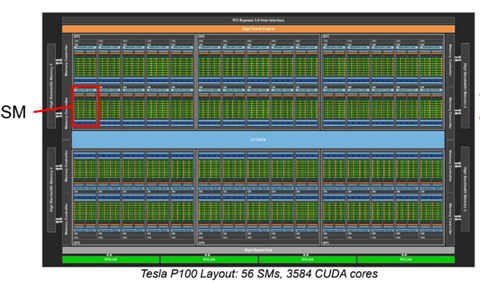
A SM or CU is a fundamental component of a GPU card, with nomenclature that is vendor dependent. NVIDIA GPUs are comprised of streaming SMs that contain CUDA cores, and AMD GPUs are comprised of CUs that contain stream processors. A SM/CU is a collection of processing units that work together to execute command kernels (CUDA for NVIDIA, HIP for AMD). Each SM/CU consists of several smaller cores, which are responsible for executing parallel computations and performing tasks related to rendering and other general-purpose computing.
The number of SMs/CUs in a GPU depends on the specific model and architecture. For example, the NVIDIA GeForce RTX 3080 has 68 SMs, while the NVIDIA Tesla V100 has 80 SMs. Similarly, the AMD MI210 contains 104 CUs. More powerful GPU cards typically contain more SMs/CUs.
-


Introducing Ansys Electronics Desktop on Ansys Cloud
The Watch & Learn video article provides an overview of cloud computing from Electronics Desktop and details the product licenses and subscriptions to ANSYS Cloud Service that are...
How to Create a Reflector for a Center High-Mounted Stop Lamp (CHMSL)
This video article demonstrates how to create a reflector for a center high-mounted stop lamp. Optical Part design in Ansys SPEOS enables the design and validation of multiple...
Introducing the GEKO Turbulence Model in Ansys Fluent
The GEKO (GEneralized K-Omega) turbulence model offers a flexible, robust, general-purpose approach to RANS turbulence modeling. Introducing 2 videos: Part 1 provides background information on the model and a...
Postprocessing on Ansys EnSight
This video demonstrates exporting data from Fluent in EnSight Case Gold format, and it reviews the basic postprocessing capabilities of EnSight.

- Fluent GPU Solver Hardware Buying Guide
- Is there a way to get the volume of a register using expression ?
- How to overcome the model information incompatible with incoming mesh error?
- Skewness in ANSYS Meshing
- What are the requirements for an axisymmetric analysis?
- What are pressure-based solver vs. density-based solver in FLUENT?
- How to create and execute a FLUENT journal file?
- How to get information about mesh cell count and cell types in Fluent?
- What is the cause of the floating point error message during Fluent simulation and how can it be addressed?
- What is a .wbpz file and how can I use it?

© 2026 Copyright ANSYS, Inc. All rights reserved.

 You are navigating away from the AIS Discovery experience