

-
-
August 24, 2021 at 6:37 pm
fahri
SubscriberAugust 24, 2021 at 9:17 pmpeteroznewman
SubscriberDesignModeler uses Parasolid, which is limited to a modeling size of 1000 m cube so geometry must have a coordinates < 500 m.
The geometry you have in Rhino is 40 km along the long edge. What do you intend to do with this geometry?
Enable Large Model support to use a larger size. The modeling size expands to 1000 km.
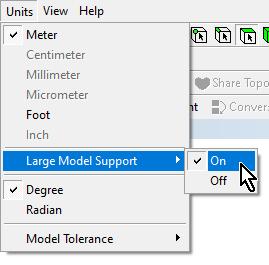 The tradeoff is that the modeling precision goes down from 1e-8 m to 1e-5 m.
One thing you could do is scale the geometry in Rhino by a factor of 1/50 so the 40 km length becomes 800 m. Then you can mesh. If the mesh is going to Fluent, you can scale the mesh back by a factor of 50.
August 24, 2021 at 10:52 pmSubscriberThank you very much for the comments.
I study on tectonic deformation. The solid is part of the earth's crust. Therefore it is large.
I already activated large model support. Otherwise, the model can't be imported to Ansys.
Can I scale in the mechanical apdl? If it can I will try what you said.
Best Regards
August 25, 2021 at 12:25 amSubscriberI don't know how to scale a mesh in MAPDL. I only read that it was possible in Fluent.
You don't need a perfect edge match, you only need the mesh to be congruent at the boundary.
Viewing 3 reply threads- The topic ‘Why Solid Faces Does No’t Exactly Match?’ is closed to new replies.
Innovation Space Trending discussions
 Top Contributors
-
peteroznewman
 5719
5719 -
scabo
 1906
1906 -
Dennis Chen
 1419
1419 -
javat33489
 1305
1305 -
Shyam Prasad V Atri
1021
Top Rated Tags
© 2026 Copyright ANSYS, Inc. All rights reserved.
Ansys does not support the usage of unauthorized Ansys software. Please visit www.ansys.com to obtain an official distribution.
-


The Ansys Learning Forum is a public forum. You are prohibited from providing (i) information that is confidential to You, your employer, or any third party, (ii) Personal Data or individually identifiable health information, (iii) any information that is U.S. Government Classified, Controlled Unclassified Information, International Traffic in Arms Regulators (ITAR) or Export Administration Regulators (EAR) controlled or otherwise have been determined by the United States Government or by a foreign government to require protection against unauthorized disclosure for reasons of national security, or (iv) topics or information restricted by the People's Republic of China data protection and privacy laws.

 You are navigating away from the AIS Discovery experience