-
-
January 27, 2025 at 1:32 pm
ThomasDD
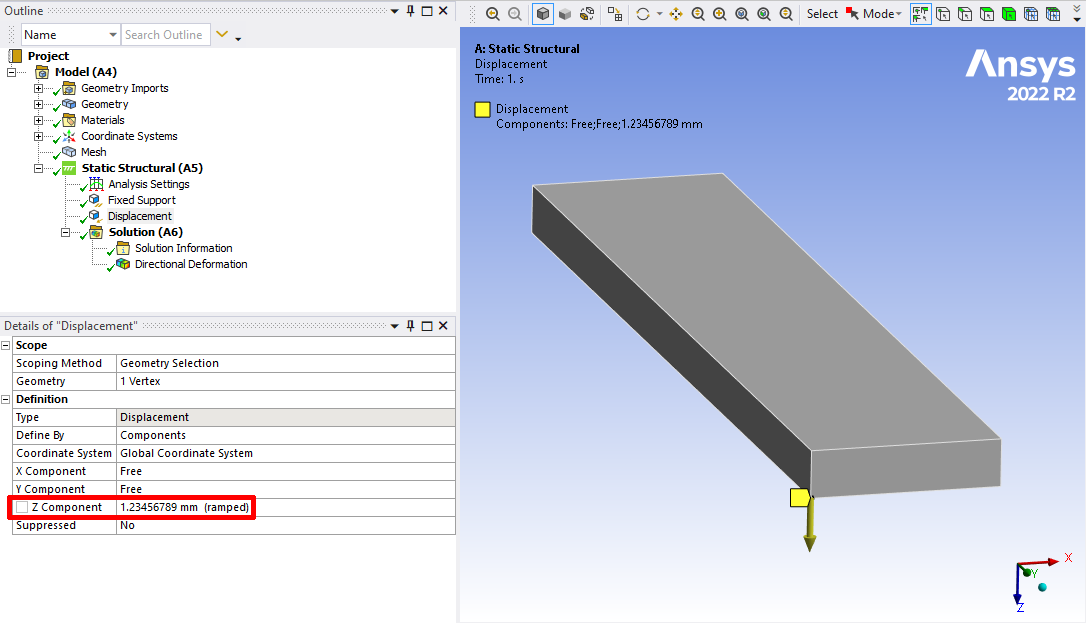
SubscriberI have a little example with simple beam bending. One side is clamped, on the other side a single node undergoes a z-displacement of 1.23456789 mm:
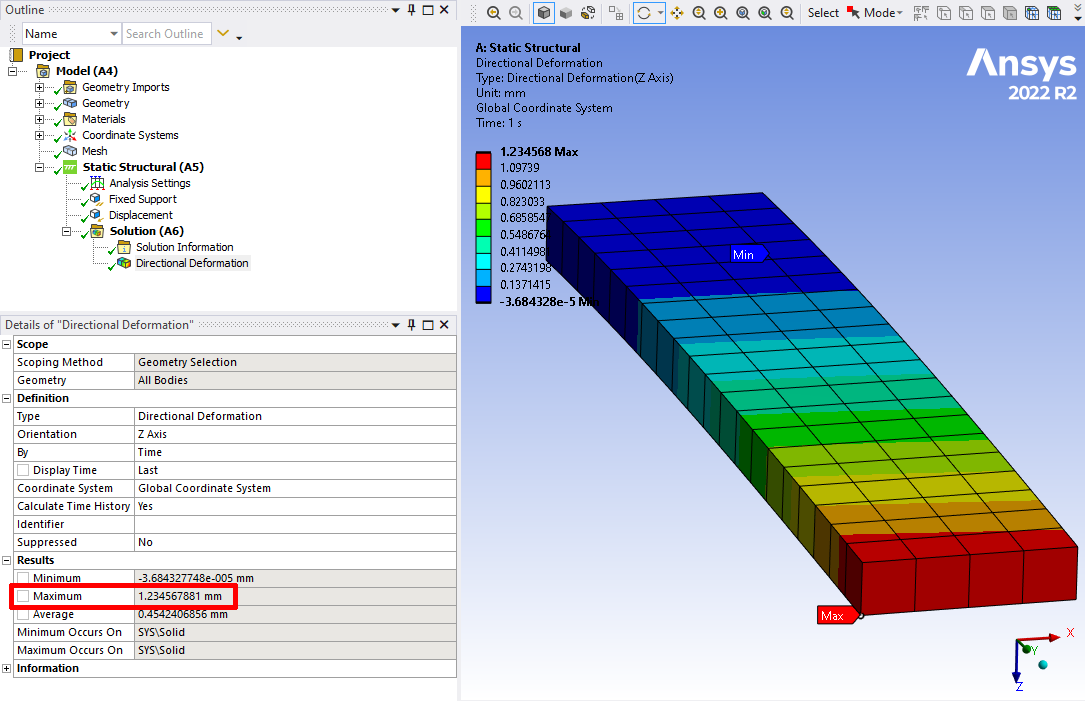
After calculation, the maximum displacement at this node is 1.234567881 only. If you read this displacement with Python console inside Mechanical you get also a value of 1.23456788063. This is exactly the value that you get if you store 1.23456789 in a single-precision floating point number (can be tried out with any programming language). This shows me that Ansys Mechanical works internally with single-precision numbers.
But the displacement values are stored inside the RST file with double-precision! If you open Ansys Classic an load that RST from the Workbench file structure, the you can get the exact displacement (Classic only):
/post1
file,' c:\scratch\test\dp0\SYS\MECH\file',rst
set,1
/format,7,f,16
prnsol,u,zAnd the list you get is:
NODE UZ
...
121 1.234567890000Or can I change the behavior of Mechanical to get the exact displacements? We have large numbers with large displacements, so this inaccuracy is a problem for a very specific use case.
Thanks!
-
January 27, 2025 at 2:28 pm
ErKo
Ansys EmployeeHi
We can change/increase the significant digits as shown:
https://innovationspace.ansys.com/knowledge/forums/topic/how-to-increase-the-significant-digits-in-tabular-data-in-mechanical/
All the best
Erik
-
January 27, 2025 at 2:32 pm
ThomasDD
SubscriberIt’s not about the number of decimal places shown, that’s already the maximum (10). It is about the fact that Mechanical does not handle and display exact numbers because it only works with low precision floating point numbers.
Reading the RST file with Ansys Classic provides the exact value: 1.234567890
In Mechanical I get a different value: 1.234567881 (as only 4 byte variables are used to store the floating point numbers)
I display 10 digits in both cases.
-
January 28, 2025 at 6:33 am
ThomasDD
SubscriberThe difference becomes much more serious if you have problems with large rigid body displacements. If I push the clamping down by 2000 mm on one side and the free side by 2000.123456789 mm, I get the following displacement at the free end:
- Ansys Workbench: 2000.12341309 mm (floating point error, a single precision float can only display the first 8 digits correctly, the last digits are a faulty “noise”)
- Ansys Classic: 2000.123456789 mm (that is the exact value, Ansys Classic works with double precision floats)
- PyMAPDL-Reader: 2000.123456789 mm (that is the exact value, PyMAPDL-Reader works with double precision floats)
… based on the same RST file.
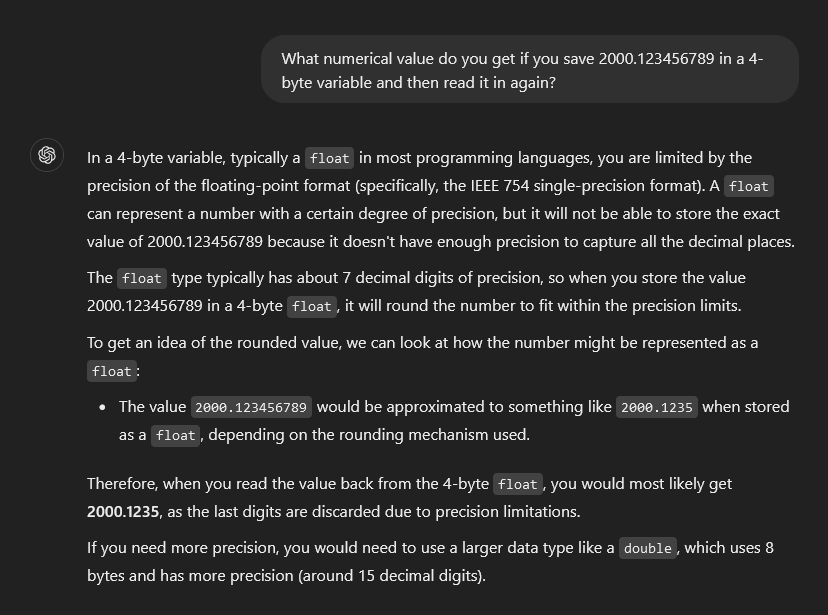
Ask ChatGPT for that: “What numerical value do you get if you save 2000.123456789 in a 4-byte variable and then read it in again?”
Script for Workbench Python-Console:
nodeID = 121
analysis = Model.Analyses[0]
reader = analysis.GetResultsData()
displacement = reader.GetResult('U', MechanicalUnitSystem.StandardNMMton)
reader.CurrentTimeFreq = 1
UX, UY, UZ = displacement.GetNodeValues(nodeID)
print(UZ)
# --> 2000.12341309Script for Ansys Classic (APDL):
/post1
file,'c:\scratch\test\dp0\SYS\MECH\file',rst
set,1
nsel,s,,,121
/format,8,g,22,16
prnsol,u,z
! --> 2000.12345678900Script for PyMAPDL Reader:
nodeID = 121
from ansys.mapdl import reader as pymapdl_reader
result = pymapdl_reader.read_binary(r'c:\scratch\test\dp0\SYS\MECH\file.rst')
num, disp = result.nodal_displacement(0)
index = list(num).index(nodeID)
UX, UY, UZ = disp[index]
print(UZ)
# --> 2000.1234567889999 -

January 28, 2025 at 4:52 pm
ThomasDD
SubscriberNow it would be important for me to know what applies here:
- Is this a bug and can it be fixed in future versions?
- Was it implemented this way on purpose? However, the question of “why” arises. On modern systems it should not be a limitation in this respect. Even a 12 year old Ansys Classic (the oldest version I still have running) already works with double precision output.
- Or is there perhaps a switch somewhere in the options where I can switch from single to double output accuracy?
This problem should affect all Ansys ACT Extensions that read field variables as described above (and that is the usual and documented way). In most cases, the accuracy probably plays a subordinate role. However, there are scenarios (e.g. large rigid body movements and yet small deformations) where this could well be the case. This can also become a problem if you are forced to use a system of units that is unfavorable for the numerical representation (e.g. if one field variable has very small numbers and the other has very large numbers and you need to calculate something with both).
The solver uses double precision by default, the results are stored with double precision in the RST, why shouldn't the output of the results also be double precision?
-
-
February 19, 2025 at 2:15 pm
ErKo
Ansys EmployeeAns:
https://ansyshelp.ansys.com/public/account/secured?returnurl=//Views/Secured/corp/v251/en/wb_sim/ds_results_intro.html?q=double%20precisionClosing as this might be useful for others.
-
- The topic ‘Why Ansys Mechanical is single precision only?’ is closed to new replies.
-
5674
-
1890
-
1419
-
1304
-
1021
© 2026 Copyright ANSYS, Inc. All rights reserved.