TAGGED: bug, case-file-read, fluent, gui
-
-
January 31, 2022 at 9:35 am
cfdasdf
SubscriberHello,
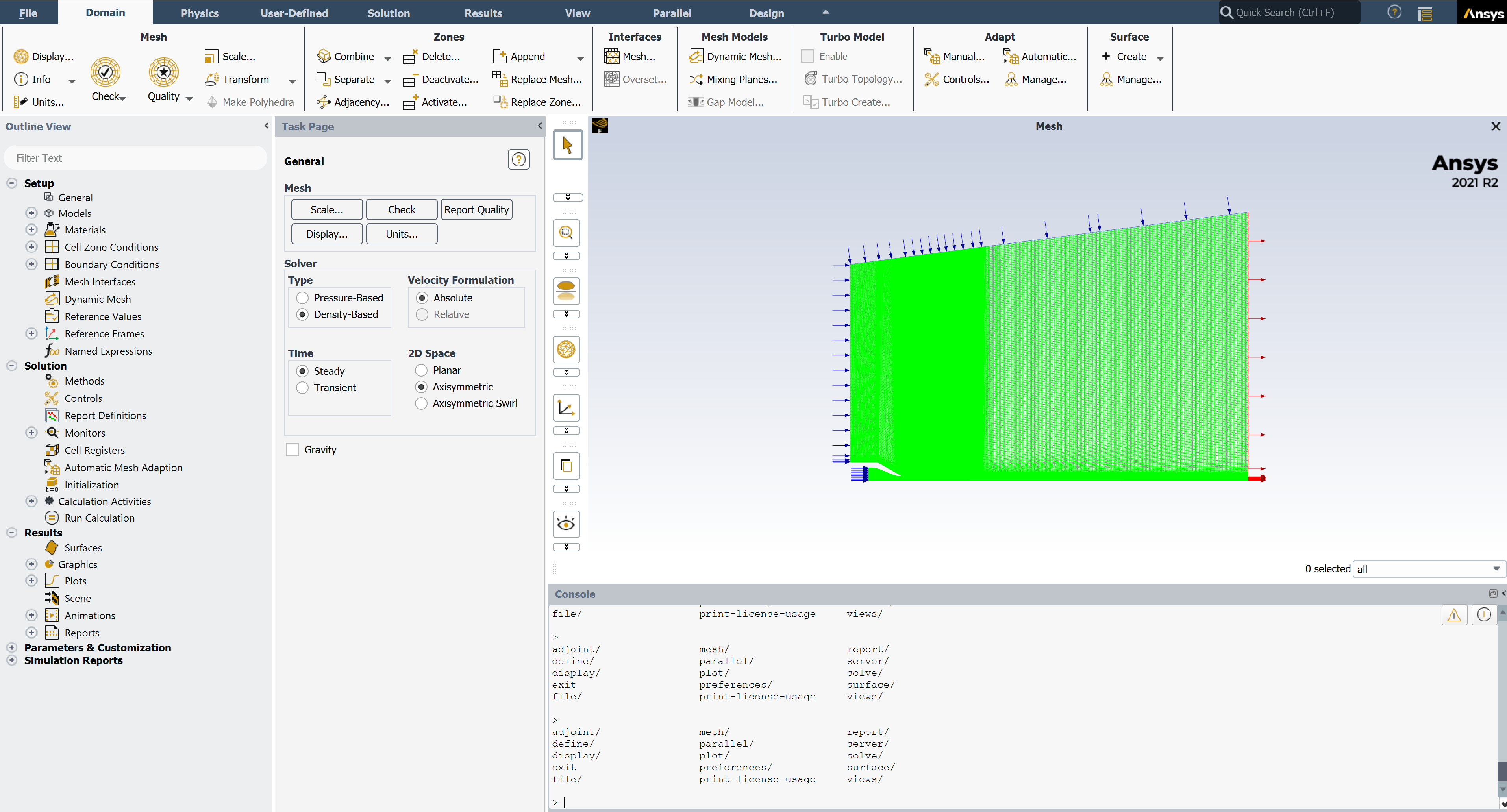
when running Ansys Fluent locally on my workstation I am unable to click the button "File" on the top left. Therefore I am unable to load any mesh, cas or dat file at that stage.
In the Fluent launcher I can load Case, Mesh etc but after starting Fluent with the loaded files I again can't access the File Button nor can I Check my Problem with the Check Button or Initialize/Start/etc my simulation.
This occurs with different independent msh, cas and dat filed and with Fluent 2020R1, 2021R1 and R2.

January 31, 2022 at 1:19 pmRob
Forum ModeratorPlease can you post a screen shot? If you click into the text interface and press Enter a few times what happens?
January 31, 2022 at 1:55 pmJanuary 31, 2022 at 3:30 pmcfdasdf
SubscriberFYI: I was able to open and edit the file on a different workstation. So I assume something is wrong with my local installation (I have already reinstalled Ansys a few times though).
January 31, 2022 at 3:52 pmRob
Forum ModeratorDo the options in the tree work? I've only ever seen this behaviour with low end graphics, and even then it's rare as Fluent's not that fussy.
January 31, 2022 at 4:15 pmcfdasdf
SubscriberI can click all options/tabs from Domain to Design and their suboptions will show/open, altough not all suboptions in each of those tabs works...
Graphics card shouldnt be the problem (RTX 4000). And the confusing thing is, that Fluent has worked fine last week.
January 31, 2022 at 4:46 pmcfdasdf
SubscriberI can btw. also load cas-file combination etc with the TUI (file/read-case-data), but with the GUI via "File" it is not possible...
January 31, 2022 at 5:42 pmRob
Forum ModeratorSo the solver is OK but the GUI got scrambled. Unless has a better idea try renaming the %appdata% file and check the graphics drivers. To confirm, clicking on File does nothing or File-Read Case does nothing?
February 1, 2022 at 7:39 amcfdasdf
SubscriberOk I will try that thanks for the information.
Clicking on File does nothing (same behaviour as if a button is greyed out).
February 1, 2022 at 7:52 amcfdasdf
SubscriberOver night I ran a simulation locally on my Workstation using TUI commands. Now in the morning after this simulation has finished, the GUI works just fine again. I haven't installed any new drivers yet nor have I changed any %appdata% file...
I can't really explain/understand this behaviour but maybe this information is helpful to you.
February 1, 2022 at 9:39 amRob
Forum ModeratorSounds like the computer pixies have got bored and gone somewhere else..... If it happens again let us know, otherwise I'm not sure there is a "fix"! or have you got any ideas?
April 8, 2022 at 11:17 amconnor.benton
SubscriberI have the same exact issue with a quadro P5000 on 2020 R2 Fluent, nothing I've tried (including renaming %appdata%, reinstalling drivers, and reinstalling Fluent products) has fixed the problem.
April 8, 2022 at 12:07 pmcfdasdf
SubscriberDoes moving your Fluent Application from one screen to the other help? (Assuming you have a two screen setup)
April 8, 2022 at 12:54 pmconnor.benton
SubscriberYeah, looks like moving the application to the other screen fixes this issue, thanks !
April 8, 2022 at 1:21 pmcfdasdf
SubscriberGreat to hear, thanks for the feedback!
Viewing 14 reply threads- The topic ‘Unable to open File in Ansys Fluent’ is closed to new replies.
Innovation SpaceTrending discussionsTop Contributors-
4683
-
1565
-
1386
-
1242
-
1021
Top Rated Tags© 2025 Copyright ANSYS, Inc. All rights reserved.
Ansys does not support the usage of unauthorized Ansys software. Please visit www.ansys.com to obtain an official distribution.
-