-
-
February 3, 2026 at 11:07 pm
hermann.chopkapnoume
SubscriberWe recently purchased Ansys with an academic research license. The purchase was done under the PI's name, and an additional user (myself) was added. We have activated the license. However, we are unable to download the software, in that we receive the error message below:
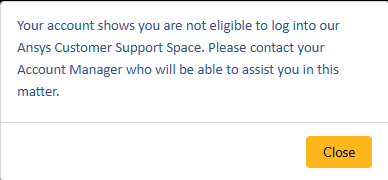
Again, I am registered as a user and the software was recently purchased from Ansys directly. Grateful for help and guidance on how to resolve this and enable us to download the package.
Thanks.
-
February 5, 2026 at 10:40 am
Rajeshwari Jadhav
Forum ModeratorHi,
Contact your Ansys Account Manager to have access to the license file, they can help you.
Regarding Installing an application you can follow below steps:
Steps to install Ansys package.
- Go to Ansys Download Center
- Select Release version and OS.
- Please download the package you need from primary packages.
- Once done, extract the zipped file and run the executable as administrator.
Click on yellow question mark to get more details of package you want to install.
Â
Additionally you can refer Ansys, Inc. Licensing Guide, Ansys License Files: How to Read and Utilize Them | Ansys Courses
Â
-
- You must be logged in to reply to this topic.
-
5049
-
1764
-
1387
-
1248
-
1021
© 2026 Copyright ANSYS, Inc. All rights reserved.








