-
-
April 29, 2020 at 11:31 am
shige2438
SubscriberHello all,
I have been working on this two-way FSI for around 2 months and it always has same error: Negative cell volume detected.
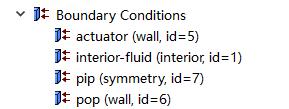
In my simulation, it involves two elastic membrane and fluid in the middle as following picture shown.
Â
The structure has two elastic membranes and one rigid pip to form a sealed cavity. Inside of this cavity, water full filled in to transfer the pressure. As the pressure applied on one side of the membrane, it will deform like ballon and pressurise the water inside of the cavity. Then the water as the pressure media will transfer the pressure on another membrane to pressurise it then generate a swelling.Â
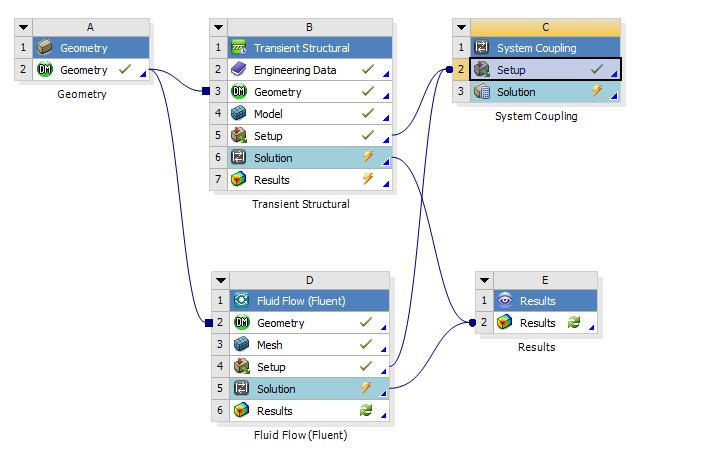
The workbench setup is as shown in down below.
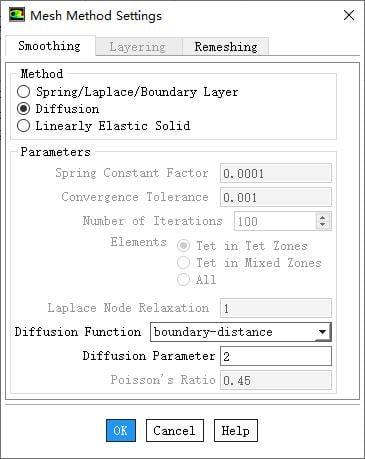
This is what want to simulate but it always has same error. I tired to reduce the time step, change the fluid mesh into tetrahedrons method, change the dynamic mesh method with smoothing and remeshing methods, inside of the smoothing method, I changed it from Spring/Laplace/Boundary Layer in to Diffusion with parameter 2. But stil does not work. So I am seeking for help that anyone could help me to see where the setting is wrong. I uploaded my workbench file.Â
Many Thank for your reading and help.Â
G
-
April 30, 2020 at 12:38 pm
Karthik Remella
AdministratorHello,
What is your original mesh quality? What are your dynamic mesh settings?
Do you get this error message right at the beginning or during the simulation?
Once you get this warning, please stop the simulation, identify the cells with negative volume, and visually inspect them. This might help you identify and understand the problem better.
Also, please try the 'Preview Mesh Motion' (without the system coupling - in standalone Fluent) to understand if you are seeing a similar issue. If you are seeing this in a standalone run, there is a good chance that it will show up when you are taking data from Mechanical and applying this to the Fluent simulation.
Please share some more information regarding the set-up and the mesh so we can give you some more insights.
Thank you.
Best,
Karthik
-
April 30, 2020 at 2:24 pm
shige2438
SubscriberHi Karthik:
Thank you for your reply.Â
For the first question, the mesh quality in mechanic stracture is as shown in figure down below.
It totally has 29557 nodes with 14251 elements. In the Body sizing setup, the element size is 1.5mm with Tetrahedrons method.Â
In the fluent, the setup:
It has 5995 nodes with 3728 elements with tetrahedrons method. The elements of the mesh is defalt: 3.57mm. I thought in order to avoide the negative volume in fluent, I need to set the fluent mesh with bigger size and bigger than the displacement of the membrane in one step.Â
For the second question, sometimes I got the error at the beginning and sometimes during the simulation. It is uncertain. But mainly happened right at the beginning of the simulation.
I also tried so see the result to identify the location that has negative volume in CFD post. But I always have the same error as well:Â Failed in handling Fluent message. Then there is no result shown in the CFD post.Â
For the Preview mesh motion, due to there is no actuation in the fluent, hence the fluid in fluent stand alone will be stational from beginning to the end.Â
The setup of fluent, smoothing and remeshing are as shown in down below.Â
This is all the essential setup for the fluent.Â
If there has any problem, please let me know and I also uploaded my workbench file in the post. Thank you very much for your reply and help. Hope you are the best.
Kind Regards
G

Â
Â
-
May 2, 2020 at 5:05 pm
shige2438
SubscriberHi,
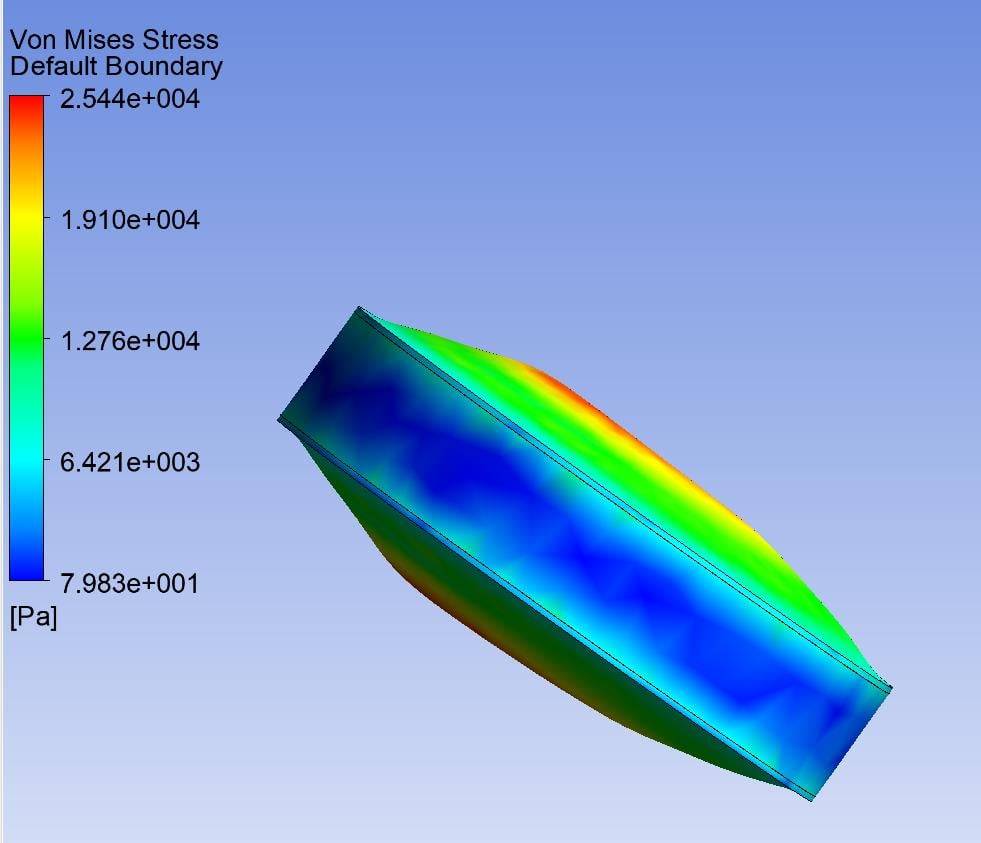
This is a result from one run although it ends with same error: Negative volume detected.Â
Besides the error, the deformation of membrane is not right as well. I believe it suppose to be that the actuator membrane is stuck in and the other membrane is swelling. Hence, is there any possible setup error in the simulation?
Thank you very much.
Kind Regards
G
Â
-
May 3, 2020 at 5:14 pm
Karthik Remella
AdministratorHello,
Your answer seems to be pointing to the fact that the quality of your initial mesh might be poor. It is not necessary to have large element sizes. However, it is very important to have a good starting mesh. The reason for the negative elements is because your quality is deteriorating and at some point in your simulation, Fluent ends up with a mesh that is locally skewed.Â
Please identify the regions with poor quality, improve them at the beginning. Please test your simulation with the improved mesh and let us know.
Thank you.
Best,
Karthik
-
July 1, 2020 at 7:27 pm
NicoKlein
SubscriberI do not know exactly how that works for FLUENT, but for Mechanical.
Â
You can click on the Mesh on the left hand side and you find a tab which says "Display Style". There, you can switch step by step from Element Quality to Aspect Ratio and so on... There are specific values for each of these criteria which indicates a high quality mesh.
Â
For example, there Aspect Ratio is perfect at value 1 but should definitely be <5 , the skewness for example should be 0 in the perfect case, but definitely <0.25
Â
Nico
-
July 2, 2020 at 1:35 am
Karthik Remella
AdministratorIn Fluent, you could use the cell registers to assess where the poor elements are.
Thanks.
Karthik
-
- The topic ‘two way FSI problem – Negative volume detected.’ is closed to new replies.
-
4678
-
1565
-
1386
-
1242
-
1021
© 2025 Copyright ANSYS, Inc. All rights reserved.