TAGGED: ansys-chemkin, fluent, thermodynamic-data
-
-
October 9, 2024 at 6:18 pm
sjohn
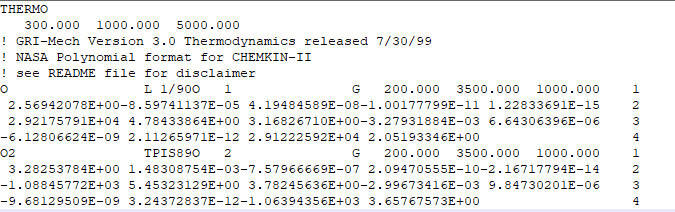
SubscriberWhat do "70590" and "62987" stand for? I got this screenshot from the Fluent User guide Figure 2.1. In Table 2.1, it says "date" but notused in the bracket.

When I created my owndatabase following this format, I get this message in chemout -
TOO MANY DATA ITEMS. NUMBER EXPECTED = 1
Error...failure reading fit temperatures
species: H2O
thermo data line: H2O 091919H2 O1 L300.000 800.000 600.000 1
columns 56-65: 800.000 60
Error...fit temperatures are not in ascending order,
species: H2O
thermo data line: H2O 091919H2 O1 L300.000 800.000 600.000 1
values found are:
300.000000000000 0.000000000000000E+000 800.000000000000 -
November 8, 2024 at 3:03 pm
jcooper
Ansys EmployeeHi sjohn:
The thermodynamic database has a strict format with regards to what items are in what columns. I don't think the numbers matter so long as the required information is in the right columns.
It looks like the last digit in the last temperature is too close to the 1 at the end of the first data row, so the temperatures are being truncated. Can you please attach a sample of your thermo file that contains the problem lines?
Please note that the thermo header also makes a difference - THERMO vs. THERMO ALL.
If temperature ranges are to be specified separately for each specie, the header usually has a temperature range that will apply if none is specified:
-
November 8, 2024 at 8:10 pm
sjohn
SubscriberThanks for reply. I had solved this issue last month by removing the common temperature range under THERMO.
-
- The topic ‘Thermodynamics database’ is closed to new replies.
-
4929
-
1623
-
1386
-
1242
-
1021
© 2026 Copyright ANSYS, Inc. All rights reserved.