-
-
December 14, 2025 at 2:15 pm
scabo
SubscriberHi
I am running an unsteady DPM simulation. I want to average the particle properties, like vectors of velocity, contour plots, etc. on the pipe cross-section over a period of time. How and where shall I do it? Is it possible to do it in Fluent/CFDPost or Paraview?
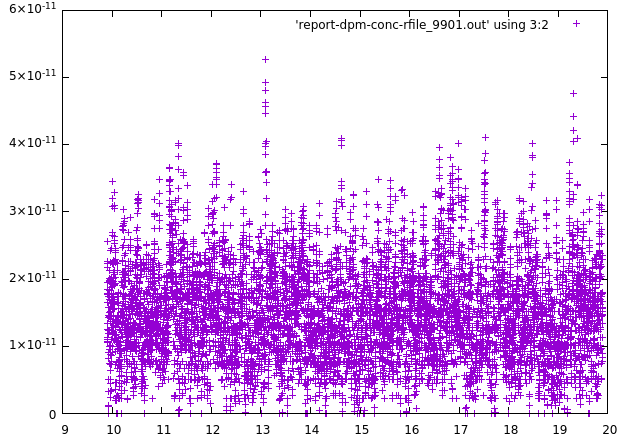
2. Also my flow is converging at a point inside the pipe but the particle proeprties like vel magnitude or dpm conc. is not converging even when i run for 30s of real time. What could be the issue?
thanks
-
December 15, 2025 at 12:25 pm
Rob
Forum ModeratorIf you mean the contours generated on surfaces of DPM Variables then creating a Custom Field Function of the value of interest and then using the time statistics in the Solve>Iterate panel should work to get the average and then you plot that on a surface.Â
I have no idea regarding the second point, but are the values showing repeating pattern (ie it's transient)?Â
-
December 15, 2025 at 2:12 pm
scabo
SubscriberÂ
Hi-thanks for reply. Are you talking about turning on the Data Sampling for Time Statistics box on? If I do this, then in Results i should get the time averaged quantities? Secondly, I was talking of vectors of time-averaged velocity for a period of time. After doing unsteady statistics, I could not transfer the DPM vectors into CFDPost or Paraview because they are not comptible-so is Fluent the only option?
Â
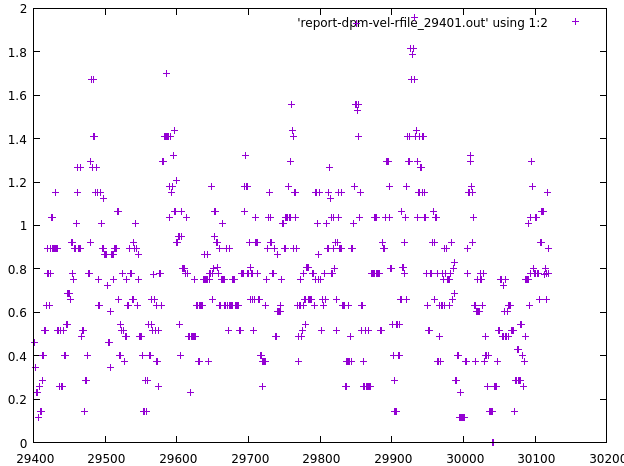
2. I have seeing some repeating patterns but the difference is sometimes quite large to say that it is converging at some value. I have attached the convergence result for dpm velocity mag (y axis) vs iteration(x axis) for unsteady solver. Is this converging or do I need to continue further?

Â
-
December 15, 2025 at 2:31 pm
Rob
Forum ModeratorThe time averaged data is for scalar fields, and is as you think. You can plot RMS-particle-x-velocity but not the RMS-particle-vector. It's likely Fluent only unless you add those CFFs/RMS fields to the .cdat file.Â
If the model is transient then iteration number is meaningless, if it's steady state then the particle update frequency may play a part in the convergence. Given the plot is also not an averaged value it's difficult to read.Â
-
December 15, 2025 at 5:04 pm
scabo
Subscriber -
December 15, 2025 at 5:15 pm
Rob
Forum ModeratorEach point being at a different time step?Â
-
December 15, 2025 at 5:23 pm
scabo
SubscriberThis result is at a given point in pipe. Yes each point on the graph is at different time-step or flow time. I have given the time-step=0.001 for flow and 0.0001 for particles. Is this procedure correct for monitoring flow convergence?
-
December 16, 2025 at 9:58 am
scabo
SubscriberHi. When i am doing unsteady statistics, I am able to plot time-averaged vectors of flow velocity. But it is not showing time-averaged dpm vectors in the unsteady statistics list. How can i plot time-averaged dpm vectors of particles?
-
December 16, 2025 at 10:00 am
Rob
Forum ModeratorYou'll need to use a Custom Field Function (of the particle scalar value that mapped onto a cell) and then do time statistics on that.Â
-
December 16, 2025 at 8:01 pm
scabo
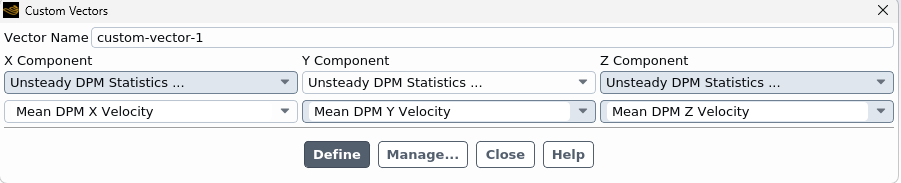
SubscriberHi-What i have found out is: When i do unsteady statistics, the mean/time-averaged DPM x,y,z velocities are available. So, i created a custom vector with those 3 variables as 3 components of the custom vector. It gives the time averaged DPM vector field. Is that right? Custom field function is not required for this.
And even if i write>particle history data in CFDPost .cdat format I cannot draw the vectors of dpm particle in CFDPost. I think this is a compatibility issue and only doable in Fluent. Also CFDPost is not taking userdefined variables while creating vectors.

-
December 17, 2025 at 9:22 am
Rob
Forum ModeratorThe particle tracks can be coloured by particle velocity. Please post a screen shot of your custom vector definition.Â
CFD Post may not know about the custom options as it's a Fluent function.Â
-
December 17, 2025 at 9:53 am
-
December 17, 2025 at 10:17 am
Rob
Forum ModeratorThat should be fine. Note, it's the DPM result on the cell, so if there are two parcels going in different directions (or speeds) you'll get the cell average.Â
CFD Post needs a particle trajectory file, I'd do everything in Fluent.Â
-
December 17, 2025 at 10:25 am
scabo
SubscriberYes thanks. Even if i import the particle track file(.xml) into CFDPost from Fluent, it still does not show the vectors of DPM particle velocity. But it shows the other DPM variables, like volume fraction, velocity magnitude contour, DPM particle sphere location, etc. I think it is just not possible to do somethings in CFDPost.
-
December 19, 2025 at 1:46 pm
scabo
SubscriberHi May i ask one thing. What is the difference between particle X vel and DPM X vel? I know that former in lagrangian and latter is Eulerian-but what does Eulerian mean here exactly?
2. How can i export the particle x,y,z position with time? I want to draw the particle tracks. The option: Write> particle history data does not let export the positions but lets export the velocities.
-
December 19, 2025 at 2:57 pm
Rob
Forum ModeratorIt should be covered in the Alphanumeric reporting chapter.Â
DPM panel, look at the Report Files.Â
-
December 21, 2025 at 9:13 pm
scabo
SubscriberHi-What i have found is if I load the unsteady .dat file and then turn off the Unsteady particle tracking, then I can draw the particle tracks for an unsteady simulation. This gives the particle trajectory. Is this also okay?
-
December 22, 2025 at 8:56 am
Rob
Forum ModeratorYes, as long as you understand the implications of doing so.Â
-
December 23, 2025 at 1:07 am
scabo
SubscriberHi-thanks. Simultaneously i am trying to do Sample DPM trajectories>Start after selecting the interior fluid as boundary and submitting the simulation to HPC, but it is not writing any .dpm file even though there are particles inside the pipe. Do i have to do anything extra?
-
December 23, 2025 at 8:32 am
Rob
Forum ModeratorIf you mean the interior surface for the fluid, that should be sufficient. Check if you need to start, confirm an overwrite and that the save path is sensible. Fluent can retain a full path for file save rather than a local path so it may be looking for your C: rather than the HPC local drive.Â
-
December 23, 2025 at 1:04 pm
scabo
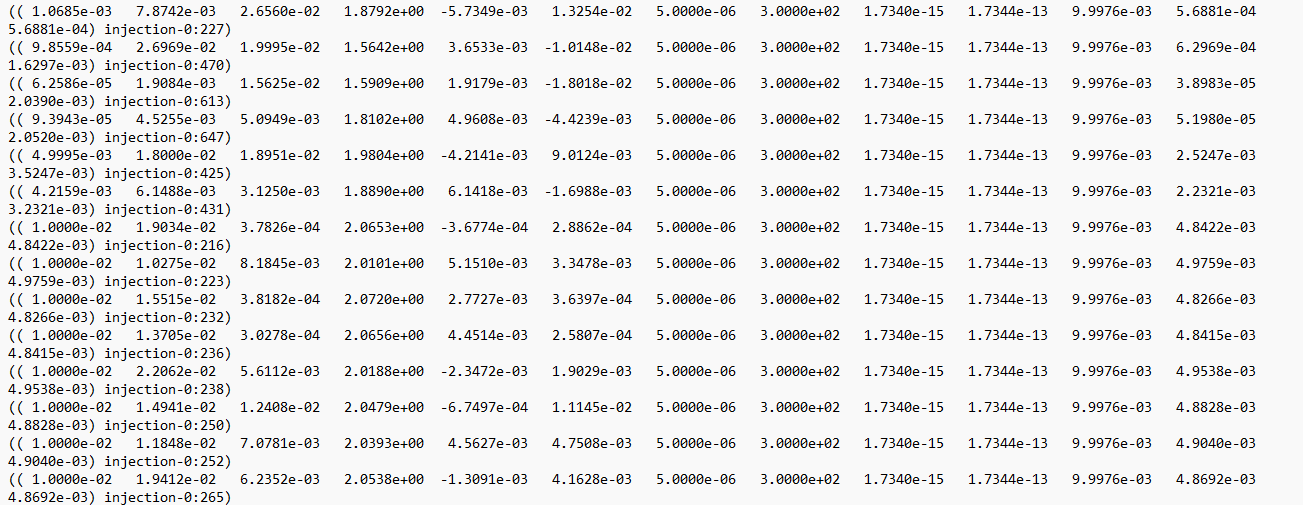
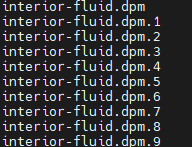
SubscriberHi-I selected interior fluid as boundary and no surfaces because i wanted the positions in the 3D fluid domain inside the pipe. Now it has written some files called interior-fluid.dpm.1, interior-fluid.dpm.2, and so on. Are these particle properties on different nodes? But how will i understand the particle id? I want to draw the trajectory of a single particle over time. I have attached the file it has written in the working dir.

-
December 23, 2025 at 1:20 pm
Rob
Forum ModeratorHow many zones did you pick when you set up the report? I don't recall seeing any parallel effects when I've used DPM Summary but also don't tend to report on the fluid interior. The name shows the injection that released the parcel and it's ID. As long as the parcel count is sensible and parcels aren't colliding you should be able to find the data for a single parcel as it's tracked through time. Python or similar may help, otherwise you've got something to keep you busy with over Christmas.Â
-
December 23, 2025 at 1:29 pm
scabo
SubscriberHi-I did /report/dpm-sample injection-0 interioir-fluid () () no. This TUI command to sample properties on the actual 3D flow. I did not choose any surface. I only selected 1 zone that is the fluid. You are saying that injection-0:227-here 227 is the parcel no? ALso it is writing several of such files (attached). SO it is a bit confusing.

-
December 23, 2025 at 1:54 pm
Rob
Forum ModeratorHow many times are you running that command? Ie is it an Execute Command? And, yes, 227 should be the parcel ID.Â
-
December 23, 2025 at 3:10 pm
scabo
SubscriberHi-I have set the command in the journal file once and then i have set the /solve commands. Is it okay?
-
December 23, 2025 at 3:15 pm
Rob
Forum ModeratorWhat happens when you run that all locally? If you check on one and then two cores what happens?Â
-
December 23, 2025 at 3:23 pm
scabo
SubscriberHi-I will check this and update
-
- You must be logged in to reply to this topic.
-
5614
-
1885
-
1403
-
1298
-
1021
© 2026 Copyright ANSYS, Inc. All rights reserved.