Electronics

Electronics

Topics related to HFSS, Maxwell, SIwave, Icepak, Electronics Enterprise and more.

Solver failed because of poor mesh quality

    • bryanluippold
      Subscriber

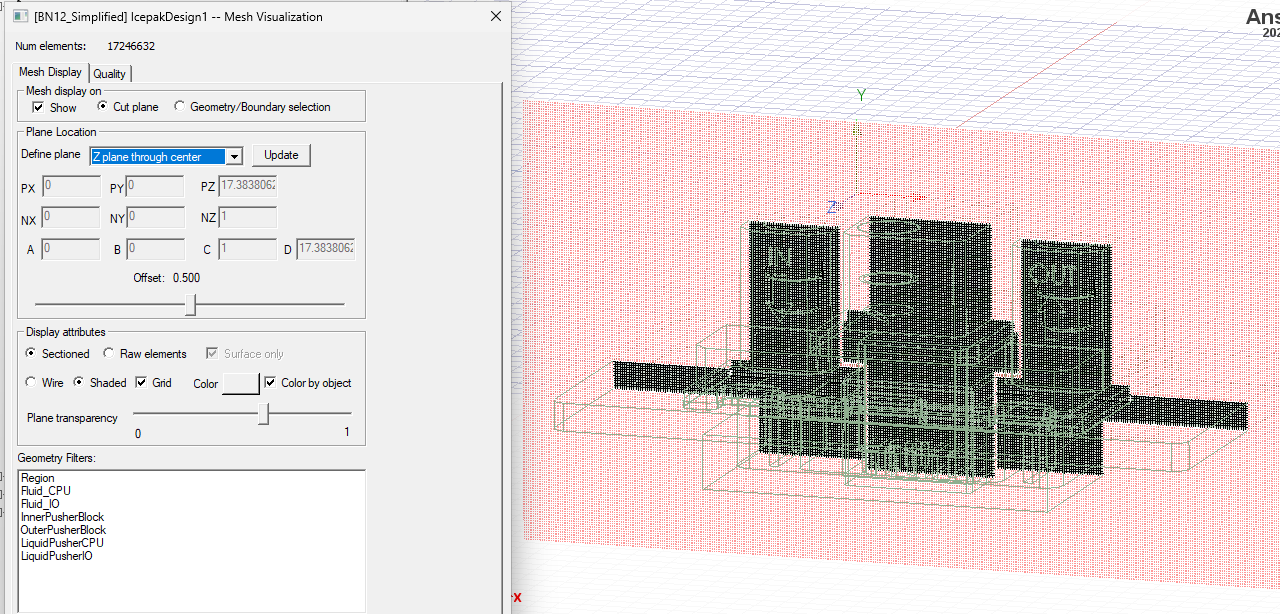
      I am trying to run a thermal simulation using ANSYS Icepak but am having issues during the analysis/solver step. The project has imported geometry from SolidWorks and I've simplified it as much as possible to mesh more easily. The model contains fluid flow (water) in two separate paths (2 inlets and 2 outlets). I don't have access to SpaceClaim so I used SolidWorks to model the fluid regions of the project. Now the issue is when meshing, I can generate a mesh while specifying certain regions to be finer (such as the fluid regions) but even on a mesh that has 17million+ elements, when I run the solver, I always get the same error of "Solver failed because of poor mesh quality. Try adjusting the mesh settings." I've attached an image of a cut plane of the mesh. I believe the errors are in the corners of the curved surfaces in some regions but I don't think it should be an issue still with this many elements. Any advice/tips for meshing this?

    • Yannis
      Ansys Employee

      Hello,

      Based on your screenshot, the mesh looks very fine, I do not think it is the source of your issue. You can check the mesh quality metrics in the Quality tab. In general, If these agree with the recommended mesh guidelines, you should not have an issue. I would recommend using a NC assembly for your geometry to minimise the impact of the fine mesh regions on the global mesh as the cell count is unnecessarily high. 

      It is difficult to provide more insight on this without looking at the simulation model. Please file a support request through the customer portal so we can provide one-to-one assistance. Kindly note, Ansys personnel cannot access file attachments in the forum.

      Regards,

      Yannis


Viewing 1 reply thread
  • The topic ‘Solver failed because of poor mesh quality’ is closed to new replies.