-
-
March 20, 2018 at 3:49 am
Fabricio.Urquhart
SubscriberHello,
Â
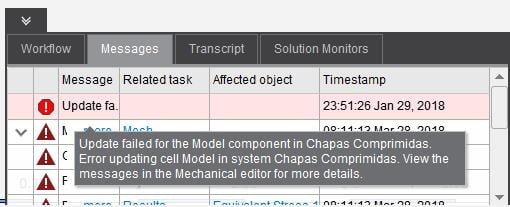
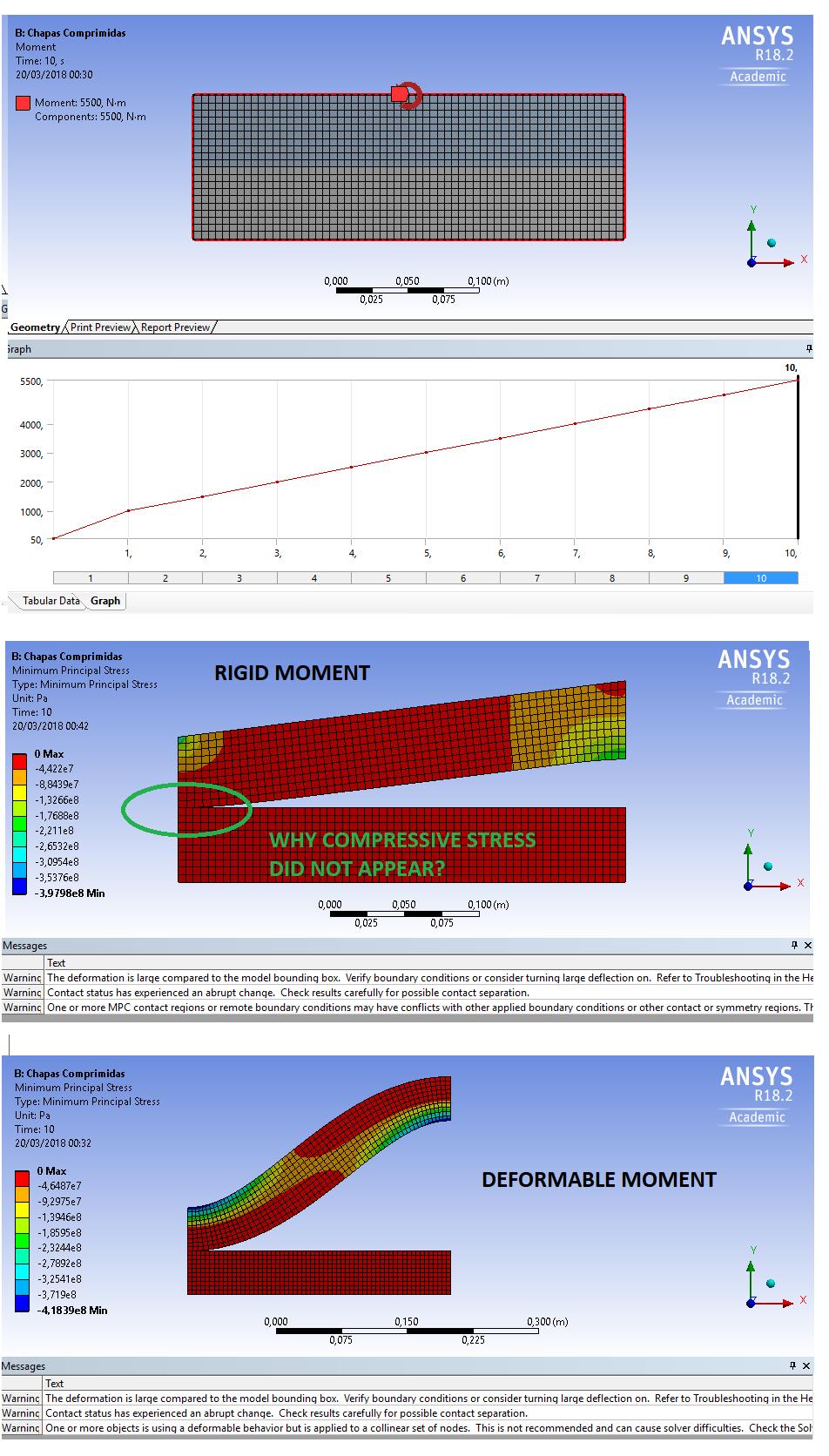
The difference between each other is clear, I suppose that it influences in the body deformation. My issue is analyse the contact between the edges, so the body's deformation will not be analysed. Because this, I was using Rigid Moment. But the warning is "One or more MPC contact regions or remote boundary conditions may have conflicts with other applied boundary conditions...."
Â
I don't agree with the warning, but despite this, I tried with the deformable moment, only to see the results, and the warning changed to "One or more object is using a deformable behaviour but is applied to a collinear set of nodes. This is not recommended an can cause solver difficulties..."
So which them is correct, rigid or deformable?I think thaht is rigid, but and the warning?
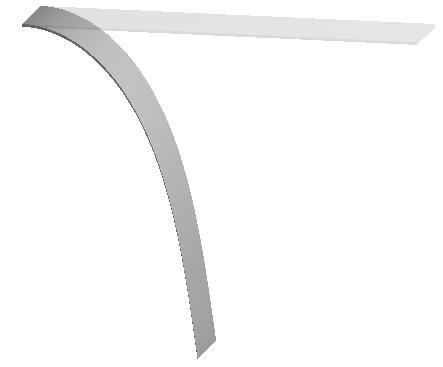
Another result that I am not understanding why do not have compressive stress in the point that stay in contact after the load is applied.
The picture comparing both of them is below:
Â
If anybody can help me, I will be greatful, I am doing my master thesis about steel bolted connections, so it involves a lot of contact problems.
Â
Thank you very much!
-
March 20, 2018 at 1:14 pm
peteroznewman
SubscriberHello Fabricio,
Please read the first warning..."or consider turning large deflection on."Â Anytime nodal deformation is of any significant displacement, like more than an element size, you must turn on large deflection under Analysis Settings. Both of those results above are invalid unless the display scale factor is huge and not True Size.
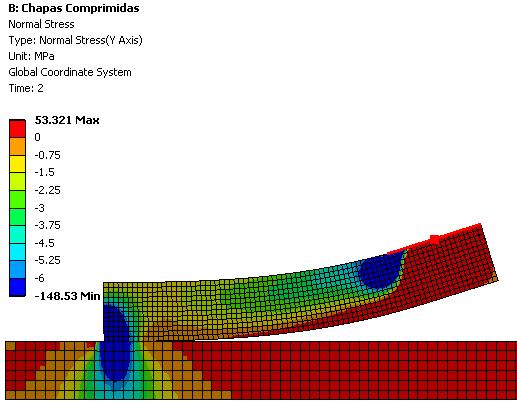
You ask why no compressive stress. That is because you have no down force. In the absence of a down force a moment can rotate the part up with no resistance.
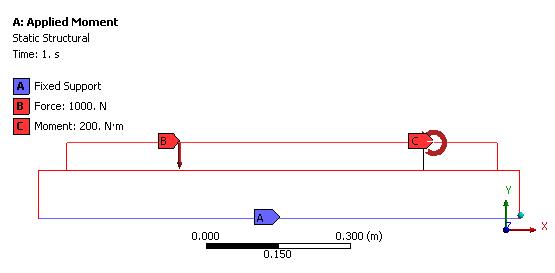
I have created a similar model, but split the top body to apply the moment for a short segment on the right, and apply a down force on the long segment on the left.
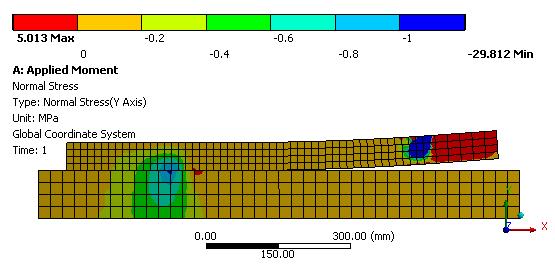
Below I plot the Normal Stress in the Y direction. You can see most of the body has a compressive stress.
The applied moment is resolved into a high tensile and a high compressive stress on the short segment.
There are no warning messages when this solves.
-
March 22, 2018 at 1:38 am
Fabricio.Urquhart
SubscriberHello Peter. In this case did you apply deformable or rigid moment?It seems to be rigid moment. But I tried both of them and the last warning remains.
I could not open the model that you sent, because I have the AIM student license. Do you know how can I open?
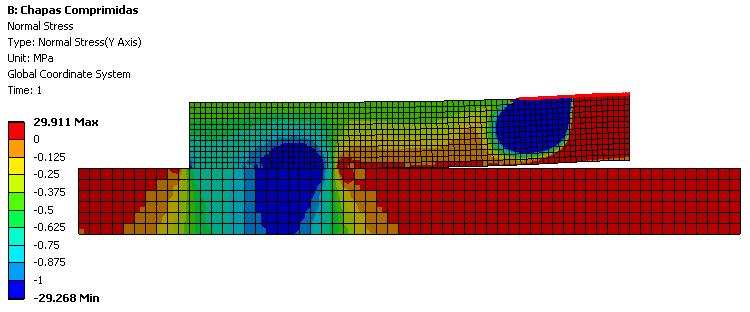
Just see the picture below,
So I do not know why the contact region does not transmit the stress. Can you help me?
-
March 22, 2018 at 2:28 am
peteroznewman
SubscriberHello Fabricio,
It looks like you have ANSYS Student 18.2, not AIM, which looks very different. The way you open my file is with Workbench, use File, Restore Archive. If you want to send me your file, you use File Archive and it will create a .wbpz file that you can Attach to your post.
I configured my legend so the first number next to red was 0 and the first number next to blue was -1 MPa so that I could see the very small compressive stress that the contact generates when there are elements with -29 MPa in my model.
I think I used rigid for the moment, but there wouldn't be a large difference in the contact pressure since that portion is lifting off.
-
March 27, 2018 at 12:36 pm
-
March 27, 2018 at 12:37 pm
Fabricio.Urquhart
SubscriberThe did not attach.
-
March 28, 2018 at 12:54 am
peteroznewman
SubscriberFabricio,
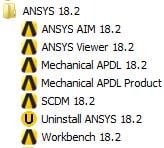
Here is a snapshot of my Start menu in Windows 7.
I have installed both ANSYS AIM and ANSYS Student 18.2, which gives me Workbench 18.2.
You have to install ANSYS Student 18.2 in order to open my attachment. You would first launch Workbench 18.2 using the Windows Start menu. Then once Workbench has opened, File, Restore Archive and save the file to a folder for future use.Â
You could also install ANSYS Student 19.0 if you want to the latest version. It will open 18.2 files.
I will post this now as I see you are online and I will look at your model next.
Regards,
Peter -
March 28, 2018 at 1:07 am
Fabricio.Urquhart
SubscriberThank you Peter.
Â
I will try now. I was trying to edit the minimum and maximum results, but I could not too. I only clicked with right button, edit, write the value and enter. But it did not change.
Â
Â
-
March 28, 2018 at 12:02 pm
Fabricio.Urquhart
SubscriberThe difference between our models are:
1 - Frictionless Contact (my model); Frictional Contact (your model)
2 - Contatct Behaviour Simmetric (my model); Program Controlled (your model)
3 - Contact Pinball region took from Contact tool (my model); Program Controlled (your model)
4 - Displacement constant in two smaller plate's edges (my model); Free (your model) because you used Frictional contact
5 - You used rigid moment
If I change this options in your model, it does not run.
Did you see the warnings in my model?
Â
Thank you Peter!
Â
Regards.
Â
-
March 28, 2018 at 12:14 pm
-
March 28, 2018 at 12:21 pm
peteroznewman
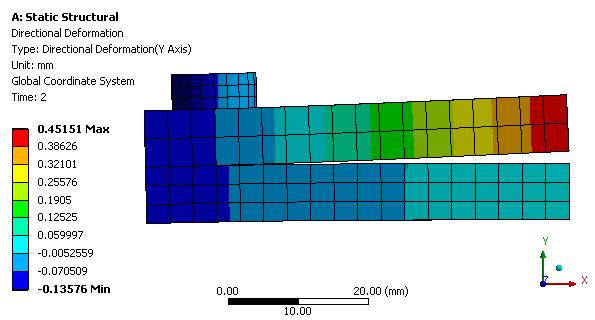
Subscriber Here is your model result with the Legend edited with a 0 and a -1 value imposed.
If you change the Moment from Deformable to Rigid, one warning message will go away.
Replace the two edges with Displacement X=0 with just the bottom left vertex of the top body. That is enough to stop the body moving, and would leave those edges free to shear and rotate. The current BC prevents those edges from shearing or rotating, but that is what you want I think. If you do that, you have to apply more down force because there is not enough to prevent the body from flipping over as the moment is applied. Here is the solution with 3000 N of down force.
AIM 18.2 Archive attached.
-
March 29, 2018 at 2:02 am
Fabricio.Urquhart
SubscriberPeter, thank you very much!
Do you know if the warning "Large deformation effects are active which may have invalidated some of your applied supports such as siplacement, cylindrical, frictionless, or compression only." may disconsider the contact that I have defined between the edges?
Â
And when there is a warning saying that the contact status has experienced an abrubt change, it depends on the load's magnitude, isn't it?
Â
Regards, thank you for be patient...
Fabricio
Â
Â
-
March 29, 2018 at 2:12 am
peteroznewman
SubscriberFabricio,Â
In this case the abrupt change to the contact was expected, we rolled a part of the surface out of contact. In other cases, the contact failed and one body passed through another body. You have to look at the deformation results when you get the warning. The warning is generated when contact status changes, it doesn't only depends on the load magnitude because the magnitude has to be large enough to change the contact status.
The other warning "may have invalidated some of your applied supports" is again something for you to check the results and look to see if anything is wrong.
Regards,
Peter
Â
-
March 31, 2018 at 9:50 pm
Fabricio.Urquhart
SubscriberOk. So the warning is to pay attention. It is not sure that there is something wrong.
About design modeler. Do you know if there is an option to the desing modeler do not join the surface bodies, when it is near?
Â
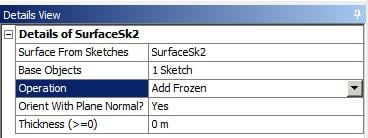
See thce picture, I modeled two independent surfaces. With 5mm between them. After that, I created a Translation Body of 5mm, and desing modeller join them. But I ould like two separated plates. Is there any option to change it?
Â
-
April 1, 2018 at 3:01 am
-
April 6, 2018 at 5:07 pm
Fabricio.Urquhart
SubscriberPeter,
Â
I woud like to plot a graph where I can identify the geometric non linearity. I tried to plot Time X Displacement. But the displacement were linear.Â
Â
Can you help how can I plot this graph?
Â
Â
Â
-
April 9, 2018 at 1:53 am
-
April 9, 2018 at 1:06 pm
Fabricio.Urquhart
SubscriberPeter, thank you very much. But the nonlinear problem that I am studying is about contact problems. The master thesis' title is: Steel Bolt Connections Parametric Analysis. So it involves contact problems.
I started with plate elements, 2D problems, but I could not see the contact nonlinearity.
The same occured in the model attached. I have a nonlinear problem with the contact between the plates. What do you think about what the nonlinearity apparently did not occure?
Â
Thank you Peter!
-
April 9, 2018 at 1:15 pm
peteroznewman
SubscriberFabricio, there are many types of nonlinearity. A nonlinear problem requires the solver to iterate to find equilibrium.
Geometric nonlinearity, which you asked about, is caused by large deflections and requires iteration to track the change in nodal locations as the load increases.
Contact nonlinearity can be caused by small deformations as the contact state changes from closed to open or vice versa.
Material nonlinearity occurs when plasticity is added to a material model.
All of these sources of nonlinearity cause the solver to iterate to find equilibrium at each load step.
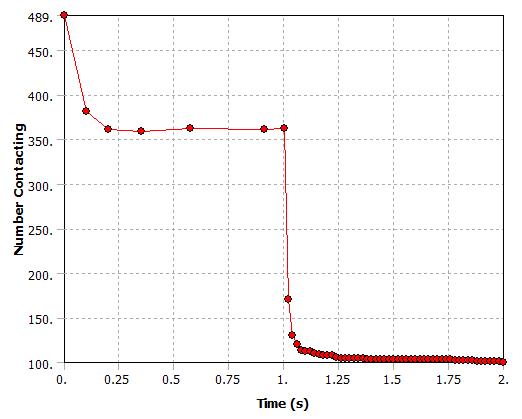
If you plot the number of elements contacting vs load, that will not be a straight line in your bending problem.
Regards, Peter
-
April 9, 2018 at 1:54 pm
Fabricio.Urquhart
SubscriberPeter, ok, I know that there many tpes of nonlinearity. In my case, I am studying the contact nonlinearity. The final objective is plot a graph between Moment X Rotation of the bolt connection and analyse the stiffness of each one.
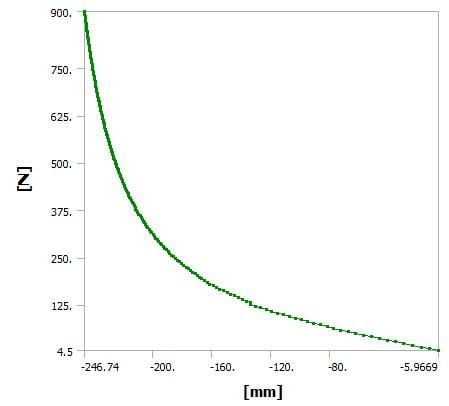
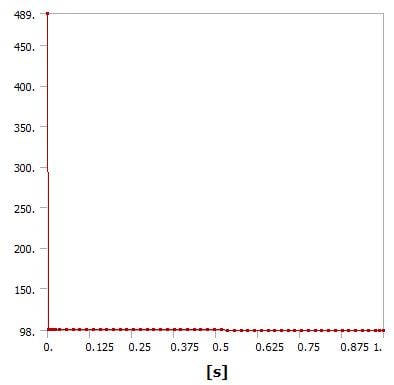
I plot the number of elements contacting vs load, but it is wrong (the model is attached), I do not why. The graph between load vs displacement has to be nonlinear as the picture below:
Â
Â
Â
-
April 9, 2018 at 2:35 pm
peteroznewman
SubscriberFabricio, I made a video for another student of a fastener with bolt pretension applied to clamp two plates together. That discussion has an attached 18.2 archive. I don't see an attachment on your post.
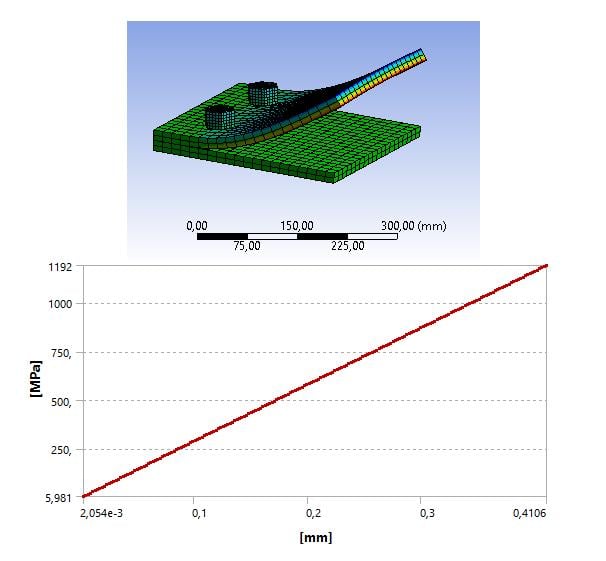
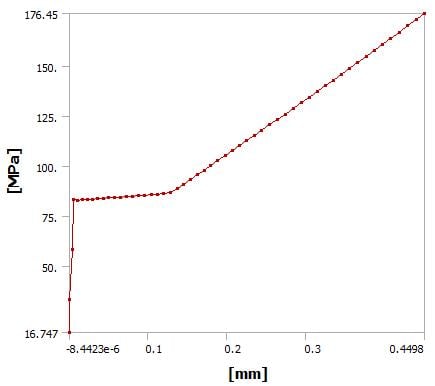
If I take my model and plot the maximum contact pressure under the bolt head vs. Y deformation of the tip of the top block, I get the following graph. Note that I had to set the initial substeps and minimum substeps to 50 each to get 50 points on the graph. This shows a significant nonlinearity. The modified 18.2 archive is attached here.
-
April 9, 2018 at 3:23 pm
Fabricio.Urquhart
SubscriberLet's try again.
Â
I plot the same graph, but it is linear. I think that I have problem in my model. But I could not find it.
Â
Thank you Peter for the attention!
-
April 9, 2018 at 3:27 pm
peteroznewman
SubscriberYou work from AIM 19.0 right? You can delete your two previous posts.
-
April 9, 2018 at 4:11 pm
Fabricio.Urquhart
SubscriberNo no, I am working from Worbench 19 now. It is faster.
-
April 9, 2018 at 4:16 pm
peteroznewman
SubscriberRight, I figured that out.
If your loading is symmetric, you can have a faster solve time (or use more elements) by cutting your model down the plane of symmetry and using just one bolt and the symmetric boundary condition to represent the other bolt. I will do that plus add a Bolt Pretension load to your model. I will do that later today.
-
April 9, 2018 at 4:30 pm
Fabricio.Urquhart
SubscriberPeter,
But in first moment, I would not like to use bolt pretension load. I do not pretend to use bolt pretension in the model. I think that there is no problem with not considering.
Â
I am not using the symmetric boundary condition, because in the master thesis I will not use it. I am modeling a simple portic structure, but only the connection with 3d elements, the other parts with beam element, see the article attached, where I started using another software but I change now, because It was impossible or so difficul to understand the nonlinearity considered by the software.
Â
-
April 9, 2018 at 5:24 pm
peteroznewman
SubscriberFabricio,
I built this model with bolt pretension. I removed the previous graph that was X axis instead of Y axis. The Y axis deformation versus pressure is very linear, but I expect that.
The number of elements contacting vs time (proportional to load) is very nonlinear.
I will run it again without bolt pretension. I used symmetry to keep the nodes+elements<32,000 for Student license.
I also used a solsh190 element that was made to use with a single element through the thickness while properly accounting for bending moments. -
April 9, 2018 at 6:14 pm
-
April 10, 2018 at 6:09 pm
-
April 19, 2018 at 12:27 pm
Fabricio.Urquhart
SubscriberHello Peter!
The graph is normalized g/l and F/EA is the force applied, not the contact pressure. So when F > EA * g/l, contact occurs and you have the constraint u2-u3 = g has to be fulfilled.
The reference book is Wrriger_ComputationalContactMechanics.
Â
Another doubt, I am modelling again, but now with the beam bolted in the plate, and a warning appeared:
" During this solution, the elapsed time exceeded the CPU time by an excessive margin. Often this indicates either a lack of physical memory (RAM) required to efficiently handle this simulation or it indicates a particularly slow hard drive configuration. This simulation can be expected to run faster on identical hardware if additional RAM or a faster hard drive configuration is made available. For more details, please see the ANSYS Performance Guide which is part of the ANSYS Help system."
Â
Can you help with it?I think that I have to improve the mesh, but I am not sure. Today I will try again.
Regards.
-
April 19, 2018 at 11:25 pm
peteroznewman
SubscriberHello Fabricio!
Regarding your figure, the length l is fixed, and could be set equal to 1 unit. The size of the gap g is variable and can be 0 or greater. When g > 0 then there is zero contact force, and when g = 0, then there is a contact force. That is the graph I drew. I still don't understand your graph.
The warning simply means you don't have hardware capable of solving this problem without waiting longer than is necessary. If you add RAM, you will not wait as long for the solution to compute. If the problem is small enough, the solver can fit the entire problem in RAM and won't need to use storage during the solve. A larger problem will exceed the available RAM, and the solver has to use storage during the solution. Then the speed of storage I/O becomes important. A HDD is much, much, much slower than RAM, but a SSD is much, much faster than a HDD, so after you install the maximum RAM your motherboard supports, you can speed up large problems by using a SSD instead of a HDD for storage.
A less dense mesh will require less RAM and at some point the warning will go away, but your mesh may be so coarse as to be useless. The amount of time you wait for the solution for a sufficiently refined mesh just depends on how much money you have to spend on the computer. It doesn't change the result of the simulation, only how long you wait for that result.
What are your computer specs? Do you have more than 2 cores? If so, did you set your Solve Process Settings to use more than 2 cores?
Regards.

-
- The topic ‘Rigid Moment X Deformable Moment’ is closed to new replies.
-
4803
-
1582
-
1386
-
1242
-
1021
© 2026 Copyright ANSYS, Inc. All rights reserved.


.jpg?width=690&upscale=false)


.jpg?width=690&upscale=false)