General Mechanical

General Mechanical

Topics related to Mechanical Enterprise, Motion, Additive Print and more.

reuse mesh in different workbench files

    • greg2835
      Subscriber

      Is there a way to save a mesh/geometry from Mechanical WB in a way that it can be reused in another Mechanical WB file? As a workaround I have a WB file called "savedMeshes" with different static and transient cells with different meshes, and when I want to reuse one I save a copy, delete the cells I don't need, and start a new simulation.

      I guess even in the same WB file I don't know how to use a mesh in a static cell and then reuse it in a transient cell. I just share Geometry and re-setup the mesh.

      I tried searching this site first but only found ways to export a mesh to be used in Fluent and other software, so hopefully this isn't digging up old bones..

    • greg2835
      Subscriber
      The reason for different files is for organizational purposes. The team likes to keep separate files for different projects, which often reuse meshes as customers put in new POs. It would just be nice to have a folder with the different meshes I can go to and use instead of my workaround or saving copies of previous project files.
    • peteroznewman
      Subscriber
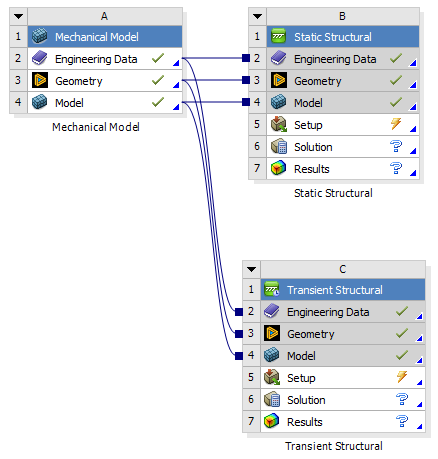
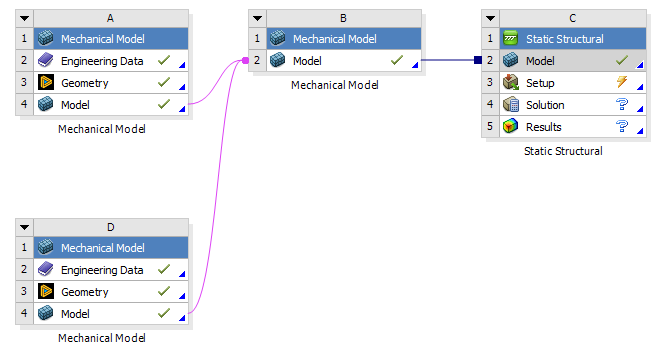
      Start with a Mechanical Model to use the same mesh for multiple analyses.
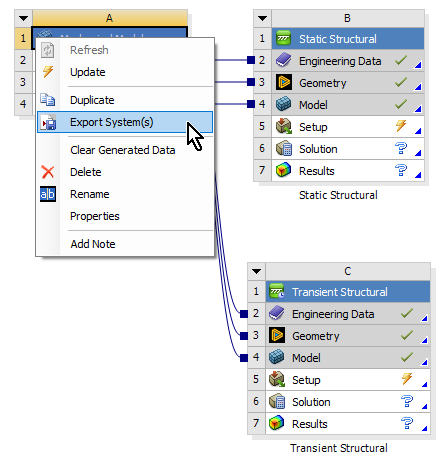
      Export that Mechanical Model to save it as export.wbpz
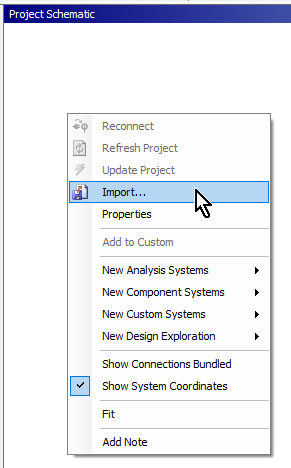
      On a New Project, you can Import the Mechanical Model that was exported from a previous Project.
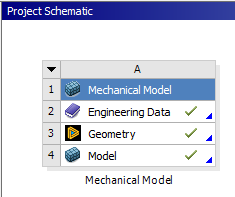
      It shows up ready to start the new project.
      Multiple subsystems that can be tied together in a new Mechanical Model and sent to an analysis system.
    • greg2835
      Subscriber
      Thank you Peter! The Export/Import feature in WB is exactly what I am looking for. Cheers!
Viewing 3 reply threads
  • The topic ‘reuse mesh in different workbench files’ is closed to new replies.