-
-
January 22, 2020 at 11:20 am
tanujsrivastava28
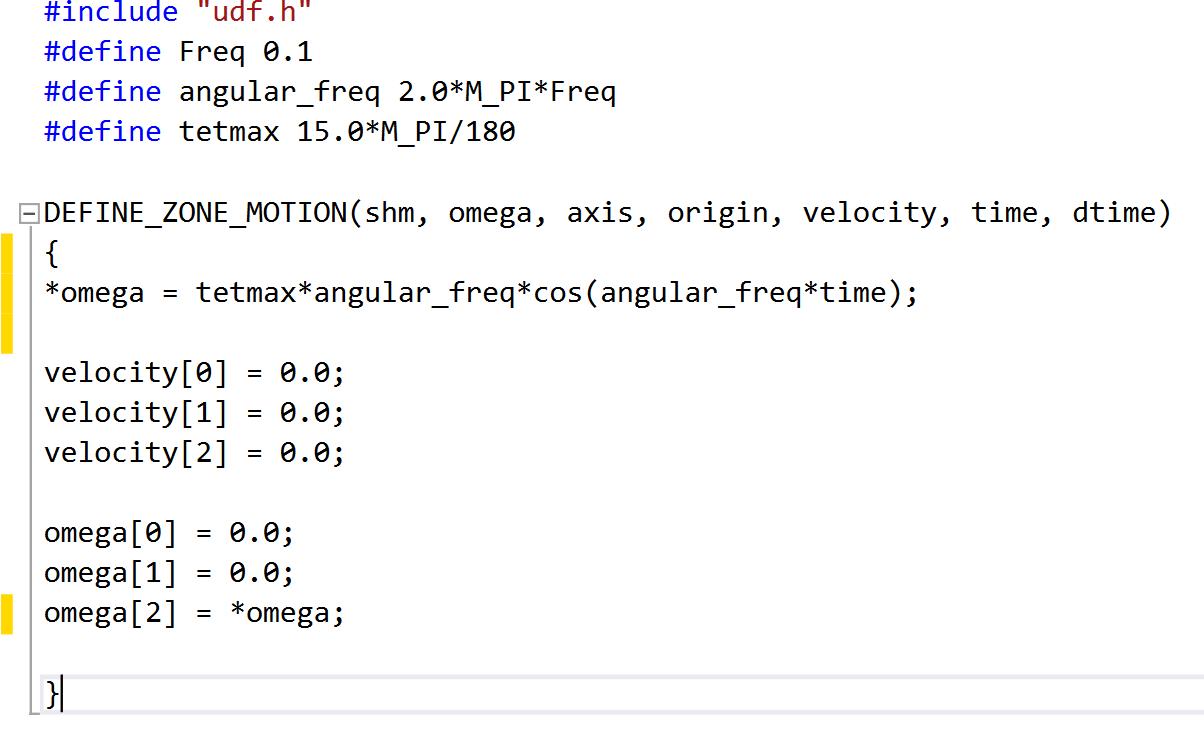
SubscriberI am trying to give the zone motion (Simple harmonic motion) using UDF in cell zone boundary condition. Below is the code attached. Though it shows no error on compilation, the zone does not seem to rotate as per code. Geometry is a simple 2-D closed-loop pipe and origin is at the bottom. Is there anything wrong with UDF? If any please suggest. Thank you in advance.
-
January 22, 2020 at 3:38 pm
Rob
Forum ModeratorHave you hooked it up to the solver?
-
January 22, 2020 at 3:59 pm
tanujsrivastava28
SubscriberYes, I did for four different cases.
1) frame motion with time period of 10 sec.
2) frame motion with time period 1 sec.
3) frame motion and mesh motion with time period 10 sec.
4) frame motion and mesh motion with time period 1 sec.
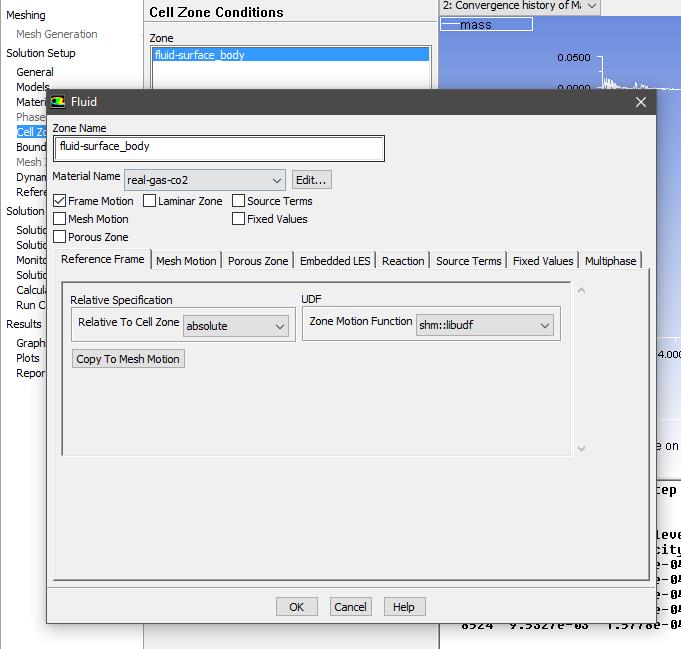
But the frame does not rotate as I see the animation. Now I come two conclusions, (i) whether my UDF is wrong (which is more probable), (ii) may be frame is rotating but in animation, it is not appearing to rotate (which would not be the case). The reason for taking four cases is to see the difference in the value of the mass flow rate for the different time periods. But in cases 1 and 2, there is some difference but the peak is nearly the same while in cases 3 and 4, values are the same.
You can see the geometry using the link below-
https://ibb.co/6BfDD1h

-
January 23, 2020 at 10:38 am
Rob
Forum ModeratorWhat time step are you using?
-
January 23, 2020 at 11:53 am
tanujsrivastava28
SubscriberI am using 0.01 sec. But motion of the zone in animation does not appear and no such difference arise when time period is changed. So there might be some mistake that I am doing that I am not able to find out.
-
January 23, 2020 at 4:09 pm
Rob
Forum ModeratorJust re-read that: why are you using zone motion to define frame motion?
-
January 24, 2020 at 4:54 am
-
January 25, 2020 at 9:06 am
tanujsrivastava28
SubscriberIf there is no interface in the domain, is it advisable to use mesh motion along with frame motion? Because if I am using only frame motion then there occurs no motion in animation. While using a frame with mesh motion ...or only mesh motion, there is the motion as I can see in animation. I find no relative literature which relates mesh or frame motion without interface.
-
January 27, 2020 at 4:38 pm
Rob
Forum ModeratorYou can't use sliding mesh without an interface. Reference frame doesn't require an interface as the mesh doesn't move. These approaches move or mimic motion of a fixed mesh. Ie a block of mesh may move but no remeshing takes place.
Mesh motion (moving/deforming mesh) doesn't require interfaces but does require remeshing.
-
January 29, 2020 at 12:59 pm
tanujsrivastava28
SubscriberWhat does fixed mesh mean? Does it mean that when the loop (https://ibb.co/6BfDD1h) will rotate, the mesh configuration will not change or it will remain at its initial vertical location (as shown in the attached link)?
In the case that I attached, there is no interface, so mesh motion cant be used but mesh changes its location as the loop rotates but does not deform.
Thanks.
-
January 30, 2020 at 11:38 am
Rob
Forum ModeratorWe can move/slide mesh blocks that doesn't change, ie the model changes (propellers spin etc) but we don't deform any cells.
-
February 11, 2020 at 3:07 pm
-
February 11, 2020 at 3:35 pm
Rob
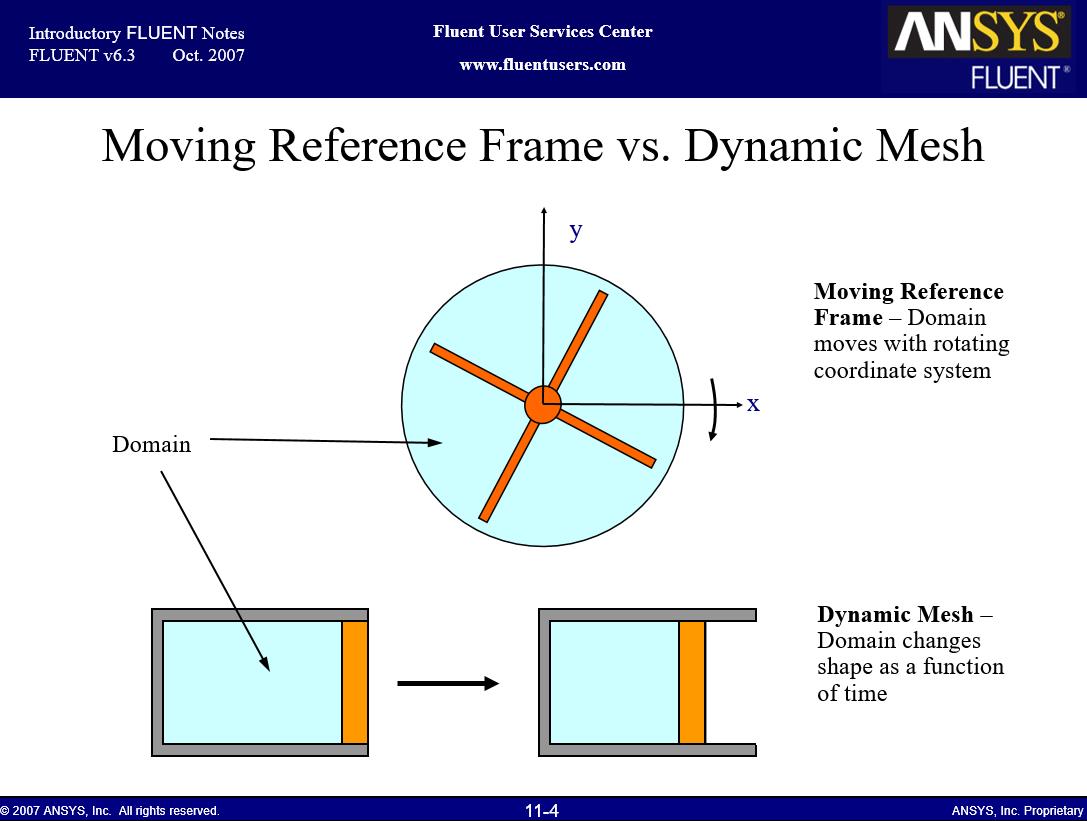
Forum ModeratorThe terms have changed since this slide was written 13 or so years ago.
Frame motion - we move the reference so mesh is stationary.
Mesh Motion - we move the mesh on a (usually) set path but don't change the cells.
-
February 12, 2020 at 7:05 am
tanujsrivastava28
SubscriberOk so is that the reason that when using "mesh motion" we see motion in animation and in "frame motion", we see no motion in animation?
-
February 12, 2020 at 11:26 am
Rob
Forum ModeratorYes. Frame motion also means we can run steady state: much more efficient if we can solve in this way.
-
- The topic ‘Query related to zone motion’ is closed to new replies.
-
4607
-
1510
-
1386
-
1209
-
1021
© 2025 Copyright ANSYS, Inc. All rights reserved.