-
-
October 24, 2023 at 6:07 pm
Flávio Lopes
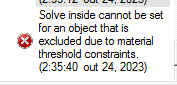
SubscriberI'm trying to create a material to be the earth with resistivity of 600ohm.m(conductivity of 1/600 siemens/m) in maxwell so I added a new material with the configuration I just writed, but when I do it the object that I assigned this new material could not anymore stay with the solve inside configuration. the following message in the image appears. this happens to the eletric transient and dc conduction(eletric). I just realised that it has nothing to do with the creation of the material, cause the same problems happens with others materials. How can I solve this problem of the image?
Â
-
October 26, 2023 at 11:55 am
Timos
Ansys EmployeeHello, the error relates to the Material Threholds. By default, perfect Insulators have conductivity<1 Siemens/m. In this case, your material cannot be simulated with these settings. In order to solve inside, change the Insulator threshold to a value that is less than the conductivity you want to simulate. To do so:Â
Maxwell3D>Design Settings>Material Thresholds>Insulator value
-
- The topic ‘problem with the solve inside in a object’ is closed to new replies.
- Three-Phase Voltage Imbalances in dual stator electric generator
- Co-simulation in Q3D, Icepak – meshing problem
- Classic Icepak – clarifications on Boundary condition
- Link the Circuit to 3D Terminals
- Magnetic Dipole moment calculation
- Integration lines or U Axis Line for circular and rectangular ports
- Core Loss in ANSYS MAXWELL Eddy Current solution
- exporting and importing my Netlist for my external circuit
- Error of Metal Fraction in Icepak Classic.
- The unit of theta in Is*sin(2*pi*fre*Time+theta-2*pi/3)
-
4592
-
1494
-
1386
-
1209
-
1021
© 2025 Copyright ANSYS, Inc. All rights reserved.