-
-
February 4, 2019 at 11:04 am
Max4
SubscriberHi,
I have created a geometry and mesh it in ANSYS Meshing. I export the mesh (.msh), but I have the following error when I open it in Fluent (2D or 3D):
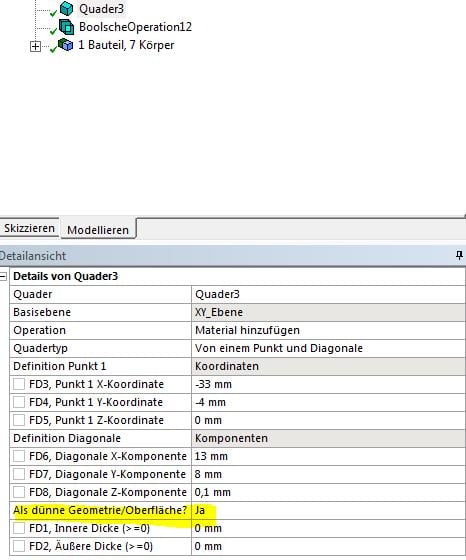
It´s a 2D-Case but I used Primitives (3D Element) in order to separate the geometry in different cell zones, and take it as "thin surface". I can´t select a value for the Z-Part of 0.
Â
Regards,
Maxime
-
February 4, 2019 at 12:01 pm
Amine Ben Hadj Ali
Ansys EmployeeCan you create a 'Fluent Analysis component in WB set it to 2D and repeat the steps. Thanks!
-
February 4, 2019 at 12:09 pm
Amine Ben Hadj Ali
Ansys EmployeeAnd ensure that the mesh is a solid mesh with fluid volumes and not just a surface mesh
-
February 4, 2019 at 12:17 pm
Max4
SubscriberFor the moment, I have created the geometry in DesignModeler, and mesh it in ANSYS Meshing (see picture 1). Then I export the .mesh file, and I´d like to import it Fluent, but I doesn´t work.
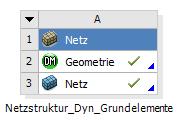
By Fluent Analysis, do you mean this? (/forum/forums/topic/what-is-the-difference-between-fluent-at-analysis-system-and-fluent-at-component-system/)
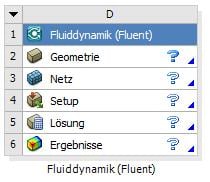
Where can I see that my mesh is a solid mesh?
Â
Regards,
Maxime
-
February 4, 2019 at 4:41 pm
Amine Ben Hadj Ali
Ansys EmployeeYes. Or Verify in the Properties of the A2 that the analysis is set to 2D.
-
February 5, 2019 at 4:11 am
Keyur Kanade
Ansys Employeeright click on geometry > properties. this will display properties on right side of workbench project page. here by default the analysis type is 3d. please change it to 2d. then open design modeler. create sketch only in xy plane. then proceed to mesh and then solver.Â
Â
-
February 6, 2019 at 7:24 am
Max4
SubscriberThank you for your answers. I have tried another method in order to split the geometry and I could export it. If it doesn't work in the future, I'll try your method.
Regards,
Maxime
-
- The topic ‘Problem using mesh-file in Fluent’ is closed to new replies.
-
4678
-
1565
-
1386
-
1241
-
1021
© 2025 Copyright ANSYS, Inc. All rights reserved.