TAGGED: -adaptive-mesh, archard-wear, frictional-contact
-
-
January 6, 2026 at 2:39 pm
somaroy
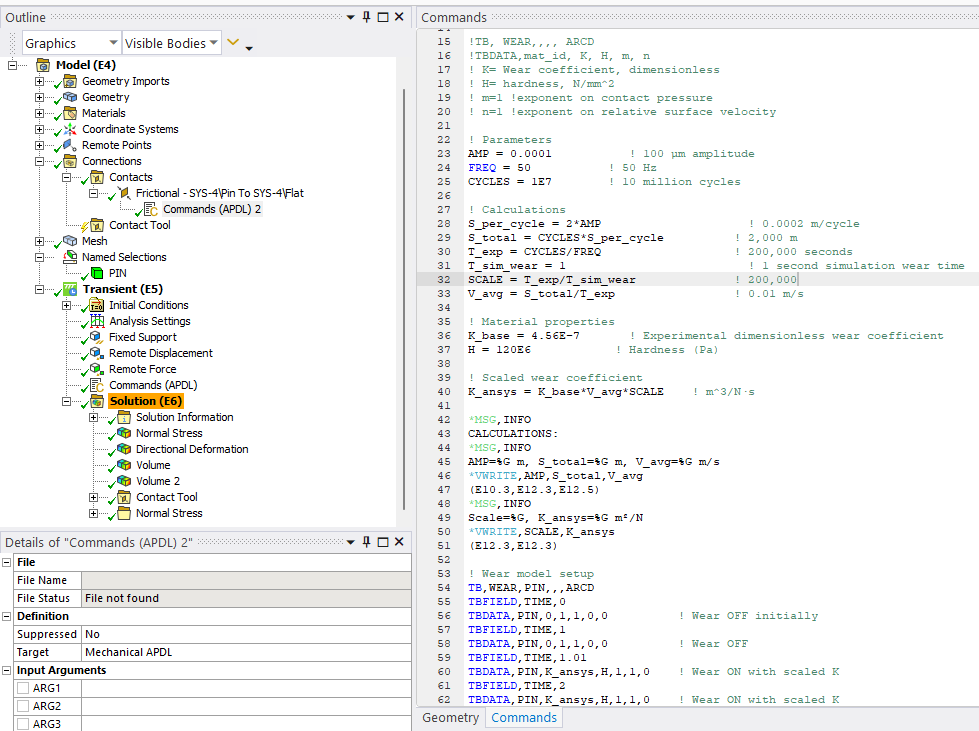
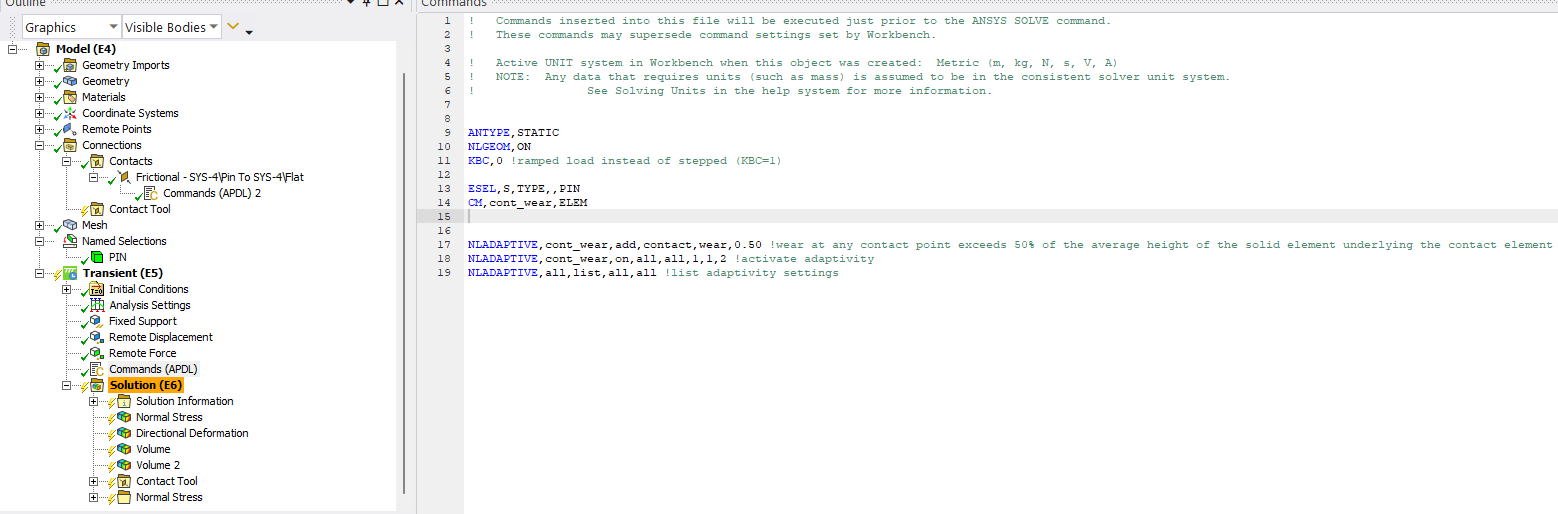
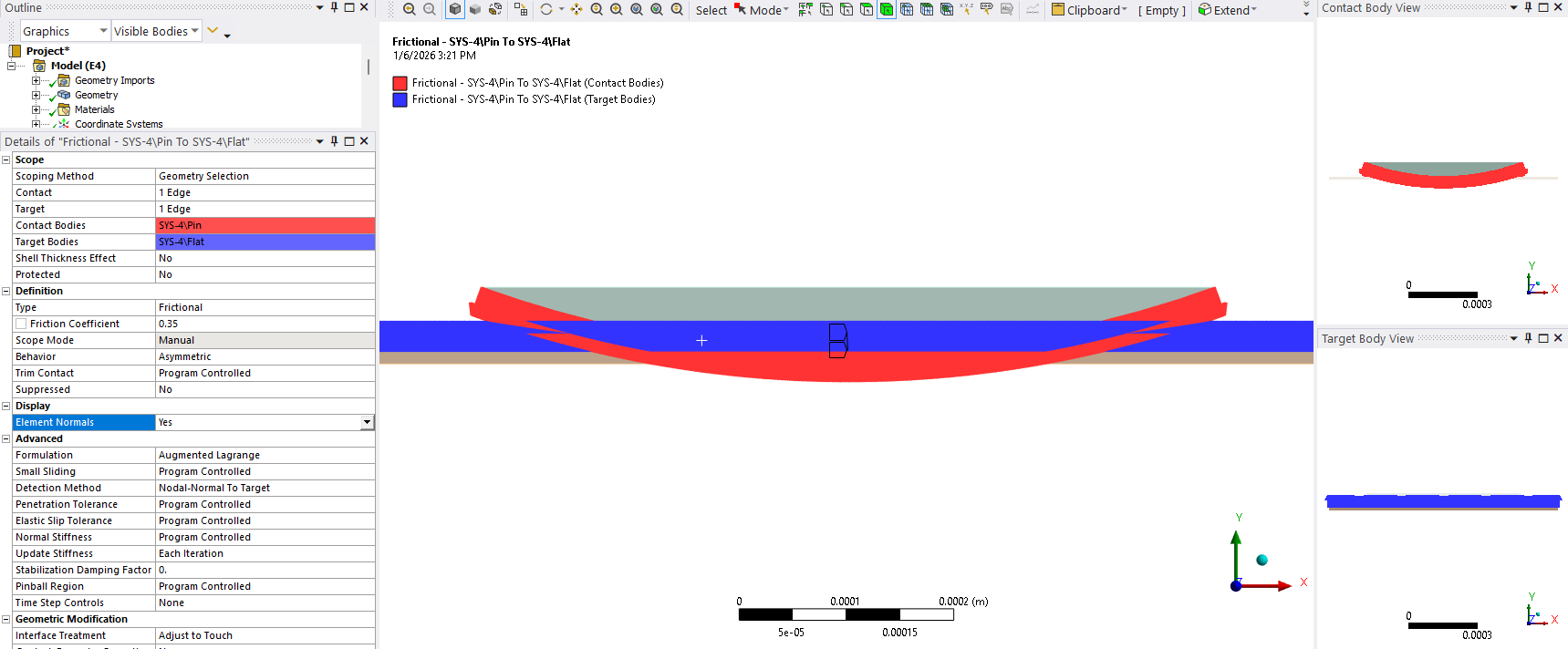
SubscriberI am following this example here: (https://ansyshelp.ansys.com/public/account/secured?returnurl=///Views/Secured/corp/v242/en/wb_wbtec/WBtecwear.html). I am trying to simulate fretting wear for a polymer pin and a metal flat using a 2D Archard wear model. I have scaled the wear coefficient to simulate wear for 10 million cycles in 1s. Below are the commands for the asymmetric frictional contact (only pin wears, COF 0.35) and non-linear adaptive meshing. I was able to generate a stress contour when the wear is off, but the stress contour disappears for the step where wear is ON. The number of contacting elements stays the same, as no real movement is simulated, just the wear coefficient. The solution converges, but no change in mesh happens, so no change occurs in the volume of the bodies. Why can I not produce wear? Here is a graphic for the model: https://imgur.com/a/XBmTeSH
keyo,cid,5,1 !KEYOPT(5) = 1 is set to close the gap with an auto contact surface offset (CNOF)
keyo,cid,10,2 !KEYOPT(10) = 2 is set to perform a contact stiffness update each iteration! Wear model setup
TB,WEAR,PIN,,,ARCD
TBFIELD,TIME,0
TBDATA,PIN,0,1,1,0,0 ! Wear OFF initially
TBFIELD,TIME,1
TBDATA,PIN,0,1,1,0,0 ! Wear OFF
TBFIELD,TIME,1.01
TBDATA,PIN,K_ansys,H,1,1,0 ! Wear ON with scaled K
TBFIELD,TIME,2
TBDATA,PIN,K_ansys,H,1,1,0 ! Wear ON with scaled KANTYPE,STATIC
NLGEOM,ON
KBC,0 !ramped load instead of stepped (KBC=1)!ESEL,S,TYPE,,PIN
!CM,wear,ELEM
!*GET,numelem,CM,cont_wear,ELEM ! Returns number of elements in componentNLADAPTIVE,all,add,contact,wear,0.50 !wear at any contact point exceeds 50% of the average height of the solid element underlying the contact element
NLADAPTIVE,all,on,all,all,1,,2 !activate adaptivity
NLADAPTIVE,all,list,all,all !list adaptivity settings
Listing the parameter just in case:! Parameters
AMP = 0.0001 ! 100 µm amplitude
FREQ = 50 ! 50 Hz
CYCLES = 1E7 ! 10 million cycles! Calculations
S_per_cycle = 2AMP ! 0.0002 m/cycle
S_total = CYCLES*S_per_cycle ! 2,000 m
T_exp = CYCLES / FREQ ! 200,000 seconds
T_sim_wear = 1 ! 1 second simulation wear time
SCALE = T_exp / T_sim_wear ! 200,000
V_avg = S_total / T_exp ! 0.01 m/s! Material properties
K_base = 4.56E-7 ! Experimental dimensionless wear coefficient
H = 120E6 ! Hardness (Pa)! Scaled wear coefficient
K_ansys = K_base*V_avg*SCALE ! m^3/N·s*MSG,INFO
CALCULATIONS:
*MSG,INFO
AMP=%G m, S_total=%G m, V_avg=%G m/s
*VWRITE,AMP,S_total,V_avg
(E10.3,E12.3,E12.5)
*MSG,INFO
Scale=%G, K_ansys=%G m²/N
*VWRITE,SCALE,K_ansys
(E12.3,E12.3)!TBDATA,mat_id, K, H, m, n
! K= Wear coefficient, dimensionless
! H= hardness, N/m^2
! m=1 !exponent on contact pressure
! n=1 !exponent on relative surface velocity -

January 6, 2026 at 6:06 pm
ErKo
Ansys EmployeeHi
Ansys employees do not provide extensive help looking through and troubleshooting apdl code/scripts - so other forum members can help, can you show the apdl commands you are using in the mechanical tree (show a screenshot of those) because clearly you are not following tech demo 43 and the way they (apdl commands) are placed first under the contact and then one under the analysis (antype, and NLGEOM commands are not in that example, so not sure what you are doing here).
All the bestErik
-
January 6, 2026 at 8:21 pm
somaroy
SubscriberHi, I would really appreciate any help from the members. I have applied the commands separately, one for contact and another for adaptive meshing under the analysis settings. I pasted them here together, sorry for the confusion. I will share the APDL tree and cmds screenshots below. I have tried many things to troubleshoot, and using NLGEOM to turn on non-linear geometry, hoping that will help with non-linear adaptive meshing (it did not). The demo 43 is an axisymmetric sliding wear, I am trying to simulate a plane strain oscillating fretting wear, with wear coefficient scaled up to account for 10 million cycles.

-
-
January 7, 2026 at 12:57 pm
peteroznewman
SubscriberHello somaroy,
I have used the Archard Wear model once before, but did not use nonlinear adaptive meshing. I am learning APDL so my skills are limited but I am willing to help you with your model. I will start with the Tech-Demo-43 model you mentioned to see how that works then look into the details of your model.
Please create a Workbench Archive .wbpz file of your model and upload that to a file sharing site such as Google Drive. Enable Sharing and set it so that Anyone with the link can download the file (not the default Restricted setting) and put the link to that file in your reply.
Regards,
Peter-
January 7, 2026 at 5:30 pm
somaroy
SubscriberHello Peter,
Thank you very much for your willingness to help and for taking the time to look into the Tech-Demo-43 example. Here is the link to a .wbpz file of my model: https://umd.box.com/s/lg2egqf77myrhn5wbj62795e5ldeh0qo
Please let me know if you have any issues accessing the file or if you need any additional information on the model/problem. I look forward to your feedback and suggestions.
Best regards,
Soma
-
-
January 7, 2026 at 10:50 pm
peteroznewman
SubscriberHello Soma,
Replies from Ansys employees are welcome if anyone sees something to comment on.
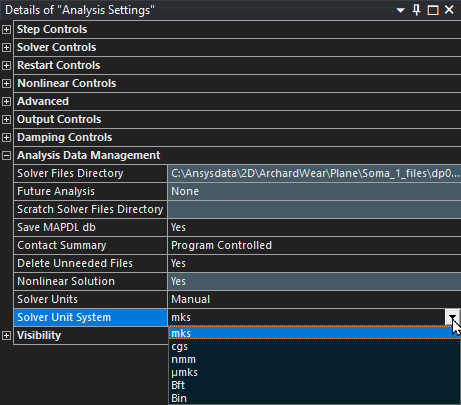
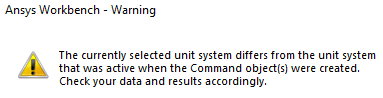
I have your file and downloaded the reference TD-43 to compare. The first time I ran TD-43 it failed to converge and I was given a warning that the units I used to Solve did not match the units used when the Command Object was created. I changed the units to match the comments in the Command object and it solved without an error. This is a common mistake that can be mitigated by editing the Solver Units under the Analysis Data Management in the Analysis Settings. Instead of allowing the Active System to be used, set it to Manual and pick the units system that matches the data in the Command objects, then it doesn’t matter what the active units system is when you hit the solve button.
I noticed in your model, there is a Warning.
Looking at your Command Object comments, it looks like all the numbers that require units are in the mks system.
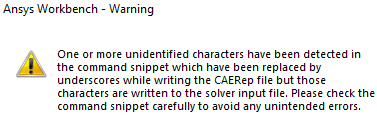
Here is another warning that is related to Commands (APDL) 2.
I don’t know what caused this warning.
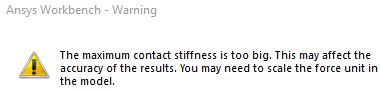
One more warning is this:
One way to do that is to change from N to kN on the units, but that comes with changing the length scale to mm and the time scale to ms then all the numbers in the Command objects have to be scaled also. I quickly made that change and that got rid of the warning, but I didn’t scale all the numbers in the command objects to put them in the new units. Another method to treat this warning is to change the Contact Normal Stiffness to Factor and use a value << 1 to soften the contact. Let’s see what the Ansys experts say on this warning.
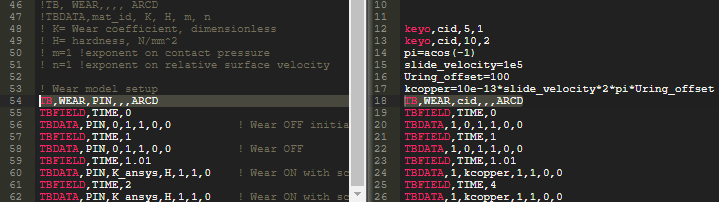
Here is a side-by-side comparison of a portion two command objects that are inserted below the Frictional Contact.
Your model on the left TD-43 on the right.The highlighted difference between TD-43 is it uses cid, the contact id.
TB,WEAR,cid,,,ARCD
while your model uses a Named Selection PIN body.
TB,WEAR,PIN,,,ARCD
Reading the Ansys Help page for the APDL command for TBDATA, the first argument is the starting location in table for entering data. It seems like the first argument should be numeric. I will see if editing these few lines to look more like the reference example helps.
Another difference between your model and the TB-43 reference model is that TB-43 is a Static Structural analysis while your model is a Transient Structural model. Have you tried running your model as a Static Structural model? I replaced the Transient with Static and it seems to run the same.
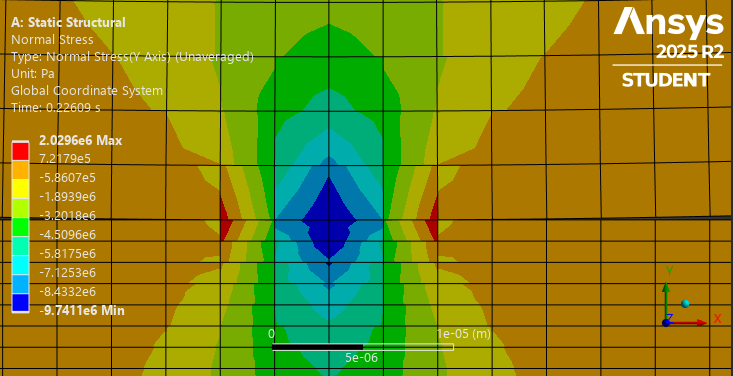
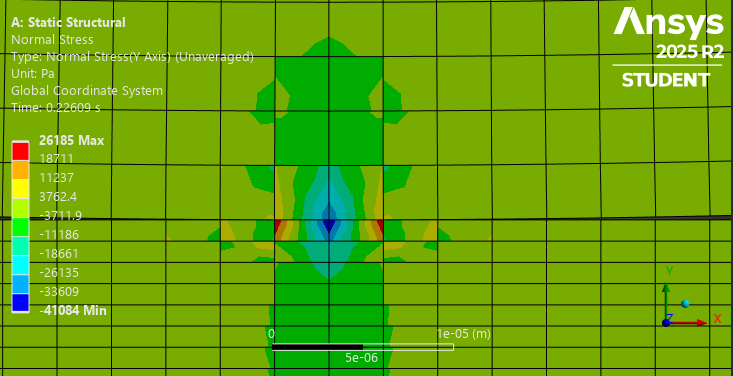
This model has a very light down force of 0.25 N per meter of depth for Plane Strain. Have you tried running it with a very high down force just to see if some wear occurs? When I ran with 250 N, a few more nodes came into contact, but there was no wear happening. I expect the model will be improved by using a smaller element size so more nodes are in contact under load.
First image is with 250 N, second image with 0.25 N of down force per meter of depth and there are only 2 nodes contacting at the end of step 1.
I’ll submit this now and reply with other information as I learn more. Maybe others will reply also.
Best regards,
Peter-
January 8, 2026 at 1:06 am
somaroy
SubscriberHello Peter,
Thank you so much for your detailed reply.
- I changed the unit system as you suggested. I believe I have consistently used MKS units; however, the SpaceClaim geometry model was on a small length scale. Not sure if that matters, because the warning went away after switching to manual.
- I also do not know what is causing the unidentified character warning.
- I will now try to fix the contact stiffness. Were you also able to generate wear doing that?
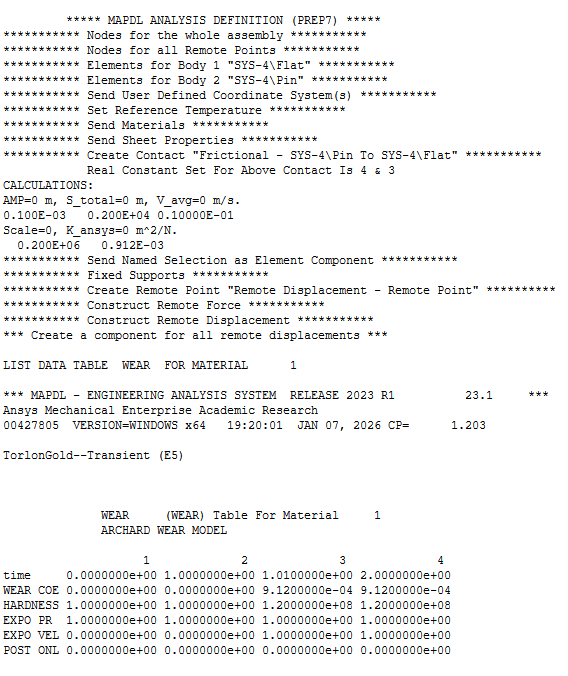
- The element information on the Named selection PIN body is read by the solver. Here you can see the wear table input for material 1.

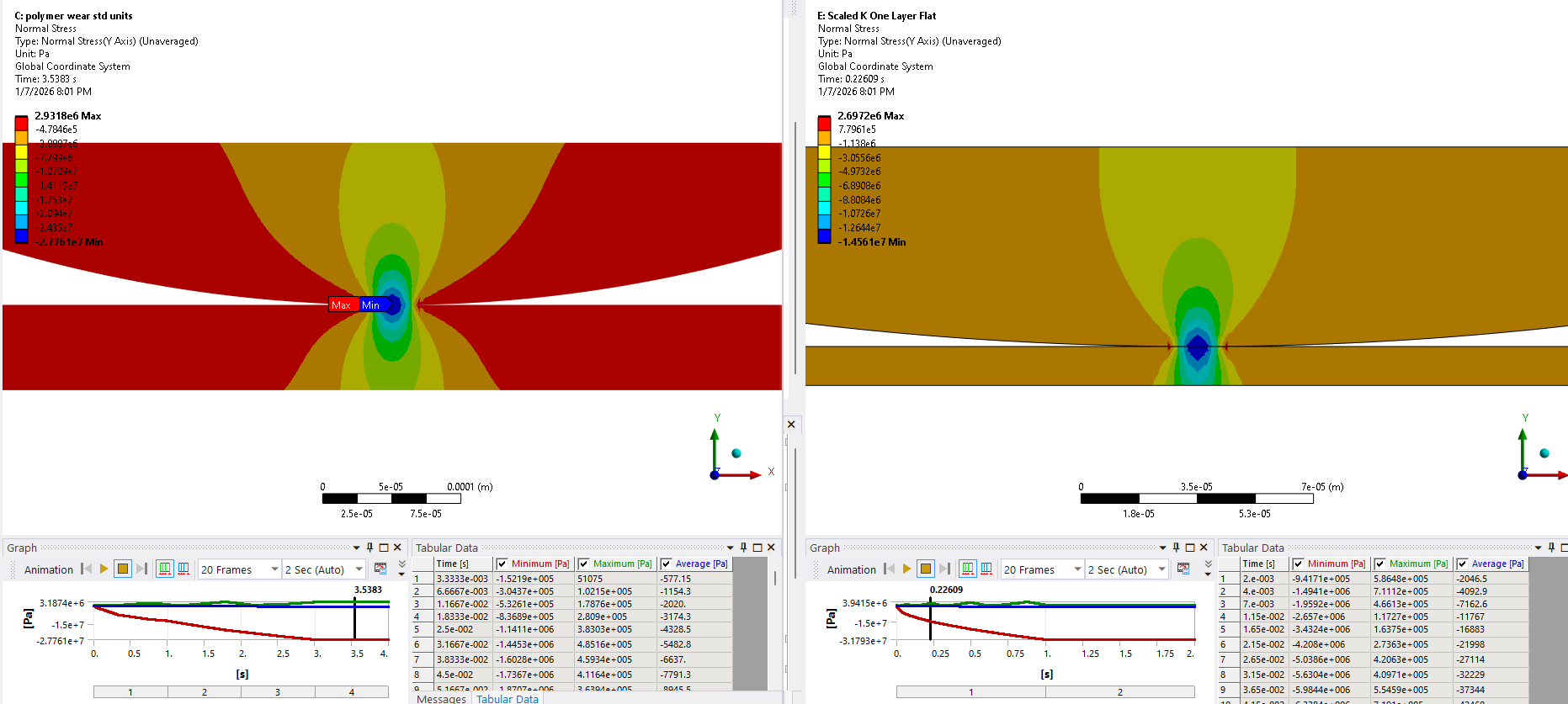
- I agree with you, I tried a static model, and that did not change anything. However, I was able to obtain this Hertzian contour below (static on the left, transient on the right), by a) changing the 2D behavior to Plane Stress with a thickness of 380 microns b) gradually increasing the load in multiple steps. However, no luck simulating wear yet. The reason behind the differences between static vs transient stress contours could be due to the gradual application of load for the static case. I kept the number of load steps = 2 for the transient one, similar to the file uploaded.

- If my Archard wear cmds are okay, is it possible to model wear without employing NLAD?
- I have tried changing the wear coefficient and normal load to force wear. Changing the wear COF did nothing. Increasing the load brought more nodes into contact, but no wear.
-
-
January 8, 2026 at 1:06 am
peteroznewman
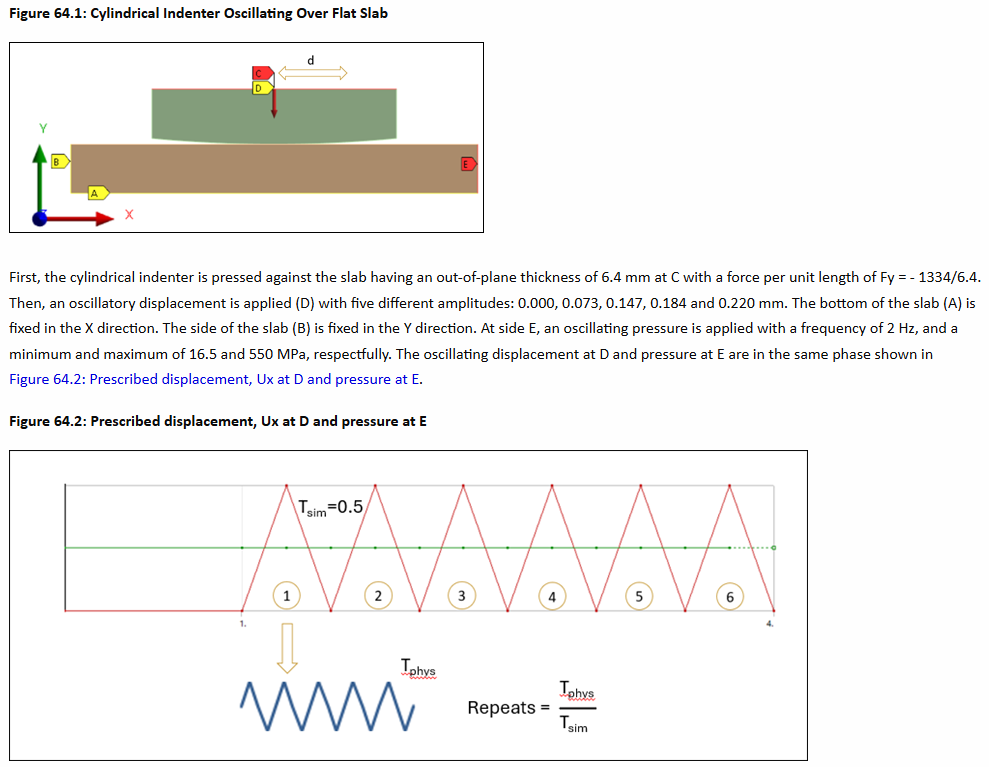
SubscriberThere is a Technology Showcase for Fretting in Chapter 64 that may be worth studying.
In that model, a lateral displacment of the cylinder block back and forth along the X axis as it pushes down on the flat slab.
-
January 8, 2026 at 1:43 am
peteroznewman
SubscriberHello Soma,
A good way to develop complicated models is break it down to the simplest model you can imagine that demonstrates the most important feature and get that working first. In your case, the most important feature is to see wear occuring, so yes you should definitely eliminate the complexity of the remeshing.

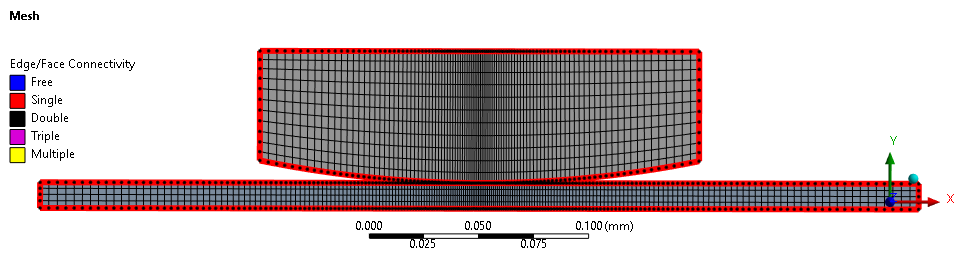
Edit the shape of the cylinder portion and cut off the pointy ends to make meshing easier to control and get nice quad elements. Use an Inflation mesh control to set the First Layer Thickness on the bottom edge to get a tall element instead of a short element to leave room for the wear to eat up the element height and keep going without needing a remesh.
-
January 8, 2026 at 1:47 pm

peteroznewman
SubscriberHello Soma,
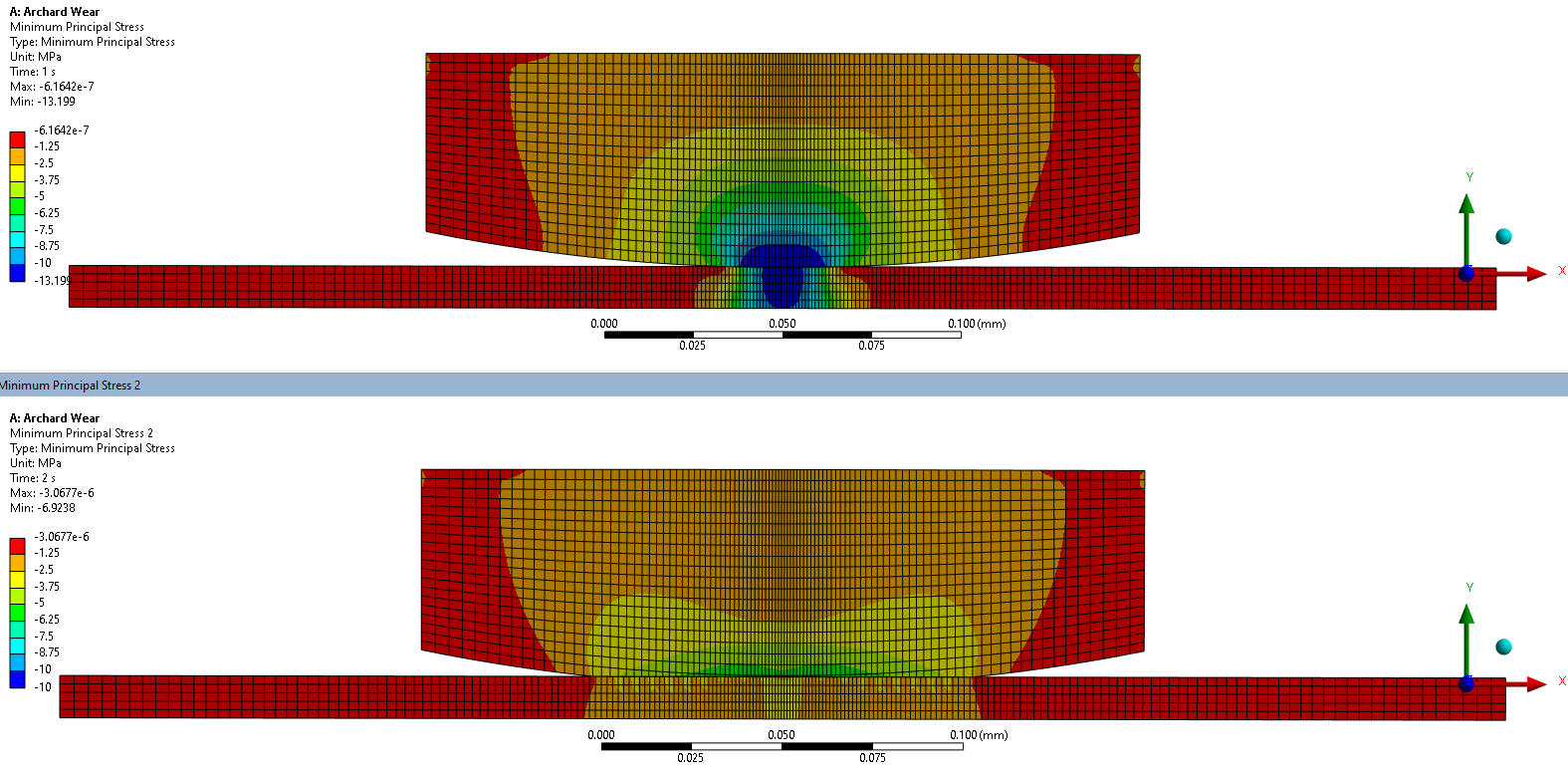
Good progress was made by starting from scratch. I constructed your geometry in SpaceClaim using mm instead of microns and clipped the ends off. I meshed the geometry using tall elements on the pin so that wear could happen without remeshing. I biased the mesh to the center so there were 13 nodes contacting at the end of Step 1 of a Static Structural anlaysis, then as the wear progressed, more and more nodes came into contact.
I setup the contact the same as you had. I used the APDL commands from TD-43 to paste into the command object under the contact, so the values are rubbish, but at least wear is occurring!
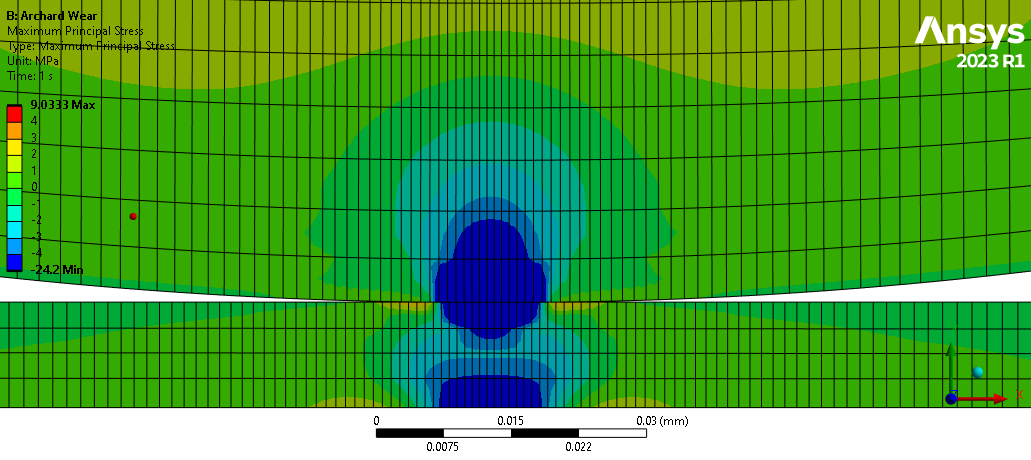
Below is the stress at the end of step 1.
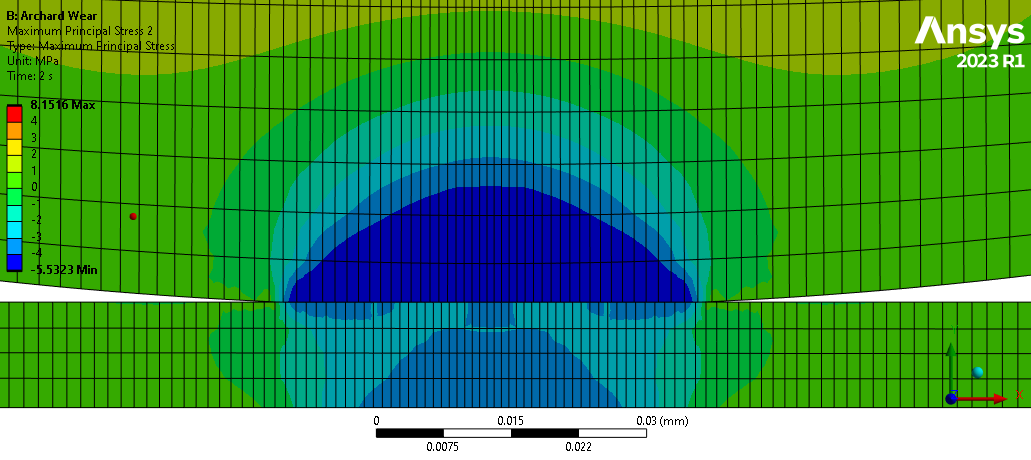
Below is the stress at the end of step 2 which is only 2 seconds of time, not the 4 seconds from TD-43.
Here is a link to the Ansys 2023 R1 archive. https://drive.google.com/file/d/1wbl5B6-KZwDLJULWV3Qt_Lobq1jgMagL/view?usp=sharing
You need to edit the values in the command object so that they match your sliding conditions. You can also look at the TD-64 I mentioned above that uses actual lateral sliding motion in the simulation of fretting. Let me know how it goes.
Best regards,
Peter
-
January 8, 2026 at 7:01 pm
somaroy
SubscriberHello Peter,
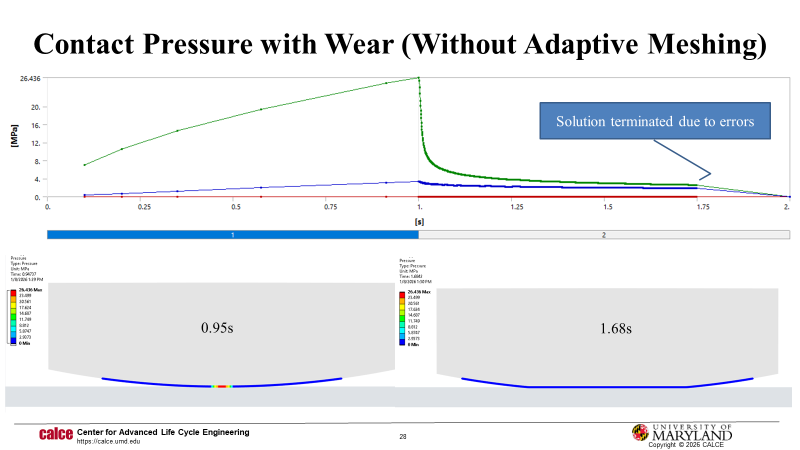
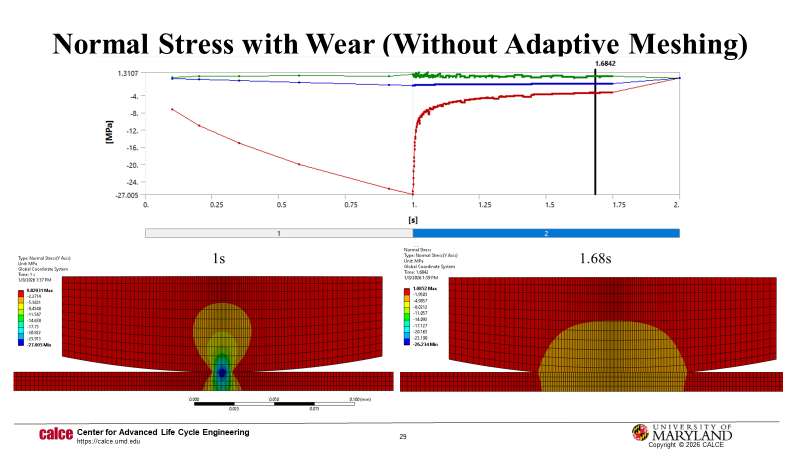
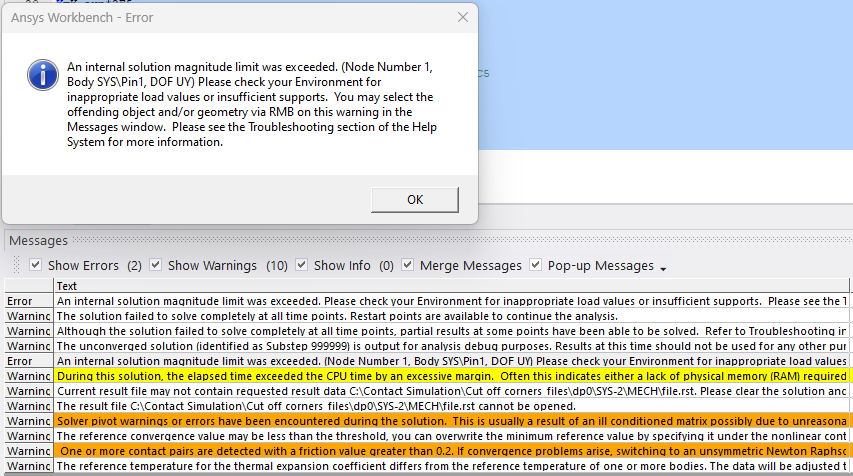
This is great! I used the geometry and mesh from your Ansys file, set the unit system to a manual nmm, and used these commands below for wear (without adaptive meshing). The contact elements wear about 50%, contact pressure drops to almost zero, and then the analysis is terminated after about 0.7s of wear due to an unconverged solution.
keyo,cid,5,1keyo,cid,10,2K_exp=4.56e-7 ! Experimental wear coeffK=K_exp*2E5H=120 ! MPaTB,WEAR,cid,,,ARCDTBFIELD,TIME,0TBDATA,1,0,H,1,0,0 ! Wear OFF initially, 1,K,H,m,n,C5TBFIELD,TIME,1TBDATA,1,0,H,1,0,0 ! Wear OFFTBFIELD,TIME,1.01TBDATA,1,K,H,1,0,0 ! Wear ON with scaled KTBFIELD,TIME,2TBDATA,1,K,H,1,0,0 ! Wear ON with scaled KI will do some debugging to fix the errors and warnings, then try to get the wear+adaptive meshing going. I have created a similar geometry with a 2 mm pin diameter, and will update here on the progress. Thank you so much for your advice and help!
Best regards,
Soma
-
January 9, 2026 at 1:30 pm
peteroznewman
SubscriberHello Soma,
I believe the errors are due to an insufficient amount of penetration in the contact relative to the wear increment. The penetration must be larger than the wear increment or the contact elements will go from a closed status to an open status resulting in rigid body motion. To prevent this, a very small time increment is used so that the wear increment is also small. Another way to achieve this is to allow more penetration by softening the contact.
Look at the TD-43 result. At the end of step 1, it has contact penetration of 0.04 mm with a contact length of about 20 mm.
I ran your model with the real wear parameters from above and at the end of step 1, it has a penetration of 0.000008 mm with a contact length of 0.01 mm.
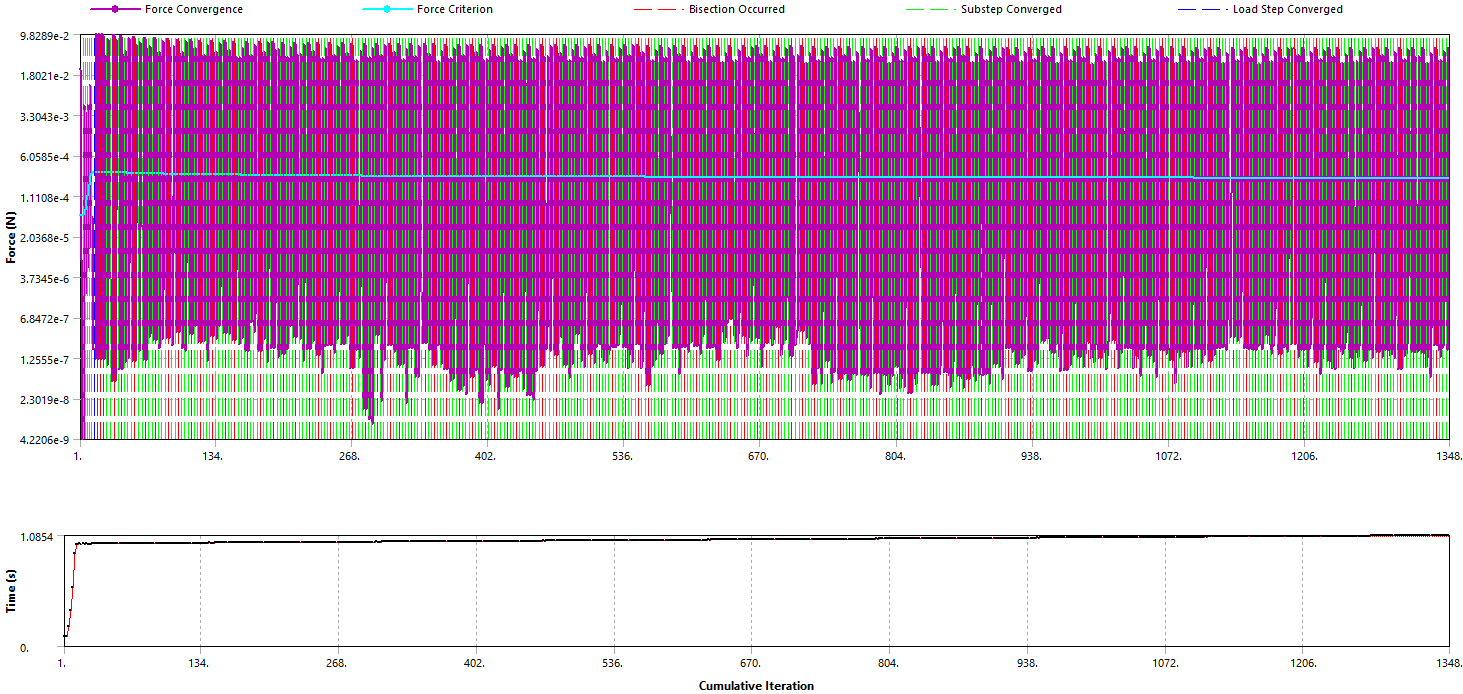
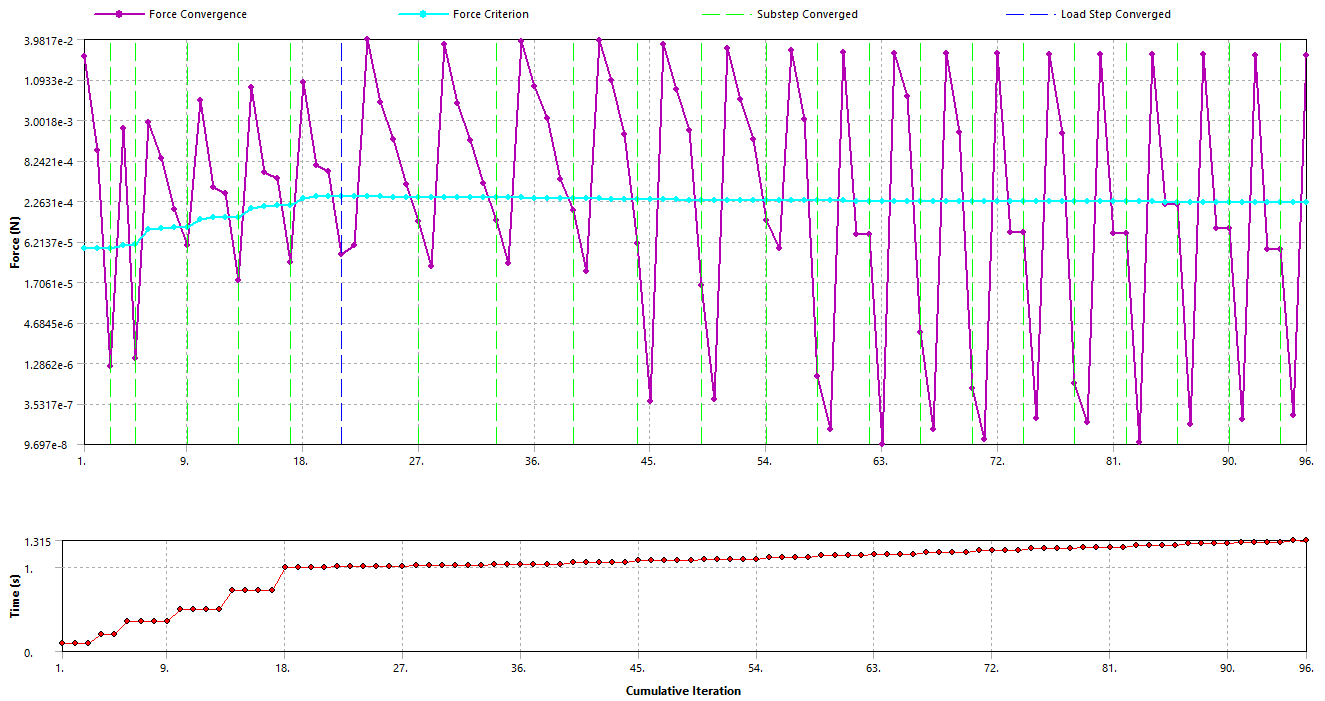
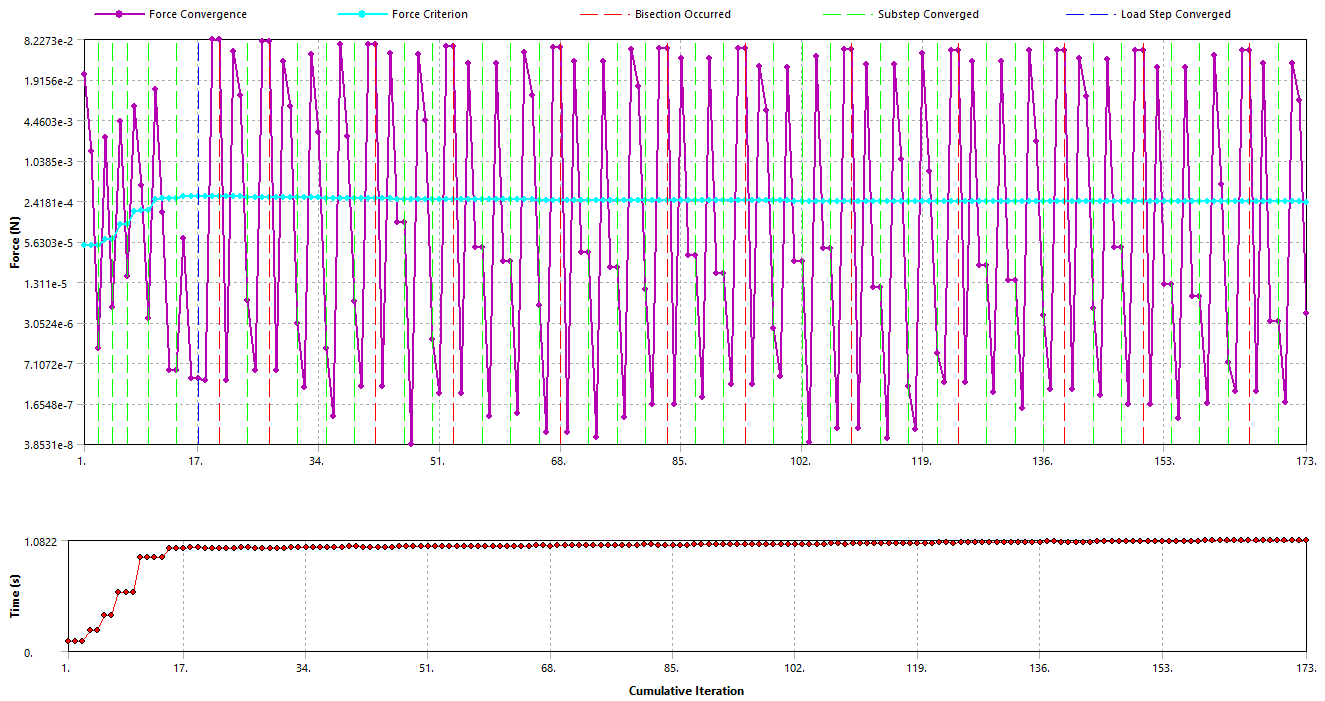
TD-43 had no Bisections, your model has a lot as shown in the image below.
I changed the Normal Stiffness and set it to a Factor of 0.01 as a trial. That made the Contact Penetration at step 1 be 0.0002 mm but it completely resolved the Bisection problem.
A second trial of a Normal Stiffness Factor value of 0.1 shows the Contact Penetration at step 1 to be 0.00005 mm but the bisections have returned.
Another way to fix the bisection issue with less penetration is to set the maximum time step to a smaller number, which will require longer solution times.
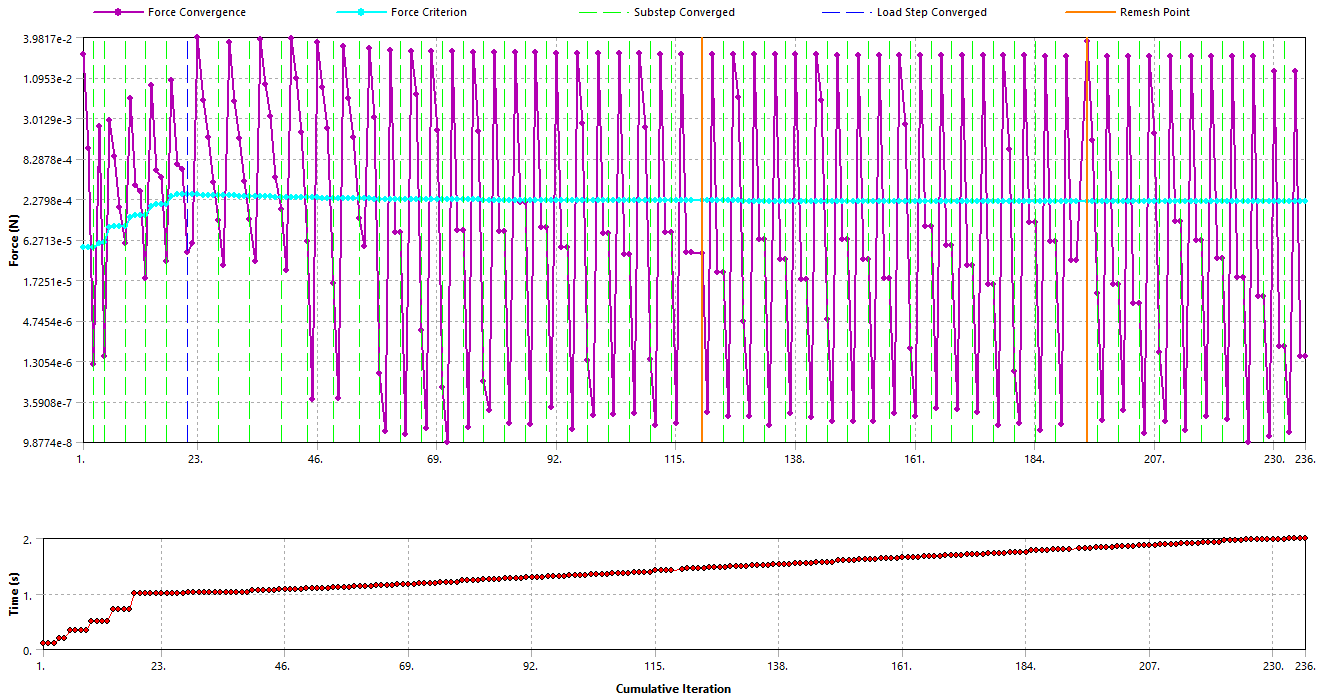
I changed the Mesh details and set the Element Order to Linear and cut the element size in half then inserted the NLADAPTIVE code for an end time of 2 s and the remesh is working!
Best regards,
Peter
-
January 16, 2026 at 12:12 am
peteroznewman
SubscriberSee related topic on the question of how to measure wear volume.
-
- You must be logged in to reply to this topic.
-
4974
-
1650
-
1386
-
1242
-
1021
© 2026 Copyright ANSYS, Inc. All rights reserved.