General Mechanical

General Mechanical

Topics related to Mechanical Enterprise, Motion, Additive Print and more.

Mode shapes of every mode and harmonic index in a cyclic symmetric modal analysi

    • t.tsiris
      Subscriber

      Hello,

      I have a cyclic symmetric sector where the total number of sectors is 11, which means that the harmonic indices are 0,1,2,3,4,5. I simulate the model to get the first 6 modes for every harmonic index. After that, I want to extract the mode shapes of every mode and harmonic index into a .txt file. I have found a way to do that, through APDL commands into Workbench, by inserting a variable that defines the number of modes that I want to extract. However, I cannot find a way to get the mode shapes of a harmonic index different to 0, since the software recognises that only 6 modes exist. These 6 modes are the first 6 modes with harmonic index=0. I haven't found a command that somehow considers also the harmonic index, so I can extract every possible mode shape.

      Is it feasible to get all the mode shapes for every inded though APDL commands or do I need to implement another way?

      Thank you in advance.

    • Akshay Singh
      Ansys Employee


      hi,
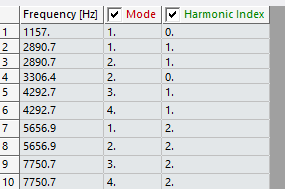
      Do you want to extract the following table into a text/csv file?

      If that is the case, you can shift select the full table, Right Click > Export>save as text file


      • t.tsiris
        Subscriber

        Hi Akshay,

        Thank you for your answer. I know that I can do that. However, I am interested in getting the mode shapes of every mode for every harmonic index, and not just the natural frequencies.

    • Akshay Singh
      Ansys Employee

      Mode shapes can be extracted as images or animations based on your requirement.

    • Akshay Singh
      Ansys Employee


      examples:
      https://ansyshelp.ansys.com/public/account/secured?returnurl=/Views/Secured/corp/v251/en/act_script/act_script_examples_export_result_animations.html

      https://ansyshelp.ansys.com/public/account/secured?returnurl=/Views/Secured/corp/v251/en/act_script/act_script_examples_export_result_images.html?q=ExportImage()


    • Dennis Chen
      Subscriber


      Hello, t.tsiris, you can do this through a python script.   I’ve written this as part of a project in the past.   below is an example script.   It just shows the idea, you will want to adjust based on your problems. 


      model = ExtAPI.DataModel.Project.Model

      mesh = model.Mesh

      materials = model.Materials

      analysis = model.Analyses[1]

      solution = analysis.Solution


      # with Transaction():

      for i in range(1,5):  # first 4 modes

          sol = solution.AddEquivalentStress()

          sol2 = solution.AddTotalDeformation()

          sol.CyclicMode = 1

          sol.HarmonicIndex = i

          sol2.CyclicMode = 1

          sol2.HarmonicIndex = i

          sol.Name = “Mode_” + str(i) + “_Stress”

          sol2.Name = “Mode_” + str(i) + “_Deformation”


      mode_start = 1

      mode_end = 80

      end_index = mode_end

      harmonic_index_1 = 9


      for j in range(mode_start, end_index, 2):  # EO 36

          sol = solution.AddEquivalentStress()

          sol2 = solution.AddTotalDeformation()

          sol.CyclicMode = j

          sol.HarmonicIndex = harmonic_index_1

          sol2.CyclicMode = j

          sol2.HarmonicIndex = harmonic_index_1

          sol.Name = “Mode_” + str(j+4) + “_Stress”

          sol2.Name = “Mode_” + str(j+4) + “_Deformation”


      with Transaction():

          solution.EvaluateAllResults()


          result_stress = DataModel.GetObjectsByType(DataModelObjectCategory.StressResult)

          result_deform = DataModel.GetObjectsByType(DataModelObjectCategory.DeformationResult)

          num_stress = 1

          for result in result_stress:

              result.Activate()

              result.Name = “mode” + str(num_stress) + “_stress”

              Graphics.ExportImage(“path” + result.Name + “.png”)

              # result.ExportToTextFile(“path” + result.Name + “.txt”)

              num_stress += 1


          num_deform = 1

          for result in result_deform:

              result.Activate()

              result.Name = “mode” + str(num_deform) + “_deformation”

              Graphics.ExportImage(“path” + result.Name + “.png”)

              # result.ExportToTextFile(“path” + result.Name + “.txt”)

              num_deform += 1

       

      • t.tsiris
        Subscriber

        Hi Dennis,

        Thanks a lot for your answer. It really helped me a lot!

Viewing 4 reply threads
  • You must be logged in to reply to this topic.