-
-
October 14, 2018 at 10:38 am
howard_hw
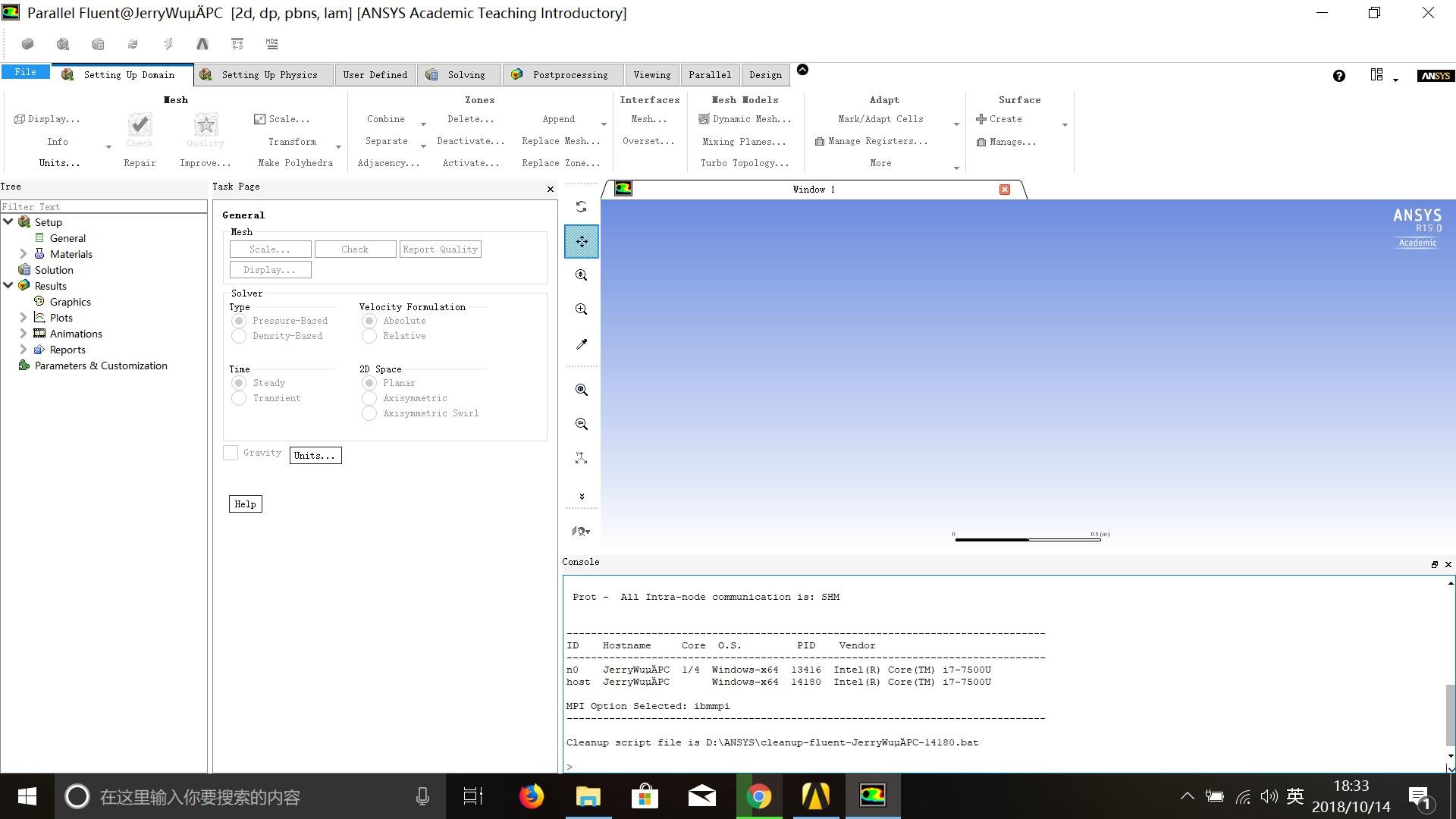
SubscriberHello, I was trying to use fluent 19.0 by directly opening it from workbench. However, the mesh did not show up and all the buttons in the fluent software were grey. Attached are the screenshots. Any suggestions? I would be grateful to any of them!
The computer had two graphics card, one from Intel and another is NVIDIA 940MX but I already set default graphics card to NVIDIA one.


-
October 15, 2018 at 4:14 am
Keyur Kanade
Ansys EmployeePlease export mesh from meshing using File --> Export. Export it in .msh format.
Open Fluent in standalone mode. i.e. go to windows start menu and type Fluent. Then open Fluent.Â
Try to read that mesh in Fluent.Â
Regards,
Keyur
Â
-
October 15, 2018 at 4:14 am
Keyur Kanade
Ansys EmployeeMoving this to installation category.Â
Regards,
Keyur
-
October 15, 2018 at 3:25 pm
howard_hw
Subscriberthanks for the reply!
I did try this method before and it worked fine. So do you mean that I cannot directly open fluent from workbench and work from there? This would work but it would be difficult for me to further do post-processing etc. What's the problem exactly then? Is there a way to fix that? Thanks
Â
-
October 15, 2018 at 3:45 pm
Rob
Forum ModeratorIt looks like Fluent hasn't read the mesh in as the draw is usually automatic and there's also no mesh data text in the TUI. Can you attach the mesh to another Fluent block (from Component systems): it should just be a WB glitch.Â
-
October 15, 2018 at 4:06 pm
howard_hw
Subscriberthanks for ur reply
I also did try that before, however, it still didn't work and showed the same situation as above.Â
-
October 15, 2018 at 5:04 pm
tsiriaks
Ansys EmployeeHi howard_hw,
I wonder if this is related to your username that has non-english alphabets included.
Can you try creating a test user profile that only has English letters as well as making sure that your systems is using English language as default ?
Thank you,
Win
-
October 16, 2018 at 5:25 am
Keyur Kanade
Ansys EmployeeGlad that standalone worked.Â
As tsiriaks mentioned, please change username and update.Â
Thanks!
Regards,
Keyur
-
October 16, 2018 at 10:49 am
howard_hw
Subscriberthanks, everyone! it turned out that it's the characters!
-
October 16, 2018 at 4:51 pm
tsiriaks
Ansys Employee Cool !
Thanks for the confirmation.
Win
-
July 7, 2019 at 1:05 pm
MLutfiFauzi
SubscriberHow to change username? -
July 10, 2019 at 9:21 pm
tsiriaks
Ansys Employee -
October 18, 2023 at 6:11 pm
Ruby Noble
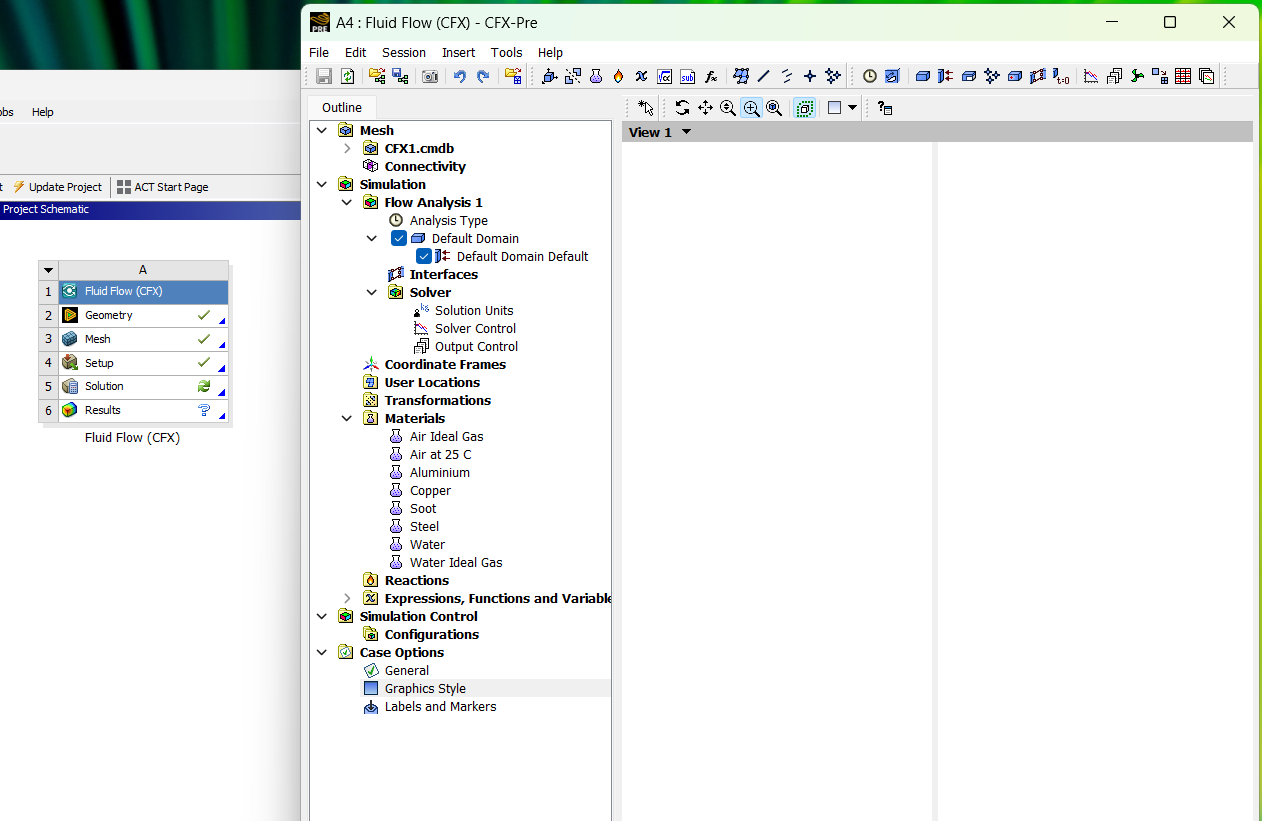
SubscriberHello, I am new to Ansys and a student. Im trying to do a basic fluid flow simulation as an exercise on CFX. I imported a premade model provided to me by my lecturer and set up the mesh correctly but the model does not show up at all in the pre CFX work space. But it had a green tick on the set up tool box. How do I veiw the model in pre CFX?
The picture provided is a screen print of what it looks like
-
- The topic ‘Mesh not showing up after fluent setup’ is closed to new replies.
-
5094
-
1830
-
1387
-
1248
-
1021
© 2026 Copyright ANSYS, Inc. All rights reserved.