

-
-
February 19, 2025 at 8:54 pm
Shangxuan Yu
SubscriberHi,
We installed Lumerical V251 and V242 on our Linux server machines, and I am trying to run simulation via lumapi api.
The first issue is that seems none of the visualizers is not working for V251, but they are fine on V242. If we open up a visulizer in V251, it just shows as a black window, but seems the tabs (although not visible) are still functioning, if we try to click blindly we can see subwindow pop-up. Interestingly, I also installed V251 on my window PC, it seems working fine.
Another issue is when I try to use lumapi to call FDTD, there is a black window pop up without showing the GUI, and after sometime it would crash without saving. It seems the software is successfully started, I tested it by use save() command to save the scripted simulation before the black window close by itself, and open the saved file on my windows computer, it seems very things is setup. This happens for both V251 and V242. I attached some screenshot FYI. I believe this issue is different from the last one, cuz the same code can run on another Linux server with same Lumerical version without this issue. So I assume this is related to some compatibility issue on my end, and I wonder how to solve it?
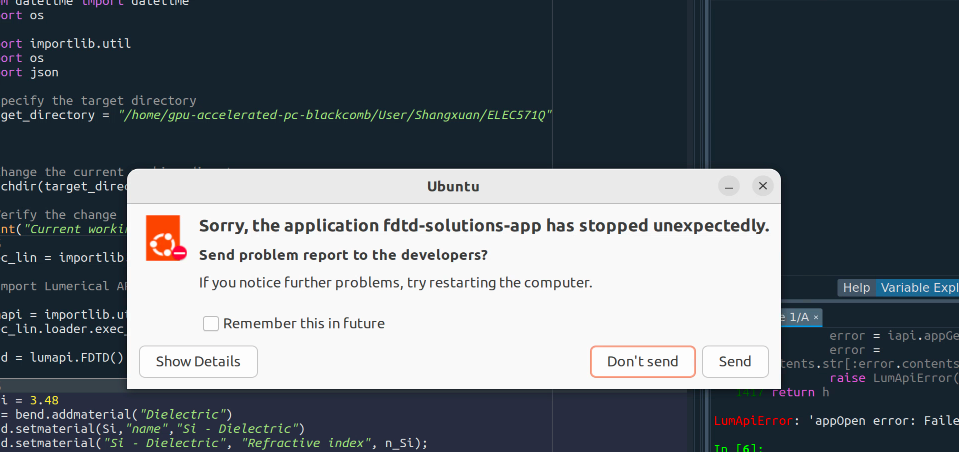
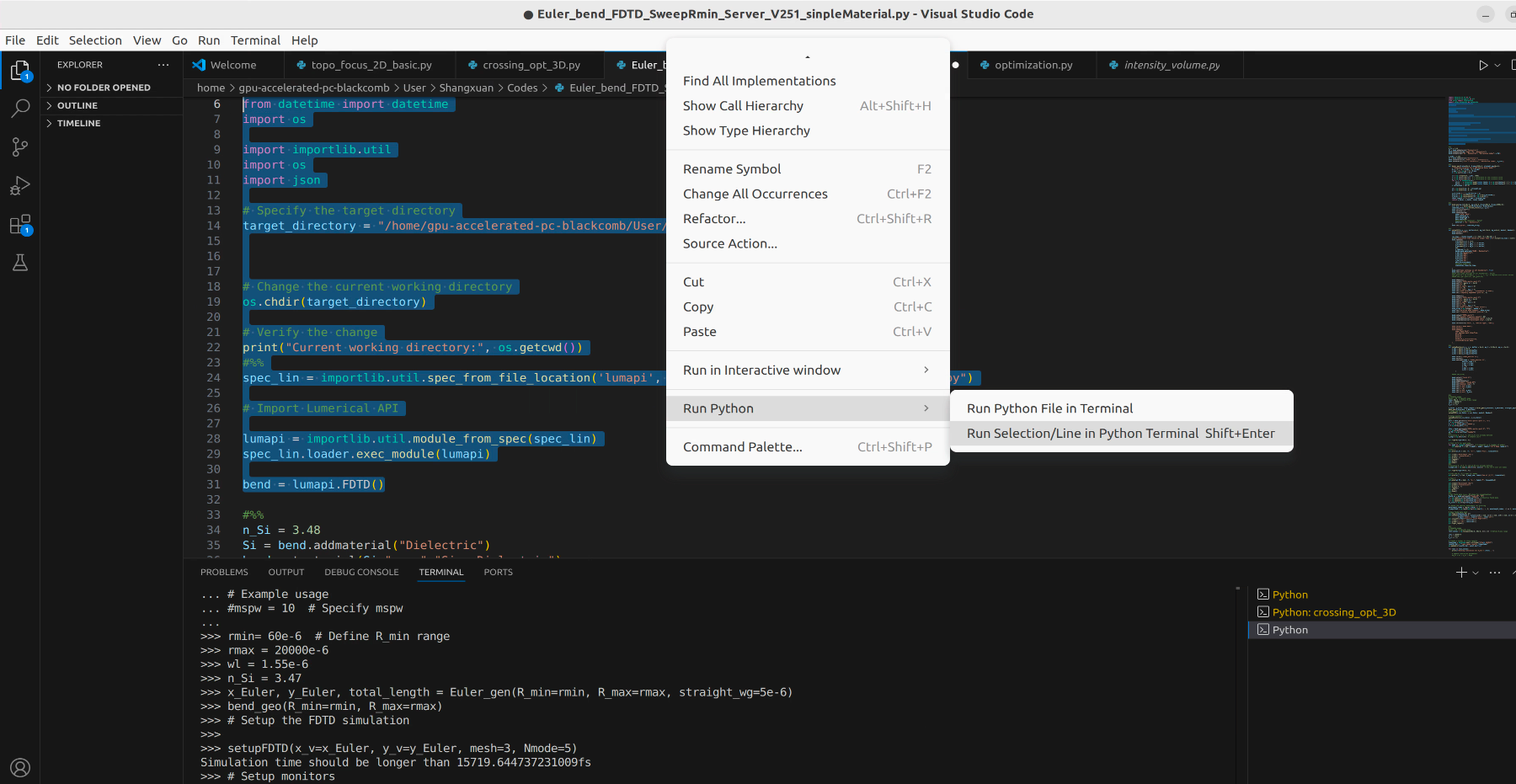
Thanks! Any advice would be appreciated!
-
February 20, 2025 at 9:36 pm
Lito
Ansys Employee@Shangxuan Yu,
Try the following:
- Before switching/opening/running different Lumerical versions, try to remove/delete the Lumerical Product Preference.ini file. In you case, "FDTD Solutions.ini" file. See this KB for more information: Ansys Lumerical product preference files – Ansys Optics
- Make sure that you are able to open/run the Lumerical FDTD CAD/IDE outside the script e.g. by running the CAD/IDE directly from the command line/terminal: (default install path shown below)
/opt/lumerical/v251/bin/fdtd-solutions & - Before switching/opening/running different Lumerical versions, try to remove/delete the Lumerical Product Preference.ini file. In you case, "FDTD Solutions.ini" file. See this KB for more information: Ansys Lumerical product preference files – Ansys Optics
-
February 21, 2025 at 2:06 amSubscriber
Hi Lito,
Thanks for the advice!
I tried deleting the FDTD Solutions.ini file (see screenshot), and re-run the code, it doesn't seem to help
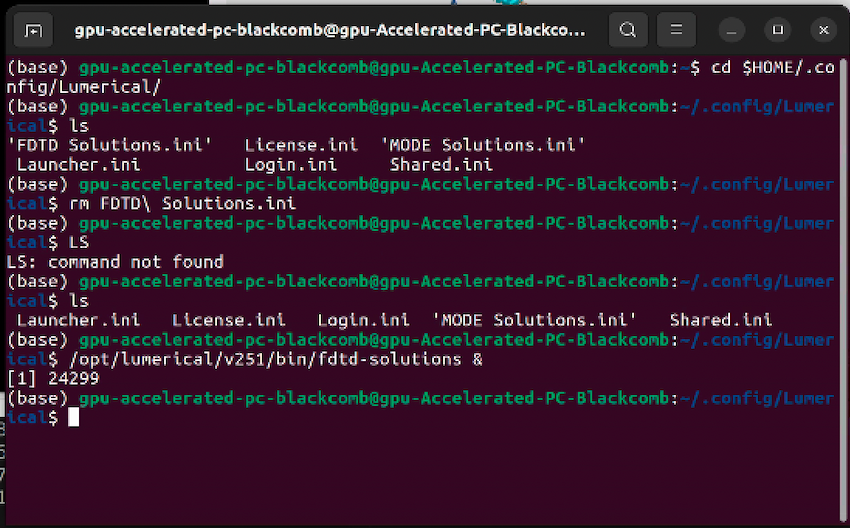
Then I tried:
/opt/lumerical/v251/bin/fdtd-solutions &
The GUI doesn't work if I start FDTD this way, still shows as black window. But if I use ANSYS optics launcher, there is no problem, the GUI works properly. Very wierd...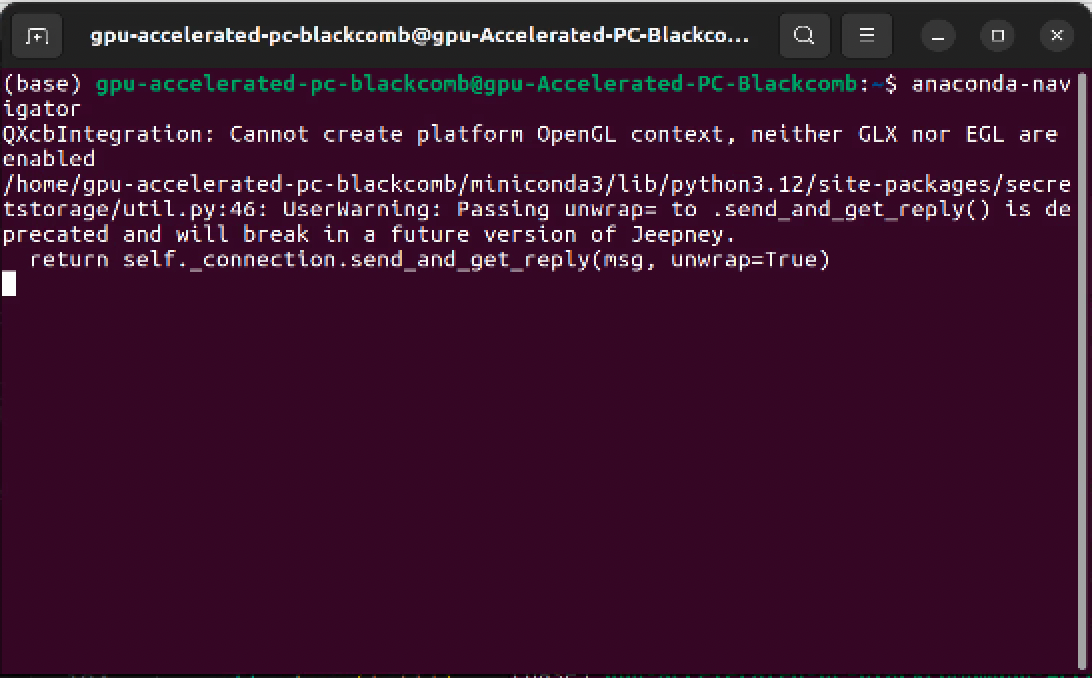 Another thing I noticed when I start my anaconda navigator from Terminal, I saw the following error about GUI:I don't know if this error is related.
 -
February 21, 2025 at 7:37 pmAnsys Employee
@Shangxuan Yu,
We will try and resolve the issue with 2025 R1. Do not open and run a different version of Lumerical.
- Please send a screenshot of the 2025 R1 Lumerical CAD/IDE error/issue.
- Does error indicate a “segmentation fault – core dump” ?
- Which distribution and version of Linux are you running?
- Make that you installed the required libraries for your system. See this KB for details.
-
February 23, 2025 at 6:36 amSubscriber
Hi Lito,
- Please send a screenshot of the 2025 R1 Lumerical CAD/IDE error/issue.
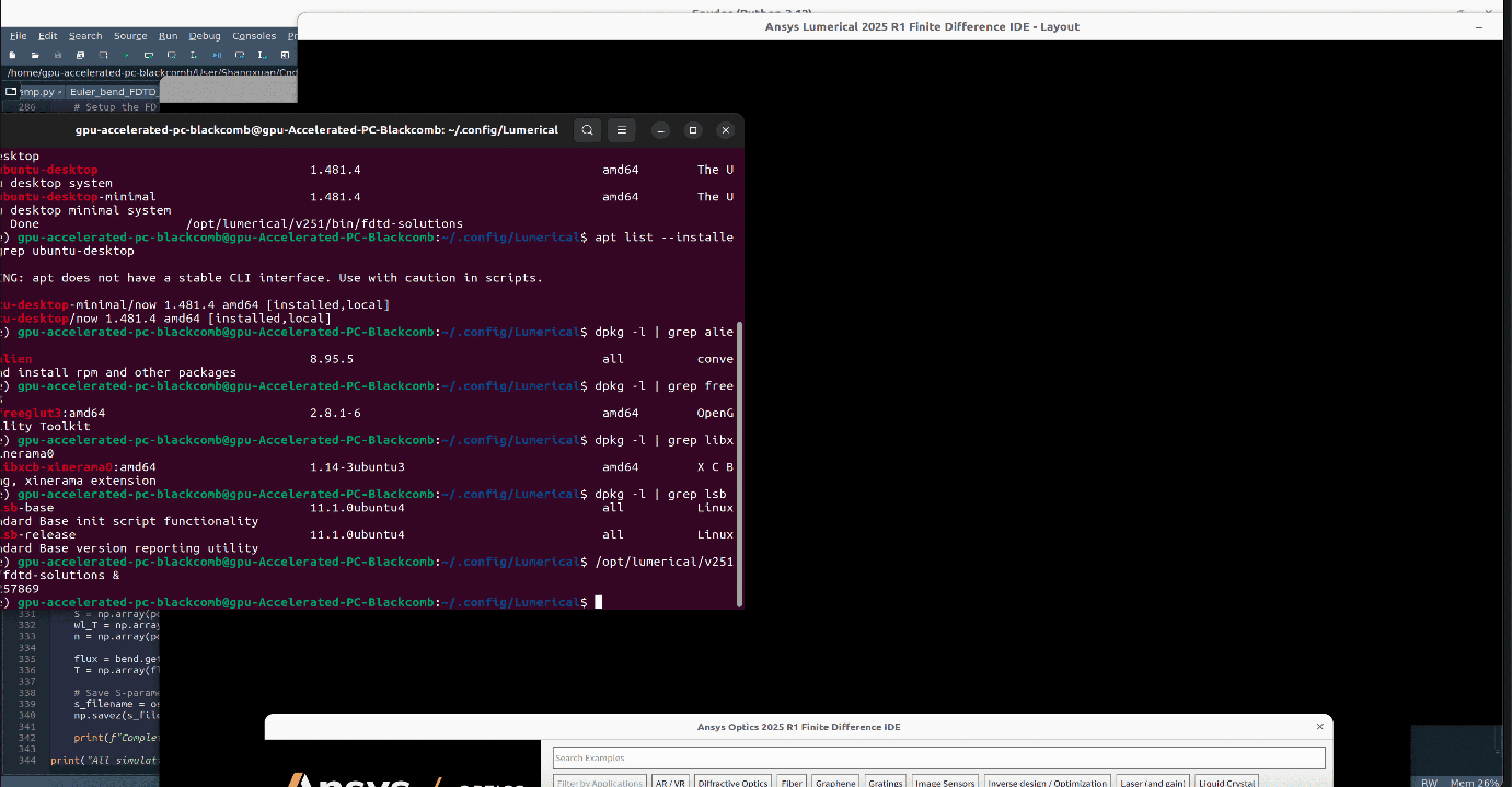
As I call my FDTD eitehr through script or in terminal, the GUI would not show up, but pop up as a black window. There seems to be no error info pop up.
- Does error indicate a “segmentation fault – core dump” ?
I didn't see this
- Which distribution and version of Linux are you running?
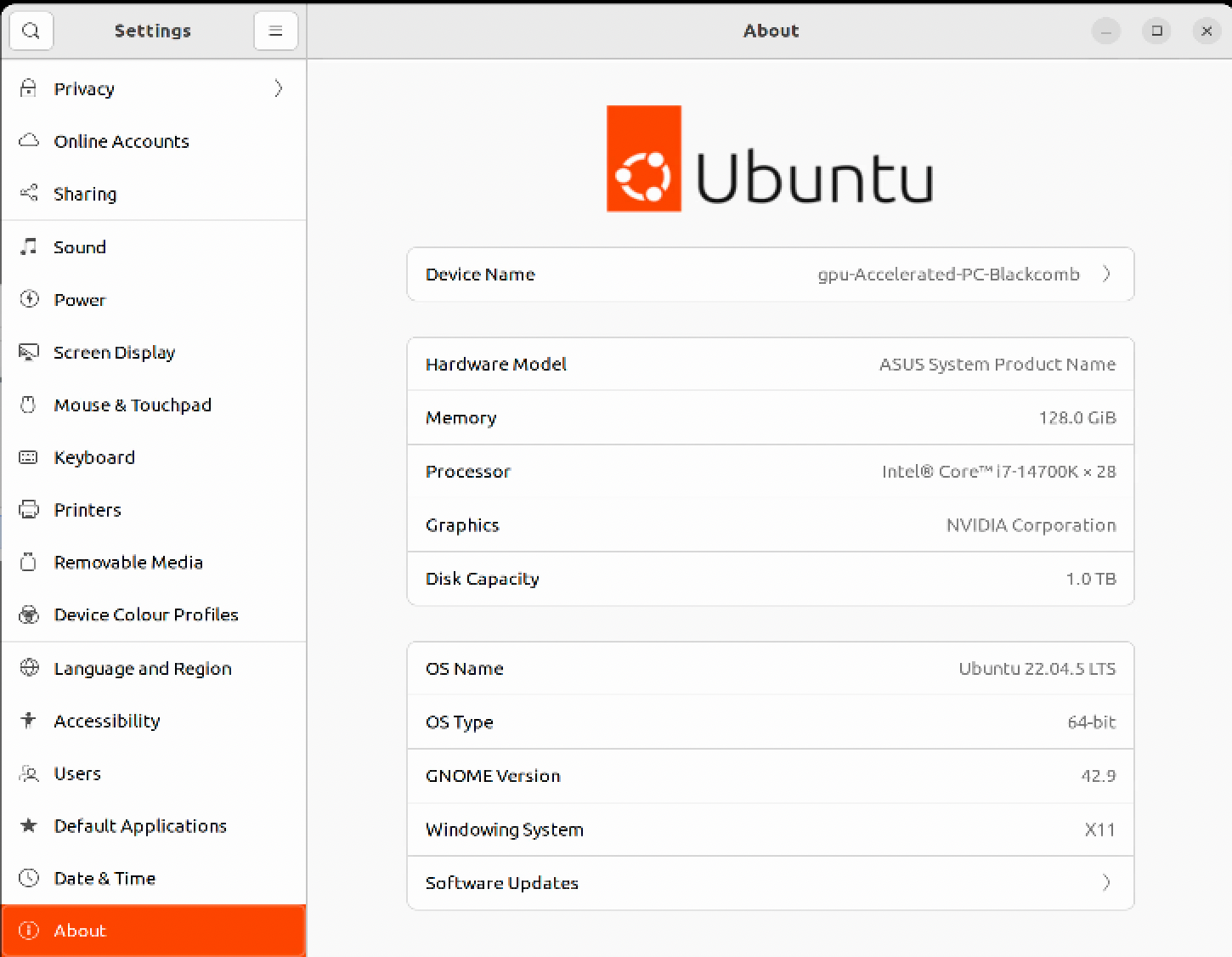
- Make that you installed the required libraries for your system. See this KB for details.
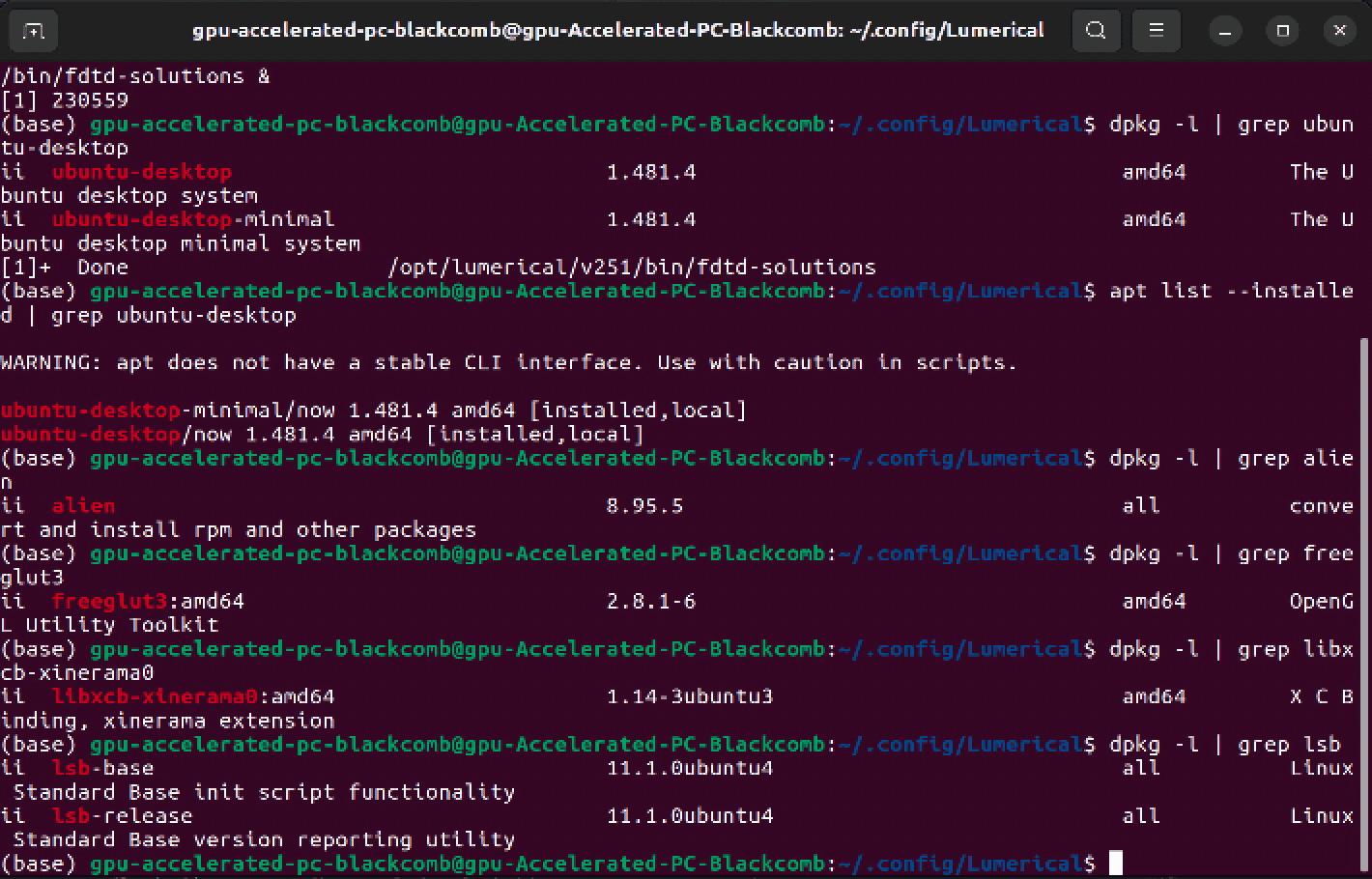
See screenshot above, it seems I have all packages required for Ubuntu.
-
February 24, 2025 at 6:03 pmAnsys Employee
@Shangxuan Yu,
By the way, how are you accessing your Ubuntu machine? e.g. VNC client, X11 forwarding, Exceed (ETX), etc?
Try running with 'fdtd-solutions-non-mesa' instead of 'fdtd-solutions' >> Launching Ansys Lumerical Products with and Without Mesa Library – Ansys Optics
Should the issue persist see these KB and send the output of the options/suggestions >>How to resolve system and OpenGL graphics related issues – Ansys Optics
-
February 24, 2025 at 7:33 pmSubscriber
Hi Lito,
I am remotely accessing it through NoMachine. But even if working locally on the machine doesn't help.
Running 'fdtd-solutions-non-mesa' doesn't seem to help, I still got an black window, and because I cannot run FDTD without mesa via the launcher, I cannot verify if it is helpful for the visualizer (Cuz I have no gui if I run FDTD through command line).
I also just tried all things suggested in How to resolve system and OpenGL graphics related issues – Ansys Optics And I got the following output:(base) gpu-accelerated-pc-blackcomb@gpu-Accelerated-PC-Blackcomb:~$ export QT_DEBUG_PLUGINS=1
(base) gpu-accelerated-pc-blackcomb@gpu-Accelerated-PC-Blackcomb:~$ ldd /opt/lumerical/v251/bin/platforms/libqxcb.solinux-vdso.so.1 (0x00007ffcb4f31000)libQt5XcbQpa.so.5 => /opt/lumerical/v251/bin/platforms/../../lib/libQt5XcbQpa.so.5 (0x0000791154422000)libfontconfig.so.1 => /lib/x86_64-linux-gnu/libfontconfig.so.1 (0x00007911543ca000)libfreetype.so.6 => /lib/x86_64-linux-gnu/libfreetype.so.6 (0x0000791154302000)libz.so.1 => /opt/lumerical/v251/bin/platforms/../../lib/libz.so.1 (0x00007911542e4000)libQt5Gui.so.5 => /opt/lumerical/v251/bin/platforms/../../lib/libQt5Gui.so.5 (0x0000791153a00000)libQt5DBus.so.5 => /opt/lumerical/v251/bin/platforms/../../lib/libQt5DBus.so.5 (0x0000791154255000)libQt5Core.so.5 => /opt/lumerical/v251/bin/platforms/../../lib/libQt5Core.so.5 (0x0000791153200000)libGL.so.1 => /lib/x86_64-linux-gnu/libGL.so.1 (0x00007911541ce000)libpthread.so.0 => /lib/x86_64-linux-gnu/libpthread.so.0 (0x00007911541c9000)libX11-xcb.so.1 => /lib/x86_64-linux-gnu/libX11-xcb.so.1 (0x00007911541c4000)libxcb-icccm.so.4 => /lib/x86_64-linux-gnu/libxcb-icccm.so.4 (0x00007911541bd000)libxcb-image.so.0 => /lib/x86_64-linux-gnu/libxcb-image.so.0 (0x00007911541b5000)libxcb-shm.so.0 => /lib/x86_64-linux-gnu/libxcb-shm.so.0 (0x00007911541b0000)libxcb-keysyms.so.1 => /lib/x86_64-linux-gnu/libxcb-keysyms.so.1 (0x00007911541ab000)libxcb-randr.so.0 => /lib/x86_64-linux-gnu/libxcb-randr.so.0 (0x0000791154198000)libxcb-render-util.so.0 => /lib/x86_64-linux-gnu/libxcb-render-util.so.0 (0x0000791154191000)libxcb-render.so.0 => /lib/x86_64-linux-gnu/libxcb-render.so.0 (0x0000791154182000)libxcb-shape.so.0 => /lib/x86_64-linux-gnu/libxcb-shape.so.0 (0x000079115417b000)libxcb-sync.so.1 => /lib/x86_64-linux-gnu/libxcb-sync.so.1 (0x0000791154171000)libxcb-xfixes.so.0 => /lib/x86_64-linux-gnu/libxcb-xfixes.so.0 (0x0000791154167000)libxcb-xinerama.so.0 => /lib/x86_64-linux-gnu/libxcb-xinerama.so.0 (0x0000791154162000)libxcb-xkb.so.1 => /lib/x86_64-linux-gnu/libxcb-xkb.so.1 (0x00007911539e2000)libxcb.so.1 => /lib/x86_64-linux-gnu/libxcb.so.1 (0x00007911539b8000)libXext.so.6 => /lib/x86_64-linux-gnu/libXext.so.6 (0x00007911539a3000)libX11.so.6 => /lib/x86_64-linux-gnu/libX11.so.6 (0x00007911530c0000)libSM.so.6 => /lib/x86_64-linux-gnu/libSM.so.6 (0x0000791153998000)libICE.so.6 => /lib/x86_64-linux-gnu/libICE.so.6 (0x000079115397b000)libxkbcommon-x11.so.0 => /lib/x86_64-linux-gnu/libxkbcommon-x11.so.0 (0x0000791153970000)libxkbcommon.so.0 => /lib/x86_64-linux-gnu/libxkbcommon.so.0 (0x0000791153929000)libdl.so.2 => /lib/x86_64-linux-gnu/libdl.so.2 (0x0000791153922000)libstdc++.so.6 => /lib/x86_64-linux-gnu/libstdc++.so.6 (0x0000791152e00000)libm.so.6 => /lib/x86_64-linux-gnu/libm.so.6 (0x0000791152d19000)libgcc_s.so.1 => /lib/x86_64-linux-gnu/libgcc_s.so.1 (0x0000791153902000)libc.so.6 => /lib/x86_64-linux-gnu/libc.so.6 (0x0000791152a00000)libexpat.so.1 => /lib/x86_64-linux-gnu/libexpat.so.1 (0x00007911538cf000)libuuid.so.1 => /lib/x86_64-linux-gnu/libuuid.so.1 (0x00007911538c6000)libpng16.so.16 => /lib/x86_64-linux-gnu/libpng16.so.16 (0x0000791153085000)libbrotlidec.so.1 => /lib/x86_64-linux-gnu/libbrotlidec.so.1 (0x00007911538b8000)libdbus-1.so.3 => /opt/lumerical/v251/bin/platforms/../../lib/libdbus-1.so.3 (0x0000791152400000)/lib64/ld-linux-x86-64.so.2 (0x0000791154546000)libGLdispatch.so.0 => /lib/x86_64-linux-gnu/libGLdispatch.so.0 (0x0000791152c61000)libGLX.so.0 => /lib/x86_64-linux-gnu/libGLX.so.0 (0x0000791153051000)libxcb-util.so.1 => /lib/x86_64-linux-gnu/libxcb-util.so.1 (0x00007911538ad000)libXau.so.6 => /lib/x86_64-linux-gnu/libXau.so.6 (0x00007911538a7000)libXdmcp.so.6 => /lib/x86_64-linux-gnu/libXdmcp.so.6 (0x000079115389f000)libbsd.so.0 => /lib/x86_64-linux-gnu/libbsd.so.0 (0x0000791153039000)libbrotlicommon.so.1 => /lib/x86_64-linux-gnu/libbrotlicommon.so.1 (0x0000791152c3e000)libsystemd.so.0 => /lib/x86_64-linux-gnu/libsystemd.so.0 (0x0000791152939000)libmd.so.0 => /lib/x86_64-linux-gnu/libmd.so.0 (0x000079115302c000)liblzma.so.5 => /lib/x86_64-linux-gnu/liblzma.so.5 (0x000079115290e000)libzstd.so.1 => /lib/x86_64-linux-gnu/libzstd.so.1 (0x000079115283f000)liblz4.so.1 => /lib/x86_64-linux-gnu/liblz4.so.1 (0x000079115281f000)libcap.so.2 => /lib/x86_64-linux-gnu/libcap.so.2 (0x0000791152c33000)libgcrypt.so.20 => /lib/x86_64-linux-gnu/libgcrypt.so.20 (0x00007911526e1000)libgpg-error.so.0 => /lib/x86_64-linux-gnu/libgpg-error.so.0 (0x00007911526bb000)(base) gpu-accelerated-pc-blackcomb@gpu-Accelerated-PC-Blackcomb:~$ /opt/lumerical/v251/bin/fdtd-solutions(base) gpu-accelerated-pc-blackcomb@gpu-Accelerated-PC-Blackcomb:~$ /opt/lumerical/v251/bin/fdtd-solutions(base) gpu-accelerated-pc-blackcomb@gpu-Accelerated-PC-Blackcomb:~$ export QT_QPA_PLATFORM=xcb(base) gpu-accelerated-pc-blackcomb@gpu-Accelerated-PC-Blackcomb:~$ /opt/lumerical/v251/bin/fdtd-solutions(base) gpu-accelerated-pc-blackcomb@gpu-Accelerated-PC-Blackcomb:~$ glxgearsglxinfo -BCommand 'glxgears' not found, but can be installed with:sudo apt install mesa-utilsCommand 'glxinfo' not found, but can be installed with:sudo apt install mesa-utils(base) gpu-accelerated-pc-blackcomb@gpu-Accelerated-PC-Blackcomb:~$ glxgearsCommand 'glxgears' not found, but can be installed with:sudo apt install mesa-utils(base) gpu-accelerated-pc-blackcomb@gpu-Accelerated-PC-Blackcomb:~$ sudo apt-get install mesa-utils[sudo] password for gpu-accelerated-pc-blackcomb:Reading package lists... DoneBuilding dependency tree... DoneReading state information... DoneThe following package was automatically installed and is no longer required:nvidia-firmware-550-550.107.02Use 'sudo apt autoremove' to remove it.The following additional packages will be installed:mesa-utils-binThe following NEW packages will be installed:mesa-utils mesa-utils-bin0 upgraded, 2 newly installed, 0 to remove and 1 not upgraded.Need to get 1,118 kB of archives.After this operation, 2,455 kB of additional disk space will be used.Do you want to continue? [Y/n] YGet:1 http://ca.archive.ubuntu.com/ubuntu jammy/universe amd64 mesa-utils-bin amd64 8.4.0-1ubuntu1 [53.8 kB]Get:2 http://ca.archive.ubuntu.com/ubuntu jammy/universe amd64 mesa-utils amd64 8.4.0-1ubuntu1 [1,065 kB]Fetched 1,118 kB in 1s (1,306 kB/s)Selecting previously unselected package mesa-utils-bin:amd64.(Reading database ... 217328 files and directories currently installed.)Preparing to unpack .../mesa-utils-bin_8.4.0-1ubuntu1_amd64.deb ...Unpacking mesa-utils-bin:amd64 (8.4.0-1ubuntu1) ...Selecting previously unselected package mesa-utils.Preparing to unpack .../mesa-utils_8.4.0-1ubuntu1_amd64.deb ...Unpacking mesa-utils (8.4.0-1ubuntu1) ...Setting up mesa-utils-bin:amd64 (8.4.0-1ubuntu1) ...Setting up mesa-utils (8.4.0-1ubuntu1) ...Processing triggers for man-db (2.10.2-1) ...(base) gpu-accelerated-pc-blackcomb@gpu-Accelerated-PC-Blackcomb:~$ glxgearsRunning synchronized to the vertical refresh. The framerate should beapproximately the same as the monitor refresh rate.91 frames in 5.0 seconds = 18.170 FPS27 frames in 5.2 seconds = 5.232 FPS18 frames in 5.1 seconds = 3.498 FPS19 frames in 5.2 seconds = 3.653 FPS18 frames in 5.1 seconds = 3.498 FPS18 frames in 5.1 seconds = 3.498 FPS19 frames in 5.2 seconds = 3.665 FPS18 frames in 5.1 seconds = 3.498 FPS18 frames in 5.1 seconds = 3.497 FPS18 frames in 5.2 seconds = 3.495 FPS20 frames in 5.2 seconds = 3.824 FPS19 frames in 5.2 seconds = 3.666 FPS23 frames in 5.3 seconds = 4.378 FPS20 frames in 5.2 seconds = 3.850 FPS18 frames in 5.1 seconds = 3.498 FPS19 frames in 5.2 seconds = 3.630 FPS18 frames in 5.1 seconds = 3.498 FPS18 frames in 5.1 seconds = 3.498 FPS19 frames in 5.2 seconds = 3.635 FPS18 frames in 5.1 seconds = 3.498 FPS18 frames in 5.1 seconds = 3.497 FPS18 frames in 5.1 seconds = 3.499 FPS19 frames in 5.2 seconds = 3.644 FPS18 frames in 5.1 seconds = 3.498 FPS18 frames in 5.2 seconds = 3.494 FPS18 frames in 5.1 seconds = 3.499 FPS18 frames in 5.0 seconds = 3.584 FPS18 frames in 5.1 seconds = 3.499 FPS18 frames in 5.1 seconds = 3.499 FPS18 frames in 5.1 seconds = 3.498 FPS20 frames in 5.2 seconds = 3.855 FPS(base) gpu-accelerated-pc-blackcomb@gpu-Accelerated-PC-Blackcomb:~$ glxinfo -Bname of display: :0display: :0 screen: 0direct rendering: YesMemory info (GL_NVX_gpu_memory_info):Dedicated video memory: 24564 MBTotal available memory: 24564 MBCurrently available dedicated video memory: 15 MBOpenGL vendor string: NVIDIA CorporationOpenGL renderer string: NVIDIA GeForce RTX 4090/PCIe/SSE2OpenGL core profile version string: 4.6.0 NVIDIA 550.120OpenGL core profile shading language version string: 4.60 NVIDIAOpenGL core profile context flags: (none)OpenGL core profile profile mask: core profileOpenGL version string: 4.6.0 NVIDIA 550.120OpenGL shading language version string: 4.60 NVIDIAOpenGL context flags: (none)OpenGL profile mask: (none)OpenGL ES profile version string: OpenGL ES 3.2 NVIDIA 550.120OpenGL ES profile shading language version string: OpenGL ES GLSL ES 3.20(base) gpu-accelerated-pc-blackcomb@gpu-Accelerated-PC-Blackcomb:~$ cd $HOME/.config/Lumerical/(base) gpu-accelerated-pc-blackcomb@gpu-Accelerated-PC-Blackcomb:~/.config/Lumerical$ ls'FDTD Solutions.ini' License.ini 'MODE Solutions.ini'Launcher.ini Login.ini Shared.ini(base) gpu-accelerated-pc-blackcomb@gpu-Accelerated-PC-Blackcomb:~/.config/Lumerical$ nano Shared.ini(base) gpu-accelerated-pc-blackcomb@gpu-Accelerated-PC-Blackcomb:~/.config/Lumerical$ /opt/lumerical/v251/bin/fdtd-solutionsI seems the only problem I had was that I didn't have glxgears, which I installed now. Also the frame rate is low because I am running an FDTD at the back. Anything suspicous you noticed? Or what else would suggest that I can try? -
February 24, 2025 at 7:43 pmSubscriber
Update: I just noticed, after the black window FDTD pop up, if I don'tr click it, it won't give any error in the terminal, but if I click anything in the black window, i got:
/opt/lumerical/v251/bin/fdtd-solutions: line 13: 371797 Segmentation fault (core dumped) $FDTD_BIN_DIR/fdtd-solutions-app "$@"
You mentioned this error in the previous reply. What does it indicate? -
February 24, 2025 at 11:46 pmAnsys Employee
Hi Shangxuan Yu,
The segmentation fault core dump error typically indicates missing libraries or incompatible OpenGL/Graphics libraries, either on the machine or the remote connection client. We do not use NoMachine and will not be able to run further tests using this remote client application on Windows.
- Are you able to physically log into the Ubuntu machine directly? e.g. not using NoMachine?
- Does it work if you are logged in directly into the machine not via NoMachine?
- Have you tried using a different GUI connection? e.g. VNC client or MobaXterm from a Windows PC? Remote connection to Linux with a graphical interface – Ansys Optics
- Can you send the output of the following?
ldd /opt/lumerical/v251/bin/fdtd-solutions-app
Thank you!
-
February 25, 2025 at 12:46 amSubscriber
Hi Lito,
I tried physically access the machine, and run the same code, it is the same black window as I saw when I remote to the system.
I have not try other GUI connection, cuz It is a shared system in a protected network, I don't want to disturb use of the system, if we deem it is necessary, I can ask our IT stuff to help.
But I double it has something to do with NoMachine, I used to work with another exactly the same server (in terms of hardware and network configuration) via NoMachine and same Lumerical version (v251), and it worked properly.
Following is what I got from
ldd /opt/lumerical/v251/bin/fdtd-solutions-app
(base) gpu-accelerated-pc-blackcomb@gpu-Accelerated-PC-Blackcomb:~/.config/Lumerical$ ldd /opt/lumerical/v251/bin/fdtd-solutions-applinux-vdso.so.1 (0x00007fff171c8000)libinteropapi-remote.so.1 => /opt/lumerical/v251/bin/../lib/libinteropapi-remote.so.1 (0x0000795b78dd1000)libifcore.so.5 => /opt/lumerical/v251/bin/../lib/libifcore.so.5 (0x0000795b78c99000)libtbb.so.12 => /opt/lumerical/v251/bin/../lib/libtbb.so.12 (0x0000795b78800000)librt.so.1 => /lib/x86_64-linux-gnu/librt.so.1 (0x0000795b78c86000)libmkl_intel_lp64.so.2 => /opt/lumerical/v251/bin/../lib/libmkl_intel_lp64.so.2 (0x0000795b77400000)libmkl_core.so.2 => /opt/lumerical/v251/bin/../lib/libmkl_core.so.2 (0x0000795b73000000)libmkl_intel_thread.so.2 => /opt/lumerical/v251/bin/../lib/libmkl_intel_thread.so.2 (0x0000795b6f800000)libtetgen.so => /opt/lumerical/v251/bin/../lib/libtetgen.so (0x0000795b78be6000)libpredicates.so => /opt/lumerical/v251/bin/../lib/libpredicates.so (0x0000795b78ba8000)liblumhdf5.so.10.2.0 => /opt/lumerical/v251/bin/../lib/liblumhdf5.so.10.2.0 (0x0000795b6f400000)liblumhdf5_hl.so.10.2.0 => /opt/lumerical/v251/bin/../lib/liblumhdf5_hl.so.10.2.0 (0x0000795b78b84000)libxml2.so.2 => /opt/lumerical/v251/bin/../lib/libxml2.so.2 (0x0000795b78697000)libxmlsec1.so.1 => /opt/lumerical/v251/bin/../lib/libxmlsec1.so.1 (0x0000795b78b11000)libxmlsec1-openssl.so.1 => /opt/lumerical/v251/bin/../lib/libxmlsec1-openssl.so.1 (0x0000795b78acf000)libavcodec.so.57 => /opt/lumerical/v251/bin/../lib/libavcodec.so.57 (0x0000795b6de00000)libswresample.so.2 => /opt/lumerical/v251/bin/../lib/libswresample.so.2 (0x0000795b78ab0000)libavutil.so.55 => /opt/lumerical/v251/bin/../lib/libavutil.so.55 (0x0000795b7861c000)libavformat.so.57 => /opt/lumerical/v251/bin/../lib/libavformat.so.57 (0x0000795b6da00000)libswscale.so.4 => /opt/lumerical/v251/bin/../lib/libswscale.so.4 (0x0000795b6f779000)libyaml-cpp.so.0.6 => /opt/lumerical/v251/bin/../lib/libyaml-cpp.so.0.6 (0x0000795b6f6fd000)libjsonSchemaWrapper.so => /opt/lumerical/v251/bin/../lib/libjsonSchemaWrapper.so (0x0000795b6f382000)libpskernel.so => /opt/lumerical/v251/bin/../lib/libpskernel.so (0x0000795b68600000)libhps_core.so => /opt/lumerical/v251/bin/../lib/libhps_core.so (0x0000795b65800000)libhps_sprk.so => /opt/lumerical/v251/bin/../lib/libhps_sprk.so (0x0000795b65200000)libhps_sprk_ops.so => /opt/lumerical/v251/bin/../lib/libhps_sprk_ops.so (0x0000795b64c00000)libhps_sprk_parasolid.so => /opt/lumerical/v251/bin/../lib/libhps_sprk_parasolid.so (0x0000795b64600000)liblumqzip.so => /opt/lumerical/v251/bin/../lib/liblumqzip.so (0x0000795b78a9e000)libvtkChartsCore-9.3.so.1 => /opt/lumerical/v251/bin/../lib/libvtkChartsCore-9.3.so.1 (0x0000795b6dc40000)libvtkCommonColor-9.3.so.1 => /opt/lumerical/v251/bin/../lib/libvtkCommonColor-9.3.so.1 (0x0000795b78a80000)libvtkCommonComputationalGeometry-9.3.so.1 => /opt/lumerical/v251/bin/../lib/libvtkCommonComputationalGeometry-9.3.so.1 (0x0000795b72fca000)libvtkCommonCore-9.3.so.1 => /opt/lumerical/v251/bin/../lib/libvtkCommonCore-9.3.so.1 (0x0000795b63200000)libvtkCommonDataModel-9.3.so.1 => /opt/lumerical/v251/bin/../lib/libvtkCommonDataModel-9.3.so.1 (0x0000795b62c00000)libvtkCommonExecutionModel-9.3.so.1 => /opt/lumerical/v251/bin/../lib/libvtkCommonExecutionModel-9.3.so.1 (0x0000795b6f287000)libvtkCommonMath-9.3.so.1 => /opt/lumerical/v251/bin/../lib/libvtkCommonMath-9.3.so.1 (0x0000795b773d8000)libvtkCommonMisc-9.3.so.1 => /opt/lumerical/v251/bin/../lib/libvtkCommonMisc-9.3.so.1 (0x0000795b62600000)libvtkCommonSystem-9.3.so.1 => /opt/lumerical/v251/bin/../lib/libvtkCommonSystem-9.3.so.1 (0x0000795b72fad000)libvtkCommonTransforms-9.3.so.1 => /opt/lumerical/v251/bin/../lib/libvtkCommonTransforms-9.3.so.1 (0x0000795b685c3000)libvtkDICOMParser-9.3.so.1 => /opt/lumerical/v251/bin/../lib/libvtkDICOMParser-9.3.so.1 (0x0000795b72f90000)libvtkdoubleconversion-9.3.so.1 => /opt/lumerical/v251/bin/../lib/libvtkdoubleconversion-9.3.so.1 (0x0000795b6f6ed000)libvtkexpat-9.3.so.1 => /opt/lumerical/v251/bin/../lib/libvtkexpat-9.3.so.1 (0x0000795b68595000)libvtkFiltersCore-9.3.so.1 => /opt/lumerical/v251/bin/../lib/libvtkFiltersCore-9.3.so.1 (0x0000795b61a00000)libvtkFiltersExtraction-9.3.so.1 => /opt/lumerical/v251/bin/../lib/libvtkFiltersExtraction-9.3.so.1 (0x0000795b683f0000)libvtkFiltersGeneral-9.3.so.1 => /opt/lumerical/v251/bin/../lib/libvtkFiltersGeneral-9.3.so.1 (0x0000795b61400000)libvtkFiltersGeneric-9.3.so.1 => /opt/lumerical/v251/bin/../lib/libvtkFiltersGeneric-9.3.so.1 (0x0000795b683c0000)libvtkFiltersGeometry-9.3.so.1 => /opt/lumerical/v251/bin/../lib/libvtkFiltersGeometry-9.3.so.1 (0x0000795b65690000)libvtkFiltersHybrid-9.3.so.1 => /opt/lumerical/v251/bin/../lib/libvtkFiltersHybrid-9.3.so.1 (0x0000795b655a1000)libvtkFiltersModeling-9.3.so.1 => /opt/lumerical/v251/bin/../lib/libvtkFiltersModeling-9.3.so.1 (0x0000795b65109000)libvtkFiltersParallel-9.3.so.1 => /opt/lumerical/v251/bin/../lib/libvtkFiltersParallel-9.3.so.1 (0x0000795b6501d000)libvtkFiltersSources-9.3.so.1 => /opt/lumerical/v251/bin/../lib/libvtkFiltersSources-9.3.so.1 (0x0000795b64f38000)libvtkFiltersStatistics-9.3.so.1 => /opt/lumerical/v251/bin/../lib/libvtkFiltersStatistics-9.3.so.1 (0x0000795b64afd000)libvtkfreetype-9.3.so.1 => /opt/lumerical/v251/bin/../lib/libvtkfreetype-9.3.so.1 (0x0000795b64e87000)libvtkgl2ps-9.3.so.1 => /opt/lumerical/v251/bin/../lib/libvtkgl2ps-9.3.so.1 (0x0000795b6f26b000)libvtkglew-9.3.so.1 => /opt/lumerical/v251/bin/../lib/libvtkglew-9.3.so.1 (0x0000795b64a38000)libvtkGUISupportQt-9.3.so.1 => /opt/lumerical/v251/bin/../lib/libvtkGUISupportQt-9.3.so.1 (0x0000795b6835e000)libvtkImagingColor-9.3.so.1 => /opt/lumerical/v251/bin/../lib/libvtkImagingColor-9.3.so.1 (0x0000795b6554d000)libvtkImagingCore-9.3.so.1 => /opt/lumerical/v251/bin/../lib/libvtkImagingCore-9.3.so.1 (0x0000795b61000000)libvtkImagingFourier-9.3.so.1 => /opt/lumerical/v251/bin/../lib/libvtkImagingFourier-9.3.so.1 (0x0000795b64a0f000)libvtkImagingGeneral-9.3.so.1 => /opt/lumerical/v251/bin/../lib/libvtkImagingGeneral-9.3.so.1 (0x0000795b64928000)libvtkImagingHybrid-9.3.so.1 => /opt/lumerical/v251/bin/../lib/libvtkImagingHybrid-9.3.so.1 (0x0000795b64894000)libvtkImagingMath-9.3.so.1 => /opt/lumerical/v251/bin/../lib/libvtkImagingMath-9.3.so.1 (0x0000795b631ba000)libvtkImagingSources-9.3.so.1 => /opt/lumerical/v251/bin/../lib/libvtkImagingSources-9.3.so.1 (0x0000795b62bb5000)libvtkInfovisCore-9.3.so.1 => /opt/lumerical/v251/bin/../lib/libvtkInfovisCore-9.3.so.1 (0x0000795b62a9e000)libvtkInteractionStyle-9.3.so.1 => /opt/lumerical/v251/bin/../lib/libvtkInteractionStyle-9.3.so.1 (0x0000795b62a4b000)libvtkInteractionWidgets-9.3.so.1 => /opt/lumerical/v251/bin/../lib/libvtkInteractionWidgets-9.3.so.1 (0x0000795b60c00000)libvtkIOCore-9.3.so.1 => /opt/lumerical/v251/bin/../lib/libvtkIOCore-9.3.so.1 (0x0000795b6257d000)libvtkIOExport-9.3.so.1 => /opt/lumerical/v251/bin/../lib/libvtkIOExport-9.3.so.1 (0x0000795b624be000)libvtkIOExportGL2PS-9.3.so.1 => /opt/lumerical/v251/bin/../lib/libvtkIOExportGL2PS-9.3.so.1 (0x0000795b6dc30000)libvtkIOImage-9.3.so.1 => /opt/lumerical/v251/bin/../lib/libvtkIOImage-9.3.so.1 (0x0000795b60a31000)libvtkIOXML-9.3.so.1 => /opt/lumerical/v251/bin/../lib/libvtkIOXML-9.3.so.1 (0x0000795b618e7000)libvtkIOXMLParser-9.3.so.1 => /opt/lumerical/v251/bin/../lib/libvtkIOXMLParser-9.3.so.1 (0x0000795b6487b000)libvtkjpeg-9.3.so.1 => /opt/lumerical/v251/bin/../lib/libvtkjpeg-9.3.so.1 (0x0000795b61386000)libvtklz4-9.3.so.1 => /opt/lumerical/v251/bin/../lib/libvtklz4-9.3.so.1 (0x0000795b63183000)libvtklzma-9.3.so.1 => /opt/lumerical/v251/bin/../lib/libvtklzma-9.3.so.1 (0x0000795b62a1e000)libvtkmetaio-9.3.so.1 => /opt/lumerical/v251/bin/../lib/libvtkmetaio-9.3.so.1 (0x0000795b612e8000)libvtkpng-9.3.so.1 => /opt/lumerical/v251/bin/../lib/libvtkpng-9.3.so.1 (0x0000795b62478000)libvtkRenderingAnnotation-9.3.so.1 => /opt/lumerical/v251/bin/../lib/libvtkRenderingAnnotation-9.3.so.1 (0x0000795b6091a000)libvtkRenderingContext2D-9.3.so.1 => /opt/lumerical/v251/bin/../lib/libvtkRenderingContext2D-9.3.so.1 (0x0000795b60fbc000)libvtkRenderingContextOpenGL2-9.3.so.1 => /opt/lumerical/v251/bin/../lib/libvtkRenderingContextOpenGL2-9.3.so.1 (0x0000795b60f83000)libvtkRenderingCore-9.3.so.1 => /opt/lumerical/v251/bin/../lib/libvtkRenderingCore-9.3.so.1 (0x0000795b60600000)libvtkRenderingFreeType-9.3.so.1 => /opt/lumerical/v251/bin/../lib/libvtkRenderingFreeType-9.3.so.1 (0x0000795b60876000)libvtkRenderingGL2PSOpenGL2-9.3.so.1 => /opt/lumerical/v251/bin/../lib/libvtkRenderingGL2PSOpenGL2-9.3.so.1 (0x0000795b6dc1d000)libvtkRenderingLabel-9.3.so.1 => /opt/lumerical/v251/bin/../lib/libvtkRenderingLabel-9.3.so.1 (0x0000795b60579000)libvtkRenderingOpenGL2-9.3.so.1 => /opt/lumerical/v251/bin/../lib/libvtkRenderingOpenGL2-9.3.so.1 (0x0000795b60200000)libvtkRenderingVolume-9.3.so.1 => /opt/lumerical/v251/bin/../lib/libvtkRenderingVolume-9.3.so.1 (0x0000795b5fc00000)libvtkRenderingVolumeOpenGL2-9.3.so.1 => /opt/lumerical/v251/bin/../lib/libvtkRenderingVolumeOpenGL2-9.3.so.1 (0x0000795b604d7000)libvtktiff-9.3.so.1 => /opt/lumerical/v251/bin/../lib/libvtktiff-9.3.so.1 (0x0000795b6017b000)libvtkViewsContext2D-9.3.so.1 => /opt/lumerical/v251/bin/../lib/libvtkViewsContext2D-9.3.so.1 (0x0000795b6553f000)libvtkViewsCore-9.3.so.1 => /opt/lumerical/v251/bin/../lib/libvtkViewsCore-9.3.so.1 (0x0000795b62453000)libvtksys-9.3.so.1 => /opt/lumerical/v251/bin/../lib/libvtksys-9.3.so.1 (0x0000795b5fbad000)libvtkzlib-9.3.so.1 => /opt/lumerical/v251/bin/../lib/libvtkzlib-9.3.so.1 (0x0000795b6485d000)libjsoncpp.so.24 => /opt/lumerical/v251/bin/../lib/libjsoncpp.so.24 (0x0000795b60f45000)libarpack.so => /opt/lumerical/v251/bin/../lib/libarpack.so (0x0000795b5faad000)libSPAIAcis.so => /opt/lumerical/v251/bin/../lib/libSPAIAcis.so (0x0000795b645f2000)libSPAIParasolid.so => /opt/lumerical/v251/bin/../lib/libSPAIParasolid.so (0x0000795b6f25b000)libSPAIInterop.so => /opt/lumerical/v251/bin/../lib/libSPAIInterop.so (0x0000795b612c1000)libSPAIopParasolid.so => /opt/lumerical/v251/bin/../lib/libSPAIopParasolid.so (0x0000795b604ae000)libSpaACIS.so => /opt/lumerical/v251/bin/../lib/libSpaACIS.so (0x0000795b5c400000)libquadprog.so => /opt/lumerical/v251/bin/../lib/libquadprog.so (0x0000795b645e9000)libm.so.6 => /lib/x86_64-linux-gnu/libm.so.6 (0x0000795b5f9c6000)libdl.so.2 => /lib/x86_64-linux-gnu/libdl.so.2 (0x0000795b6d9fb000)libz.so.1 => /opt/lumerical/v251/bin/../lib/libz.so.1 (0x0000795b618c9000)libglut.so.3 => /lib/x86_64-linux-gnu/libglut.so.3 (0x0000795b5f979000)libGLU.so.1 => /lib/x86_64-linux-gnu/libGLU.so.1 (0x0000795b5c3aa000)libcrypto.so.3 => /opt/lumerical/v251/bin/../lib/libcrypto.so.3 (0x0000795b5be00000)libssl.so.3 => /opt/lumerical/v251/bin/../lib/libssl.so.3 (0x0000795b5c302000)libApipWrapper.so => /opt/lumerical/v251/bin/../lib/libApipWrapper.so (0x0000795b5ba00000)libQt5OpenGL.so.5 => /opt/lumerical/v251/bin/../lib/libQt5OpenGL.so.5 (0x0000795b5c2a9000)libQt5Svg.so.5 => /opt/lumerical/v251/bin/../lib/libQt5Svg.so.5 (0x0000795b5bda8000)libQt5Widgets.so.5 => /opt/lumerical/v251/bin/../lib/libQt5Widgets.so.5 (0x0000795b5b200000)libQt5Gui.so.5 => /opt/lumerical/v251/bin/../lib/libQt5Gui.so.5 (0x0000795b5aa00000)libQt5NetworkAuth.so.5 => /opt/lumerical/v251/bin/../lib/libQt5NetworkAuth.so.5 (0x0000795b5bd74000)libQt5XmlPatterns.so.5 => /opt/lumerical/v251/bin/../lib/libQt5XmlPatterns.so.5 (0x0000795b5a600000)libQt5Network.so.5 => /opt/lumerical/v251/bin/../lib/libQt5Network.so.5 (0x0000795b5a468000)libQt5Xml.so.5 => /opt/lumerical/v251/bin/../lib/libQt5Xml.so.5 (0x0000795b5b9bc000)libQt5Sql.so.5 => /opt/lumerical/v251/bin/../lib/libQt5Sql.so.5 (0x0000795b5b97b000)libQt5Core.so.5 => /opt/lumerical/v251/bin/../lib/libQt5Core.so.5 (0x0000795b59c00000)libGL.so.1 => /lib/x86_64-linux-gnu/libGL.so.1 (0x0000795b5b8f4000)libpthread.so.0 => /lib/x86_64-linux-gnu/libpthread.so.0 (0x0000795b64e82000)libstdc++.so.6 => /lib/x86_64-linux-gnu/libstdc++.so.6 (0x0000795b59800000)libiomp5.so => /opt/lumerical/v251/bin/../lib/libiomp5.so (0x0000795b59000000)libgcc_s.so.1 => /lib/x86_64-linux-gnu/libgcc_s.so.1 (0x0000795b60856000)libc.so.6 => /lib/x86_64-linux-gnu/libc.so.6 (0x0000795b58c00000)/lib64/ld-linux-x86-64.so.2 (0x0000795b78e26000)libimf.so => /opt/lumerical/v251/bin/../lib/./libimf.so (0x0000795b58800000)libsvml.so => /opt/lumerical/v251/bin/../lib/./libsvml.so (0x0000795b57000000)libirng.so => /opt/lumerical/v251/bin/../lib/./libirng.so (0x0000795b56a00000)libintlc.so.5 => /opt/lumerical/v251/bin/../lib/./libintlc.so.5 (0x0000795b5b882000)liblzma.so.5 => /lib/x86_64-linux-gnu/liblzma.so.5 (0x0000795b5b1d5000)libxslt.so.1 => /lib/x86_64-linux-gnu/libxslt.so.1 (0x0000795b5b193000)libltdl.so.7 => /lib/x86_64-linux-gnu/libltdl.so.7 (0x0000795b63178000)libbz2.so.1 => /lib/x86_64-linux-gnu/libbz2.so.1 (0x0000795b60f32000)libX11.so.6 => /lib/x86_64-linux-gnu/libX11.so.6 (0x0000795b5a328000)libXext.so.6 => /lib/x86_64-linux-gnu/libXext.so.6 (0x0000795b60499000)libvtkkissfft-9.3.so.1 => /opt/lumerical/v251/bin/../lib/libvtkkissfft-9.3.so.1 (0x0000795b63171000)libvtkloguru-9.3.so.1 => /opt/lumerical/v251/bin/../lib/libvtkloguru-9.3.so.1 (0x0000795b5c297000)libvtkpugixml-9.3.so.1 => /opt/lumerical/v251/bin/../lib/libvtkpugixml-9.3.so.1 (0x0000795b5a9c6000)libvtkFiltersHyperTree-9.3.so.1 => /opt/lumerical/v251/bin/../lib/libvtkFiltersHyperTree-9.3.so.1 (0x0000795b5a2dd000)libvtkParallelDIY-9.3.so.1 => /opt/lumerical/v251/bin/../lib/libvtkParallelDIY-9.3.so.1 (0x0000795b59b0c000)libvtkParallelCore-9.3.so.1 => /opt/lumerical/v251/bin/../lib/libvtkParallelCore-9.3.so.1 (0x0000795b59aa8000)libvtkFiltersVerdict-9.3.so.1 => /opt/lumerical/v251/bin/../lib/libvtkFiltersVerdict-9.3.so.1 (0x0000795b5a29f000)libvtkfmt-9.3.so.1 => /opt/lumerical/v251/bin/../lib/libvtkfmt-9.3.so.1 (0x0000795b5b16f000)libvtkFiltersTexture-9.3.so.1 => /opt/lumerical/v251/bin/../lib/libvtkFiltersTexture-9.3.so.1 (0x0000795b5bd55000)libvtkIOLegacy-9.3.so.1 => /opt/lumerical/v251/bin/../lib/libvtkIOLegacy-9.3.so.1 (0x0000795b59745000)libGLX.so.0 => /lib/x86_64-linux-gnu/libGLX.so.0 (0x0000795b59a74000)libOpenGL.so.0 => /lib/x86_64-linux-gnu/libOpenGL.so.0 (0x0000795b59a48000)libvtkRenderingHyperTreeGrid-9.3.so.1 => /opt/lumerical/v251/bin/../lib/libvtkRenderingHyperTreeGrid-9.3.so.1 (0x0000795b5f96d000)libvtkRenderingUI-9.3.so.1 => /opt/lumerical/v251/bin/../lib/libvtkRenderingUI-9.3.so.1 (0x0000795b5c282000)libvtkRenderingVtkJS-9.3.so.1 => /opt/lumerical/v251/bin/../lib/libvtkRenderingVtkJS-9.3.so.1 (0x0000795b59720000)libvtkDomainsChemistry-9.3.so.1 => /opt/lumerical/v251/bin/../lib/libvtkDomainsChemistry-9.3.so.1 (0x0000795b596db000)libvtkIOGeometry-9.3.so.1 => /opt/lumerical/v251/bin/../lib/libvtkIOGeometry-9.3.so.1 (0x0000795b594e4000)libvtklibharu-9.3.so.1 => /opt/lumerical/v251/bin/../lib/libvtklibharu-9.3.so.1 (0x0000795b58f3b000)libvtkRenderingSceneGraph-9.3.so.1 => /opt/lumerical/v251/bin/../lib/libvtkRenderingSceneGraph-9.3.so.1 (0x0000795b59a32000)libvtkjsoncpp-9.3.so.1 => /opt/lumerical/v251/bin/../lib/libvtkjsoncpp-9.3.so.1 (0x0000795b594a8000)libXcursor.so.1 => /lib/x86_64-linux-gnu/libXcursor.so.1 (0x0000795b5b163000)libXrender.so.1 => /lib/x86_64-linux-gnu/libXrender.so.1 (0x0000795b5949b000)libXfixes.so.3 => /lib/x86_64-linux-gnu/libXfixes.so.3 (0x0000795b6244b000)libifcoremt.so.5 => /opt/lumerical/v251/bin/../lib/libifcoremt.so.5 (0x0000795b58691000)libifport.so.5 => /opt/lumerical/v251/bin/../lib/libifport.so.5 (0x0000795b59472000)libSPAIInteropC.so => /opt/lumerical/v251/bin/../lib/libSPAIInteropC.so (0x0000795b58ef2000)libSPAIop.so => /opt/lumerical/v251/bin/../lib/libSPAIop.so (0x0000795b56600000)libSPAIopAcisC.so => /opt/lumerical/v251/bin/../lib/libSPAIopAcisC.so (0x0000795b59464000)libSPAIopParasolidC.so => /opt/lumerical/v251/bin/../lib/libSPAIopParasolidC.so (0x0000795b59457000)libSPAIopC.so => /opt/lumerical/v251/bin/../lib/libSPAIopC.so (0x0000795b56200000)libXi.so.6 => /lib/x86_64-linux-gnu/libXi.so.6 (0x0000795b59443000)libXxf86vm.so.1 => /lib/x86_64-linux-gnu/libXxf86vm.so.1 (0x0000795b612ba000)libpng16.so.16 => /opt/lumerical/v251/bin/../lib/libpng16.so.16 (0x0000795b58ebe000)libGLdispatch.so.0 => /lib/x86_64-linux-gnu/libGLdispatch.so.0 (0x0000795b56f48000)libxcb.so.1 => /lib/x86_64-linux-gnu/libxcb.so.1 (0x0000795b58e94000)libvtkverdict-9.3.so.1 => /opt/lumerical/v251/bin/../lib/libvtkverdict-9.3.so.1 (0x0000795b58e5c000)libSPAXBase.so => /opt/lumerical/v251/bin/../lib/libSPAXBase.so (0x0000795b56dab000)libSPAXInterop.so => /opt/lumerical/v251/bin/../lib/libSPAXInterop.so (0x0000795b56940000)libSPAXBoundaryRep.so => /opt/lumerical/v251/bin/../lib/libSPAXBoundaryRep.so (0x0000795b5864a000)libSPAXIop.so => /opt/lumerical/v251/bin/../lib/libSPAXIop.so (0x0000795b55e00000)libSPAXIopAcis.so => /opt/lumerical/v251/bin/../lib/libSPAXIopAcis.so (0x0000795b58e33000)libSPAXIopParasolid.so => /opt/lumerical/v251/bin/../lib/libSPAXIopParasolid.so (0x0000795b58627000)libXau.so.6 => /lib/x86_64-linux-gnu/libXau.so.6 (0x0000795b60493000)libXdmcp.so.6 => /lib/x86_64-linux-gnu/libXdmcp.so.6 (0x0000795b60173000)libSPAXCommon.so => /opt/lumerical/v251/bin/../lib/libSPAXCommon.so (0x0000795b5861a000)libSPAXicuC.so => /opt/lumerical/v251/bin/../lib/libSPAXicuC.so (0x0000795b56d96000)libSPAXGeometryRepresentation.so => /opt/lumerical/v251/bin/../lib/libSPAXGeometryRepresentation.so (0x0000795b564a2000)libSPAXAssemblyRep.so => /opt/lumerical/v251/bin/../lib/libSPAXAssemblyRep.so (0x0000795b56911000)libSPAXVisualizationRep.so => /opt/lumerical/v251/bin/../lib/libSPAXVisualizationRep.so (0x0000795b56138000)libSPAXVisualizationAsm.so => /opt/lumerical/v251/bin/../lib/libSPAXVisualizationAsm.so (0x0000795b56d80000)libSPAXPMIRep.so => /opt/lumerical/v251/bin/../lib/libSPAXPMIRep.so (0x0000795b568f8000)libSPAXMeshVisualizationUtils.so => /opt/lumerical/v251/bin/../lib/libSPAXMeshVisualizationUtils.so (0x0000795b58e2a000)libSPAXManufacturingRep.so => /opt/lumerical/v251/bin/../lib/libSPAXManufacturingRep.so (0x0000795b56d74000)libSPAXMultiProc.so => /opt/lumerical/v251/bin/../lib/libSPAXMultiProc.so (0x0000795b568e1000)libSPAXAcisBase.so => /opt/lumerical/v251/bin/../lib/libSPAXAcisBase.so (0x0000795b5642e000)libSPAXAcisManufacturingImporter.so => /opt/lumerical/v251/bin/../lib/libSPAXAcisManufacturingImporter.so (0x0000795b568ca000)libSPAXAcisPMIImporter.so => /opt/lumerical/v251/bin/../lib/libSPAXAcisPMIImporter.so (0x0000795b560e5000)libSPAXParasolid.so => /opt/lumerical/v251/bin/../lib/libSPAXParasolid.so (0x0000795b55a00000)libSPAXParasolidManufacturingImporter.so => /opt/lumerical/v251/bin/../lib/libSPAXParasolidManufacturingImporter.so (0x0000795b568b7000)libSPAXParasolidPMIImporter.so => /opt/lumerical/v251/bin/../lib/libSPAXParasolidPMIImporter.so (0x0000795b56896000)libSPAXMil.so => /opt/lumerical/v251/bin/../lib/libSPAXMil.so (0x0000795b55dbf000)libbsd.so.0 => /lib/x86_64-linux-gnu/libbsd.so.0 (0x0000795b5687e000)libVENicuuc73.so => /opt/lumerical/v251/bin/../lib/libVENicuuc73.so (0x0000795b55800000)libVENicuin73.so => /opt/lumerical/v251/bin/../lib/libVENicuin73.so (0x0000795b55400000)libExperienceKernel.so => /opt/lumerical/v251/bin/../lib/libExperienceKernel.so (0x0000795b55256000)libCATSysTS.so => /opt/lumerical/v251/bin/../lib/libCATSysTS.so (0x0000795b54a00000)libSPAXAcisKernel.so => /opt/lumerical/v251/bin/../lib/libSPAXAcisKernel.so (0x0000795b560c3000)libSPAXAcisMesh.so => /opt/lumerical/v251/bin/../lib/libSPAXAcisMesh.so (0x0000795b56422000)libSPAXAcisPMIEntities.so => /opt/lumerical/v251/bin/../lib/libSPAXAcisPMIEntities.so (0x0000795b55d64000)libmd.so.0 => /lib/x86_64-linux-gnu/libmd.so.0 (0x0000795b56415000)libicudt73.so => /opt/lumerical/v251/bin/../lib/libicudt73.so (0x0000795b52a00000)Do you see anything missimng? Thanks again for helping!
Shangxuan
-
February 25, 2025 at 1:51 amAnsys Employee
Hi Shangxuan,
From the glxinfo - you are using new NVIDIA drivers. But the available GPU memory is a bit low, only 15 MB out of the ~24000 MB
Memory info (GL_NVX_gpu_memory_info):
    Dedicated video memory: 24564 MB
    Total available memory: 24564 MB
    Currently available dedicated video memory: 15 MB
OpenGL vendor string: NVIDIA Corporation
OpenGL renderer string: NVIDIA GeForce RTX 4090/PCIe/SSE2
OpenGL core profile version string: 4.6.0 NVIDIA 550.120
OpenGL ES profile version string: OpenGL ES 3.2 NVIDIA 550.120- Is the Ubuntu machine a bare metal machine or is this a VM running inside a Windows or MacOS computer?
- If you are able to connect via NoMachine, try to connect using MobaXterm (via X11/SSH) from a Windows PC. Simply install MobaXterm on your Windows PC and connect to the Ubuntu machine. There is nothing to installe/setup on the Ubuntu machine for X11/SSH connection from Windows.
-
February 25, 2025 at 3:11 amSubscriber
Hi Lito,
I think the reason why available GPU memory is a bit is that I am running a huge FDTD simulation using the GPU.
This is a standalone PC with only Ubuntu, there is no VM, and no windows/macOS installed.
I'll try MobaXterm from a Windows PC, but may I ask why you think it is related to NoMachine? Thanks.
Shangxuan Yu
-
February 25, 2025 at 7:50 amAnsys Employee
Sorry, I missed that the issue happens even when you are directly logged into the machine - no remote connection. Have you tried the "fdtd-solutions-no-mesa" when you were directly logged into the machine?
We are not sure what is the issue with your Ubuntu 22 install/system. We cannot reproduce the issue on our end. We can open/run the 2025 R1 CAD/IDE when direct login or via remote connection using VNC or MobaXterm. We cannot not test/use NoMachine. We will try to run more tests and try and reproduce the issue.
In the meantime, please continue to use the version that is working on your machine.
-
- You must be logged in to reply to this topic.



-
peteroznewman
 5669
5669 -
scabo
 1890
1890 -
Dennis Chen
 1419
1419 -
javat33489
 1304
1304 -
Shyam Prasad V Atri
1021



© 2026 Copyright ANSYS, Inc. All rights reserved.

 You are navigating away from the AIS Discovery experience