Ansys Assistant will be unavailable on the Learning Forum starting January 30. An upgraded version is coming soon. We apologize for any inconvenience and appreciate your patience. Stay tuned for updates.
Ansys Free Student Software

Ansys Free Student Software

Topics cover installation and configuration of our free student products.

License Error

    • Dhruv_S
      Subscriber
      This is an embed external element. It can be deleted using the delete key or the backspace key. To view the full element, press the preview button below.
      Image
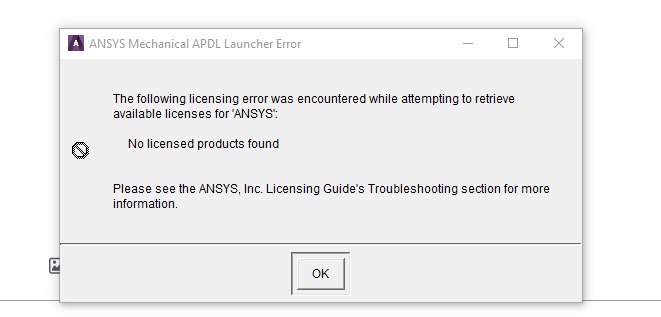
      License Error.png
      12.92 KB


      I am getting the license error

      I tried this

      "%awp_root202%\..\Shared Files\Licensing\winx64\ansysli_util" -checkout ANS_SOLVER

      "%awp_root202%\..\Shared Files\Licensing\winx64\ansysli_util" -checkout aa_t_i


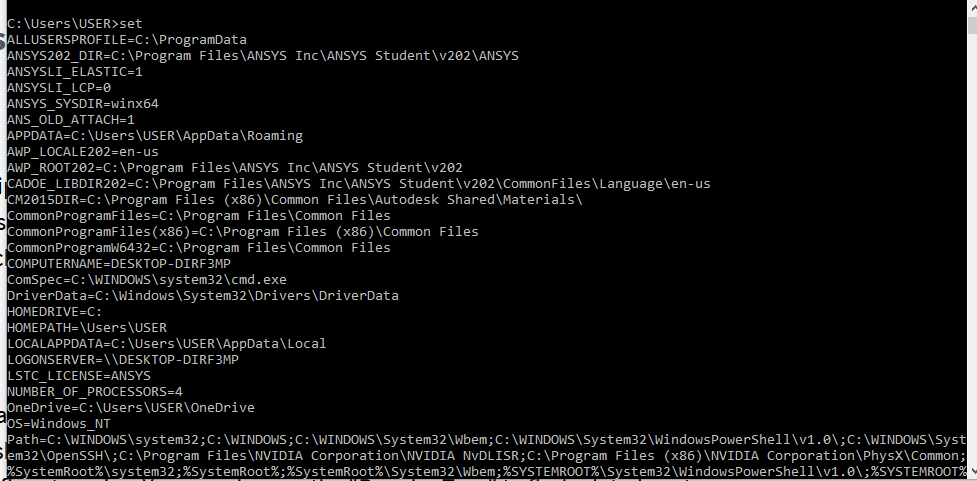
      then typed set

      This is an embed external element. It can be deleted using the delete key or the backspace key. To view the full element, press the preview button below.
      Image
      Screenshot 2020-09-28 094638.png
      18.76 KB
      This is an embed external element. It can be deleted using the delete key or the backspace key. To view the full element, press the preview button below.
      Image
      set 1.png
      52.68 KB
      This is an embed external element. It can be deleted using the delete key or the backspace key. To view the full element, press the preview button below.
      Image
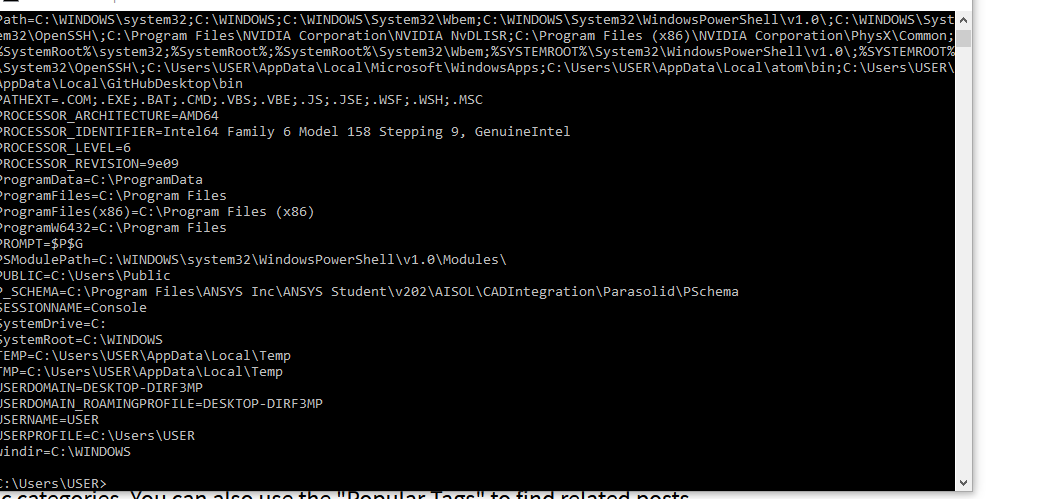
      set 2.png
      57.03 KB

      Please someone help me out

    • Rob
      Forum Moderator
      Please post the images in with the text, staff are not permitted to open/download files and attachmentsn
    • Dhruv_S
      Subscriber
      I am getting the license errornI tried thisn%awp_root202%\..\Shared Files\Licensing\winx64\ansysli_util -checkout ANS_SOLVERn%awp_root202%\..\Shared Files\Licensing\winx64\ansysli_util -checkout aa_t_innthen typed setn
    • tsiriaks
      Ansys Employee
      Try the suggestion in herenTry the suggestion in herenn
    • Dhruv_S
      Subscriber
      I have refered the post but I did not understand on how to proceed.nCheck your Windows environment variables to see if any of these existnANSYSLI_ELASTICnANSYSLI_LCPnIf so, delete them.nCan you explain me how to do this?n
    • tsiriaks
      Ansys Employee
      Search online for 'Windows environment variablesnit will show you the instructions to either add or modify environment variables. nThen, all you need to do is to check if these two existnANSYSLI_ELASTICnANSYSLI_LCPnIf so, you have to delete them.n
Viewing 5 reply threads
  • The topic ‘License Error’ is closed to new replies.
[bingo_chatbox]