-
-
April 1, 2026 at 8:17 am
gerardcabanabatllaura
SubscriberHey everyone, I’m currently developing a braking simulation in Ansys Workbench, but I’m running into some issues. I believe my model is correct, so the problem might be related to computational limitations. Does anyone know someone who could help me review the model or, if they have better computational resources, try to run the simulation? I’d be happy to pay a reasonable amount for the help (I’m a student, so please be kind hehe).
-
April 2, 2026 at 11:05 am
peteroznewman
SubscriberHello,
I'm willing to help review your model. To get started, use the Workbench File, Archive menu to save a .wbpz file. Upload that file (not the .wbpj file!) to a sharing site such as Google Drive or OneDrive. Change the Sharing setting so that Anyone with the link can download it. Copy the link to the file and paste the link in your reply.
There are many ways to idealize the model so it fits within the Student license limits. After the review, if it seems like you need more resources, you should enquire with your department if one of the labs has purchased a Research license for Ansys that has no node/element limits and request that you are given access to that license and maybe the computer it is installed on.
Regards,
Peter -
April 2, 2026 at 11:54 am
gerardcabanabatllaura
SubscriberHi Peter,
First of all, thank you very much for your kind response and your willingness to help, I really appreciate it. Please find attached the Drive link. If you have any issues opening it, or if you have any questions about why I’m using certain parameters, time steps, etc., please don’t hesitate to reach out.
Kind regards,
Gerard
Â
https://drive.google.com/file/d/1Mw06eT3sK2FP9eEzJY92cMVle9hzCmvC/view?usp=drive_link
Â
-
April 2, 2026 at 4:53 pm
peteroznewman
SubscriberHi Gerard,
A complicated model is best built in stages. Start with the fewest parts that create some interesting physics. In this case, the fundamental interaction is between the brake pads and the rotor.
But to make it even simpler, put a plane through the center of the rotor and slice the body in half so you can use Symmetry in the Y axis.
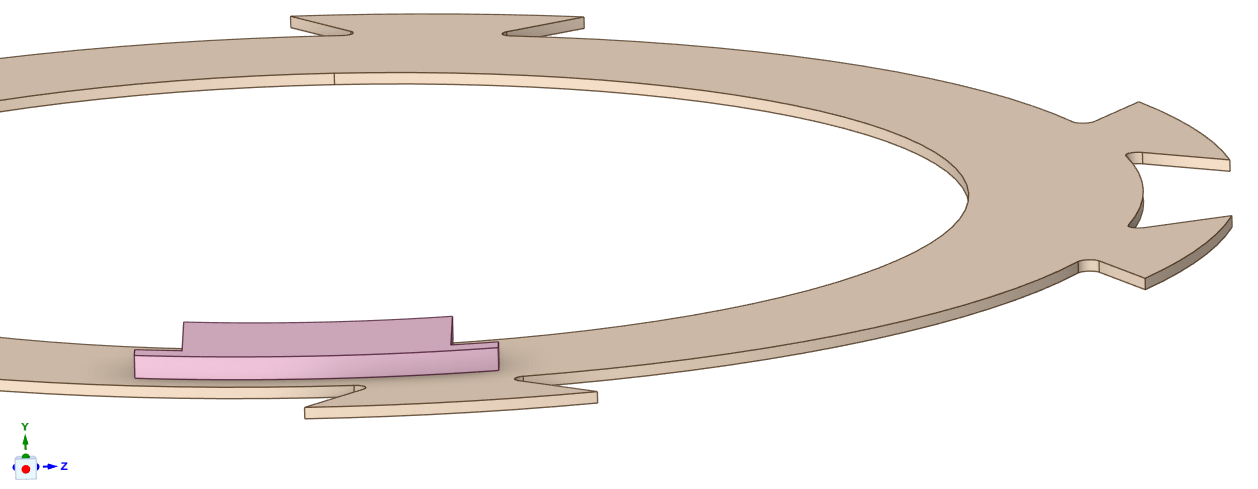
The Symmetry BC (Displacement Y=0) will react the forces that the one pad pushes down with. Use a Revolute Joint on the Rotor to provide an axle for it to rotate and a joint load to enforce rotation. Use a Translational Joint on the Pad and a joint load to apply a force to push it down. Then you only need one frictional contact between one side of the rotor and one side of the pad. With that defined, the Contact Tool was used to Generate Initial Contact Results and I found there is a 1 mm gap between the pad and the rotor. I inserted a Part Transform to move the Pad -1 mm in the Y direction to close the gap.
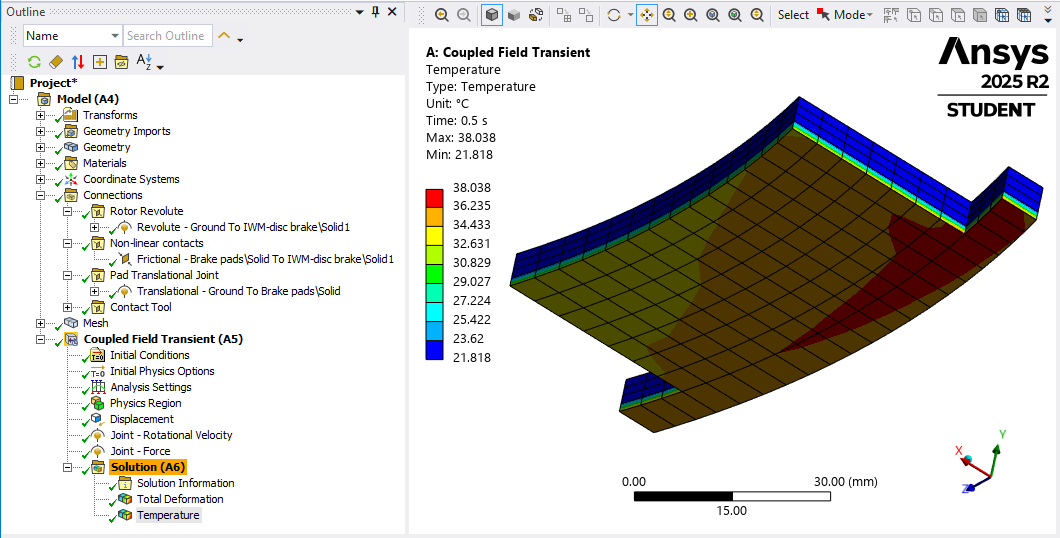
These parts mesh easily with hex elements using a Sweep Method and after a 1 hour solve time, I have the temperature on the face of the Pad.
Best regards,
Peter -
April 3, 2026 at 8:33 am
gerardcabanabatllaura
SubscriberHi Peter! First of all, thank you very much for taking the time to help me, I really appreciate it.
I understand the simplification you proposed, and it definitely makes sense in terms of reducing computational cost. However, in my case I am not only interested in the temperature at the pad–disc contact area, but also in how the heat evolves and transfers through the disc and into the interior of the rotor. That is why I included convection coefficients, as I want to analyse how the internal parts heat up over time.
My goal is to run the same type of simulation on a conventional braking system (I have also uploaded that model to the Drive) and compare both cases: the IWM system, which is more enclosed, and the conventional system, where there is more airflow. I want to evaluate how this affects the overall temperature evolution and especially how much more the internal components heat up in the enclosed IWM configuration.
For this reason, I am not entirely sure how to simplify the model while still capturing the thermal behaviour inside the rotor and across the whole system, not just the local contact temperature on the pad surface. In particular, I would expect the IWM configuration (being a more closed system) to generate and retain more heat than the conventional open system, and I would like the simulation to reflect that behaviour.
At the moment, I am struggling to find a way to simplify the model while still preserving this key aspect — that the braking contact should lead to higher heat accumulation in the enclosed system compared to the conventional one.
With that in mind, I would like to ask if you have any further suggestions. Given your experience, are there any parameters in my current setup (uploaded to the Drive) that you would recommend adjusting? For example, settings that may be increasing computational cost such as pressure definition, analysis settings, time stepping, or contact definitions.
I used bonded contacts where possible because I understood they are less computationally demanding than joints. Would you recommend replacing the pressure with a joint force instead? I am not very experienced, so I am not sure whether changes like this could significantly improve convergence or reduce simulation time.
I will also try to run the simulation on university computers to see if they have more computational power and can reduce the solving time. Even so, at the moment the model is very computationally expensive, and I am not sure whether it will fully converge.
Thanks again for your help.
-
April 3, 2026 at 3:59 pm
peteroznewman
SubscriberHi Gerard,
The first change I would make is to go from a Coupled Field Transient analysis to a Steady-State Thermal analysis. Later you can build that into a Transient Thermal analysis.
Â
Thermal models have only 1 DOF at each node (Temperature) while Coupled Field models have 4 DOF at each node (Temperature and X, Y and Z deformations). Â This change greatly reduces the number of unknowns the solver has to compute, reducing solution time. Another benefit of a Thermal model is that you can use a coarse mesh compared with a Structural model used to calculate stress results which require a refined mesh. The coarse mesh further reduces the solution time.Since you want to compare an open braking system with an enclosed braking system, start with a Steady-State solution because this shows the end-point of temperature in the assembly and is a useful comparison between the two systems. Steady-State solutions take much less time to compute than Transient solutions.
You only mention Thermal issues and nothing about Structural issues. The Coupled Field solution computed the heat generated by sliding friction between the brake pad and rotor which came at a huge computational cost. You want that heat to conduct, convect and radiate to the rest of the assembly. Replace the heat computed from sliding friction with a simple Thermal boundary condition such as Internal Heat Generation or Heat Flux to represent the same amount of heat created by the sliding friction but with no computational cost.Â
Use a hand calculation for the Heat Generation Rate P.
P = Ff*v where Ff is the friction force and v is the linear sliding velocity.
Ff = mu*Fn where mu is the coefficient of friction and Fn is the normal clamping force from the calipers.
v = omega*r where omega is the angular velocity of the wheel and r is the radius of the pad.It is important to note that the total heat generated is split between the rotor and the pads. Research and simulations, such as those from MakerLuis, indicate that the rotor typically absorbs over 98% of the generated heat due to its higher mass and thermal conductivity. For a Steady-State analysis, you can divide the face of the rotor into the annular ring that contacts the pad and assign a heat generation rate to that face to heat the rotor. Â The pad face can get a heat generation rate to put heat into the caliper assembly.
Makerluis has a page where he computes the transient temperature rise of a braking system using a Lumped Parameter model.
https://www.makerluis.com/thermal-analysis-of-a-brake-disc/#:~:text=Why%20brake%20discs%20get%20hot,dbrake -
April 3, 2026 at 5:44 pm
gerardcabanabatllaura
SubscriberHi Peter,
Thank you very much for your detailed explanation and suggestions, I really appreciate your help. I think your approach using a thermal-only model is very interesting and I will likely use it later for my study (I believe this is the study I will finally use as a result because Coupled module is too demanding..).
Before moving to that approach, I would like to further explore the coupled-field simulation, since although it is more computationally expensive, it is also more physically representative of the braking process. Even if I only capture the temperature increase in the pad and disc (without fully modeling heat transfer to the rest of the assembly), it could still be a valid and useful result.
I have already simplified my model in a similar way to yours (keeping only the disc and pads, removing other components, and ensuring initial contact), but I have not yet applied symmetry like you did. However, the simulation is still extremely slow and progresses very little over time.
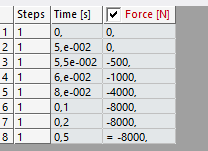
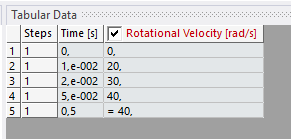
Since you mentioned that your simplified model solved in about 1 hour and produced a temperature increase, I was wondering if you could please share a bit more detail about your setup. In particular:
- The values and time evolution you used for rotational velocity
- The force applied on the pad (and how it is defined)
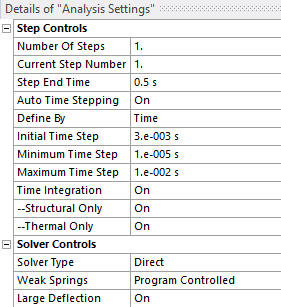
- Your Analysis Settings (time stepping, etc.)
I feel I may be missing something important, as my setup seems conceptually similar but is still much slower.
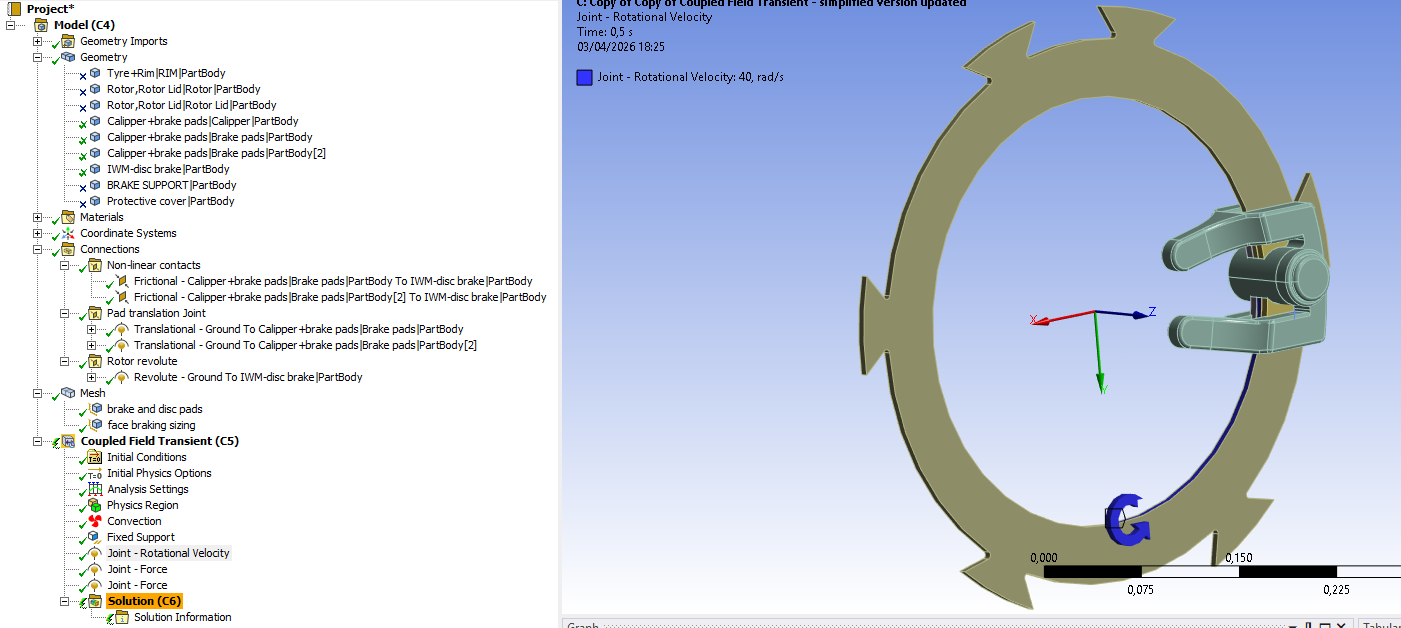
I’ve attached a few screenshots of my current setup for reference.
Thanks again for your help, it’s been very valuable.
Hi Peter,
Thank you very much for your detailed explanation and suggestions, I really appreciate your help. I think your approach using a thermal-only model is very interesting and I will likely use it later for my study.
Before moving to that approach, I would like to further explore the coupled-field simulation. Although it is more computationally expensive, it is also more physically representative of the braking process. Ideally, I would like to observe how temperature evolves not only at the contact but also across the different components. However, I understand that the main heat generation occurs at the pad–disc interface, so even if I only capture the temperature evolution of the pads and disc, it would still be a valid and useful result.
The idea is later to compare this with a conventional open braking system, where I would apply convection to represent airflow and expect lower temperatures. So even a simplified coupled result focusing on pad and disc temperatures would still be meaningful for comparison. I would like to explore this option fully before moving to the thermal-only approach.
I have already simplified my model in a similar way to yours (keeping only the disc and pads, removing other components, and ensuring initial contact), although I have not yet applied symmetry. However, the simulation is still extremely slow and progresses and now, it has failed to converge. So the last option is trying to know what setup values you have applied and use the same in orther to obtein the results you shared (then I coul increase the time to obtein a higher temperature).
Since you mentioned that your simplified model solved in about 1 hour and produced a temperature increase, I was wondering if you could please share a bit more detail about your setup. In particular:
- The values and time evolution you used for rotational velocity
- The force applied on the pad (and how it is defined)
- Your Analysis Settings (time stepping, etc.)
I feel I may be missing something important, as my setup seems conceptually similar but behaves quite differently. Even obtaining reliable temperature results just for the disc and pads would already be very helpful at this stage.
I’ve attached a few screenshots of my current setup for reference.
Thanks again for your help, it’s been very valuable. If it still does not converge with your setup ifnromation or progress properly, I will move on to the thermal-only approach you suggested.
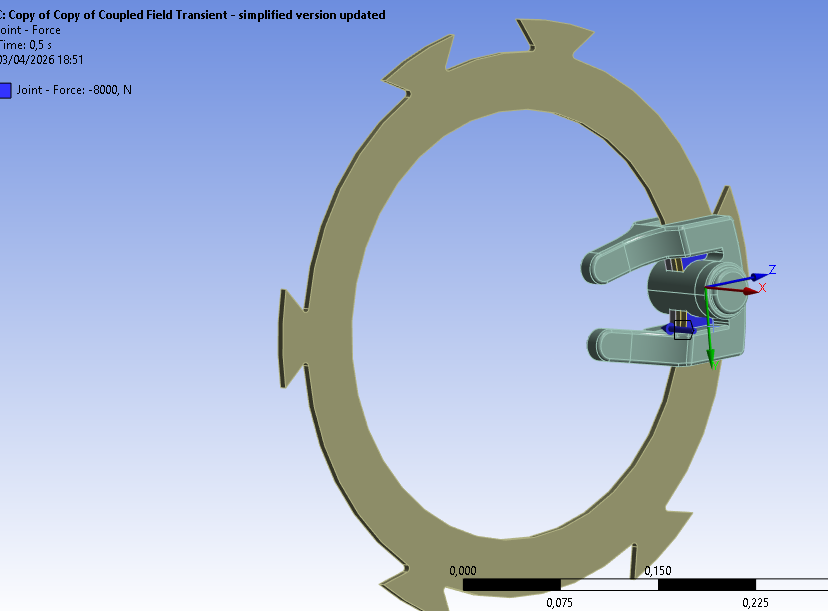
-
April 3, 2026 at 6:25 pm
peteroznewman
SubscriberThe mesh used Linear elements, which keeps the node count down. My mesh has 9,621 nodes 5,806 elements and 34,262 DOF with a default element size of 5 mm using a sweep of 2 elements on the half-rotor and 4 elements on the pad.
Revolute Joint load was Velocity which ramped from 0 to 100 rad/s in 0.5 sec which integrates to about 4 revolutions of the rotor.
Translational Joint load was Force which ramped from 0 to 1000 N in 0.5 secI deleted all Thermal Boundary Conditions so no heat was lost by convection or radiation. The heat generated could only be conducted within the two parts to spread out and would only build up over time. The intent of this model was only to show a temperature rise, not to be realistic in any way.
I didn’t change your Analysis Settings. It tells me it used the Unsymmetric solver.
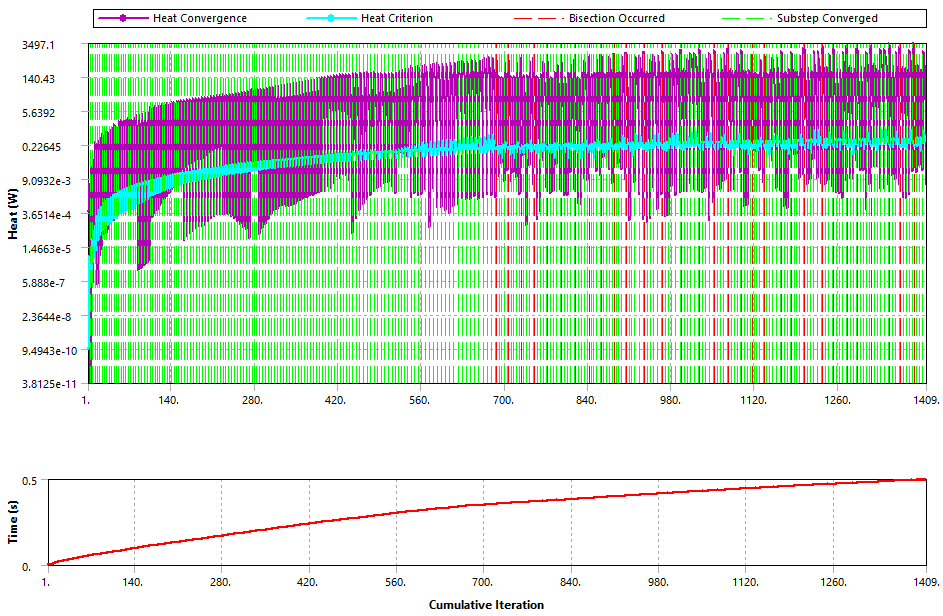
These seemed to work okay. Converging on the Heat Equilibrium was the limiting factor and the second half of the simulation resulted in a number of bisections.
Here is paper on disc brake thermal simulation which included a CFD model to compute the convective heat transfer coefficient on the rotor.
https://revistas.udistrital.edu.co/index.php/revcie/article/view/11602
-
April 3, 2026 at 9:10 pm
peteroznewman
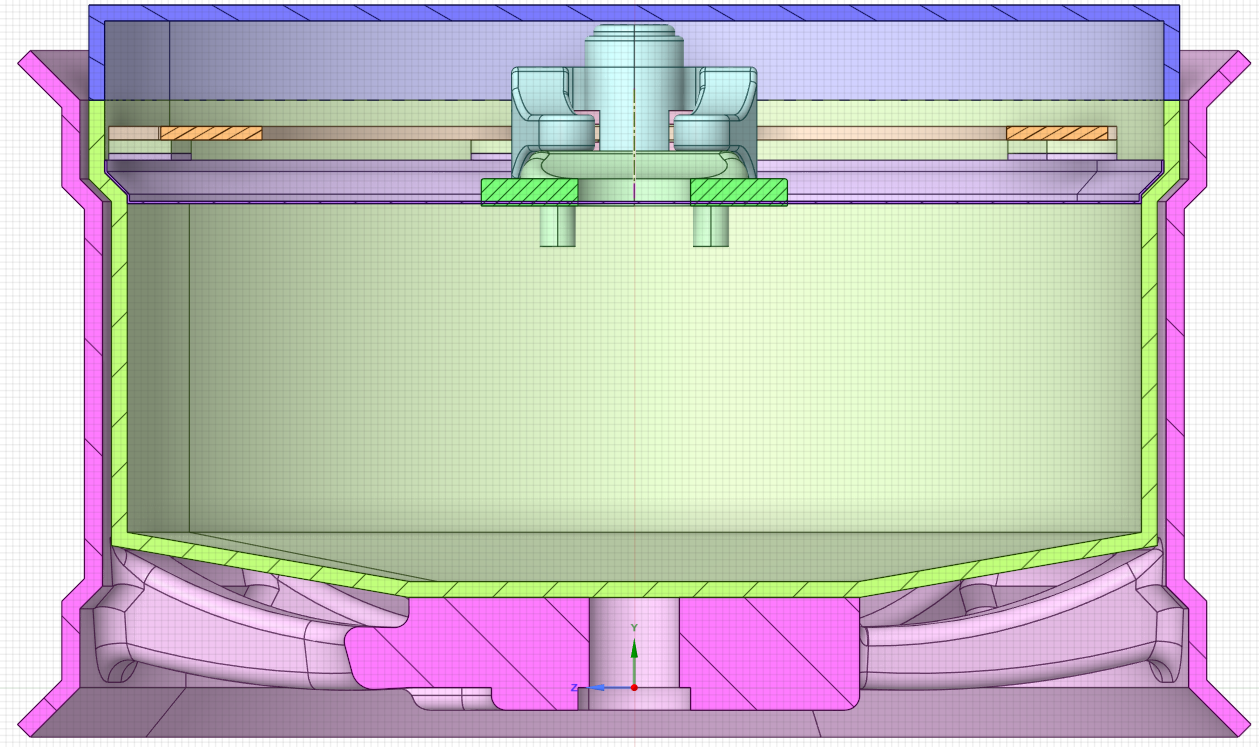
SubscriberAnother opportunity to reduce the resources needed for the full model with thin-walled covers is to replace the solid bodies with midsurface bodies. In SpaceClaim, on the Prepare tab, you can convert a thin-walled solid body into a midsurface body. When that geometry is sent to Mechanical for meshing, instead of the mesher trying to fill the thin-walled cover with solid elements which will add a large number of nodes and elements, the solid body is suppressed and the midsurface is sent over with the thickness attribute for each surface. The mesher now only has to mesh the surface with shell elements which will add very few nodes and elements compared with the solid body mesh.
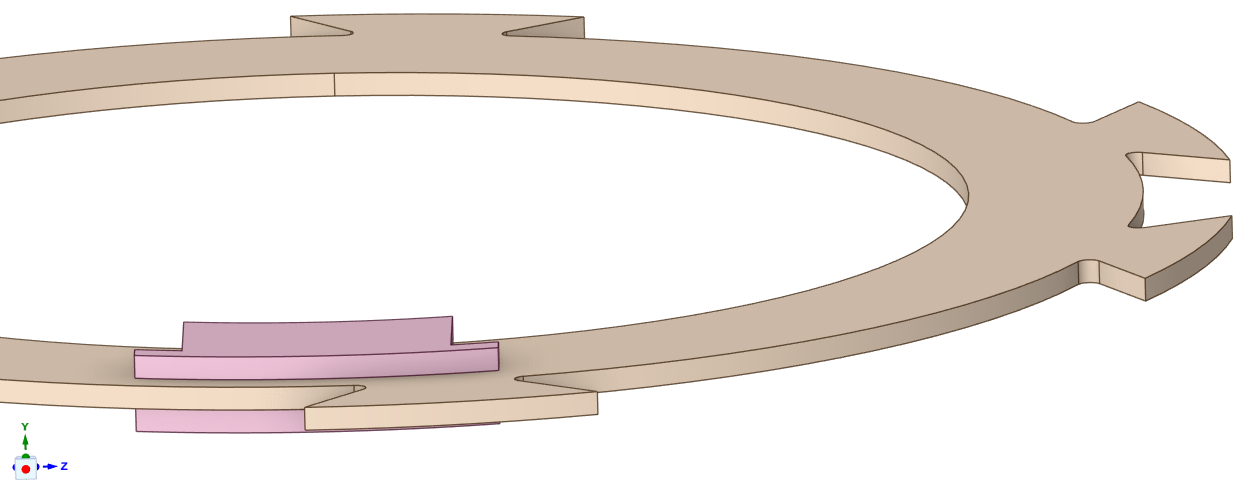
Below is the cross-section and you can see the Protective cover has an especially thin wall thickness.
Maybe this is preliminary geometry, but I don’t see how the wheel can rotate with the cover also enclosing the calipers. Can you explain that?
-
- You must be logged in to reply to this topic.
-
5874
-
1906
-
1420
-
1306
-
1021
© 2026 Copyright ANSYS, Inc. All rights reserved.