-
-
January 27, 2022 at 3:36 am
conls91
SubscriberI have downloaded ANSYS 20221R1, and I receive the following error message:
"The application failed to initialize. This may be caused by an issue with the installation."
I have tried uninstalling, removing all folders/files in the Program Files/ANSYS Inc directory, and reinstalling. No luck. I also see no install error logs in the program files directory. Any indications on how I can determine the issue, and resolve?
January 27, 2022 at 12:46 pmGeorge Karnos
Ansys EmployeeAfter trying to start the program, can you check the Windows Event Viewer
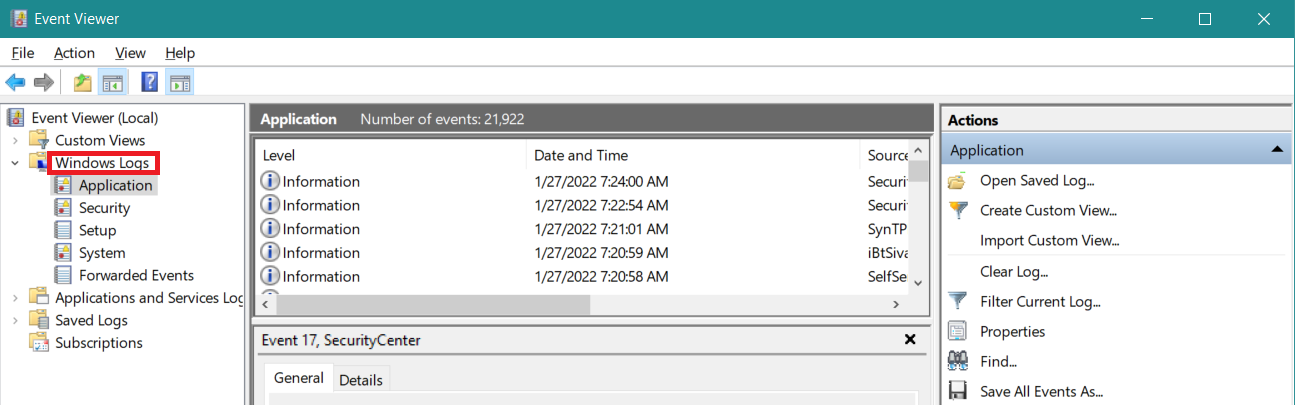
(in the search field on the task bar type in: Event Viewer)
Once it appears, click on Windows Logs and then check the Application, setup, and System logs
If you find any errors related to the program, please double-click on it and post a screenshot as we are not permitted to open files.
January 27, 2022 at 2:37 pmconls91
SubscriberThanks for your reply. There were two errors in the 'Application' tab. Screenshots of the errors are attached.
January 27, 2022 at 2:39 pmGeorge Karnos
Ansys EmployeePlease post screen shots as we are not permitted to open files.
January 27, 2022 at 2:43 pmconls91
SubscriberThe screenshots aren't coming through for some reason. Here are copies of the error details:
Error1:
Application: Discovery.exe
Framework Version: v4.0.30319
Description: The process was terminated due to an unhandled exception.
Exception Info: System.NullReferenceException
at Apollo.Engine.Graphics.Tools.SurfaceAnimationToolWrapper+PInvoke.DestroyInstance(Apollo.Engine.Graphics.ApolloGraphics, Apollo.Engine.Graphics.Tools.SurfaceAnimationToolWrapper)
at Apollo.Engine.Graphics.Tools.SurfaceAnimationToolWrapper.Dispose(Boolean)
at Apollo.Engine.Graphics.Tools.SurfaceAnimationToolWrapper.Finalize Log Name: Application
Source: .NET Runtime
Event ID: 1026
Level: Error
Error 2:
Faulting application name: Discovery.exe, version: 22.1.0.0, time stamp: 0x61a3bbd4
Faulting module name: unknown, version: 0.0.0.0, time stamp: 0x00000000
Exception code: 0xc0000005
Fault offset: 0x00007ffad156f390
Faulting process ID: 0x850
Faulting application start time: 0x01d81389bc9ec93b
Faulting application path: C:\Program Files\ANSYS Inc\ANSYS Student\v221\Discovery\Discovery.exe
Faulting module path: unknown
Report ID: 3a2c89dc-d399-454a-8c43-8c7709e33086
Faulting package full name:
Faulting package-relative application ID:
Log Name: Application
Source: Application Error
Event ID: 1000
Level: Error
Let me know if more info is needed. Thanks.
January 27, 2022 at 3:06 pmGeorge Karnos
Ansys EmployeeCheck the Graphics Card driver. Verify that it is the latest.
The following is a search of the forum for the exception code 0xc0000005 /forum/search?Search=0xc0000005 There are some other posts to look at...
January 29, 2022 at 12:13 amconls91
SubscriberI've verified the graphics card version is the latest, and I am running the GPU that is recommended in the ANSYS downloads section.
I've removed all ANSYS software and followed the advice of one post (for exception code 0xc0000005) to remove the app data for ansys from my computer. The other posts did not appear to be entirely relevant.
Still no luck.
I downloaded an earlier version of the Discovery Student (2021 R2) and it seems to be working fine.
I have a SpaceClaim model for 2022R1, and since model export to .stp is no longer supported I'd still like to see if it is possible to get this running.... if any other advice is recommended, please let me know - thanks.
February 3, 2022 at 3:04 pmnoormd
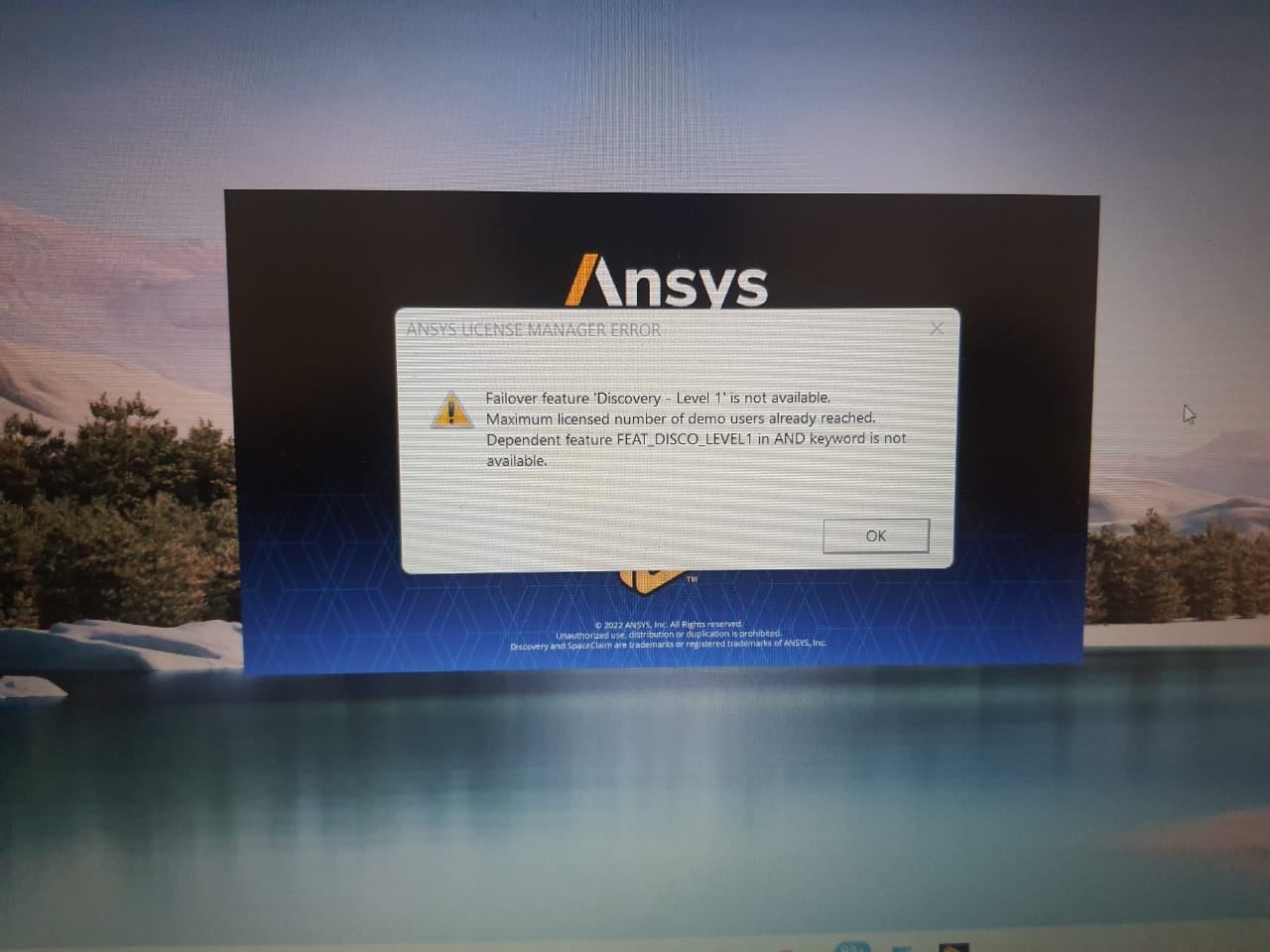
SubscriberWhile I am starting ansys 2022R1 (student version ) it will show an error like Level 2 all licence are reserved. then after some time application closes automatically.
February 3, 2022 at 4:32 pmFebruary 22, 2022 at 8:01 pmDMoses
SubscriberRecently had a customer run into this error. The fix for them was as follows: Please try installing the VC_redist.x64.exe and vc_redist.x86.exe for Visual Studio 2015, 2017, 2019 and 2022 package. If they already have 2015 installed, you may need to uninstall before installing this downloaded version. https://docs.microsoft.com/en-us/cpp/windows/latest-supported-vc-redist?view=msvc-170
Viewing 9 reply threads- The topic ‘Issue with starting ANSYS Discovery 2022R1 Student’ is closed to new replies.
Innovation SpaceTrending discussionsTop Contributors-
4693
-
1565
-
1386
-
1242
-
1021
Top Rated Tags© 2025 Copyright ANSYS, Inc. All rights reserved.
Ansys does not support the usage of unauthorized Ansys software. Please visit www.ansys.com to obtain an official distribution.
-
Ansys Assistant
Welcome to Ansys Assistant!
An AI-based virtual assistant for active Ansys Academic Customers. Please login using your university issued email address.
Hey there, you are quite inquisitive! You have hit your hourly question limit. Please retry after '10' minutes. For questions, please reach out to ansyslearn@ansys.com.
RETRY