-
-
May 21, 2026 at 8:39 pm
Syousefn
SubscriberHi there,
I have been using Ansys Electronics 2022 R1 for several years without any issues. After obtaining a new license, I installed Ansys Electronics 2024 R2. However, the simulations are not running properly, and I am encountering different errors with the same simulation files that previously worked correctly in Ansys Electronics 2022 R1. The error messages are attached for your reference.
To troubleshoot the issue, I reinstalled Ansys Electronics 2022 R1. Unfortunately, I am still unable to use the license because it is a web-sharing license, and it seems that the 2022 R1 version may not support this type of licensing. On the other hand, the 2024 R2 version accepts the web-sharing license, but the simulations produce many errors, and I am not sure what is causing the problem.
Could you please help me resolve this issue?
Best regards,
SoheilÂ
Â
-
May 21, 2026 at 11:34 pm
Takeshi Itadani
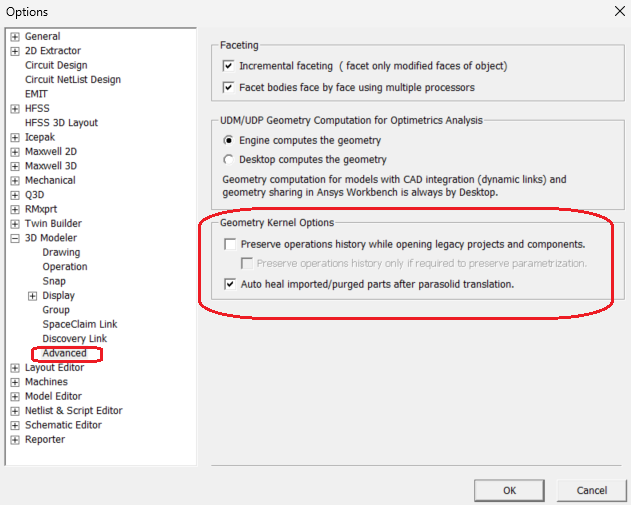
Ansys EmployeeAEDT changed its 3D Modeler kernel from ASIC to Parasolid starting with version 2023R1.As a result, when opening project files created in versions prior to 2023R1 in versions 2023R1 or later, a model geometry conversion is attempted, but this conversion likely fails.ÂIn 2024R2, select Tools > Options > General Options..., then 3D Modeler > Advanced, and uncheck "Preserve operations history while opening legacy projects and components" in the Geometry Kernel Options section.ÂUnchecking this will purge the operation history in the Model tree, but it will significantly improve the conversion success rate.ÂWith this option unchecked, try opening a 2022R2 project file in 2024R2. -
May 22, 2026 at 3:04 pm
Syousefn
SubscriberThank you so much for your help, but unfortunately, these methods didn’t work, and I encountered over 1,500 errors with both options.
-
May 22, 2026 at 5:34 pm
HDLI
Ansys EmployeeHello Syousefn,
 1. Could you please contact your account manager to obtain a local license (instead of a web license) to access version 22R1? This will allow us to purge the geometry history in 22R1 and then open the project in 24R2.
 2. If you need to proceed only with version 24R2, some geometries may need to be rebuilt. Please run the validation first to identify which geometries have issues. You have to pass the validation before making mesh and run.
Thanks.
HDÂ Â Â
-
- You must be logged in to reply to this topic.
-
6520
-
1906
-
1463
-
1310
-
1022
© 2026 Copyright ANSYS, Inc. All rights reserved.