Ansys Free Student Software

Ansys Free Student Software

Topics cover installation and configuration of our free student products.

Installing VS for UDFs

    • itb7
      Subscriber
      Hello, I am hoping to create a UDF for ANSYS Fluent 2020 R2, and have installed VS 2019 for reasons that aren't fully clear to me, as most tutorials I have seen involve using a simple text editor to create basic UDFs. However, when I try to load the function, I get the following error:nNo version of Visual Studio compiler found - C/C++ compilers most likely not set correctlynFile C:\Users\itb7\Documents\ansys projects\udftest2_files\dp0\FFF\Fluent\libudf\win64\2ddp_host\SConstruct, line 5, in nnIt seems that the VS 2019 needs to be set up to work with ANSYS somehow, but I can't find any information on how the setup process actually works. I would really appreciate any advice!n
    • Matt Madore
      Forum Moderator
      .

      itb7 Please install Visual Studio 2019 with the options noted in this screenshot.

      Thank you,

      Matt

      .
    • itb7
      Subscriber
      .

      mmadore Thank you for the help. My installer does not have all the options shown on the right column, will it work with these settings?

      .
    • Matt Madore
      Forum Moderator
      Those look like they should be sufficient.
    • itb7
      Subscriber
      Array
      I have added those features and restarted my computer, but the same error is happening. Is there a step somewhere that I actually need to link Fluent to the VS files or is it supposed to just "know" that they are there?
    • Matt Madore
      Forum Moderator
      Array Can you please open a command prompt and run the command "set" without quotes and send me the full output?
    • itb7
      Subscriber
      Array
      Microsoft Windows [Version 10.0.18363.1256]
      (c) 2019 Microsoft Corporation. All rights reserved.

      C:Usersitb7>set
      ADSK_CLM_WPAD_PROXY_CHECK=FALSE
      ALLUSERSPROFILE=C:ProgramData
      ANSYS202_DIR=C:Program FilesANSYS IncANSYS Studentv202ANSYS
      ANSYS_SYSDIR=winx64
      APPDATA=C:Usersitb7AppDataRoaming
      AWP_LOCALE202=en-us
      AWP_ROOT202=C:Program FilesANSYS IncANSYS Studentv202
      CADOE_LIBDIR202=C:Program FilesANSYS IncANSYS Studentv202CommonFilesLanguageen-us
      CommonProgramFiles=C:Program FilesCommon Files
      CommonProgramFiles(x86)=C:Program Files (x86)Common Files
      CommonProgramW6432=C:Program FilesCommon Files
      COMPUTERNAME=ASUS
      ComSpec=C:WINDOWSsystem32cmd.exe
      DriverData=C:WindowsSystem32DriversDriverData
      FPS_BROWSER_APP_PROFILE_STRING=Internet Explorer
      FPS_BROWSER_USER_PROFILE_STRING=Default
      HOMEDRIVE=C:
      HOMEPATH=Usersitb7
      LOCALAPPDATA=C:UsersiantbAppDataLocal
      LOGONSERVER=\ASUS
      LSTC_LICENSE=ANSYS
      NUMBER_OF_PROCESSORS=8
      OMP_NUM_THREADS=8
      OneDrive=C:Usersitb7OneDrive - Binghamton University
      OneDriveCommercial=C:Usersitb7OneDrive - Binghamton University
      OneDriveConsumer=C:Usersitb7OneDrive
      OS=Windows_NT
      Path=C:Program Files (x86)Common FilesOracleJavajavapath;C:WINDOWSsystem32;C:WINDOWS;C:WINDOWSSystem32Wbem;C:WINDOWSSystem32WindowsPowerShellv1.0;C:WINDOWSSystem32OpenSSH;C:Program FilesMicrosoft SQL Server120ToolsBinn;C:Program FilesCalibre2;C:Program Files (x86)Pulse SecureVC142.CRTX64;C:Program Files (x86)Pulse SecureVC142.CRTX86;C:Program Filesdotnet;C:UsersiantbAppDataLocalMicrosoftWindowsApps;C:Usersiantb.dotnettools
      PATHEXT=.COM;.EXE;.BAT;.CMD;.VBS;.VBE;.JS;.JSE;.WSF;.WSH;.MSC
      PROCESSOR_ARCHITECTURE=AMD64
      PROCESSOR_IDENTIFIER=AMD64 Family 23 Model 24 Stepping 1, AuthenticAMD
      PROCESSOR_LEVEL=23
      PROCESSOR_REVISION=1801
      ProgramData=C:ProgramData
      ProgramFiles=C:Program Files
      ProgramFiles(x86)=C:Program Files (x86)
      ProgramW6432=C:Program Files
      PROMPT=$P$G
      PSModulePath=C:Program FilesWindowsPowerShellModules;C:WINDOWSsystem32WindowsPowerShellv1.0Modules
      PUBLIC=C:UsersPublic
      P_SCHEMA=C:Program FilesANSYS IncANSYS Studentv202AISOLCADIntegrationParasolidPSchema
      SESSIONNAME=Console
      SystemDrive=C:
      SystemRoot=C:WINDOWS
      TEMP=C:Usersitb7AppDataLocalTemp
      TMP=C:Usersitb7AppDataLocalTemp
      USERDOMAIN=ASUS
      USERDOMAIN_ROAMINGPROFILE=ASUS
      USERNAME=itb7
      USERPROFILE=C:Usersitb7
      windir=C:WINDOWS

    • Matt Madore
      Forum Moderator
      Array
      First, make sure there are no spaces in the path. I see you have "ansys projects", please close that space or replace with _
      Can you let me know the exact process you are trying to follow to compile your UDF? The steps should be to launch FLUENT 2020R2 -> User Defined -> Compiled -> Add -> browse for your .c file which should be saved in "~udftest2_filesdp0FFFFluent" -> Build -> Load
      Please share the entire contents of the FLUENT console output.
    • itb7
      Subscriber
      .

      mmadore I've made a new folder without spaces and set up a new project to test this out. The process I've been using to compile the UDF is exactly as you describe, and I've been checking off the box that says "use built-in compiler" in the popup menu. I've attached the Fluent console output in the notepad file.

      .
    • itb7
      Subscriber
      Array just wanted to follow up on this problem-- I attempted compiling a blank .c file as a UDF and it didn't return the same errors, but as soon as anything else gets put in I still receive the message that the C compiler is not set correctly. Do you know of any other way I could fix this issue?
    • Matt Madore
      Forum Moderator
      Array Can you try without the "use built-in compiler" box checked?

      Thanks,
      Matt
    • itb7
      Subscriber
      Array The udf still fails to load, although the error is slightly different. I'm putting the Fluent log below:
      Copied C:Usersitb7DocumentsANSYSProjectsudftest3_filesdp0FFFFluent/C:Usersitb7DocumentsANSYSProjectsudftest3_filesdp0FFFFluentforumdoc.c to libudfsrc
      Creating user_nt.udf file for 3ddp_host ...
      (system "copy "C:PROGRA~1ANSYSI~1ANSYSS~1v202fluent"fluent20.2.0srcudfmakefile_nt.udf "libudfwin643ddp_hostmakefile" ")
             1 file(s) copied.
      (chdir "libudf")(chdir "win643ddp_host")'nmake' is not recognized as an internal or external command,
      operable program or batch file.
      Creating user_nt.udf file for 3ddp_node ...
      (system "copy "C:PROGRA~1ANSYSI~1ANSYSS~1v202fluent"fluent20.2.0srcudfmakefile_nt.udf "libudfwin643ddp_nodemakefile" ")
             1 file(s) copied.
      (chdir "libudf")(chdir "win643ddp_node")'nmake' is not recognized as an internal or external command,
      operable program or batch file.

      Done.

      ASUS: Opening library "C:Usersitb7DocumentsANSYSProjectsudftest3_filesdp0FFFFluentlibudf"...
      Error at Node 1: The UDF library you are trying to load (libudf) is not compiled for paralle

      Error at Node 3: The UDF library you are trying to load (libudf) is not compiled for parallel use on the current platform (win64).

      The
      Error at Node 4: The UDF library you are trying to load (libudf) is not compiled for parallel use on the current platform (win64).

      The system cannot find the file spe
      Error at Node 5: The UDF library you are trying to load (libudf) is not compiled for parallel use on the current platform (win64).

      The system cannot find the cified.

      C:Usersitb7DocumentsANSYSProjefile specified.

      C:Usersitb7DocumentsANSYSProjectsudftest3_filesdp0FFFFluentlibudfwin643ddp_nodelibudf.dll
      l use on the current platform (win64).

      The system cannot find the file specified.

      C:Users system cannot fictsudftest3_filesdp0FFFFluentlibudfwin643ddp_nodelibudf.dll
      itb7DocumentsANSYSProjectsudftest3_fil
      Error at Node 2: The UDF lind the file specified.

      C:Usersitb7DocumentEsANSYSProjectsudftest3_filesdp0ebrFFFFluentlibudfwin643ddp_norardelibudf.dll
      RPC RCX_SC_SET_ERR_MSG failed: RPC: Can't encode arguments

      ror at Nsoy you are trying tod load (leibudf) is not compiled for parallel use on the
      Error at host: The UDF library you are trying to load (libudf) is not compiled for parallel use on the current platform (win64).

      The system cannot find the current platform file specified.

      C:Usersitb7DocumentsANSYSProjectsudftest3_filesdp0FFFFluentlibudfwin643ddp_hostlibudf.dll
      (win64).

      The system cannot find the file specified.

      C:Usersitb7DocumentsANSYSProjectsudftest3_filesdp0FFFFluentlibud0:fwin643ddp_nodelibudf.dll
       dThe pUD0FFFFF lluenibrary youtl are tryinibudfwing643ddp_node libudf.dll
      to load (libudf) is not compiled for parallel use on the current platform (win64).

      The system cannot find the file specified.

      C:Usersitb7DocumentsANSYSProjectsudftest3_filesdp0FFFFluentlibudfwin643ddp_nodelibudf.dll

      ===============Message from the Cortex Process================================

      Compute processes interrupted. Processing can be resumed.

      ==============================================================================

      Error: The UDF library you are trying to load (libudf) is not compiled for parallel use on the current platform (win64).nnThe system cannot find the file specified.
      nnC:Usersitb7DocumentsANSYSProjectsudftest3_filesdp0FFFFluentlibudfwin643ddp_hostlibudf.dll
    • Matt Madore
      Forum Moderator
      Array I am checking with a colleague on any additional suggestions.
    • Matt Madore
      Forum Moderator
      Array Can you please try these steps?
      1. Open up the Visual Studio 2019 x64 Native Tools Command Prompt window and change to your working directory where your case and data reside.
      2. Create an ANSYS Fluent v1xx.x shortcut on the desktop
      3. Drag the ANSYS Fluent shortcut into the x64 Native tools Command Prompt window.
      4. Press Enter
      5. ANSYS Fluent launcher opens. 
      6. Go to Environment tab and uncheck "Set up Compilation Environment for UDF"
      7. On the "General Options" tab, make sure your “Working Directory” is set to the location where your case, data and UDF is located in.
      8. Launch Fluent and try to compile a UDF, with "use built-in compiler" unchecked.
    • itb7
      Subscriber
      .

      mmadore built a new simulation in a new folder to make sure any previous settings wouldn't interfere. I otherwise followed the instructions above, and everything described was exactly where specified. It looks like the error generated is slightly different, and rather than saying "C directory is not set up properly", it says "not compiled for parallel use on the current platform." I will try and set it up on one core of the computer to see if it will at least work under those circumstances, although I don't think I can run any practical simulations in this manner. I'm attaching the Fluent output below.

      .
    • itb7
      Subscriber
      .

      mmadore output from running Fluent without parallel computing is below.

      .
    • Matt Madore
      Forum Moderator
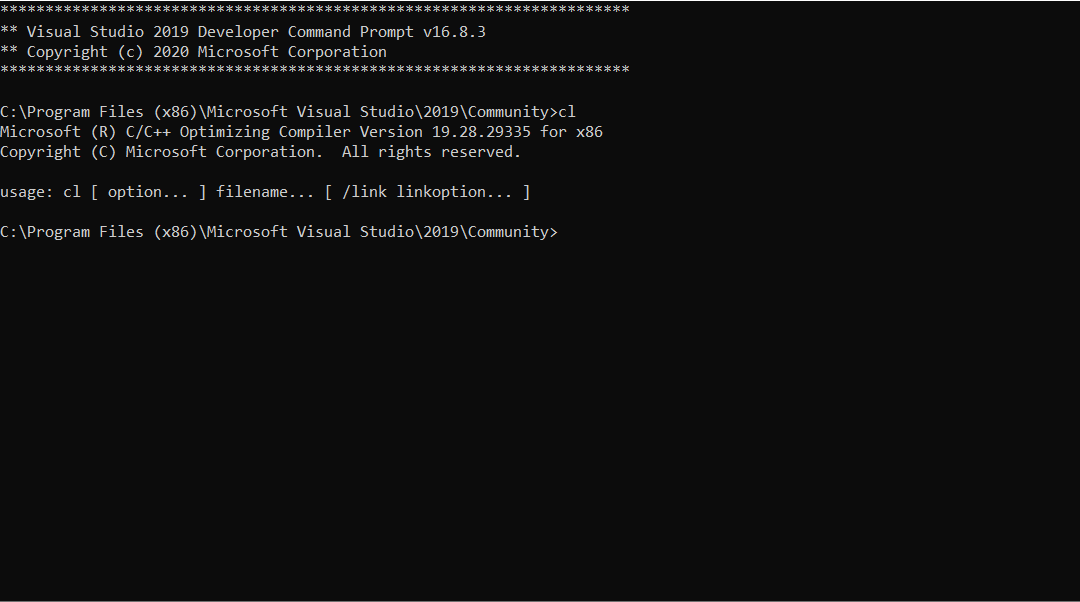
      Array Please open the Visual Studio 2019 x64 Native Tools Command Prompt and enter "cl" without the quotes and send a screenshot of the entire window and output.
    • itb7
      Subscriber
      .

      mmadore

      .
    • Matt Madore
      Forum Moderator
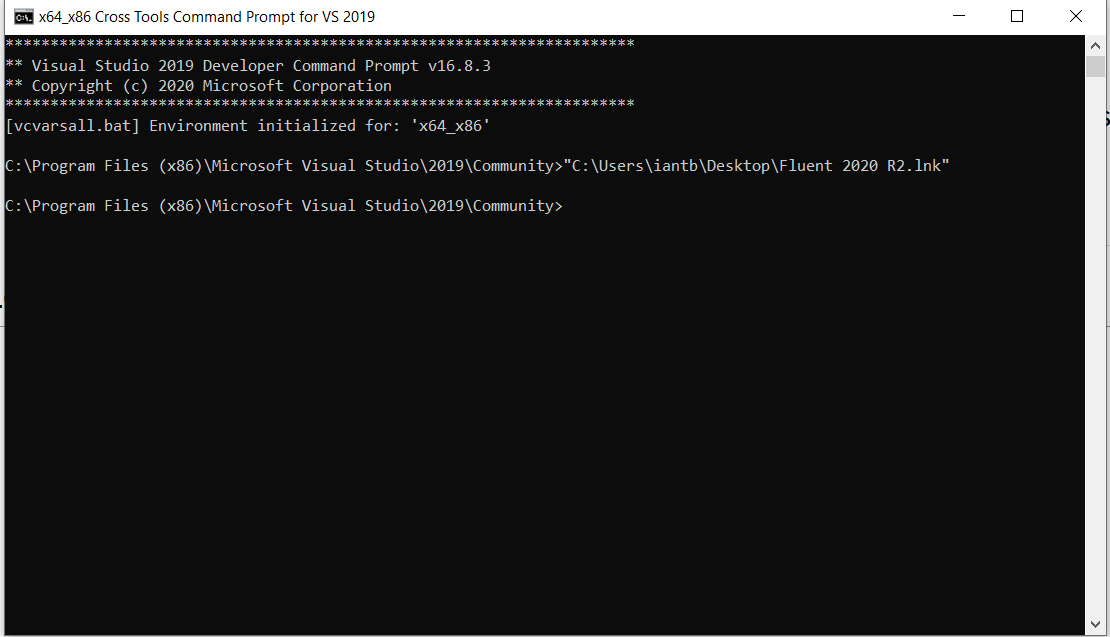
      Array Can you try running Fluent from the command prompt again and compiling, but instead use the "x64_x86 Cross Tools Command Prompt for VS 2019" rather than the "x64 Native Tools Command Prompt"?
    • itb7
      Subscriber
      .

      mmadore it seems to have returned the same error.

      .
    • elwinxavier
      Subscriber
      Hi Array , I have the same error here

      I'm using 2020 R2, & enable "Built-In Compilers"
      I've tried set the system variable, launch Fluent outside workbench, Install Microsoft visual studio community 2019 (will try 2017 soon)

      So the problem Statement is, when in Compiled UDFs
      "Built" and will become:
      "'C:PROGRA~1ANSYS' is not recognized as an internal or external command, operable program or batch file."
      LOAD and will become:
      "Error: The UDF library you are trying to load (libudf) is not compiled for parallel use on the current platform (win64).nnThe system cannot find the file specified."


      Do ANSYS team knows, with Build-In Compiler, is the problem still lies within Visual Studio? Because if it doesn't we can certainly skip the MS Visual Studio and look other way.
      Or the problem is more to the Build-in Compilers itself. Is there anyway to check on Build-In Compilers? DO we have any patch and installer to re-install on ANSYS Patch?
    • Rob
      Forum Moderator
      Linking into this for info /forum/discussion/comment/102174#Comment_102174 I'll close the thread in Fluids.
    • elwinxavier
      Subscriber
      The ANSYS Folder is:
      C:Program FilesANSYS Inc

      While my Fluent File is:
      C:UserselwinOneDriveDesktopMASTERRaphael
    • elwinxavier
      Subscriber
      I uninstall and install Visual Studio 2017 and still the same. Anyway, Array since you said Built-in Compiler has nth to do with Visual Studio then I think I'll stop installing the other component like compiler/sdk, etc, there are too many version anyway.
      So Anyway I can troubleshoot the "Built-in Compiler"?
    • YasserSelima
      Subscriber
      Array from fluentoutput3.txt

      forumdoc.obj : error LNK2019: unresolved external symbol __imp__RP_Get_Float referenced in function _source

      try RP_Get_Real
    • YasserSelima
      Subscriber
      RP_Get_Float is defined in your header file but the compiler can not find the function.
    • itb7
      Subscriber
      .

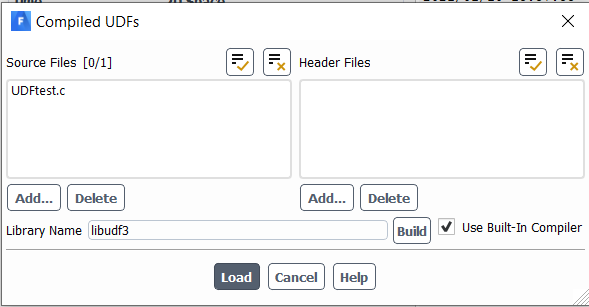
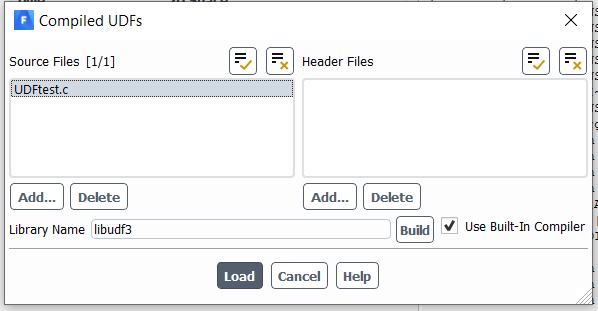
      mmadore It looks like it was a user error; my mistake was that I did not have the UDF selected while pressing "load". Below I am attaching the steps used to get the function to load. Now I just need to get my function itself to work!

      .
    • Rob
      Forum Moderator
      Easily done, select the .c file and Build. Once the TUI stops doing things (issuing gibberish and warnings for the most part) then Load.
      Build creates the library, and Load opens it in Fluent.
    • sumykk
      Subscriber
      I still have error
    • sumykk
      Subscriber
      It worked once but idk y it doesn't work anymore

    • Rob
      Forum Moderator
      If you loaded the library then tried to change the .c file you may struggle to rebuild the library. Unload the library then rebuild: it's a feature of Windows where we can't overwrite a file that's in use.
    • Shyam Prasad V Atri
      Subscriber
      .

      Is there a way to check if the C++ compiler is working for UDF.

      I installed ansys 2021 r2 two days ago and my UDF's are not working.

      I keep getting this warning.

      scons: warning: No version of Visual Studio compiler found - C/C++ compilers most likely not set correctly

      I am trying to use the inbuilt compiler.

      The UDF's were working well in the previous version, please let me know how to rectify this

      .
    • Rob
      Forum Moderator
      .

      Not sure how you're getting a VS error with the built in compiler. Please double check you've ticked the box. What else did the TUI print when trying to compile the code?

      .
    • Shyam Prasad V Atri
      Subscriber
      .

      Never mind the UDF started to work even with that error....

      This is what i would get on my comp

      scons: warning: No version of Visual Studio compiler found - C/C++ compilers most likely not set correctly

      File "C:UserssatriOneDrive - North Carolina State UniversityDesktopsimulationsm1m2m3codesquarter1modelwin643ddp_hostSConstruct", line 18, in

      Compiler used is "C:PROGRA~1ANSYSI~1v212fluent"ntbinclangbinclang-cl

      Linker used is "C:PROGRA~1ANSYSI~1v212fluent"ntbinclangbinlld-link

      .
    • Shyam Prasad V Atri
      Subscriber
      .

      That is still a misleading warning because when i run a execute on-demand function i would not get any output..i assumed that because of this warning nothing is happening..

      I have put another request on how to run execute on-demand on the forum..please let me know how to go about this one

      I did not know where to ask this one

      .
    • Shyam Prasad V Atri
      Subscriber
      .

      Why doesent the TUI commands not work i am trying to load udfs using TUI ... I am following everything given in the documentation and i am not able to load the TUI at all...

      I am trying to load three udf

      define/user-defined/compiled-functions/compile,yes,

      ["C:/Users/satri/Desktop/simulations/m1/m2/m3/c1.c"],

      ["C:/Users/satri/Desktop/simulations//m1/m2/m3/c2.c"],

      ["C:/Users/satri/Desktop/simulations//m1/m2/m3/c3.c"],

      I am really confused as to how to make tui do a lot of repetitive tasks

      I have to change a parameter in my udf and run it multiple times but i cant load the udf even once. Someone please help me out here..

      I am really getting frustrated with the unhelpfulness of TUI documentation..are there any resources for TUI which gives me a few examples of how to use a command i am not able to get good number of resources to understand that

      .
    • Rob
      Forum Moderator
      .

      You can put all three into one .c file. One issue can be with OneDrive - the paths are a mess.

      .
    • Shyam Prasad V Atri
      Subscriber
      .

      I have put it in d drive and this was the error that i was getting.

      and i get this error

      define/user-defined/compiled-functions/compile,yes,

      ["D:/m1/m2/m3/codes/c1.c"],

      ["D:/m1/m2/m3/codes/c2.c"],

      ["D:/m1/m2/m3/codes/c3.c"],

      ["D:/m1/m2/m3/codes/c4.c"],

      ["D:/m1/m2/m3/codes/c5.c"],

      ["D:/m1/m2/m3/codes/c6.c"],

      ["D:/m1/m2/m3/codes/c7.c"],


      .
    • Shyam Prasad V Atri
      Subscriber
      .

      all codes and model are located in the same folder

      .
    • Rob
      Forum Moderator
      .

      Try:


      define/user-defined/compiled-functions/compile yes

      "D:/m1/m2/m3/codes/c1.c"

      "D:/m1/m2/m3/codes/c2.c"

      etc

      ()


      Commas, quote marks, brackets etc have a meaning in Fluent. Run the command manually one step at a time and see what happens: don't just fire a journal at the solver.

      .
    • Shyam Prasad V Atri
      Subscriber
      .

      That syntax works very well Rob.

      Thank you so much for suggesting that.

      .
    • hjubaer
      Subscriber
      .

      [Apologies for adding to this old thread. Please feel free to move the post if another thread was more appropriate]

      Hello all,

      Does anyone have made the experience of installing VS2019 and getting the following error message in Fluent while compiling UDFs:

      Now, I have found the solution in which you would load Fluent from the "x86_x64 Cross Tools Command Prompt" and then the UDF library gets built without any issues. This indicates that, in my limited understanding, the issue is stemming from some environemnt variable in VS2019, or the lack of it for that matter.

      While the abovestated solution works, in my opinion, it is not the most convenient way to be mindful of this cross-terminal step every time I open Fluent. I was just wondering if anybody had a more robust or elegant resolution to this issue? Or am I missing something?

      Any help would be much appreciated!

      FYI: The built-in compiler works and VS 2017 works as well without any difficulty for the codes to be compiled.

      .
    • rajneeshkumar0678
      Subscriber
      .

      Hi,

      Visual Studio Community 2017 (version 15.9) is compatible with Ansys 2020 R2. This works very well to compile all kinds of UDFs.

      Thanks and regards

      Rajneesh

      .
    • LoïcS
      Subscriber
      Hi, Did you find a work-around? I'm facing the same issue on fluent 2021R2. I had upgrade my version to 2022R2 but the issue is still there.
Viewing 43 reply threads
  • The topic ‘Installing VS for UDFs’ is closed to new replies.