-
-
June 19, 2020 at 2:47 am
yuxx
SubscriberHi,
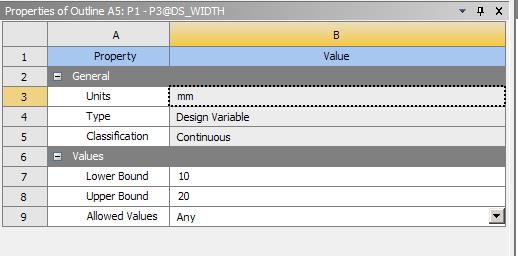
I would like to input my incremental values under my upper bound and my lower bound values so that when I run my optimization it will be a increment of 2.example from 2-5 it will be 2, 2.5, 3, 3.5, 4, 4.5, 5Â . Is there a way where I can input increment value of 0.5Â
-
June 19, 2020 at 10:16 am
-
June 26, 2020 at 6:19 am
yuxx
SubscriberManufacturable values &
Any -
June 26, 2020 at 11:59 am
peteroznewman
SubscriberWhen you choose Manufacturable values, can you enter the values you want?
-
June 26, 2020 at 12:15 pm
yuxx
SubscriberCan. But after i click preview the number that is generated on the table is not the manufacturable values that i key in. -
June 26, 2020 at 3:05 pm
peteroznewman
SubscriberPlease reply with screen shots to show what happens.
-
Viewing 5 reply threads
- The topic ‘Incremental input’ is closed to new replies.
Innovation Space
Trending discussions
- LPBF Simulation of dissimilar materials in ANSYS mechanical (Thermal Transient)
- Real Life Example of a non-symmetric eigenvalue problem
- How can the results of Pressures and Motions for all elements be obtained?
- Contact stiffness too big
- 13-Node Pyramid Element Shape Function
- Element Birth and Death
- Python-Script to Export all Children of a Solution Tree
- Which equations and in what form are valid for defining excitations?
Top Contributors
-
4592
-
1494
-
1386
-
1209
-
1021
Top Rated Tags
© 2025 Copyright ANSYS, Inc. All rights reserved.
Ansys does not support the usage of unauthorized Ansys software. Please visit www.ansys.com to obtain an official distribution.