-
-
April 29, 2026 at 11:54 am
melihcelilozkara
SubscriberHello,
I am trying to automate a series of simulations using the Workbench Parameter Set. My goal is to vary the Mass Flow Rate in a Periodic Boundary Condition.
To achieve this, I created a named expression in Fluent called mdot and enabled it as an input parameter (so it appears in the Workbench Parameter Set). However, when I open the periodic conditions dialog box, I cannot find a way to assign this mdot expression to the mass flow rate field. The input field for the mass flow rate does not seem to support expressions or parameter selection directly.
Could you please guide me on how to correctly link my mdot input parameter to the Periodic Mass Flow Rate so that I can control it from the Workbench level?
Best regards.
-
April 29, 2026 at 12:49 pm
Rob
Forum ModeratorI think the simple answer is, you don't. The TUI command won't accept an Expression either. It's possible there's a UDF style option but as it's not documented I can't comment, nor do I know if one exists.
-
April 29, 2026 at 1:46 pm
melihcelilozkara
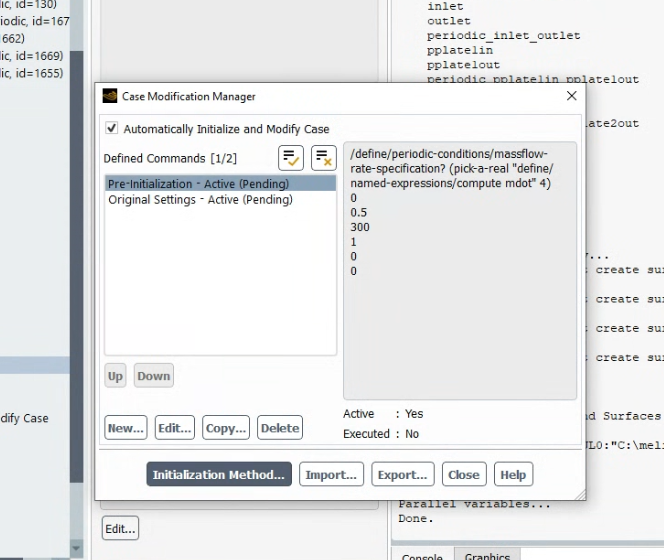
SubscriberI’ve been searching for a solution to this and found an interesting suggestion from an Ansys Employee (DrAmine) in another thread (see attached screenshot).DrAmine states that for those working under Workbench, it is possible to use 'Automatic modify case' to adjust the mass flow rate for every design point by using a 'Pre-Initialization modification.' I have already created a named expression called mdot and enabled it as an Input Parameter, but I am struggling to find the exact location or the correct setup for this 'Pre-Initialization' step in the Workbench/Fluent workflow. I tried the TUI command mentioned in the post, but I couldn't get it to link correctly to the Workbench Parameter Set.Could anyone provide a step-by-step guide or more details on how to access this 'Automatic modify case' feature? It seems like this is exactly what is needed to automate periodic mass flow rates across multiple design points.Thank you for your help! -

April 29, 2026 at 2:02 pm
Rob
Forum ModeratorThat will be in Calculation Activities.
-
April 29, 2026 at 2:07 pm
melihcelilozkara
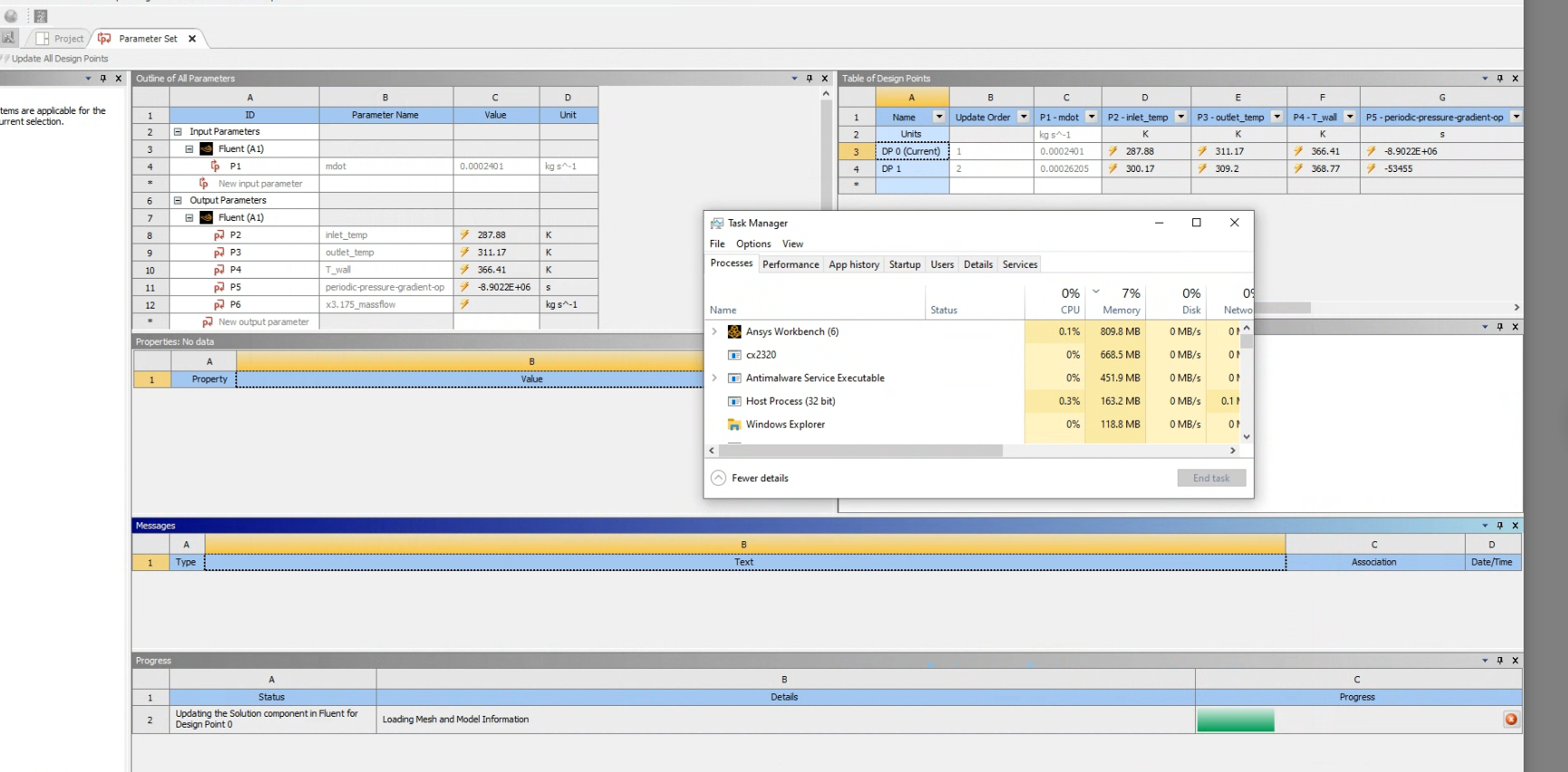
SubscriberI tried that, but it seems to be causing a bug. When I start the analysis for the parameters from Workbench, it gets stuck at the 'loading mesh and information' stage and just hangs there. It doesn't move past that point. Any idea why it might be bugging out at that specific stage
-
April 29, 2026 at 2:28 pm
Rob
Forum ModeratorIt's possible it's not liking the expression and parameter. How many of these models do you need? You might be about as quick just running the models with a normal TUI command or manually changing the mass flow value.
-
April 29, 2026 at 2:42 pm
melihcelilozkara
SubscriberI am a Master's student and my goal is to obtain a comprehensive solution by parameterizing both the geometry and the flow for a range of Re = 300 to 5000. I am aware that I could solve each case manually, but I am curious and eager to learn new methods to automate this process. :)
-
April 30, 2026 at 7:07 am
NickFL
SubscriberI know I am late to the party here, but have you considered doing the parameterization outside of Workbench? It may be possible to use old school Scheme to change the mass flow rate. You could then have all your outputs in a simple text or csv file that could be read into Numpy or MATLAB to get the colorful 3D plots.
Since we (or at least I am) not aware of your geometry, the range of Reynolds numbers does not mean much. Also when you say X and Z, that does not help us much.
-
-
April 29, 2026 at 3:31 pm
Rob
Forum ModeratorThe newer optimisation functions are via Optislang, but not all functions are available to all methods as yet. Periodics are a fairly niche application so tend to lag behind everything else. You may want to do some reading into PyFluent too.
-
April 29, 2026 at 6:46 pm
melihcelilozkara
SubscriberHi everyone,You are right about PyFluent being a great tool, but unfortunately, I don’t have the time to dive into learning it at the moment, so I’m trying to solve this within the standard workflow.I am using the “Automatic Modify Case” feature with Pre-Initialization to adjust my periodic conditions. Specifically, I use a custom script within the pre-initialization step to update my mass flow rate from an initial value of 0 to my target value.The good news is that the logic works—the analysis runs correctly and the mass flow updates as expected. However, the problem arises after the analysis is finished. When I try to check or update the parameters back in the Workbench Project Schematic, it gets stuck on the “Loading mesh and information” stage and doesn’t progress.I’ve attached photos of my setup and the specific code I’m using in the Pre-Initialization step (which might not be visible in the general settings).Has anyone encountered this “hanging” issue when using pre-initialization scripts to modify parameters? Any advice on how to get Workbench to recognize the completed state without getting stuck would be greatly appreciated! -
April 29, 2026 at 7:20 pm
melihcelilozkara
SubscriberMy geometry requires periodicity in both the X and Z directions. However, since the X and Z faces intersect, Fluent Meshing struggles to define both as periodic zones simultaneously.
To work around this, I have successfully matched and defined the Z-direction as a periodic zone within Fluent Meshing. However, for the X-direction, I am using a non-conformal interface instead of a standard periodic boundary.
Could this hybrid approach (one direction periodic, the other a non-conformal interface) be causing the 'Loading mesh and information' hang when Workbench tries to reconcile the parameters after the solution? Specifically, I wonder if the 'Automatic Modify Case' script struggles to handle the initialization when such complex interface definitions are present
-
April 30, 2026 at 7:40 am
Rob
Forum ModeratorIn theory two sets of periodic boundaries can't work. Some users find using a conformal set and a separate nonconformal set to work but it's not supported. Depending on the flow direction try switching a set to be symmetry.
-
- You must be logged in to reply to this topic.
-
6269
-
1906
-
1457
-
1308
-
1022
© 2026 Copyright ANSYS, Inc. All rights reserved.