Ansys Assistant will be unavailable on the Learning Forum starting January 30. An upgraded version is coming soon. We apologize for any inconvenience and appreciate your patience. Stay tuned for updates.
Fluids

Fluids

Topics related to Fluent, CFX, Turbogrid and more.

How to match the nodes on a boundary surface?

    • Hoss
      Subscriber

      Hi there,


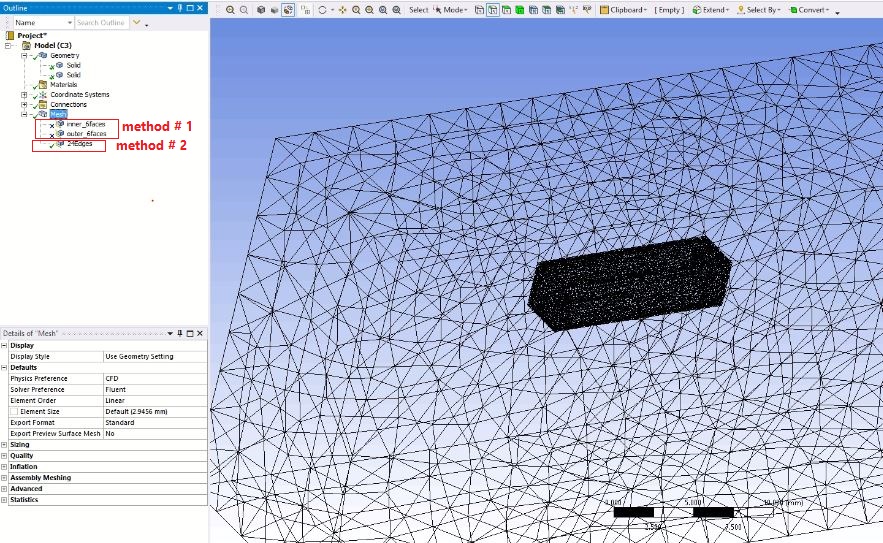
      As shown in the Figure, I have two domains (i.e. two boxes). How can I match the nodes on the boundary of these two domains?


      Thanks


      PS.


      I tried these two methods, but didn't work:


      1) On the contact boundary, I selected 6 faces from the inner box and defined a "Mesh Sizing". Then, I defined the same sizing for the 6 faces of the outer box. However, as shown in the figure, it didn't work and the mesh became too fine in one side of the boundary and too coarse in the other side.


      2) I also chose 2*12 Edges of the boundary and defined an edge sizing on them. That didn't match the nodes as well.


    • Karthik Remella
      Administrator

      Hello,


      Please see if you are able to use the 'Match-Control' to get control over the number of nodes in Ansys Meshing.


      There are numerous videos on YouTube related to this. Could you please take a look of them and see if this help?


      Thanks.


      Karthik

    • Hoss
      Subscriber

      Apparently, "Match Control" is used for copying the mesh properties from one entity to the other and it didn't work in my case.


      Probably, 'Geometry -> 'Form New Part' could be an option. I performed this, however, I couldn't check whether it does what I want properly cause I didn't know how to create a cut-section on the mesh to look at the joint area more closely and check if the nodes in the interface of two parts are matched (there was a handy cut-tool in previous versions of Workbench).


      Please kindly advise if that's the solution and how to cut.


      Thanks

    • Karthik Remella
      Administrator

      Hello,


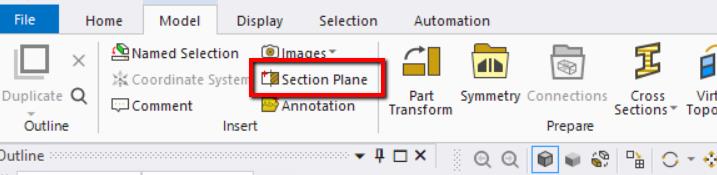
      Please use the 'Section Plane' to cut the mesh for better visualization.


      Thank you.

Viewing 3 reply threads
  • The topic ‘How to match the nodes on a boundary surface?’ is closed to new replies.

[bingo_chatbox]