-
-
November 11, 2019 at 8:42 pm
pengchengyin
SubscriberHi all,
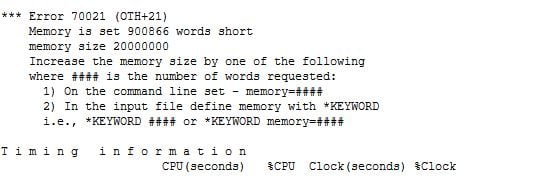
I got an error when I did the drop test simulation which is memory is set 900866 words short error as the below image. And I already tried to use command *keyword memory=30000000, but the simulation is still stuck by this error. I know how to solve it by using k file. But I want to know how to solve the error in workbench ls-dyna. Does anyone know the solution?
Thanks,
Pengcheng
-
November 12, 2019 at 1:11 am
Sandeep Medikonda
Ansys Employee'Mo' refers to Mega Words in Workbench Mechanical and the default is 20Mo.
Often, using the default value might not work for larger models and one might encounter errors such as:
*** Error 70021 (OTH+21) (Processor # 0)
Memory is set *** words short
memory size 20000000
Increase the memory size etc.
In such cases just double or tripling the value to 40 Mo or 60 Mo should help the model run.
It has to be noted that Mo refers to Mega Words in the Workbench Mechanical GUI, where as the solver writes out the expanded number.
-
November 12, 2019 at 5:37 pm
pengchengyin
SubscriberThank you sir, it works!
-
- The topic ‘how to increase the memory size in workbench ls-dyna?’ is closed to new replies.

-
4949
-
1639
-
1386
-
1242
-
1021
© 2026 Copyright ANSYS, Inc. All rights reserved.